Data modeling through StarRocks asynchronous materialized views enables you to simplify pipeline management and improve the efficiency and flexibility of data modeling through declarative modeling language. This topic describes how to use StarRocks asynchronous materialized views for data modeling.
Why use materialized views for data modeling
Raw data often suffers from low quality, overly complex metrics, or prohibitive query costs due to missing pre-aggregation. Modeling the raw data addresses these problems, but keeping the modeling process in sync with rapidly changing business requirements is difficult — and the return on investment is hard to justify in the early stages of a business.
StarRocks asynchronous materialized views address these problems through three capabilities:
-
Simplified data warehouse architecture: StarRocks provides a one-stop data governance experience, eliminating the need to maintain separate data processing systems or components.
-
Simplified modeling experience: Any data analyst with basic SQL knowledge can build data models — no professional data engineers required.
-
Simplified system maintenance: Asynchronous materialized views automatically manage the dependencies and refresh order across data layers.

In practice, combine StarRocks logical views and asynchronous materialized views across three layers:
-
Intermediate layer: Use views to join real-time data with dimension tables; use materialized views to join historical data lake data with dimension tables. Apply data cleansing and business semantic mapping at this layer.
-
Application layer: Run Join, Agg, Union, and Window calculations for specific business scenarios. Use views for real-time links and materialized views for near real-time links.
-
Analytical data storage (ADS): Select the appropriate storage based on timeliness and performance requirements. This layer serves real-time dashboards, near real-time BI, ad hoc queries, and scheduled reports.
Views vs. materialized views
StarRocks data modeling combines logical views and asynchronous materialized views. Understanding when to use each is essential.
-
Views do not store physical data. Every query against a view is parsed and executed from scratch. Views are well suited for expressing business semantics and simplifying SQL, but they do not reduce query execution overhead.
-
Materialized views store pre-computed results, avoiding repeated computation. They optimize query performance and simplify ETL pipelines, at the cost of storage overhead and update latency.
| Comparison item | View | Materialized view |
|---|---|---|
| Scenarios | Business modeling, data governance | Data modeling, transparent acceleration, data lakehouse |
| Storage overhead | Does not store data, no storage overhead | Stores pre-computed results, has additional storage cost |
| Update overhead | No update overhead | Has update overhead when base table data is updated |
| Performance benefit | No pre-computation, no performance benefit | Pre-computed results, accelerates queries |
| Data timeliness | Returns the latest data when querying the view | Results are pre-computed, may have data latency |
| Dependencies | References base tables by name; becomes invalid if base table name changes | References base tables by ID; base table name changes do not affect availability |
| Create syntax | CREATE VIEW |
CREATE MATERIALIZED VIEW |
| Modify syntax | ALTER VIEW |
ALTER MATERIALIZED VIEW |
Capabilities of asynchronous materialized views
StarRocks asynchronous materialized views provide four atomic capabilities for data modeling:
-
Auto-refresh: Materialized views refresh automatically when data is imported into base tables — no external scheduling required.
-
Partition refresh: For time-series data, partition-level refresh delivers near real-time computing without refreshing the entire materialized view.
-
Collaborative use with views: Combine materialized views and logical views to implement multi-layer modeling, enabling intermediate layer reuse and simpler data models.
-
Schema Change: Modify computation results with a simple SQL statement, without touching complex data pipelines.
Auto-refresh
When creating an asynchronous materialized view, use the REFRESH clause to specify the refresh strategy. Three strategies are available:
| Strategy | Syntax | When to use |
|---|---|---|
| Auto-refresh | REFRESH ASYNC |
A refresh task is triggered whenever data in the base table changes. StarRocks manages all data dependencies automatically. Use this when you need the materialized view to stay as fresh as possible with minimal operational overhead. |
| Scheduled refresh | REFRESH ASYNC EVERY (INTERVAL <refresh_interval>) |
Refresh tasks run on a fixed schedule — for example, every minute, day, or month. If no data has changed in the base table, no refresh task is triggered. Use this when you can tolerate some data latency and want predictable resource consumption. |
| Manual refresh | REFRESH MANUAL |
Refresh only runs when you explicitly run REFRESH MATERIALIZED VIEW. Use this when an external scheduling framework controls the refresh timing. |
CREATE MATERIALIZED VIEW <db_name>.<mv_name>
REFRESH
    [ ASYNC |
      ASYNC [START <time>] EVERY(<interval>) |
      MANUAL
    ]
AS <query>
Partition refresh
Use the PARTITION BY clause to associate the partitions of a materialized view with the partitions of its base table. When a partition in the base table changes, only the corresponding partition in the materialized view is refreshed.
Three partition mapping options are available:
| Option | Description |
|---|---|
PARTITION BY <column> |
The materialized view uses the same partition column and granularity as the base table. |
PARTITION BY date_trunc(<granularity>, <column>) |
Roll up the base table's partition column to a coarser granularity — for example, from daily to monthly. |
PARTITION BY { time_slice | date_slice }(<column>, <granularity>) |
Fine-grained time granularity control, offering more flexibility than date_trunc. |
CREATE MATERIALIZED VIEW <db_name>.<mv_name>
REFRESH ASYNC
PARTITION BY
    [
        <base_table_column> |
        date_trunc(<granularity>, <base_table_column>) |
        time_slice(<base_table_column>, <granularity>) |
        date_slice(<base_table_column>, <granularity>)
    ]
AS <query>
Collaborative use with views
StarRocks supports three patterns for combining views and materialized views:
-
Materialized view based on a view: The materialized view refreshes automatically when data changes in the base tables referenced by the view.
-
Materialized view based on another materialized view: Enables multi-level cascading refresh across nested materialized views.
-
View based on a materialized view: Treated like a view over a regular table — no special refresh logic.
Schema Change
Use the following statements to modify materialized views, views, and base tables.
-- Modify a base table.
ALTER TABLE <db_name>.<table_name> ADD COLUMN <column_desc>;

-- Atomically replace a base table.
ALTER TABLE <db_name>.<table1> SWAP WITH <table2>;

-- Modify a view definition.
ALTER VIEW <db_name>.<view_name> AS <query>;

-- Atomically replace a materialized view (swaps names without modifying data).
ALTER MATERIALIZED VIEW <db_name>.<mv1> SWAP WITH <mv2>;

-- Re-enable a materialized view.
ALTER MATERIALIZED VIEW <db_name>.<mv_name> ACTIVE;
When Schema Change makes a materialized view Inactive
Certain changes cause dependent materialized views to become Inactive:
-
Table renaming or atomic replacement operations
-
Schema Change on base table columns that the materialized view depends on
-
View definition changes
-
Atomic replacement of a materialized view (causes nested dependent materialized views to become Inactive)
The Inactive state propagates upward through all dependent materialized views.
Behavior of Inactive materialized views
-
Cannot be refreshed or used for automatic query rewriting.
-
Can still be queried directly, but data consistency is not guaranteed until the view is made Active again.
Fixing Inactive materialized views
Three repair options are available:
-
Manual repair: Run
ALTER MATERIALIZED VIEW <mv_name> ACTIVE. StarRocks rebuilds the materialized view based on its original SQL definition. The rebuild succeeds only if the SQL definition is still valid after the Schema Change. -
Repair during refresh: StarRocks automatically attempts the repair command before each refresh.
-
Automatic repair: StarRocks periodically attempts to repair Inactive materialized views. To disable this behavior, run
ADMIN SET FRONTEND CONFIG('enable_mv_automatic_active_check'='false').
Hierarchical modeling
Real-world data sources include real-time detailed data, dimension data, and archived data in data lakes. Business requirements span real-time dashboards, near real-time BI, ad hoc queries, and scheduled reports. These scenarios have different requirements — some prioritize flexibility, others performance, and others cost.
No single approach meets all these needs. StarRocks uses a combination of views and materialized views to address each layer efficiently.
Partition modeling
In addition to hierarchical modeling, partition modeling controls how fact table data is associated and how long it is retained. Most partition-based models follow a star schema or snowflake schema pattern, with fact tables and dimension tables as the core building blocks. StarRocks materialized views support fact table partition association: when a fact table is partitioned, the Join results in the materialized view follow the same partition structure.
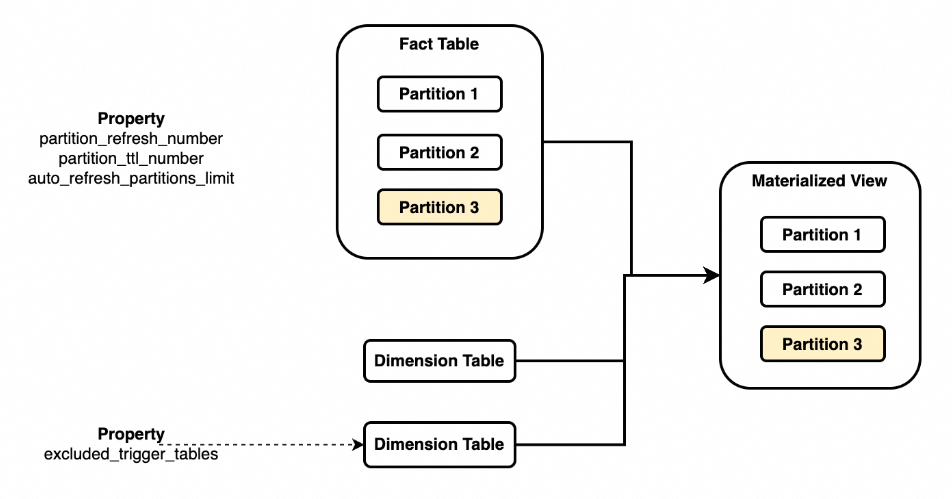
Key behaviors of partition association:
-
Specify the partition key of the fact table in the materialized view using
PARTITION BY fact_tbl.col. A materialized view can associate with only one base table. -
When data in a specific partition of the associated base table changes, only the corresponding partition in the materialized view is refreshed.
-
When non-associated base tables (typically dimension tables) change, the entire materialized view is refreshed by default. To avoid this, configure
excluded_trigger_tablesto ignore changes from specific tables.
Use cases
| Use case | Description |
|---|---|
| Fact table updates | Partition fact tables by day or hour. After a partition updates, the corresponding materialized view partitions refresh automatically. |
| Dimension table updates | To avoid a full materialized view refresh when dimension tables change, ignore specific dimension tables using excluded_trigger_tables, or specify a time range to limit which partitions are refreshed. |
| External table auto-refresh | For external sources such as Apache Hive or Apache Iceberg, StarRocks subscribes to partition-level data changes and refreshes only the affected materialized view partitions. |
| TTL (time-to-live) | Set the number of recent partitions to retain using partition_ttl_number. Use this when analysts only need data within a recent time window and do not need full historical data. |
Use the following parameters to control refresh behavior:
| Parameter | Description |
|---|---|
partition_refresh_number |
Number of partitions to refresh per refresh operation |
partition_ttl_number |
Number of recent partitions to retain |
excluded_trigger_tables |
Tables whose changes do not trigger automatic refresh |
auto_refresh_partitions_limit |
Maximum number of partitions refreshed per automatic refresh operation |
Limitations
Partitioned materialized views have the following limitations:
-
Only supported on partitioned base tables. Non-partitioned tables cannot be used.
-
Only
DATEandDATETIMEpartition column types are supported.STRINGis not supported. -
Partition roll-up is limited to
date_trunc,time_slice, anddate_slice. -
Only a single column can be used as the partition column. Multiple partition columns are not supported.