Table design
A table is a data storage unit. Understanding and designing table schemas effectively in StarRocks helps you optimize data organization and improve query efficiency. Unlike traditional databases, StarRocks stores complex semi-structured data, such as JSON and ARRAY, in a columnar format to ensure high query performance. This topic describes the table schema in StarRocks to help you design efficient data management structures for your specific scenarios.
Table schema
Like other relational databases, a StarRocks table is logically composed of rows and columns:
Row: Each row represents a record that contains a set of related data.
Column: A column defines the properties of a record. For example, an employee table might include columns for name, employee ID, department, and salary. Each column stores data of the same data type, and all rows have the same number of columns.
Creating a table in StarRocks is simple. You can define the columns and their data types in a CREATE TABLE statement.
CREATE DATABASE example_db;

USE example_db;

CREATE TABLE user_access (
    uid int,
    name varchar(64),
    age int,
    phone varchar(16),
    last_access datetime,
    credits double
)
ORDER BY (uid, name);
The preceding example creates a duplicate key table. The data in this table has no constraints, and identical rows can exist. The first two columns are specified as sort columns, which form the sort key. Data is stored in the order of the sort key to enable fast indexing during queries.
View the table schema
DESCRIBE user_access;The following information is returned.
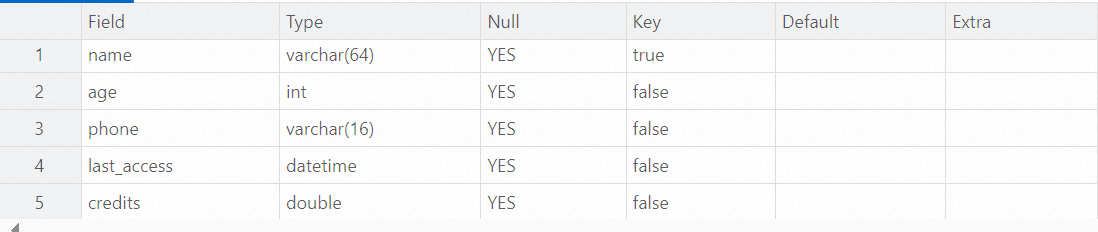
View the CREATE TABLE statement
SHOW CREATE TABLE user_access;
Table types
StarRocks provides four table types: duplicate key, primary key, aggregate, and update. These tables are suitable for storing various types of business data, such as raw data, frequently updated real-time data, and aggregate data.
Duplicate key table: Simple and easy to use. Data in this table has no constraints, and identical rows can exist. This table type is suitable for storing raw data that does not require constraints or pre-aggregation, such as logs.
Primary key table: Powerful and enforces UNIQUE and NOT NULL constraints. This table type supports real-time updates and partial column updates while ensuring query performance, making it suitable for real-time queries.
Aggregate table: Suitable for storing pre-aggregated data. This can reduce the amount of data scanned and computed during aggregate queries, significantly improving their efficiency.
Update table: Suitable for real-time update scenarios. This table type is gradually being replaced by the primary key table.
Data distribution
StarRocks uses a two-level data distribution strategy that combines partitioning and bucketing to evenly distribute data across BE nodes. This strategy effectively prunes the amount of data scanned during queries and maximizes the concurrent processing power of the cluster, thereby improving query performance.

Partitioning
The first level is partitioning. Data in a table can be divided into smaller data management units based on partition key columns, which are typically time or date columns. During queries, partition pruning reduces the amount of data scanned and significantly optimizes query performance.
StarRocks provides a simple and easy-to-use partitioning method: expression partitioning. It also offers more flexible methods: range partitioning and list partitioning.
Bucketing
The second level is bucketing. Data within the same partition is divided into smaller data management units through bucketing. Buckets are distributed evenly across BE nodes with multiple replicas (three by default) to ensure high availability.
StarRocks provides two bucketing methods:
Hash bucketing: Divides data into buckets based on the values of bucketing keys. Selecting frequently used conditional columns as bucketing keys can effectively improve query efficiency.
Random bucketing: Randomly divides data into buckets. This bucketing method is simpler and easier to use.
Data types
In addition to basic data types such as numeric, date, and string types, StarRocks also supports complex semi-structured data types, including ARRAY, JSON, MAP, and STRUCT.
Indexes
An index is a special data structure that acts as a directory for data. When a query condition hits an index column, StarRocks can quickly locate the data that meets the condition.
StarRocks provides built-in indexes, including prefix indexes, Ordinal indexes, and ZoneMap indexes. It also supports manually created indexes to improve query efficiency, including Bitmap and Bloom Filter indexes. For more information, see Indexes.
Constraints
Constraints are used to ensure data integrity, consistency, and accuracy. The primary key columns in a primary key table have UNIQUE and NOT NULL constraints. The aggregate key columns in an aggregate table and the unique key columns in an update table have UNIQUE constraints.
Temporary tables
When processing data, you might need to save intermediate calculation results for later reuse. In previous versions, StarRocks only supported using Common Table Expressions (CTEs) to define temporary results within a single query. However, a CTE is only a logical concept. It does not physically store the results and cannot be shared across different queries, which imposes certain limitations. If you create a table to save intermediate results, you are responsible for managing the table's lifecycle, which increases the operational cost.
To address these issues, StarRocks introduced temporary tables in v3.3.1. Temporary tables let you store temporary data, such as intermediate results from extract, transform, and load (ETL) calculations, in a table. The lifecycle of a temporary table is bound to a session and managed by StarRocks. When the session ends, the temporary table is automatically purged. A temporary table is visible only within the current session. You can create temporary tables with the same name in different sessions.
Use temporary tables
Add the TEMPORARY keyword to the following SQL statements to create or delete a temporary table:
CREATE TABLE
CREATE TABLE AS SELECT
CREATE TABLE LIKE
DROP TABLE
Like other internal tables, a temporary table must be created in a specific database within the Default Catalog. However, because temporary tables are session-based, their names are not subject to uniqueness constraints. You can create temporary tables with the same name in different sessions or create a temporary table with the same name as another internal table.
If a temporary table and a non-temporary table with the same name exist in the same database, the temporary table has the highest access priority. Within that session, all queries and operations on that table name apply only to the temporary table.
Limits
The usage of temporary tables is mostly the same as that of regular internal tables, but with some limitations and differences:
Temporary tables must be created in the Default Catalog.
Setting a Colocate Group is not supported. If you explicitly specify the
colocate_withproperty when creating the table, the property is ignored.When creating the table, the
ENGINEmust be set toolap.The ALTER TABLE statement is not supported.
Creating views and materialized views based on temporary tables is not supported.
The EXPORT statement is not supported for exporting data.
The SELECT INTO OUTFILE statement is not supported for exporting data.
Submitting asynchronous tasks using the SUBMIT TASK statement based on temporary tables is not supported.
More features
In addition to the common features described above, you can use more features to design a more robust table schema based on your business needs. For example, you can use Bitmap and HLL columns to accelerate distinct counting, specify generated columns or auto-increment columns to speed up certain queries, configure flexible data auto-cooling policies to reduce operations and maintenance (O&M) costs, and configure Colocate Join to accelerate multi-table JOIN queries.