When your data contains JSON with varying fields across rows, storing it as plain strings forces full-payload scans on every query. Paimon Variant solves this by combining metadata indexing with columnar Shredding, enabling typed field extraction with query pushdown on EMR Serverless Spark.
How it works
Variant improves performance over plain JSON strings through three mechanisms:
| Mechanism | Description |
|---|---|
| Metadata indexing | During writes, Variant extracts and encodes field metadata so queries can access individual fields without scanning the full payload. |
| Shredding | Variant applies columnar storage techniques to hot fields, reducing I/O overhead and enabling query pushdown. |
| Parquet compatibility | Variant is built on Parquet, making it compatible with mainstream storage formats. |
Prerequisites
Before you begin, make sure you have:
An EMR Serverless Spark workspace with engine version esr-5.1.0 or later
A running SQL session, or permission to create one
Write Variant data
Step 1: Open Data Studio
Log on to the E-MapReduce console.
In the left navigation pane, choose EMR Serverless > Spark.
Click the name of the target workspace.
In the left navigation pane of the EMR Serverless Spark page, click Development.
Step 2: Create a Spark SQL task
On the Development tab, click the
 icon.
icon.In the dialog box, enter a task name (for example,
variant_test_task), keep the default SparkSQL type, and click OK.
Step 3: Configure the SQL session
From the database drop-down list, select a database. From the session drop-down list, select a running session instance.
To create a new session instance, select Create SQL Session from the drop-down list. For more information, see Manage SQL Sessions.
Add the following Spark configurations to the SQL session before running the task:
# Enable query pushdown during reads
spark.sql.variant.pushVariantIntoScan true
# Automatically infer shreddingSchema during writes
spark.paimon.variant.inferShreddingSchema true
Step 4: Create a table and insert data
Copy the following code into the variant_test_task tab and click Run.
-- Create a table with a Variant column
CREATE TABLE variant_tbl (id INT, v VARIANT) USING paimon;

-- Use parse_json to convert JSON strings to Variant before inserting.
-- Without parse_json, only a String-type Variant is written.
INSERT INTO variant_tbl
SELECT
  id,
  CASE
    WHEN id = 0 THEN parse_json('{"age":21,"city":"Beijing"}')
    WHEN id = 1 THEN parse_json('{"age":27}')
    WHEN id = 2 THEN parse_json('{"city":"Beijing", "other":"xxx"}')
    WHEN id = 3 THEN parse_json('{"other":"yyy"}')
    WHEN id = 4 THEN parse_json('{"age":28}')
    WHEN id = 5 THEN parse_json('{"age":27,"city":"Hangzhou"}')
    WHEN id = 6 THEN parse_json('{"age":29,"city":"Beijing"}')
  END AS v
FROM range(7);
As an alternative tospark.paimon.variant.inferShreddingSchema = true, you can specify theshreddingSchemaexplicitly when creating the table:
CREATE TABLE variant_tbl (id INT, v VARIANT)
TBLPROPERTIES
('parquet.variant.shreddingSchema' =
'{"type":"ROW","fields":
  [{"name":"v",
  "type":{"type":"ROW",
  "fields":[{"name":"age","type":"INT"},{"name":"city","type":"STRING"}]}}]}'
)
Query Variant data
Use variant_get to extract typed fields by path from a VARIANT column. Its semantics are equivalent to get_json_object, but it provides type safety and supports query pushdown.
Function syntax
variant_get(c, path, type)Parameters
| Parameter | Description |
|---|---|
c | The VARIANT column name |
path | The path to the target field (see Path syntax) |
type | The target data type, such as int, string, or boolean |
Path syntax
| Pattern | Syntax | Example |
|---|---|---|
| Root | $ | $ |
| Nested field | $.field | $.user.name |
| Array element | $.array[n] | $.items[0].id |
Example
SELECT
  variant_get(v, '$.age', 'int') AS age,
  variant_get(v, '$.city', 'string') AS city,
  variant_get(v, '$.other', 'string') AS other
FROM variant_tbl;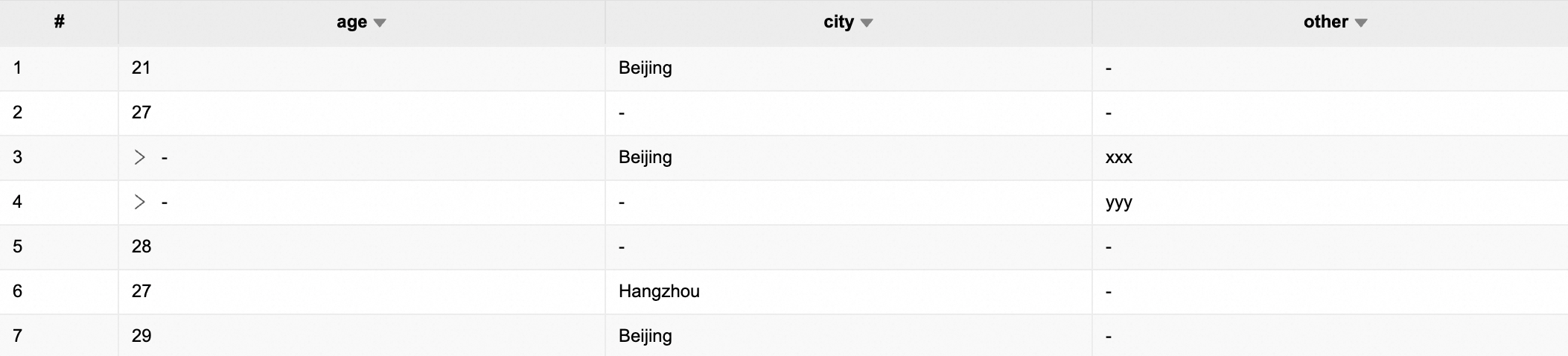
Optimize queries with subqueries
When post-processing query results, extract Variant fields in a subquery rather than in the outer query. This triggers column pruning, which significantly reduces the amount of data scanned.
-- Extract fields in the inner query to trigger column pruning
SELECT
  max(age),
  city
FROM (
  SELECT
    variant_get(v, '$.age', 'int') AS age,
    variant_get(v, '$.city', 'string') AS city
  FROM variant_tbl
)
GROUP BY city;