This topic shows how to use Ray for GPU scheduling and OpenCV/NumPy for CPU frame processing in the Ray environment of Alibaba Cloud EMR Serverless Spark, and turn egocentric human videos into training data in LeRobotDataset v3.0 format. Video clipping and action segmentation run on the CPU head node. 3D reconstruction runs on GPU workers, where a Ray GPU actor loads HaWoR, MoGe-2, and MegaSAM one after another. The pipeline outputs a standard dataset that contains 108-dimensional state vectors and H.264 video.
For a robot to operate on its own in the physical world, perception alone is not enough. The robot also needs a complete loop that understands the task goal, predicts how the environment changes, and executes actions. Real scenes are far less predictable than purely digital ones: occlusion, lighting changes, object deformation, and camera motion can all make the same operation end differently. Vision-Language-Action (VLA) models target exactly this problem, and they need training signals organized by action segment: video, 3D hand states, camera trajectories, and natural language instructions.
Acquiring training data is the core bottleneck that keeps VLA from scaling. Real-robot collection is accurate but limited by hardware cost, site safety, and manual annotation effort. Internet video is abundant but lacks precise 3D states and action encodings. Egocentric human videos sit in between: wearable devices collect them at scale, the viewpoint is close to that of a robot, and they naturally preserve the operator's hand motion and object interactions. Once you recover camera poses, scene depth, 3D poses of both hands, and action semantics from these videos, you have the complete observation-action trajectories that VLA training requires.
This topic uses Ray for GPU scheduling and OpenCV/NumPy for CPU frame processing in the Ray environment of Alibaba Cloud EMR Serverless Spark to turn egocentric human videos into training data in LeRobotDataset v3.0 format. CPU resources on the node handle video clipping and action segmentation. On GPU workers, a Ray GPU actor loads HaWoR, MoGe-2, and MegaSAM one after another to perform 3D reconstruction. The final output is a standard dataset that contains 108-dimensional state vectors and H.264 video.
Overall workflow
This pipeline is built on the approach for processing egocentric human videos proposed in the VITRA paper from Microsoft Research. The workflow is as follows.
|
Stage |
Operator |
Description |
|
Read videos from OSS |
|
Scans an OSS prefix to discover the videos to process. |
|
Clip and normalize videos |
CPU UDF |
Cuts 20-second clips with 2-second overlap, resamples to 30 fps, removes distortion, and writes JPEG frames. |
|
Recover depth and hand poses |
Ray GPU actor |
HaWoR for two-hand MANO, MoGe-2 for depth, and MegaSAM for camera poses. |
|
Align coordinates and generate action segments |
CPU UDF |
Splits the video into atomic action segments at wrist speed minima. |
|
Write LeRobotDataset v3.0 |
CPU writer |
Parquet, H.264 MP4, and JSON metadata. |
The job first scans an OSS prefix to discover videos. In the CPU preprocessing stage, it cuts each source video into 20-second clips that overlap by 2 seconds, removes distortion, and resamples the frame rate. HaWoR, MoGe-2, and MegaSAM then load one after another inside the same Ray GPU actor to fit GPU memory, and recover two-hand MANO parameters, scene depth, and the camera trajectory in turn. The reconstruction results are split into atomic action segments at local minima of the smoothed wrist speed curve. Each segment is labeled with the placeholder instruction perform operation, and the pipeline finally writes out a LeRobotDataset v3.0.
The pipeline uses Ray for distributed orchestration: the CPU head node runs the driver and the preprocessing stage, and GPU worker nodes run the 3D reconstruction actor. ray.remote(num_gpus=1) schedules GPU inference onto a worker, while CPU stages run sequentially in the driver process. The state of each episode is a 108-dimensional vector [left_hand(54), right_hand(54)], where each hand = wrist_pos(3) + wrist_rot_6d(6) + mano_joints(45). Before you move on to the key stages and the code, complete the following preparations.
Prerequisites
1. Prepare an OSS bucket and input videos
Prepare an Alibaba Cloud OSS bucket to store input videos, model weights, build caches, and output datasets. The pipeline uses scan_input to scan all .mp4 files under the specified prefix. A local directory or a .txt file list also works. OSS access goes through pyjindo (JindoOssFileSystem), which is preinstalled on the EMR Ray cluster, and authenticates through the node RAM role instead of an AccessKey pair. This is consistent with how Ray runtime_env handles the oss:// protocol. The submitting machine no longer needs plaintext OSS credentials.
2. Prepare model files and third-party source code
Download the source code and submodules of HaWoR, mega-sam, GeoCalib, MoGe, pytorch3d, and utils3d, and organize them in the following directory structure. Model weights are not packaged with the source code. At runtime, oss_model.ensure_model() downloads them from OSS to the local weights/ directory on the worker as needed.
vitra/
├── pipeline.py                        # CLI entry point
├── config.yaml                        # All configuration
├── setup_pip.py                       # Dependency installation script (run once after a cluster cold start)
├── core/orchestrator.py               # Orchestration logic
├── stages/                            # Pipeline stage implementations
│   ├── s0_preprocess.py               #   Preprocessing
│   ├── s1_motion_labeling/            #   3D motion labeling (Ray GPU actor)
│   ├── s2_segmentation.py             #   Action segmentation
│   ├── lerobot_output.py              #   LeRobot v3.0 writer
│   └── visualization/                 #   Visualization renderers
├── ray_pipeline/                      # Ray runtime layer
│   ├── runtime/cluster.py             #   Ray initialization and lifecycle
│   ├── runtime/oss_io.py              #   OSS read and write
│   ├── runtime/oss_model.py           #   Model weight download and CUDA extension build
│   ├── manifest/scanner.py            #   Input scanning
│   └── steps/gpu/                     #   GPU inference steps
├── modules/                           # Business logic modules
│   ├── hawor_no_filler.py             #   HaWoR wrapper
│   ├── megasam.py                     #   MegaSAM wrapper
│   └── long_video.py                  #   Long video segmentation
├── utils/                             # Geometry utilities
│   └── geometry.py                    #   Rotation, speed, and projection
├── weights/                           # Model weights (downloaded from OSS at runtime)
│   ├── hawor/                         #   HaWoR weights and MANO assets
│   ├── moge2/                         #   MoGe-2 weights
│   ├── megasam/                       #   MegaSAM weights
│   └── geocalib/                      #   GeoCalib weights
└── thirdparty/                        # Third-party source code
    ├── HaWoR/                         #   Two-hand MANO and DROID-SLAM
    ├── MoGe/                          #   MoGe-2 depth estimation
    ├── mega-sam/                      #   MegaSAM camera tracking
    ├── GeoCalib/                      #   Camera intrinsics calibration
    ├── pytorch3d/                     #   MANO rendering (Stage 1 HaWoR)
    └── utils3d/                       #   Transitive dependency of MoGe
The following shows how model weights are stored in OSS. The plural models/ prefix is controlled by OSS_KEY_PREFIX, which defaults to vitra/:
oss://<BUCKET>/vitra/
├── models/
│   ├── geocalib/pinhole.tar
│   ├── hawor/{hawor.ckpt, detector.pt, model_config.yaml, hawor_DATA.zip}
│   ├── moge2/model.pt
│   └── megasam/megasam_final.pth
├── compiled/
│   └── droid_backends-cp312-cu118-x86_64.tar.gz   # CUDA extension build cache
└── videos/                                          # Input videos
Model weights and build caches are reused across Ray sessions through a node-level persistent cache (/tmp/vitra_cache/). Each time an actor starts, setup_persistent_weights() symlinks repo_root/weights to /tmp/vitra_cache/weights/ and clears the weights directory left by an earlier session on the same node. This prevents the pipeline from downloading about 4.5 GB of models repeatedly and filling up the disk. Build artifacts are cached the same way in /tmp/vitra_cache/compiled/, so the next session extracts them directly instead of going to OSS.
3. Prepare Python dependencies
The Ray cluster image ships with Ray 2.47.1 and Python 3.12. The pip option of Ray runtime_env creates a virtualenv on each worker, which easily fills up the overlay disk and hides conda packages that are already installed on the system. This project therefore uses setup_pip.py to install dependencies directly into the system Python. Run it once after a cluster cold start.
setup_pip.py installs core dependencies including ultralytics (hand detection for HaWoR), scipy (find_peaks for action segmentation), pyarrow/pandas (LeRobot output), opencv-python, and imageio-ffmpeg (MP4 encoding). Large packages that HaWoR, MoGe-2, and MegaSAM depend on, such as PyTorch and torchvision, are provided by the conda environment on the cluster and are not in the pip list. pyjindo, which OSS read and write operations rely on, is preinstalled in the cluster image.
Some dependencies contain C++ or CUDA extensions that must be built for the runtime environment of the Ray worker:
|
Extension |
Used by |
Build artifacts |
|
DROID-SLAM |
Stage 1 HaWoR and MegaSAM |
|
|
PyTorch3D |
MANO rendering in Stage 1 HaWoR |
|
The build must run on a GPU worker, because CUDA extensions link against the exact PyTorch, Python, and CUDA versions on that worker. Build artifacts are cached at two levels: a node-level persistent cache (/tmp/vitra_cache/compiled/, reused across sessions) and OSS (the compiled/ prefix, reused across cluster cold starts). When a worker hits the node-level cache, it extracts the artifacts within seconds. On a miss, it downloads them from OSS and writes them to the persistent cache. If OSS has no cache either, the worker builds the extensions on the spot and uploads them to OSS.
4. Configure the cluster
Use an Alibaba Cloud EMR Serverless Spark Ray cluster. The CPU head node runs the driver process and the CPU stages, and GPU worker nodes run the 3D reconstruction actor. The source code (the vitra/ directory) is uploaded to every node in the cluster through the --working-dir option of ray job submit. Model weights and build caches are downloaded from OSS at runtime as needed.
OSS read and write operations go through pyjindo (JindoOssFileSystem), which is preinstalled on the EMR Ray cluster, and authenticate through the node RAM role instead of an AccessKey pair. The submitting machine needs no plaintext credentials. You only need to make sure that the OSS_BUCKET environment variable is correct.
The cluster endpoint (RAY_ADDRESS and RAY_TOKEN) and the OSS bucket (OSS_BUCKET) are configured as environment variables in submit_vitra.py. Update them after the cluster is restarted or rebuilt. To obtain RAY_ADDRESS and RAY_TOKEN, log on to the EMR console, go to the target workspace, click the target cluster in the Ray cluster list, and view the cluster endpoint (which corresponds to RAY_ADDRESS) and the access token (which corresponds to RAY_TOKEN) in the connection information on the cluster details page. Then set them as the corresponding environment variables in submit_vitra.py.
Key stages
To keep this topic concise, the following sections use sample code to show how each stage uses the Ray API, and omit part of the engineering details. For the full code, see the project repository. After you submit the job, you can check its status and logs in the Ray dashboard. The dashboard shows the overall resource usage of the cluster, the state of each node (the CPU head node and the GPU workers), and the progress, log output, and exception stacks of every task and actor in the current job, which makes it easier to troubleshoot the GPU inference stage.
1. Read video metadata from OSS
The pipeline uses scan_input to scan an OSS prefix or a local directory and discover the video files to process:
class VideoDiscovery:
    def __init__(self, config: dict):
        self.config = config

    def __call__(self) -> list[str]:
        """Discover input videos from config.

        Supports: directory of .mp4, .txt list, single .mp4, oss:// prefix.
        """
        from manifest.scanner import scan_input

        specific = self.config.get('pipeline', {}).get('specific_videos')
        if specific:
            return specific

        input_path = self.config.get('paths', {}).get('input_videos', '')
        if not input_path:
            raise ValueError('paths.input_videos not set in config')

        _, videos = scan_input(input_path)
        return [str(p) for p in videos]
scan_input supports three input types: an OSS prefix, a local directory, and a .txt file list. It returns a list of video paths. Videos on OSS are downloaded to the local disk on demand in Stage 0.
2. Clip and normalize videos
After the preprocessing operator downloads a source video, it cuts the video into 20-second clips that overlap by 2 seconds, removes distortion if needed, and resamples each clip to 30 FPS. OpenCV handles per-frame undistortion and scaling. JPEG frames are written straight to disk so that later GPU stages can reuse them without decoding the video again. For a long video, the operator first extracts all frames to a shared directory, and then creates symbolic links along the clip boundaries.
One source video produces multiple clips, so this stage fans out over the clip list. The following sample code shows the logic:
class PreprocessVideo:
    def __init__(self, config: dict):
        self.config = config

    def __call__(self, video_path: str, work_dir: str) -> list[dict]:
        """Run Stage 0 preprocessing for a single video."""
        from runtime.oss_io import ensure_local_video, scene_from_url

        pp = self.config.get('pipeline', {})
        clip_duration_s = pp.get('clip_duration_s', 20.0)
        clip_overlap_s = pp.get('clip_overlap_s', 2.0)
        target_fps = pp.get('target_fps', 30)
        undistort = pp.get('undistort', True)

        local_video = ensure_local_video(video_path)
        scene = scene_from_url(video_path)
        work_dir = Path(work_dir)
        work_dir.mkdir(parents=True, exist_ok=True)

        fps, duration_s, total_frames = _get_video_info(local_video)
        clips = _plan_clips(fps, total_frames, clip_duration_s, clip_overlap_s)

        if len(clips) <= 1:
            # Short video: extract all frames into one directory
            frames_dir = work_dir / 'frames'
            n = _extract_frames(local_video, frames_dir, target_fps, undistort)
            clips[0]['frames_dir'] = str(frames_dir)
            clips[0]['video_path'] = local_video
            clips[0]['fps'] = target_fps
        else:
            # Long video: extract all frames, then create per-clip symlink dirs
            all_frames_dir = work_dir / '_all_frames'
            n_all = _extract_frames(all_frames_dir, target_fps, undistort)
            all_frames_p = Path(all_frames_dir)
            for clip in clips:
                clip_frames_dir = work_dir / f'clip_{clip["clip_idx"]:03d}' / 'frames'
                clip_frames_dir.mkdir(parents=True, exist_ok=True)
                saved = 0
                for src_idx in range(clip['start_frame'], clip['end_frame']):
                    src = all_frames_p / f'{src_idx:06d}.jpg'
                    dst = clip_frames_dir / f'{saved:06d}.jpg'
                    dst.symlink_to(os.path.relpath(src, clip_frames_dir))
                    saved += 1
                clip['frames_dir'] = str(clip_frames_dir)
                clip['video_path'] = local_video
                clip['fps'] = target_fps

        return clips
The preprocessed JPEG frames are stored in cache/{clip_id}/*.jpg for Stage 1 to read directly.
3. Recover depth, hand poses, and the camera trajectory
Stage 1 runs in a Ray GPU remote function (@ray.remote(num_gpus=1)). To fit GPU memory, the three models load one after another, and each model is unloaded (del plus torch.cuda.empty_cache()) before the next one loads. The driver schedules the work on the CPU head node, and GPU inference runs on a worker:
import ray

@ray.remote(num_gpus=1)
def _remote_stage1(video_path, clips, work_dir, config):
    from stages.s1_motion_labeling.actor import run_stage1
    return run_stage1(video_path, clips, work_dir, config)

motion_label = ray.get(_remote_stage1.remote(
    video_path, clips, str(work_dir), config))
MotionLabelingActor is a plain Python class, not a Ray actor. It is instantiated inside the worker process and runs the three phases in sequence:
class MotionLabelingActor:
    def __init__(self, config: dict):
        self.config = config
        _ensure_models(config)  # Download model weights and build CUDA extensions
        self.focal = None

    def run(self, video_path, clips, work_dir) -> dict | None:
        local_video = _ensure_local_video(video_path)
        self.focal = _get_focal(local_video, work_dir, self.config)
        if len(clips) == 1:
            return self._run_single_clip(
                local_video, clips[0], self.focal, work_dir)
        else:
            return self._run_multi_clip(
                local_video, clips, self.focal, work_dir)

    def _run_single_clip(self, video_path, clip, focal, work_dir):
        # Phase 1: HaWoR (detect, track, motion estimation)
        detect_meta, fc_map, cs_map, args = _run_hawor_phase(
            video_path, clip['frames_dir'], focal, work_dir)
        # Phase 2: MoGe-2 (depth)
        moge_result = _run_moge2_phase(
            clip['frames_dir'], clip['scene'], work_dir, focal)
        # Phase 3: MegaSAM (camera tracking)
        megasam_result = _run_megasam_phase(
            clip['frames_dir'], clip['scene'], work_dir,
            moge_result['moge_base_dir'], focal, self.config)
        # Finalize: inject camera poses into HaWoR
        save_path = str(Path(work_dir) / 'result' / f'{clip["scene"]}_cleaned.pth')
        pred_result = _finalize_hawor(
            video_path=video_path, image_dir=clip['frames_dir'], focal=focal,
            cam_c2w=megasam_result['cam_c2w'],
            detect_meta=detect_meta, fc_map=fc_map,
            cs_map=cs_map, save_path=save_path)
        return _compose_result(
            pred_result=pred_result,
            cam_c2w=megasam_result['cam_c2w'],
            fov=moge_result['avg_fov'], fps=clip.get('fps', 30),
            frames_dir=clip['frames_dir'], video_path=video_path,
            scene=clip['scene'])
Inside the actor, the three phases run in sequence:
-
Phase 1 — HaWoR: Runs inside the actor process.
modules/hawor_no_fillerloads the model throughload_hawor_model()and then calls it directly, with PyTorch3D provided by the conda environment on the cluster. The internal chain is YOLO hand detection (detector.pt) to MANO to masked DROID-SLAM to depth prior. It outputs aHandFrameResultfor each hand over T frames, which contains wrist rotation (axis-angle), translation, hand pose, and hand shape parameters. -
Phase 2 — MoGe-2: Runs inference frame by frame and outputs depth maps, point maps, normal maps, and FoV. Two workarounds apply:
MemEffAttentionis patched to SDPA to avoid xformers, andnp.savezis monkey-patched to redirectseek()writes, which pyjindo does not support, to/tmp. -
Phase 3 — MegaSAM: Runs three steps in sequence inside the actor process: Depth-Anything monocular disparity, conversion of MoGe-2 depth to the UniDepth format, and DROID-SLAM camera tracking. It outputs
camera_to_world [T,4,4]. The pyjindo workarounds include copying.sofiles to the local/tmpdisk (pyjindo cannotmmapordlopenthem) and extendingLD_LIBRARY_PATH.
The results are composed into a MotionLabel3D dictionary. The arrays for both hands are padded to T = max(left, right, depth_count, 1), where missing entries are filled with zeros and marked valid=False:
|
Field |
Shape |
Description |
|
|
|
Left wrist position. |
|
|
|
Left wrist rotation (axis-angle). |
|
|
|
MANO 15-joint pose of the left hand. |
|
|
|
Per-frame validity of the left hand. |
|
|
Same as above |
Corresponding fields for the right hand. |
|
|
|
Camera-to-world transform. |
|
|
|
Horizontal field of view, in degrees. |
The three models run as separate stages that load one after another, which makes them easier to run on a single GPU. GPU memory use is roughly 10 GB for HaWoR, 6 GB for MoGe-2, and 4 GB for MegaSAM.
4. Generate atomic action segments from clips
The action segmentation operator takes the MotionLabel3D from Stage 1, computes the 3D speed of both wrists, and uses max(left_speed, right_speed) as a joint signal. After smoothing the signal with a moving average, it uses scipy.signal.find_peaks to detect speed minima, which are the pauses between actions, and splits the video into atomic action segments. The default segment length is constrained by a minimum distance (0.5 seconds) and peak prominence.
class ActionSegmentation:
    def __init__(self, config: dict):
        self.config = config

    def __call__(self, motion_label: dict) -> list[dict[str, Any]]:
        """Segment the motion into atomic action clips."""
        from utils.geometry import compute_wrist_speed
        from scipy.signal import find_peaks

        T = motion_label['T']
        fps = motion_label.get('fps', 30)

        left_speed = compute_wrist_speed(
            motion_label['left_wrist_pos'],
            motion_label['left_valid'],
        )
        right_speed = compute_wrist_speed(
            motion_label['right_wrist_pos'],
            motion_label['right_valid'],
        )

        # Joint signal: max of left and right hand speeds
        joint_speed = np.maximum(left_speed, right_speed)

        # Smooth the speed signal with a moving average
        window = max(1, int(fps * 0.3))  # 300ms window
        kernel = np.ones(window) / window
        smoothed = np.convolve(joint_speed, kernel, mode='same')

        # Find speed minima (pauses between actions) using find_peaks on negated signal
        min_distance = max(1, int(fps * 0.5))
        max_speed = float(np.max(smoothed)) if len(smoothed) > 0 else 0.0
        prominence = max(max_speed * 0.05, 1e-6)

        peaks, _ = find_peaks(-smoothed, distance=min_distance, prominence=prominence)

        # Build segment boundaries: [0, peak1, peak2, ..., T-1]
        boundaries = [0] + list(peaks) + [T]
        segments = []

        for i in range(len(boundaries) - 1):
            start = boundaries[i]
            end = boundaries[i + 1]
            if end <= start:
                continue

            # Determine main hand: which hand has higher average speed in this segment
            left_avg = float(np.mean(left_speed[start:end])) if end > start else 0
            right_avg = float(np.mean(right_speed[start:end])) if end > start else 0

            if left_avg > right_avg and left_avg > 0:
                main_hand = 'left'
            elif right_avg > 0:
                main_hand = 'right'
            else:
                main_hand = None

            seg = {
                'start': int(start),
                'end': int(end),
                'main_hand': main_hand,
                'left_avg_speed': left_avg,
                'right_avg_speed': right_avg,
                'duration_s': float(end - start) / fps if fps > 0 else 0,
            }
            segments.append(seg)

        # Fallback: if no segments found, use the whole video as one segment
        if not segments:
            segments = [{
                'start': 0, 'end': T, 'main_hand': None,
                'left_avg_speed': float(np.mean(left_speed)) if T > 0 else 0,
                'right_avg_speed': float(np.mean(right_speed)) if T > 0 else 0,
                'duration_s': float(T) / fps if fps > 0 else 0,
            }]

        return segments
Each segment carries the sub-trajectories of both hands, the main hand (whichever hand moves faster), and the duration.
5. Write out the dataset in the standard format
LeRobot v3.0 stores frame-level data and action segment metadata in Parquet, and videos in MP4. The writer builds a 108-dimensional state vector [left_hand(54), right_hand(54)] for each action segment, where each hand = wrist_pos(3) + wrist_rot_6d(6) + mano_joints(45), and the action is the state of the next frame. Frames are encoded into H.264 MP4 (1280x720@30fps) with ffmpeg, and the files are then generated according to the LeRobotDataset directory structure:
class WriteLeRobotDataset:
    def __init__(self, config: dict):
        self.config = config
        self.dataset_dir = None

    def __call__(self, scene: str, clips: list[dict], motion_label: dict,
                 segments: list[dict[str, Any]], instructions: list[str],
                 output_dir: str) -> Path:
        """Write LeRobot v3.0 dataset for a scene. Each segment becomes one episode."""
        import pyarrow as pa
        import pyarrow.parquet as pq

        self.dataset_dir = Path(output_dir) / self.config.get('output', {}).get(
            'dataset_dir', 'vla_dataset')
        T = motion_label['T']
        fps = motion_label.get('fps', 30.0)
        frames_dir = motion_label.get('frames_dir')

        # Build state array for all frames
        all_states = np.zeros((T, STATE_DIM), dtype=np.float32)
        for t in range(T):
            all_states[t] = _build_state_vector(motion_label, t)

        episode_index = 0
        total_frames = 0
        tasks: dict[str, int] = {}

        for seg_idx, seg in enumerate(segments):
            start, end = seg['start'], seg['end']
            task_text = instructions[seg_idx] if seg_idx < len(instructions) else 'null'
            task_index = tasks.setdefault(task_text, len(tasks))

            rows = []
            for t in range(start, end):
                local_t = t - start
                action_t = min(t + 1, T - 1)
                rows.append({
                    'frame_index': local_t,
                    'episode_index': episode_index,
                    'index': total_frames + local_t,
                    'task_index': task_index,
                    'observation.state': all_states[t].tolist(),
                    'observation.action': all_states[action_t].tolist(),
                    'timestamp': float(local_t) / fps if fps > 0 else 0.0,
                })

            # Write parquet
            pq_path = self.dataset_dir / 'data' / 'chunk-000' / f'file-{episode_index:03d}.parquet'
            pq.write_table(pa.Table.from_pylist(rows, schema=schema), pq_path)

            # Encode H.264 MP4 video
            if frames_dir:
                frame_list = _frame_files(frames_dir, start, end)
                mp4_path = (self.dataset_dir / 'videos' / 'observation.images.ego'
                            / 'chunk-000' / f'file-{episode_index:03d}.mp4')
                _encode_video(frame_list, mp4_path, fps,
                    target_w=1280, target_h=720)

            total_frames += (end - start)
            episode_index += 1
The final training data directory is as follows:
dataset/
├── meta/
│   ├── info.json
│   ├── stats.json
│   ├── tasks.parquet
│   └── episodes/chunk-000/file-000.parquet
├── data/chunk-000/file-000.parquet
└── videos/observation.images.ego/chunk-000/file-000.mp4
Deploy and run the job
1. First deployment: install dependencies
After a cluster cold start (the autoscaler has destroyed a round of workers), first use ray job submit to submit setup_pip.py to the cluster, which installs the pip dependencies into the system Python on the driver and all workers:
python3 submit_vitra.py  # The first submission runs pipeline.py.
                          # To install dependencies separately, submit setup_pip.py manually.
2. Submit the job
Run submit_vitra.py from a machine that can reach the endpoint of the Alibaba Cloud EMR Ray cluster. The script does the following:
-
Uploads the
vitra/directory to the cluster asworking_dir(about 12 MB, including third-party source code). -
Injects the bucket, prefix, and other values into all workers through
runtime_env.env_vars. It does not inject an AccessKey pair. -
Submits the job with
--no-wait, and follows the logs automatically after it obtains thejob_id.
# Submit the job. Logs are followed automatically.
# Ctrl+C only stops the local output. It does not stop the job.
python3 submit_vitra.py

# Use the ray CLI from a separate venv (recommended, avoids version mismatches).
RAY_CLI= python3 submit_vitra.py
Key environment variables in submit_vitra.py:
|
Variable |
Default value |
Description |
|
|
The bucket that stores model weights and videos |
Name of the OSS bucket. |
|
|
|
Prefix of the OSS object subdirectory. |
|
|
|
Node-level persistent cache directory on a worker, which stores model weights and build artifacts. |
|
|
|
OSS prefix of the input videos. |
|
|
|
Local output path on a worker. |
|
|
|
Upload destination. |
|
|
Built into the script |
Cluster endpoint. Update it after the cluster is rebuilt. |
|
|
Path to the local ray CLI |
Path to the ray CLI on the local machine. |
3. pipeline.py CLI options
By default, submit_vitra.py uses pipeline.py --config config.yaml as the entry point. pipeline.py supports the following options:
|
Option |
Description |
|
|
Path to the configuration file. Default: |
|
|
Processes only the first N videos. |
|
|
Runs Stage 0 preprocessing only, on the first three videos. |
|
|
Processes only the specified file. |
|
|
Overrides |
|
|
Overrides |
|
|
Uploads the results to OSS (the |
|
|
Deletes the local output after a successful upload. |
By default, submit_vitra.py passes --upload-to-oss and --delete-after-upload, so the results are pushed to OSS and the local disk on the worker is cleaned up as soon as the job finishes.
Results
While the pipeline writes out training data, it can optionally generate a visualization video for each action segment. These videos are not part of the training set. Instead, they overlay the 3D reconstruction results on the original footage, which helps developers quickly verify the accuracy of depth estimation, hand tracking, and camera trajectory recovery.
1. Depth estimation overlay
The per-frame depth maps that MoGe-2 outputs are converted to pseudo-color with cv2.applyColorMap and then overlaid on the original video. Near areas appear warmer and distant areas appear cooler, which makes it easy to tell apart the spatial layers of hands, objects, and background.
2. Wrist motion trajectory
The 3D positions of both wrists are projected to pixel coordinates with the camera intrinsics and then drawn as polylines on each frame. The green polyline is the trajectory of the right hand and the blue polyline is the trajectory of the left hand, which makes the motion path and current position of each wrist easy to follow.
3. Camera motion trajectory
The translation component of camera_to_world [T,4,4] that MegaSAM recovers is drawn as a trajectory curve in an XY top-down view, with the start point in green and the end point in red. Use it to judge the overall magnitude and direction of camera motion in an egocentric video.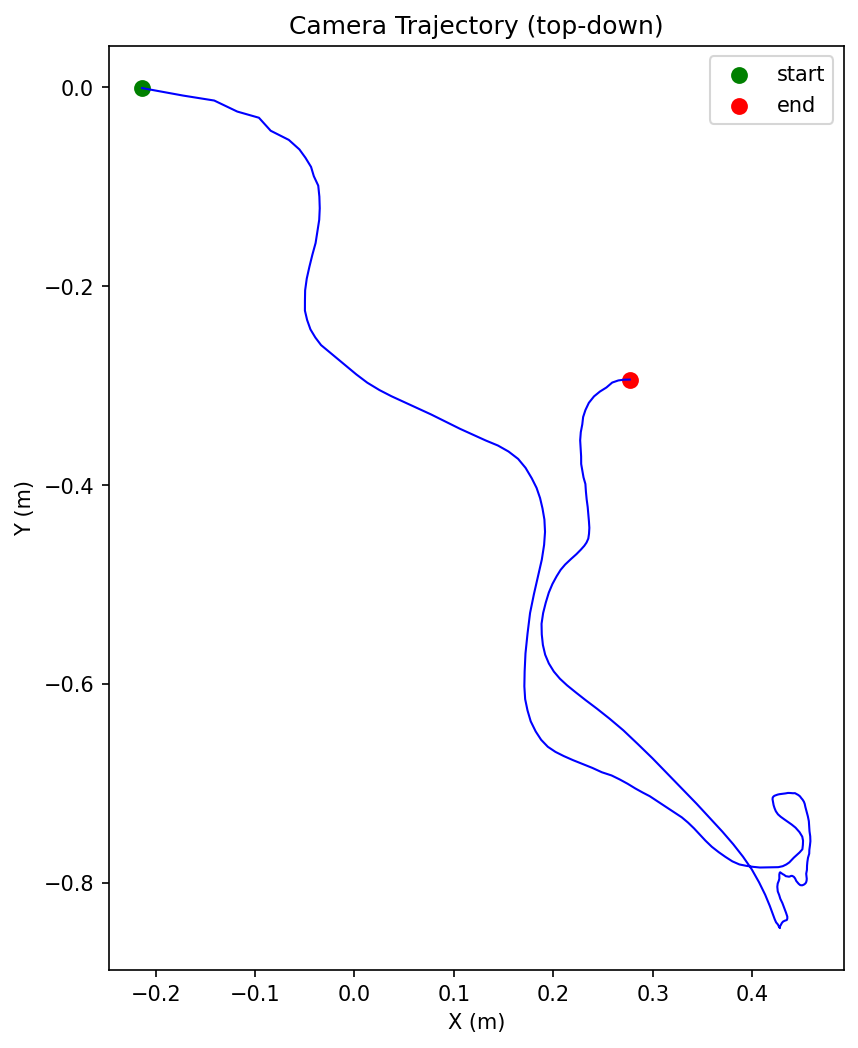
Summary
Ray sits at the center of the whole pipeline: the CPU head node handles I/O-bound work such as video discovery, clipping, and action segmentation; GPU workers run the sequential inference of HaWoR, MoGe-2, and MegaSAM through ray.remote(num_gpus=1); and the driver process writes out the LeRobotDataset v3.0 and generates visualization videos for verification. In practice, this architecture pays off in three ways:
-
Python-native operators lower the engineering barrier: OpenCV frame processing, PyTorch model inference, and pyarrow Parquet output are all expressed as Python functions and Ray remote tasks. Iterating on the algorithm requires no language switch and no extra intermediate layer.
-
Model reuse under GPU memory constraints: The three models load and unload one at a time inside the same actor, so models that need about 20 GB of GPU memory in total can run on a single 16 GB GPU. This avoids the complexity of multi-GPU deployment or model parallelism.
-
A node-level persistent cache speeds up cold starts: Model weights and CUDA extension build artifacts are cached in a node-level directory (
/tmp/vitra_cache/) and reused across Ray sessions. After the first download, later sessions hit the local cache and skip both the OSS download and the on-the-spot build. Leftovers from earlier sessions are cleared automatically, so the disk does not keep growing. OSS acts as a second-level cache for cluster cold starts.pipeline.pysetsPYTHONPATHcentrally at startup, so Ray runtime_env does not interfere with it.
The following table lists the original download locations of the model weights (about 4.5 GB in total). Download them yourself and then upload them to the /vitra/models directory in OSS:
|
File |
Size |
Source |
|
vitra dependencies |
181 MB |
|
|
vitra-ray code |
56.1 MB |
|
|
|
110 MB |
|
|
|
3.1 GB |
|
|
|
< 1 MB |
|
|
|
51 MB |
|
|
|
6 MB |
MANO official website (registration required; download |
|
|
1.3 GB |
|
|
|
19 MB |
MegaSAM project page (the |
For the full code, build scripts, and config.yaml, see the project repository.