JindoFS block storage mode delivers the highest data read/write throughput and metadata query performance in E-MapReduce (EMR), backed by Object Storage Service (OSS) with local disk acceleration.
How it works
JindoFS stores data as blocks in OSS and uses Namespace Service to maintain metadata. This gives JindoFS the scalable capacity of OSS combined with metadata performance comparable to Hadoop Distributed File System (HDFS). JindoFS also provides an external client so that you can access JindoFS from outside an EMR cluster.
Key characteristics:
Unlimited storage capacity: Storage scales independently from cluster size. Scale your EMR cluster in or out without affecting stored data.
Local read acceleration: JindoFS caches block data on local cluster disks to improve read throughput. This is particularly effective for Write Once Read Many (WORM) workloads.
High-performance metadata: Namespace Service handles metadata with efficiency similar to HDFS, avoiding the slowdowns from frequent OSS API calls that affect OssFileSystem.
Data locality: JindoFS schedules jobs on nodes that hold local block copies, reducing network traffic and improving read performance.
Choose a storage system
EMR provides three storage systems: OssFileSystem, HDFS, and JindoFS. The following table compares their characteristics.
| Feature | Hadoop support for Alibaba Cloud OSS | OssFileSystem | HDFS | JindoFS |
|---|---|---|---|---|
| Storage capacity | Tremendous | Tremendous | Depends on cluster scale | Tremendous |
| Reliability | High | High | High | High |
| Throughput factor | Server | I/O performance of disk caches | I/O performance of disks | I/O performance of disks |
| Metadata query efficiency | Low | Medium | High | High |
| Scale out | Easy | Easy | Easy | Easy |
| Scale in | Easy | Easy | Node decommission required | Easy |
| Data locality | None | Weak | Strong | Medium |
Use JindoFS block storage mode when:
Your jobs are metadata-intensive (many small files, frequent directory listing).
You need elastic cluster scaling without HDFS node decommission.
Your workloads follow WORM patterns and benefit from local read caching.
You want OSS-scale capacity with HDFS-level metadata performance.
Configure JindoFS
Set all JindoFS parameters in Bigboot.
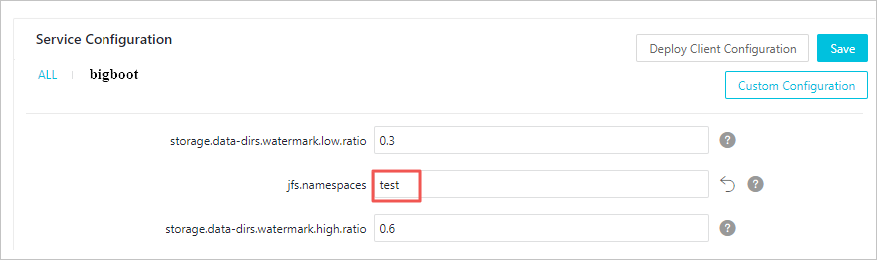
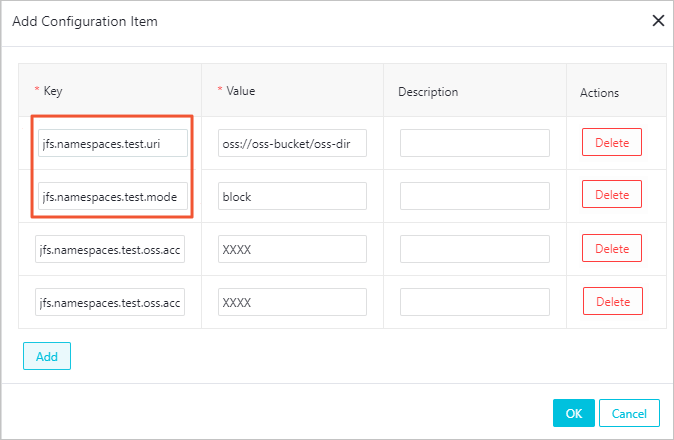
test is used in the following examples.| Parameter | Description | Example |
|---|---|---|
jfs.namespaces | The namespaces supported by JindoFS. Separate multiple namespaces with commas (,). | test |
jfs.namespaces.test.uri | The OSS storage backend for the test namespace. Set this to a directory in an OSS bucket. That directory becomes the root directory for the namespace. | oss://oss-bucket/oss-dir |
jfs.namespaces.test.mode | The storage mode for the test namespace. | block |
jfs.namespaces.test.oss.access.key | The AccessKey ID for accessing the OSS bucket. If the OSS bucket is in the same region and under the same account as your EMR cluster, password-free access applies and you can leave this blank. | xxxx |
jfs.namespaces.test.oss.access.secret | The AccessKey secret for accessing the OSS bucket. Leave blank if password-free access applies. | — |
After configuring the parameters, save and deploy the configuration. Then restart Namespace Service in SmartData to apply the changes.

Set storage policies
JindoFS provides four storage policies that control how many copies of data are kept in OSS and on local cluster disks.
| Policy | OSS copies | Local copies | Best used for |
|---|---|---|---|
| COLD | 1 | 0 | Infrequently accessed archive data |
| WARM (default) | 1 | 1 | General workloads with occasional re-reads |
| HOT | 1 | Multiple | Frequently accessed data requiring maximum read throughput |
| TEMP | 0 | 1 | Temporary intermediate data. Data is lost if the local cluster fails. |
New files are stored based on the storage policy configured for the parent directory.
Apply a storage policy
Run the following command to set a storage policy for a directory:
jindo dfsadmin -R -setStoragePolicy [path] [policy]Run the following command to check the storage policy on a directory:
jindo dfsadmin -getStoragePolicy [path]| Parameter | Description |
|---|---|
[path] | The directory path to apply or query. |
[policy] | The storage policy name: COLD, WARM, HOT, or TEMP. |
-R | Applies the policy recursively to all subdirectories. |
Archive cold data
The archive command evicts local block copies for a directory, keeping only the OSS copy. Use this to reclaim local disk space for data that is no longer frequently accessed.
jindo dfsadmin -archive [path]| Parameter | Description |
|---|---|
[path] | The directory containing the data to archive. |
Example: If Hive partitions a table by day and data older than one week is rarely read, run the archive command weekly on that partition directory. Local copies are removed, and the OSS copy is retained for future access.