When you use HBase in clusters of E-MapReduce (EMR) V5.6.0 or a later minor version,
or EMR V3.40.0 or a later minor version, you can store data of HBase in Object Storage
Service (OSS). This topic describes the architecture of HBase on OSS and how to use
OSS as the storage backend of HBase.
Limits
To ensure that an EMR HBase cluster can be restored from OSS, the kernel version of
HBase in the cluster must be the same as that of the original EMR cluster.
Procedure
- Enable OSS-HDFS and grant access permissions. For more information, see Enable OSS-HDFS and grant access permissions.
- Obtain the domain name of the HDFS service.
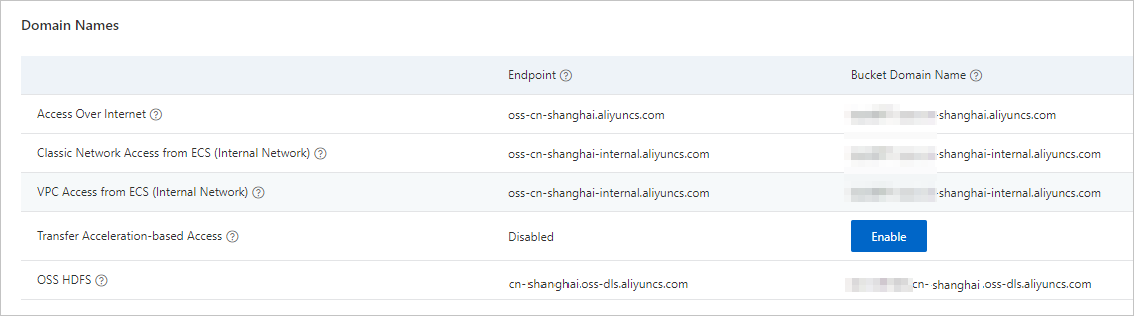
On the
Overview page of a bucket in the OSS console, copy the domain name of the HDFS service. This
way, you can use the domain name as the value of the
hbase.rootdir parameter when you create an EMR HBase cluster.
- Add custom software configurations.
- Go to the Cluster Management page.
- Log on to the Alibaba Cloud EMR console.
- In the top navigation bar, select the region where your cluster resides and select a resource group based on your business requirements.
- Click the Cluster Management tab.
- Click Cluster Wizard in the upper-right corner.
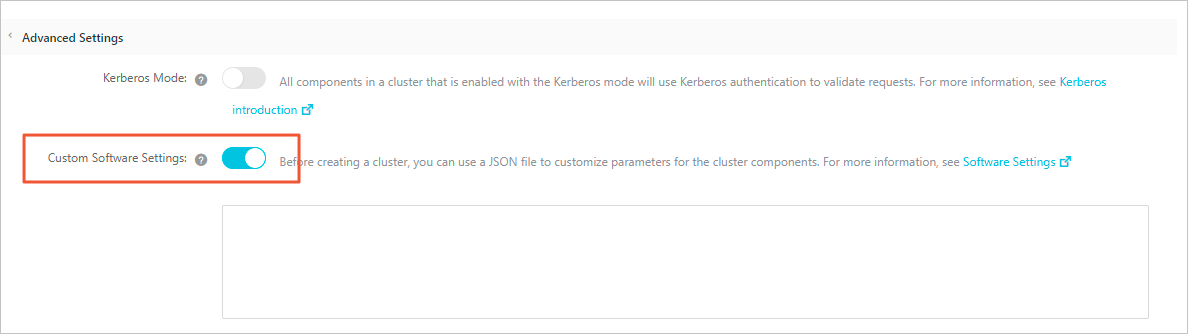
- In the Advanced Settings section of the Software Settings step, turn on Custom Software Settings.
- Add the following configurations.
To use OSS as the storage backend of HBase, you must replace the related configuration
information based on your business requirements. The following code provides the custom
configurations:
[
  {
       "ServiceName":"HBASE",
       "FileName":"hbase-site",
       "ConfigKey":"hbase.rootdir",
       "ConfigValue":"oss://${oss_bucket}.${endpoint}/${hbase-root-dir}"
  },
  {
       "ServiceName":"HBASE",
       "FileName":"hbase-site",
       "ConfigKey":"hbase.wal.dir",
       "ConfigValue":"hdfs://${namespace}/${hbase-wal-dir}"
  }
]
| Parameter |
Description |
| hbase.rootdir |
The root directory that is used to store HBase data. Set this parameter to an OSS
path in the oss://${oss_bucket}.${endpoint}/${hbase-root-dir} format. Example: oss://test_bucket.cn-shanghai.oss-dls.aliyuncs.com/hbase.
Note You need to modify the configurations of the following parameters:
- ${oss_bucket}: the name of the bucket that you created in the OSS console.
- ${endpoint}: the domain name of HDFS that you obtained in Step 2.
- ${hbase-root-dir}: the root directory of HBase in OSS.
|
| hbase.wal.dir |
The local Hadoop directory in which the WAL files of HBase are stored. Value values:
- For a non-high-availability cluster, set this parameter to
hdfs://emr-header-1:9000/hbase.
- For a high-availability cluster, set this parameter to
hdfs://emr-cluster/hbase.
|
- Stop the HBase service.
To stop the HBase service, perform the flush operation to ensure that the data of
all tables cached in memory is flushed to HFiles. Then, disable the related tables
to prevent data from being written to these tables.
- Restore an HBase cluster from OSS.
To restore an HBase cluster from OSS, turn on
Custom Software Settings in the
Advanced Settings section of the
Software Settings step and add the following custom configurations:
[
  {
       "ServiceName":"HBASE",
       "FileName":"hbase-site",
       "ConfigKey":"hbase.rootdir",
       "ConfigValue":"oss://${bucket}.${endpoint}/${hbase-root-dir}"
  },
  {
       "ServiceName":"HBASE",
       "FileName":"hbase-site",
       "ConfigKey":"hbase.wal.dir",
       "ConfigValue":"hdfs://${namespace}/${hbase-wal-dir}"
  }
]
| Parameter |
Description |
Remarks |
| hbase.rootdir |
The value must be the same as that of the original HBase cluster. Example: oss://test_bucket.cn-shanghai.oss-dls.aliyuncs.com/hbase.
|
For more information about the parameter configurations, see Step 3.
|
| hbase.wal.dir |
The HDFS directory of the new EMR cluster. Make sure that the directory is empty.
|