Jindo DistCp supports parameters that let you tune copy behavior for large-scale HDFS-to-OSS migrations, resumable transfers, incremental sync, bandwidth control, and more. This topic covers the exact parameter combinations for 13 common scenarios.
Prerequisites
Before you begin, make sure you have:
-
An E-MapReduce (EMR) cluster of a supported version. For details, see Create a cluster.
-
Java Development Kit (JDK) 1.8 installed.
-
The
jindo-distcp-<version>.jarfile downloaded for your Hadoop version:-
Hadoop 2.7 and later: jindo-distcp-3.0.0.jar
-
Hadoop 3.x: jindo-distcp-3.0.0.jar
-
If you are not using EMR, you also need:
-
Read access to the Hadoop Distributed File System (HDFS) source.
-
An AccessKey ID, AccessKey secret, and endpoint for Object Storage Service (OSS), with write access to the destination bucket.
-
An OSS bucket with a storage class other than Archive.
-
Permission to submit MapReduce jobs.
Base command
All examples in this topic extend the following base command. Replace the placeholder values with your own before running.
hadoop jar jindo-distcp-<version>.jar \
  --src /data/incoming/hourly_table \
  --dest oss://destBucket/hourly_table \
  --ossKey yourkey \
  --ossSecret yoursecret \
  --ossEndPoint oss-cn-hangzhou.aliyuncs.com \
  --parallelism 10
For a complete parameter reference, see Use Jindo DistCp.
Scenario 1: Copy millions of HDFS files to OSS efficiently
For large-scale migrations (millions or tens of millions of files), increase --parallelism and add --enableBatch to reduce per-file overhead and optimize job scheduling.
| Parameter | Description | Constraint |
|---|---|---|
--parallelism |
Number of parallel copy tasks | Set to a high value (e.g., 500) for large-scale jobs |
--enableBatch |
Enables batch mode to reduce per-file scheduling overhead | — |
hadoop jar jindo-distcp-<version>.jar \
  --src /data/incoming/hourly_table \
  --dest oss://destBucket/hourly_table \
  --ossKey yourkey \
  --ossSecret yoursecret \
  --ossEndPoint oss-cn-hangzhou.aliyuncs.com \
  --parallelism 500 \
  --enableBatch
Scenario 2: Verify data integrity after copying
Use either of the following methods to confirm that all files were copied correctly.
Method 1: Check DistCp counters
After a copy job completes, inspect the MapReduce task counters. A successful copy shows equal byte counts in the source and destination:
Distcp Counters
        Bytes Destination Copied=11010048000
        Bytes Source Read=11010048000
        Files Copied=1001

Shuffle Errors
        BAD_ID=0
        CONNECTION=0
        IO_ERROR=0
        WRONG_LENGTH=0
        WRONG_MAP=0
        WRONG_REDUCE=0
Counter descriptions:
| Counter | Description |
|---|---|
Bytes Destination Copied |
Total bytes written to the destination |
Bytes Source Read |
Total bytes read from the source |
Files Copied |
Number of files successfully copied |
Method 2: Run a diff check
Add --diff to compare file names and sizes between source and destination. If any files are missing or incomplete, --diff generates a manifest file in the directory where the command is submitted.
hadoop jar jindo-distcp-<version>.jar \
  --src /data/incoming/hourly_table \
  --dest oss://destBucket/hourly_table \
  --ossKey yourkey \
  --ossSecret yoursecret \
  --ossEndPoint oss-cn-hangzhou.aliyuncs.com \
  --diff
If all files are present, the output is:
INFO distcp.JindoDistCp: distcp has been done completelyScenario 3: Resume a failed copy job
If a copy job fails partway through, use --diff to identify missing files, then replay only those files using the generated manifest.
-
Run
--diffto check which files are missing:hadoop jar jindo-distcp-<version>.jar \ --src /data/incoming/hourly_table \ --dest oss://destBucket/hourly_table \ --ossKey yourkey \ --ossSecret yoursecret \ --ossEndPoint oss-cn-hangzhou.aliyuncs.com \ --diffIf all files are present, the output is:
INFO distcp.JindoDistCp: distcp has been done completely. -
If some files are missing, a manifest file is generated. Pass that manifest to
--previousManifestand add--copyFromManifestto copy only the remaining files:Parameter Description Constraint --previousManifestPath to the manifest file generated by --diffMust be a local file path (e.g., file:///opt/manifest-2020-04-17.gz)--copyFromManifestCopies only the files listed in the manifest Must be used together with --previousManifesthadoop jar jindo-distcp-<version>.jar \ --src /data/incoming/hourly_table \ --dest oss://destBucket/hourly_table \ --previousManifest=file:///opt/manifest-2020-04-17.gz \ --copyFromManifest \ --parallelism 20Replace
file:///opt/manifest-2020-04-17.gzwith the actual path of your manifest file.
Scenario 4: Copy only files added since the last run
When upstream processes continuously generate new files (for example, hourly or per-minute), add --update to copy only files that are new or changed since the previous run. Before copying each file, Jindo DistCp compares the name, size, and checksum. To skip the checksum comparison, also add --disableChecksum.
| Parameter | Description | Constraint |
|---|---|---|
--update |
Incremental copy mode; skips files that already exist with the same name, size, and checksum | — |
--disableChecksum |
Skips the checksum comparison step | Use only with --update |
hadoop jar jindo-distcp-<version>.jar \
  --src /data/incoming/hourly_table \
  --dest oss://destBucket/hourly_table \
  --ossKey yourkey \
  --ossSecret yoursecret \
  --ossEndPoint oss-cn-hangzhou.aliyuncs.com \
  --parallelism 10 \
  --update
Scenario 5: Set a YARN queue and bandwidth limit
Add --queue and --bandwidth to control resource consumption. Both parameters are independent and can be used together or separately.
| Parameter | Description | Constraint |
|---|---|---|
--queue |
Name of the YARN queue to use | — |
--bandwidth |
Maximum bandwidth per task, in MB/s | — |
hadoop jar jindo-distcp-<version>.jar \
  --src /data/incoming/hourly_table \
  --dest oss://destBucket/hourly_table \
  --ossKey yourkey \
  --ossSecret yoursecret \
  --ossEndPoint oss-cn-hangzhou.aliyuncs.com \
  --queue yarnqueue \
  --bandwidth 6 \
  --parallelism 10
Scenario 6: Write to Cold Archive, Archive, or Infrequent Access storage
Add --policy to direct copied files into a specific OSS storage class.
| Storage class | Parameter | Constraint |
|---|---|---|
| Cold Archive | --policy coldArchive |
Available only in select regions. See OSS overview. |
| Archive | --policy archive |
— |
| Infrequent Access (IA) | --policy ia |
— |
Example for Cold Archive:
hadoop jar jindo-distcp-<version>.jar \
  --src /data/incoming/hourly_table \
  --dest oss://destBucket/hourly_table \
  --ossKey yourkey \
  --ossSecret yoursecret \
  --ossEndPoint oss-cn-hangzhou.aliyuncs.com \
  --policy coldArchive \
  --parallelism 20
Scenario 7: Optimize transfer performance based on file size distribution
By default, Jindo DistCp distributes files across copy tasks by equalizing total bytes per task. This works well when file sizes are uniform, but performs poorly when a few large files are mixed with many small ones: a single task can end up with both large and small files, leaving other tasks idle while one task is overloaded.
Choose the optimization strategy that matches your data:
Mixed small and large files
Add --enableDynamicPlan to let faster tasks pick up additional work instead of waiting for overloaded tasks to finish.
| Parameter | Description | Constraint |
|---|---|---|
--enableDynamicPlan |
Dynamically rebalances work so faster tasks pick up more files | Cannot be used with --enableBalancePlan |
hadoop jar jindo-distcp-<version>.jar \
  --src /data/incoming/hourly_table \
  --dest oss://destBucket/hourly_table \
  --ossKey yourkey \
  --ossSecret yoursecret \
  --ossEndPoint oss-cn-hangzhou.aliyuncs.com \
  --enableDynamicPlan \
  --parallelism 10
The following figure shows the performance improvement. 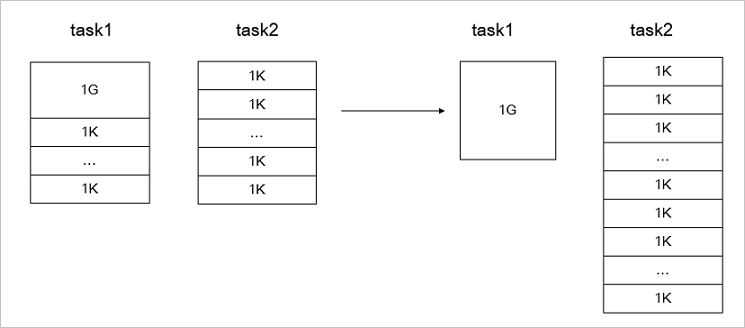
Files of similar sizes
Add --enableBalancePlan to distribute files more evenly across tasks when size differences are small.
| Parameter | Description | Constraint |
|---|---|---|
--enableBalancePlan |
Distributes files evenly across tasks based on count when sizes are similar | Cannot be used with --enableDynamicPlan |
hadoop jar jindo-distcp-<version>.jar \
  --src /data/incoming/hourly_table \
  --dest oss://destBucket/hourly_table \
  --ossKey yourkey \
  --ossSecret yoursecret \
  --ossEndPoint oss-cn-hangzhou.aliyuncs.com \
  --enableBalancePlan \
  --parallelism 10
The following figure shows the performance improvement. 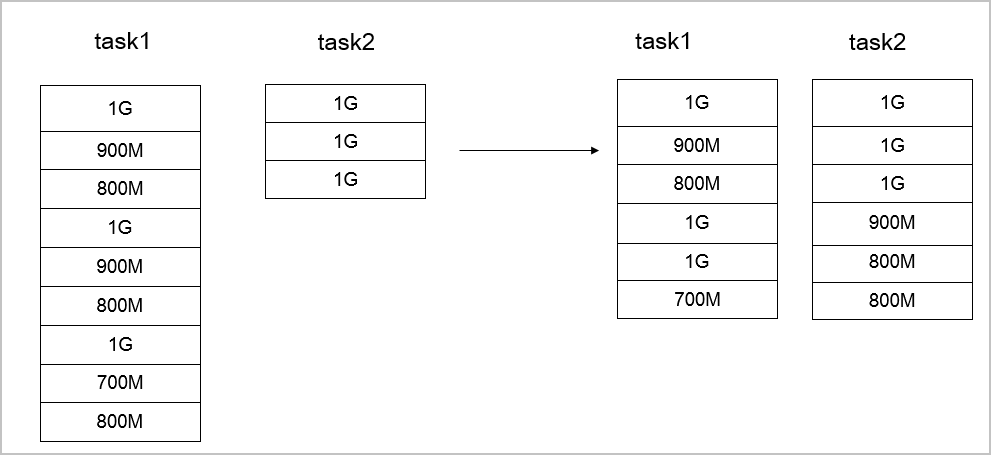
Scenario 8: Use Amazon S3 as the data source
Replace the OSS credential parameters with the Amazon S3 equivalents:
| Parameter | Description | Constraint |
|---|---|---|
--s3Key |
AccessKey ID for Amazon S3 | Replaces --ossKey |
--s3Secret |
AccessKey secret for Amazon S3 | Replaces --ossSecret |
--s3EndPoint |
Endpoint for Amazon S3 | Replaces --ossEndPoint |
hadoop jar jindo-distcp-<version>.jar \
  --src s3a://yourbucket/ \
  --dest oss://destBucket/hourly_table \
  --s3Key yourkey \
  --s3Secret yoursecret \
  --s3EndPoint s3-us-west-1.amazonaws.com \
  --parallelism 10
Scenario 9: Compress files during copy
Add --outputCodec to compress files as they are copied, reducing storage space on the destination.
hadoop jar jindo-distcp-<version>.jar \
  --src /data/incoming/hourly_table \
  --dest oss://destBucket/hourly_table \
  --ossKey yourkey \
  --ossSecret yoursecret \
  --ossEndPoint oss-cn-hangzhou.aliyuncs.com \
  --outputCodec=gz \
  --parallelism 10
Supported codec values:
| Value | Behavior | Constraint |
|---|---|---|
gzip / gz |
Compress with gzip | — |
lzo / lzop |
Compress with LZO | In open source Hadoop clusters, install the gplcompression native library and the hadoop-lzo package first. |
snappy |
Compress with Snappy | — |
none |
Copy without compression; decompress source files if they are already compressed | — |
keep |
Copy files without changing their compression (default) | — |
Scenario 10: Filter files by pattern or source subdirectory
Copy files matching a pattern
Add --srcPattern with a regular expression to copy only files whose paths match. For example, to copy only .log files:
hadoop jar jindo-distcp-<version>.jar \
  --src /data/incoming/hourly_table \
  --dest oss://destBucket/hourly_table \
  --ossKey yourkey \
  --ossSecret yoursecret \
  --ossEndPoint oss-cn-hangzhou.aliyuncs.com \
  --srcPattern .*\.log \
  --parallelism 10
Copy files from specific subdirectories
Add --srcPrefixesFile with a path to a text file listing the directories to copy. Each line is a full HDFS path:
hadoop jar jindo-distcp-<version>.jar \
  --src /data/incoming/hourly_table \
  --dest oss://destBucket/hourly_table \
  --ossKey yourkey \
  --ossSecret yoursecret \
  --ossEndPoint oss-cn-hangzhou.aliyuncs.com \
  --srcPrefixesFile file:///opt/folders.txt \
  --parallelism 20
Example folders.txt content:
hdfs://emr-header-1.cluster-50466:9000/data/incoming/hourly_table/2017-02-01
hdfs://emr-header-1.cluster-50466:9000/data/incoming/hourly_table/2017-02-02
Scenario 11: Merge small files during copy
To reduce the total file count in the destination, add --targetSize and --groupBy to merge files that match a pattern into larger files.
| Parameter | Description | Constraint |
|---|---|---|
--targetSize |
Maximum size of each merged output file, in MB | — |
--groupBy |
Regular expression that groups source files for merging | — |
hadoop jar jindo-distcp-<version>.jar \
  --src /data/incoming/hourly_table \
  --dest oss://destBucket/hourly_table \
  --ossKey yourkey \
  --ossSecret yoursecret \
  --ossEndPoint oss-cn-hangzhou.aliyuncs.com \
  --targetSize=10 \
  --groupBy='.*/([a-z]+).*.txt' \
  --parallelism 20
Scenario 12: Delete source files after a successful copy
Add --deleteOnSuccess to remove source files from HDFS after they are successfully copied. This is useful for scheduled log archival jobs where you want to avoid copying the same files twice.
--deleteOnSuccess permanently deletes source files. Verify the copy succeeded before relying on this option.
hadoop jar jindo-distcp-<version>.jar \
  --src /data/incoming/hourly_table \
  --dest oss://destBucket/hourly_table \
  --ossKey yourkey \
  --ossSecret yoursecret \
  --ossEndPoint oss-cn-hangzhou.aliyuncs.com \
  --deleteOnSuccess \
  --parallelism 10
Scenario 13: Store OSS or Amazon S3 credentials in core-site.xml
To avoid specifying credentials on every command, add them to core-site.xml. Jindo DistCp reads credentials from this file automatically.
OSS credentials
<configuration>
    <property>
        <name>fs.jfs.cache.oss-accessKeyId</name>
        <value>xxx</value>
    </property>

    <property>
        <name>fs.jfs.cache.oss-accessKeySecret</name>
        <value>xxx</value>
    </property>

    <property>
        <name>fs.jfs.cache.oss-endpoint</name>
        <value>oss-cn-xxx.aliyuncs.com</value>
    </property>
</configuration>
Amazon S3 credentials
<configuration>
    <property>
        <name>fs.s3a.access.key</name>
        <value>xxx</value>
    </property>
    <property>
        <name>fs.s3a.secret.key</name>
        <value>xxx</value>
    </property>
    <property>
        <name>fs.s3.endpoint</name>
        <value>s3-us-west-1.amazonaws.com</value>
    </property>
</configuration>