Business data changes over time, and tracking those changes is a core challenge in data warehousing. E-MapReduce (EMR) provides granularity-based slowly changing dimensions (G-SCDs) — a Delta Lake–based solution that captures time-granular business snapshots without the storage overhead or query performance trade-offs of traditional approaches.
How G-SCDs work
Slowly changing dimensions (SCDs)
A slowly changing dimension (SCD) is a data warehouse dimension that changes slowly over time. Data warehouses must handle SCDs carefully to preserve both current and historical data for analysis. SCDs are classified into three types:
| Type | Description |
|---|---|
| Type 1: Overwrite | New values overwrite historical values. Historical data is not retained; historical trend analysis is not possible. |
| Type 2: Add a row | Every attribute change adds a new record marked as valid. Previous records are marked invalid, typically using start time and end time fields. All historical values are retained. |
| Type 3: Add a column | A new column stores the previous value of an attribute. The original column holds the current value. This way, you can analyze the historical information of the attribute. |
The G-SCD solution
Traditional data warehousing systems use two common approaches to process Hive tables, each with significant drawbacks:
| Solution | Drawback |
|---|---|
| Build an incremental T+1 table in streaming mode and merge it with the T partition to produce a T+1 partition. | High storage costs. |
| Store a base table and incremental tables separately; merge them only at query time. | Poor query performance. |
The following figure shows the data processing mechanism of Solution 1. 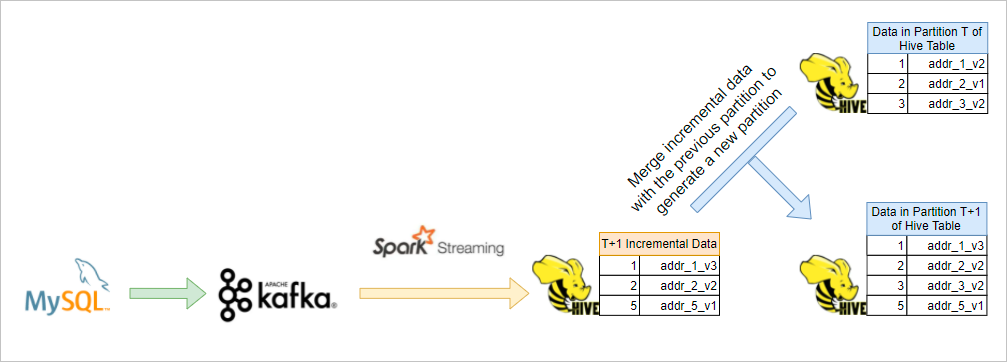
The G-SCD solution, developed by the Alibaba Cloud EMR team and built on Delta Lake, eliminates these trade-offs. Like Type 2 SCDs, G-SCDs retain all historical information — but instead of adding a record for each attribute change, G-SCDs use the Delta Lake Time Travel feature to version and trace snapshot data.
| Solution | Similarity | How |
|---|---|---|
| Type 2 SCD | All historical information is retained. | Adds a new record per attribute change |
| G-SCD | All historical information is retained. | Uses Delta Lake Time Travel; no extra records added |
The following figure shows the G-SCD solution. 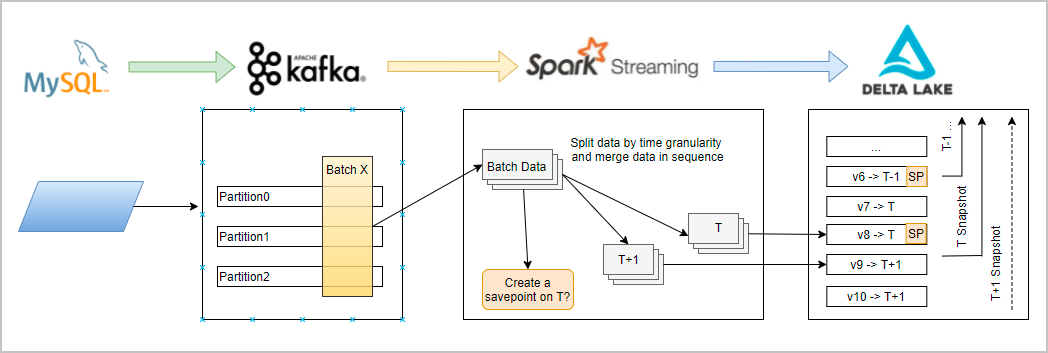
G-SCDs provide the following advantages:
-
Unified stream and batch processing: No need to manage incremental tables and base tables separately.
-
Lower storage costs: Historical data is versioned through Delta Lake Time Travel, not duplicated by time granularity.
-
High query performance: Leverage Delta Lake's Optimize, Z-ordering, and Data Skipping features.
-
SQL compatibility: Compatible with Hive SCD SQL statements. The G-SCD column behaves like a partition column, letting you query snapshot data for any time range using standard SQL.
Prerequisites
Before you begin, ensure that you have:
-
An EMR cluster. For more information, see Create a cluster.
Limits
-
Messages in each Kafka partition must be stored in the order in which they are sent.
-
Messages that have the same key must be stored in the same Kafka partition.
Create a G-SCD table
The following example creates a G-SCD table. The dt field stores the snapshot date in yyyy-MM-dd format, and a new snapshot is created automatically each day.
CREATE TABLE target (id Int, body String, dt string)
USING delta
TBLPROPERTIES (
  "delta.gscdTypeTable" = "true",
  "delta.gscdGranularity" = "1 day",
  "delta.gscdColumnFormat" = "yyyy-MM-dd",
  "delta.gscdColumn" = "dt"
);
The following table describes the parameters.
| Parameter | Description |
|---|---|
delta.gscdTypeTable |
Whether the table is a G-SCD table. Set to true to enable G-SCD features. Set to false to create a standard table. |
delta.gscdGranularity |
The time granularity at which business snapshots are created. For example: 1 day, 1 hour, or 30 minutes. |
delta.gscdColumnFormat |
The time format for snapshot identifiers. Valid values: yyyyMM, yyyyMMdd, yyyyMMddHH, yyyyMMddHHmm, yyyy-MM, yyyy-MM-dd, yyyy-MM-dd HH, yyyy-MM-dd HH:mm. |
delta.gscdColumn |
The field that identifies the snapshot version. Must be defined in the table schema and must be of the STRING type. |
Write data to a G-SCD table
Write data in streaming mode or batch mode based on your use case.
Streaming mode
Streaming mode is the standard approach for continuous data ingestion from Kafka. The following SQL uses EMR-specific SQL extensions: CREATE SCAN defines the watermark on the source stream, and CREATE STREAM drives the MERGE operation.
-- Step 1: Define the Kafka source table
CREATE TABLE IF NOT EXISTS gscd_kafka_table
USING kafka
OPTIONS(
  kafka.bootstrap.servers = 'localhost:9092',
  subscribe = 'xxxxxx'
);

-- Step 2: Create a streaming scan with a watermark expression
-- watermark.time specifies the event time in seconds, derived from the Kafka message field ts.
-- When the watermark time reaches the value of delta.gscdGranularity (1 day), a savepoint is created automatically.
CREATE SCAN gscd_stream ON gscd_kafka_table USING STREAM
OPTIONS (
  `watermark.time` = 'floor(ts/1000)'
);

-- Step 3: Define the streaming merge job
CREATE STREAM delta_job
OPTIONS (
  triggerType = 'ProcessingTime',
  checkpointLocation = '/path/to/checkpoint'
)
MERGE INTO gscd_target_table AS target
USING (
  SELECT *, from_unixtime(ts/1000, 'yyyy-MM-dd') AS dt FROM gscd_stream
) AS source
ON source.id = target.id AND target.dt = source.dt
WHEN MATCHED THEN update set *
WHEN NOT MATCHED THEN insert *;When defining the watermark time expression in the CREATE SCAN statement:
-
The
watermark.timeparameter specifies the event time of the streaming source. Unit: seconds. -
The watermark time is used as the value of the field specified by
delta.gscdColumn. -
When the watermark time reaches the value of
delta.gscdGranularity(1 day in this example), a savepoint is created automatically. -
In each partition, the watermark time increases as new messages are sent.
Batch mode
In most cases, you can run a streaming job to write data. However, if a data exception occurs in a streaming job, the G-SCD solution allows you to roll back data and write the restored data in batch mode. After each batch write, run CREATE SAVEPOINT to permanently retain that version.
MERGE INTO GSCD("2021-01-01") gscd_target_table
USING gscd_source_table
ON source.id = target.id
WHEN MATCHED THEN UPDATE SET body = source.body
WHEN NOT MATCHED THEN INSERT(id, body) VALUES(source.id, source.body);
GSCD("2021-01-01") identifies the target G-SCD time range for the write operation.
A single batch-write job can only write to one G-SCD (one time range). To write to multiple G-SCDs, split the data in advance and run separate jobs.
Example: Process dimensional data with batch writes
The following example demonstrates the complete G-SCD workflow using two batch-write jobs to simulate what a streaming job does continuously.
Step 1: Prepare source data.
CREATE TABLE s1 (id Int, body String) USING delta;
CREATE TABLE s2 (id Int, body String) USING delta;
INSERT INTO s1 VALUES (1, "addr_1_v1"), (2, "addr_2_v1"), (3, "addr_3_v1");
INSERT INTO s2 VALUES (2, "addr_2_v2"), (4, "addr_1_v1");
Step 2: Write the first batch and create a savepoint.
-- Batch write data for the 2021-01-01 snapshot
MERGE INTO GSCD ("2021-01-01") target as target
USING s1 as source
ON source.id = target.id
WHEN MATCHED THEN UPDATE SET body = source.body
WHEN NOT MATCHED THEN INSERT(id, body) VALUES(source.id, source.body);

-- Permanently retain the 2021-01-01 version
CREATE SAVEPOINT target GSCD('2021-01-01');
Step 3: Write the second batch and create a savepoint.
-- Batch write data for the 2021-01-02 snapshot
MERGE INTO GSCD ("2021-01-02") target as target
USING s2 as source
ON source.id = target.id
WHEN MATCHED THEN UPDATE SET body = source.body
WHEN NOT MATCHED THEN INSERT(id, body) VALUES(source.id, source.body);

-- Permanently retain the 2021-01-02 version
CREATE SAVEPOINT target GSCD('2021-01-02');
Verify data writes
Query snapshot data using standard SQL. The gscdColumn field (dt in this example) must be included as a query condition.
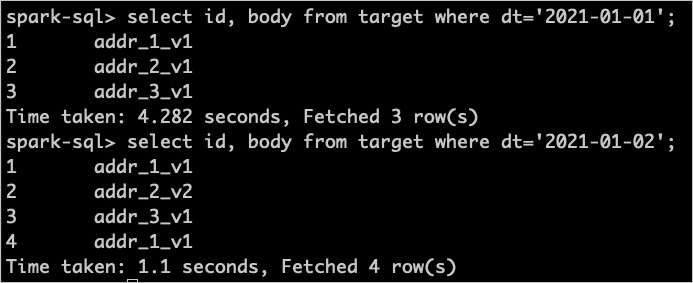
Query the 2021-01-01 snapshot:
SELECT id, body FROM target WHERE dt = '2021-01-01';Query the 2021-01-02 snapshot:
SELECT id, body FROM target WHERE dt = '2021-01-02';If the expected data is returned, the writes were successful. The following figure shows the query results in this example.