The recycle bin feature protects you from accidental data loss by moving deleted files and directories to a recycle bin directory instead of permanently removing them. You can restore data at any time before it is cleared from the recycle bin.
Background information
The recycle bin feature is implemented through client-side encapsulation of the Hadoop FileSystem API by Hadoop Shell or specific services such as Hive. When the recycle bin feature is enabled, Hadoop Shell calls the rename operation of FileSystem to move deleted files or directories to the /user/<username>/.Trash/Current directory. When the recycle bin feature is disabled, Hadoop Shell calls the delete operation of FileSystem to permanently remove the files or directories.
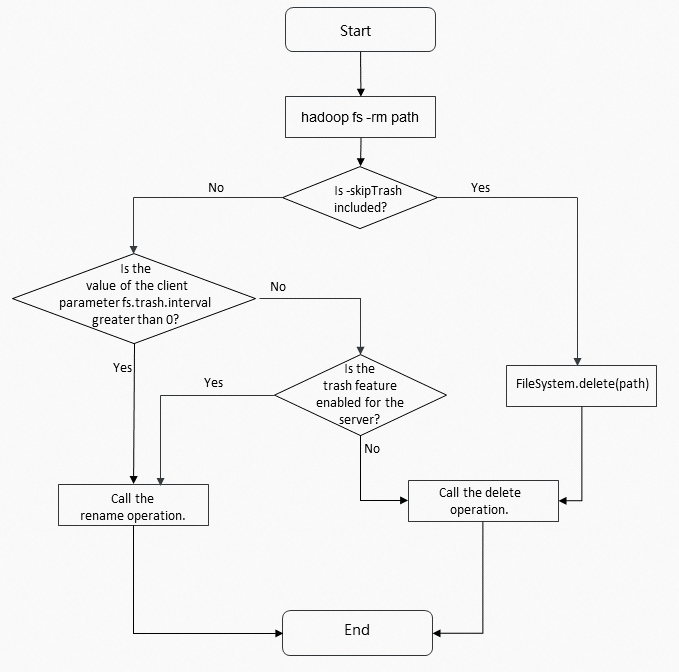
Enable the recycle bin feature
To enable the recycle bin feature, set the fs.trash.interval parameter to a value greater than 0. When enabled, files and directories deleted from HDFS, Object Storage Service (OSS), OSS-HDFS, or JindoFS are moved to the recycle bin directory instead of being permanently deleted.
Disable the recycle bin feature
hadoop fs -rm command. We recommend that you keep the recycle bin feature enabled. To disable the recycle bin feature, set the fs.trash.interval parameter to 0. For HDFS, this configuration takes effect only after you restart the NameNode component of HDFS.
Access a recycle bin directory
The default recycle bin directory path is /user/<username>/.Trash/Current. To access the recycle bin directory for a specific storage type, use the appropriate path prefix. Examples: hdfs://hdfs-cluster/user/<username>/.Trash/Current and oss://bucket/user/<username>/.Trash/Current.
Clear data in a recycle bin directory
- HDFS: By default, EMR clears data stored in the recycle bin directory of HDFS after 1 day (1,440 minutes). You can configure the fs.trash.interval parameter to specify the retention period in minutes.
- OSS-HDFS: The EMR server clears data stored in the recycle bin directory of OSS-HDFS after seven days. This time period is fixed and cannot be configured. We recommend that you monitor and manage the recycle bin directory regularly to prevent retained data from consuming additional storage space.
- OSS: EMR cannot automatically clear data stored in the recycle bin directory of OSS. To clear the data, configure a lifecycle rule for the recycle bin directory. For more information about how to configure lifecycle rules, see Lifecycle rules based on the last modified time.
- JindoFS in block storage mode: You must manually clear data stored in the recycle bin directory of JindoFS in block storage mode.