In E-MapReduce (EMR) versions earlier than V2.4.0, on-premises MySQL databases are used to store the Hive metadata of clusters. In EMR V2.4.0 and later versions, high-reliability Hive metadatabases are used for centralized metadata management.
Background information
A metadatabase can be accessed only by using a public IP address. Make sure that you have configured a public IP address for your cluster. Do not change the public IP address. Otherwise, the database whitelist becomes invalid.
You cannot manage the metadata of an on-premises metadatabase in the console. However, you can use the Hue tool on a cluster to manage the metadata.
- Total capacity: 200 MiB
- Maximum number of queries per hour: 720,000
- Maximum number of updates per hour: 144,000
Precautions
The Hive unified metadata storage type will be phased out in the future. You need to use the DLF unified metadata storage type that is provided in the new EMR console to store metadata. For more information, see EMR Metadata Migration Notice. If you are a new user of EMR, use the DLF unified metadata storage type to store metadata.
Overview
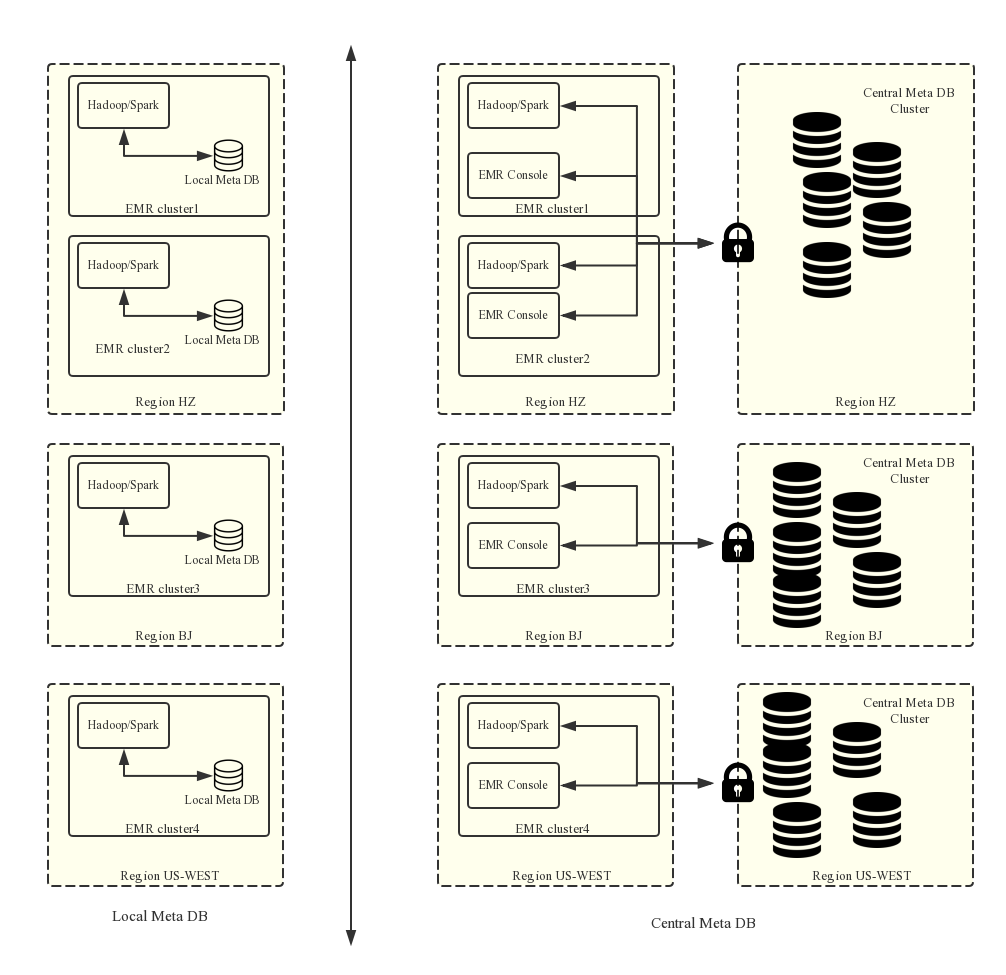
- Persistent metadata storage
In earlier versions, metadata is stored in MySQL databases that are deployed on clusters and is deleted when the clusters are released. This issue becomes even more prominent because EMR allows you to release a pay-as-you-go cluster if it is no longer needed. To retain the metadata, you need to log on to a cluster and export the metadata manually.
After centralized metadata management is enabled, the metadata of released clusters is retained. Before you delete data in Object Storage Service (OSS) or in the Hadoop Distributed File System (HDFS) of a cluster or you release a cluster, make sure that the metadata is deleted. That means the tables and database that store the data are also deleted. This prevents a buildup of dirty metadata in the database.
- Separation of computing and storage
EMR can store data in Alibaba Cloud OSS, which significantly reduces the costs for storing large volumes of data. EMR clusters are mainly used as computing resources and can be released if they are no longer needed. You do not need to migrate metadata before cluster release because data is stored in OSS.
- Data sharing
If all data is stored in OSS, all clusters can access data without the need to migrate or restructure metadata. This way, EMR clusters that process different services can directly share data.
Create a cluster that uses unified metadata
- From the console
When you create a cluster, on the Basic Configuration page, select Unified Metadatabase.
- By using the API Call the CreateClusterV2 operation to create a cluster. For more information, see CreateClusterV2.Note You must specify the parameter useLocalMetaDb=false.
Manage tables
For more information, see Basic operations on Hive metadata.
View metadata information
- Go to the metadata management page.
- Log on to the Alibaba Cloud E-MapReduce console.
- In the top navigation bar, select a region and resource group.
- Click the Metadata Management tab.
- In the left-side navigation pane, click Metabase Information.
You can view the current usage and limits of the ApsaraDB RDS instance.
The Metadatabase Information page displays the following fields: Metadatabase Name, Metadatabase Connection Info, Capacity Usage, Total Capacity, Query Rate Limit/Hour, and Update Rate Limit/Hour.