Storing all data in a single high-performance storage layer is expensive and unnecessary — older data is rarely accessed and doesn't need millisecond query latency. By routing recent, frequently accessed data to Tablestore and archiving all data to Delta Lake, you pay for fast storage only where it matters while keeping the full dataset queryable at low cost.
This topic covers hot and cold data separation based on data creation time. For access-popularity-based classification, see the relevant documentation.
Key concepts
Hot data, warm data, and cold data classify data by access frequency. Hot data is recently written and frequently accessed; as access frequency drops over time, data transitions to warm and eventually cold. Cold data has four defining characteristics:
-
Large volume: Cold data accumulates over long periods and is often retained permanently.
-
Low access frequency: Rarely queried; tolerable latency is tens of seconds or longer, and asynchronous processing is acceptable.
-
Batch operations only: Written and deleted in bulk; not updated. Queries read only data matching specific conditions, and conditions are not complex.
-
Low management cost: Infrequent access makes cold data suitable for low-cost, high-compression storage.
Time to live (TTL) is a Tablestore attribute that automatically deletes rows whose data version has exceeded the retention period. Setting a shorter TTL on your source table trims it to hot data only — rows older than the TTL are deleted based on version numbers, while Delta Lake retains the full history.
Change Data Capture (CDC) tracks insert, update, and delete operations on a data source and streams them to a downstream consumer. The Tablestore Tunnel service exposes a CDC stream that Streaming SQL can consume to keep Delta Lake in sync.
Use cases
Hot and cold data separation is most valuable for data with a natural time dimension, where recent data dominates query traffic:
-
Instant messaging (IM): Users mostly query recent messages; historical messages are retrieved occasionally. Example: DingTalk.
-
Monitoring: Recent metrics are checked continuously; historical data is queried only for incident investigation or reporting. Example: Cloud Monitor.
-
Billing: Users primarily view bills from the past month; year-old bills are rarely opened. Example: Alipay.
-
Internet of Things (IoT): Recently reported device telemetry is analyzed frequently; historical device data is accessed infrequently.
-
Archived data: Data that is easy to read and write but expensive to query can be archived to low-cost or high-compression storage to reduce costs.
Choose a storage tier
| Tablestore (hot storage) | Delta Lake (cold/all-data storage) | |
|---|---|---|
| Best for | Recent data with frequent, latency-sensitive queries | Full dataset retention and historical analysis |
| Query latency | Milliseconds on terabytes | Tens of seconds or longer, depending on data volume |
| Data retention | Controlled by TTL; older data is auto-deleted | Retains all data; no automatic expiry |
| Write model | Supports put, update, and delete via CDC | Append and merge via streaming job |
| Cost profile | Higher per-GB cost; optimized for speed | Lower per-GB cost; optimized for volume |
Store hot data in Tablestore for efficient terabyte-scale queries. Store cold data — or the full dataset — in Delta Lake. Adjust the Tablestore TTL to control the hot data boundary.
How it works
Tablestore (OrderSource)
        │
        │  CDC tunnel (incremental changes)
        ▼
  Streaming SQL job (Header node)
        │
        │  MERGE INTO (PUT / UPDATE / DELETE)
        ▼
Delta Lake (delta_orders, /delta/orders)-
Order data is written to the Tablestore source table
OrderSource. -
A CDC tunnel on
OrderSourcecaptures every insert, update, and delete. -
A Streaming SQL job on the EMR Header node reads the tunnel and merges changes into the Delta Lake sink
delta_orders. -
Delta Lake holds the complete dataset. Tablestore retains only the data within the TTL window — the hot tier.
Separate hot and cold data
This example uses an order table to demonstrate the complete setup: stream 90 days of order data into both Tablestore and Delta Lake, then shrink the Tablestore TTL to 30 days to isolate the hot tier.
Prerequisites
Before you begin, ensure that you have:
-
An EMR cluster with Streaming SQL enabled
-
A Tablestore instance and the permissions to create tables and tunnels
-
The Tablestore SDK for Java (for writing sample data)
Step 1: Set up the source table and load sample data
Create a Tablestore table named OrderSource with two primary key columns (UserId and OrderId) and two attribute columns (price and timestamp).
Use the BatchWriteRow operation from the Tablestore SDK for Java to write order data into the table. In this example, the timestamp range covers the latest 90 days (2020-02-26 to 2020-05-26), and the total number of records is 3,112,400.
When writing data, populate the timestamp column as the version number attribute column of the Tablestore row. Configure TTL on the table so that rows whose version number exceeds the retention period are automatically deleted.
Step 2: Create a CDC tunnel
In the Tablestore console, create a tunnel on the OrderSource table for incremental synchronization. Record the tunnel ID — you will use it in the Streaming SQL configuration.
Step 3: Start Streaming SQL and create source and sink tables
On the Header node of your EMR cluster, start the Streaming SQL interactive shell:
streaming-sql --master yarn --use-emr-datasource --num-executors 16 --executor-memory 4g --executor-cores 4Run the following commands to create the Tablestore source table, the Delta Lake sink, the incremental scan view, and the streaming job:
-- 1. Create the Tablestore source table.
DROP TABLE IF EXISTS order_source;
CREATE TABLE order_source
USING tablestore
OPTIONS(
  endpoint="http://vehicle-test.cn-hangzhou.vpc.tablestore.aliyuncs.com",
  access.key.id="",
  access.key.secret="",
  instance.name="vehicle-test",
  table.name="OrderSource",
  catalog='{"columns": {"UserId": {"col": "UserId", "type": "string"}, "OrderId": {"col": "OrderId", "type": "string"}, "price": {"col": "price", "type": "double"}, "timestamp": {"col": "timestamp", "type": "long"}}}'
);

-- 2. Create the Delta Lake sink.
DROP TABLE IF EXISTS delta_orders;
CREATE TABLE delta_orders(
  UserId string,
  OrderId string,
  price double,
  timestamp long
)
USING delta
LOCATION '/delta/orders';

-- 3. Create an incremental scan view for the source table.
--    tunnel.id: the ID of the tunnel created in Step 2.
--    maxoffsetsperchannel: the maximum data volume that can be written to each partition over the tunnel.
CREATE SCAN incremental_orders ON order_source USING STREAM
OPTIONS(
  tunnel.id="324c6bee-b10d-4265-9858-b829a1b71b4b",
  maxoffsetsperchannel="10000"
);

-- 4. Start the streaming job.
--    The job merges CDC changes (PUT / UPDATE / DELETE) into delta_orders.
--    __ots_record_type__ is a predefined column from the Tablestore streaming source
--    that identifies the row operation type.
CREATE STREAM orders_job
OPTIONS (
  checkpointLocation='/delta/orders_checkpoint',
  triggerIntervalMs='3000'
)
MERGE INTO delta_orders
USING incremental_orders AS delta_source
ON delta_orders.UserId=delta_source.UserId AND delta_orders.OrderId=delta_source.OrderId
WHEN MATCHED AND delta_source.__ots_record_type__='DELETE' THEN
  DELETE
WHEN MATCHED AND delta_source.__ots_record_type__='UPDATE' THEN
  UPDATE SET UserId=delta_source.UserId, OrderId=delta_source.OrderId, price=delta_source.price, timestamp=delta_source.timestamp
WHEN NOT MATCHED AND delta_source.__ots_record_type__='PUT' THEN
  INSERT (UserId, OrderId, price, timestamp) VALUES (delta_source.UserId, delta_source.OrderId, delta_source.price, delta_source.timestamp);
The four SQL statements do the following:
| Statement | What it does |
|---|---|
| Create the Tablestore source table | Defines order_source with the schema from the catalog parameter: UserId, OrderId, price, and timestamp columns. |
| Create the Delta Lake sink | Defines delta_orders and specifies /delta/orders as the storage location for Delta files. |
| Create the incremental scan view | Defines incremental_orders as a streaming view over the CDC tunnel. tunnel.id identifies the tunnel; maxoffsetsperchannel caps the volume fetched per partition per batch. |
| Start the streaming job | Reads from incremental_orders and merges changes into delta_orders based on the primary key (UserId, OrderId). Converts CDC operation types (PUT, UPDATE, DELETE) to the corresponding Delta Lake operations. |
Step 4: Verify initial sync and set the TTL
Before changing the TTL, confirm that both tables contain the same number of records.
Query record counts in both order_source and delta_orders. The counts should match (3,112,400 records each). 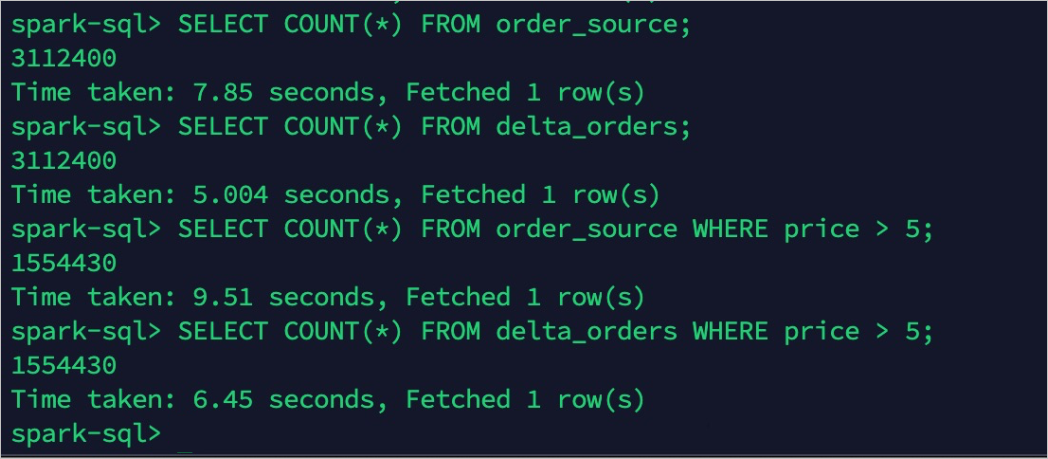
Set the TTL for the OrderSource table to 30 days. After the TTL takes effect:
-
order_sourceretains only records from the latest 30 days: 1,017,004 records. -
delta_ordersstill contains all records: 3,112,400 records.
Hot data and cold data are now separated. 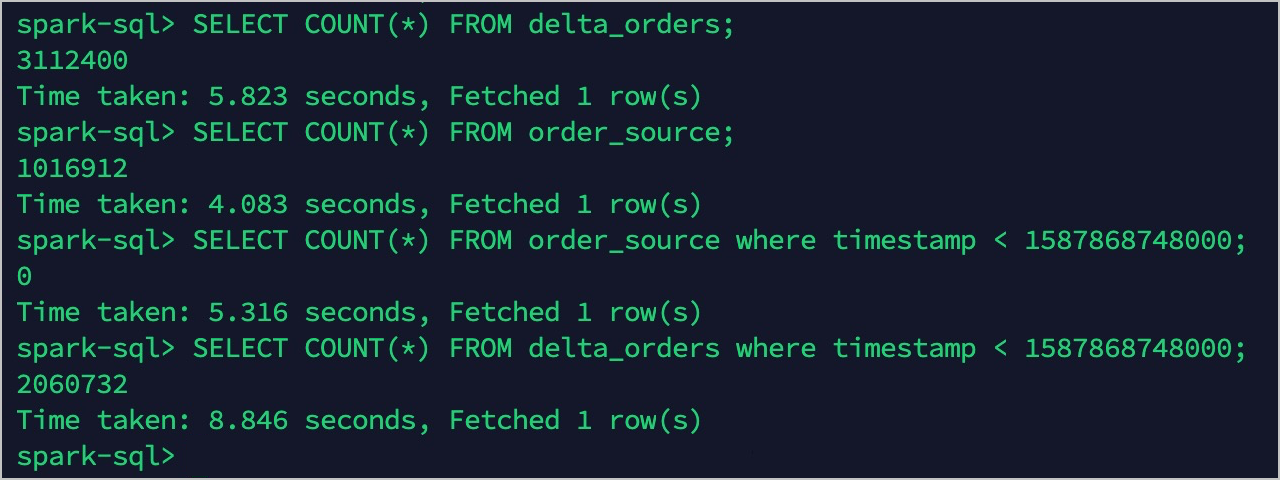
What's next
-
Query hot data directly from
order_sourcein Tablestore for low-latency results. -
Query cold data or the full historical dataset from
delta_ordersin Delta Lake. -
Adjust the Tablestore TTL to shift the hot-data boundary as your storage cost and query latency requirements evolve.