HBase Thrift Server allows you to easily interact with E-MapReduce (EMR) HBase clusters in multiple programming languages to meet the requirements of different development environments. You can use HBase Thrift Server to efficiently access and manage data in EMR HBase clusters. This way, Java clients are not required.
Background information
HBase Thrift Server is a service that is developed based on Apache Thrift. HBase Thrift Server provides efficient access to EMR HBase clusters for cross-language service development. Thrift is a scalable remote procedure call (RPC) framework for cross-language service development. The supported programming languages include C++, Java, Python, PHP, Ruby, Erlang, Perl, Haskell, C#, Go, Cocoa, JavaScript, Node.js, and Smalltalk.
Features
By default, Thrift Server is started on the master node of an EMR HBase cluster. The service port is 9091.
In high availability mode, Thrift Server is started on the three master nodes of the EMR HBase cluster. You can implement a custom load balancing policy based on your business requirements to evenly distribute requests across multiple Thrift Server instances.
Use HBase Thrift Server
A DataServing cluster or custom cluster that contains the HBase service is created. For more information, see Create a cluster.
In this example, ThriftServer v1 is used in Python. You can set hbase.thrift.server.version in the HBase configuration to v1 and restart ThriftServer to switch the version to v1.
Check and modify the HBase configuration.
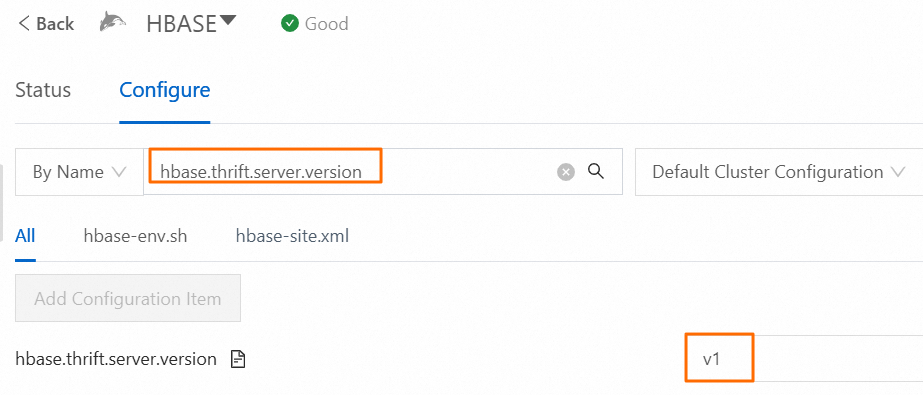
On the Configure tab of the HBase service in the EMR console, search for and view the value of the
hbase.thrift.server.versionparameter.If the parameter value is v1, proceed to the next step.
If the parameter value is not v1, change the value to v1 and perform operations as prompted. This ensures that the change takes effect before you proceed to the next step.
Install dependencies.
Log on to the master node of the EMR cluster. For more information, see Log on to a cluster.
Run the following command to install Python and the required Thrift library.
pip2.7 install hbase-thrift
Optional. Create a table.
The following substeps show an example of creating a table for the Python script file.
Use HBase Shell to connect to the EMR HBase cluster. For more information, see Use HBase Shell.
Execute the following statement to create a table named test_table with the cf column family:
create 'test_table','cf'Execute the following statement to write data to the table:
put 'test_table','test_rowkey','cf:q','v1'
Create a Python script.
Create a Python script file named
hbase_thrift_test.pyand add the following code to the script file. In the code,test_tableindicates the table name andtest_rowkeyindicates the row key. You must modify them based on your business requirements. If you want to use the table created in the previous step, you can directly use the following code without modifications.#! /usr/bin/env python2.7 #coding=utf-8 from thrift import Thrift from thrift.transport import TSocket, TTransport from thrift.protocol import TBinaryProtocol from hbase import Hbase socket = TSocket.TSocket('master-1-1', 9091) socket.setTimeout(60000) transport = TTransport.TBufferedTransport(socket) transport.open() protocol = TBinaryProtocol.TBinaryProtocol(transport) client = Hbase.Client(protocol) result = client.getRow("test_table", "test_rowkey") for r in result: print 'The rowkey is ', r.row print 'The value is ', r.columns.get('cf:q').value socket.close()Execute the Python script.
Run the following command to execute the script and access the data in the EMR HBase cluster:
python2.7 hbase_thrift_test.pyIf the command execution is successful, the following or similar information is returned:
The rowkey is  test_rowkey
The value is  v1