The EMR Remote Shuffle Service (ESS) is an extension for E-MapReduce (EMR) that optimizes shuffle operations in compute engines.
Background
Traditional shuffle mechanisms present several challenges:
-
In scenarios with large data volumes, shuffle write operations can cause data to spill to disk, leading to write amplification.
-
Shuffle read operations generate a high volume of small network packets, which can cause connection reset errors.
-
Shuffle read operations involve numerous small I/O requests and random reads, placing a heavy load on disks and CPUs.
-
When the number of mappers (M) and reducers (N) reaches the thousands, the total number of network connections (M × N) can prevent a job from completing.
-
The NodeManager and the Spark Shuffle Service run in the same process. When shuffle data volumes are extremely large, the NodeManager can restart, which impacts the stability of YARN scheduling.
ESS provides the following advantages:
-
It uses a push-style shuffle mechanism instead of a pull-style one, which reduces memory pressure on mappers.
-
It supports I/O aggregation, which reduces the number of shuffle read connections from M × N to N and replaces random reads with sequential reads.
-
It supports a two-replica mechanism to reduce the probability of fetch failures.
-
It supports a compute-storage separation architecture, allowing you to deploy the Shuffle Service in a separate hardware environment that is decoupled from the compute cluster.
-
It eliminates the dependency on local disks when you run Spark on Kubernetes.
The following figure shows the architecture of ESS.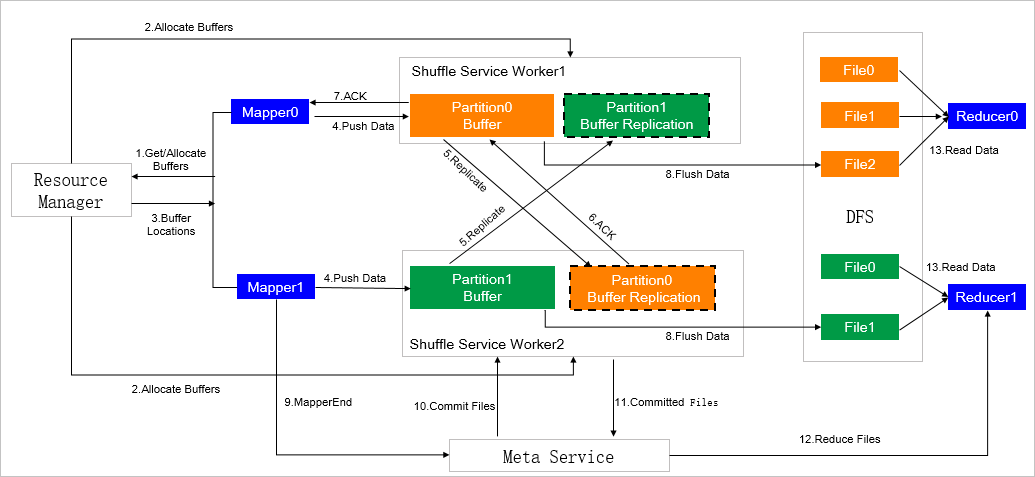
Limitations
This document applies only to EMR versions earlier than EMR-3.39.1, versions in the EMR-4.x series, and versions earlier than EMR-5.5.0. For EMR-3.39.1 or later and EMR-5.5.0 or later, see RSS.
Create a cluster
For example, on EMR-4.5.0, you can create a cluster with ESS in two ways:
-
Create an E-MapReduce Shuffle Service cluster. On the Software Configuration page, for Cluster Type, select Shuffle Service. The required service is ESS (1.0.0).
-
Create an E-MapReduce Hadoop cluster. On the Software Configuration page, in the Cluster Type section, select a type such as Hadoop, Kafka, or Druid. Then, configure the Cloud Native Options (for example, on ECS) and Product Version (for example, EMR-4.5.0). The page then displays the corresponding required services (such as HDFS, YARN, and Spark) and optional services (such as ESS, HBase, and Flink) with their versions.
For more information about how to create a cluster, see Create a cluster.
Using ESS
To use ESS with Spark, add the following parameters to your Spark job submission. For more information about how to configure parameters, see Edit jobs.
For more information about Spark parameters, see Spark Configuration.
|
Parameter |
Description |
|
spark.shuffle.manager |
The value must be org.apache.spark.shuffle.ess.EssShuffleManager. |
|
spark.ess.master.address |
Specify the address in the format <ess-master-ip>:<ess-master-port>. The parameters are as follows:
|
|
spark.shuffle.service.enabled |
Set the value to You must disable the default external shuffle service to use EMR Remote Shuffle Service. |
|
spark.shuffle.useOldFetchProtocol |
Set the value to This enables compatibility with the legacy shuffle protocol. |
|
spark.sql.adaptive.enabled |
Set the value to EMR Remote Shuffle Service does not support Adaptive Execution. |
|
spark.sql.adaptive.skewJoin.enabled |
Parameters
The ESS service configuration page lists all ESS parameters.
|
Parameter |
Description |
Default |
|
ess.push.data.replicate |
Enables or disables the two-replica feature. Valid values:
Note
We recommend that you enable this feature in production environments. |
true |
|
ess.worker.flush.queue.capacity |
The number of flush buffers per directory. Note
To improve performance, you can configure multiple disks. For optimal read and write throughput, we recommend that you use no more than two directories per disk. The heap memory consumed by the flush buffer for each directory is ess.worker.flush.buffer.size * ess.worker.flush.queue.capacity, which is |
512 |
|
ess.flush.timeout |
The timeout period for flushing data to the storage layer. |
240s |
|
ess.application.timeout |
The application heartbeat timeout. If a heartbeat is not received within this period, ESS cleans up the application's resources. |
240s |
|
ess.worker.flush.buffer.size |
The size of the flush buffer. When the buffer exceeds this size, ESS flushes the data to disk. |
256k |
|
ess.metrics.system.enable |
Enables or disables monitoring. Valid values:
|
false |
|
ess_worker_offheap_memory |
The size of off-heap memory for a core node. |
4g |
|
ess_worker_memory |
The size of heap memory for a core node. |
4g |
|
ess_master_memory |
The size of heap memory for the master node. |
4g |