Change Data Capture (CDC) keeps a data warehouse or data lake in sync with an upstream business database. When records are inserted, updated, or deleted in the source database, CDC detects those changes and propagates them downstream. Unlike the database field, where mature CDC tools and standards are widely available, the big data field has few established CDC practices or technical implementations — you typically need to compose existing engines to build your own CDC pipeline.
Choose a synchronization method
Two CDC methods are available on E-MapReduce (EMR). Choose based on your latency and deletion requirements.
| Method | How it works | Supports deletions | Latency | When to use |
|---|---|---|---|---|
| Batch update | Periodically exports incremental rows by timestamp or auto-incremented ID, then merges them into Delta Lake using MERGE |
No | Minutes to hours | Append-heavy workloads where deletes are not needed and near-real-time sync is not required |
| Real-time synchronization | Streams database binary logs (binlog) through Kafka into Spark, then replays INSERT, UPDATE, and DELETE operations against a Delta table | Yes | Seconds | Any workload that requires delete propagation or low-latency replication |
The batch update method requires a primary key (or composite primary key) on the table for theMERGEoperation, and a timestamp or auto-incremented field (such as amodifiedcolumn) to identify incremental rows. Without such a field, full-table exports are needed for each sync cycle.
Operational trade-offs
Before choosing a method, consider these operational factors:
| Factor | Batch update | Real-time synchronization |
|---|---|---|
| Small-file problem | Not applicable | Each micro-batch commit creates small files; requires compaction strategy |
| Compaction risk | Not applicable | Compaction can conflict with the active write stream if intervals are too frequent |
| Infrastructure | Sqoop, HDFS | ApsaraDB RDS for MySQL, Data Transmission Service (DTS), Kafka, Spark Structured Streaming |
| Code complexity | Low | High |
Batch update
This example uses Sqoop to export incremental rows from MySQL and MERGE to apply them to a Delta table.
Prerequisites
Before you begin, ensure that you have:
-
A MySQL database with a table that has a timestamp or auto-incremented field to track changes
-
An EMR DataLake cluster with access to Hadoop Distributed File System (HDFS)
-
Sqoop installed on the cluster
Set up the source table
-
Create the
salestable in MySQL and insert initial data.CREATE TABLE sales(id LONG, date DATE, name VARCHAR(32), sales DOUBLE, modified DATETIME); INSERT INTO sales VALUES (1, '2019-11-11', 'Robert', 323.00, '2019-11-11 12:00:05'), (2, '2019-11-11', 'Lee', 500.00, '2019-11-11 16:11:46'), (3, '2019-11-12', 'Robert', 136.00, '2019-11-12 10:23:54'), (4, '2019-11-13', 'Lee', 211.00, '2019-11-13 11:33:27');The
modifiedfield marks when each row was last changed. Sqoop uses this field to identify incremental updates. -
Export the full table to HDFS.
sqoop import \
  --connect jdbc:mysql://emr-header-1:3306/test \
  --username root \
  --password EMRroot1234 \
  -table sales \
  -m1 \
  --target-dir /tmp/cdc/staging_sales
Create the initial Delta table
-
Start the streaming-sql client.
streaming-sql -
Create a temporary external table over the HDFS export, then create the Delta table from it.
-- LOAD DATA INPATH does not work with Delta tables; use a temporary external table instead.
CREATE TABLE staging_sales (id LONG, date STRING, name STRING, sales DOUBLE, modified STRING)
USING csv LOCATION '/tmp/cdc/staging_sales/';

CREATE TABLE sales USING delta LOCATION '/user/hive/warehouse/test.db/test'
SELECT * FROM staging_sales;

-- Remove the temporary table and its HDFS directory.
DROP TABLE staging_sales;
hdfs dfs -rm -r -skipTrash /tmp/cdc/staging_sales/
Apply incremental updates
After the source database changes, export only the updated rows and merge them into the Delta table.
-
Export rows modified after the last sync. Replace
2019-11-20 00:00:00with the actual last-sync timestamp.Sqoop cannot capture deleted rows. To synchronize deletes, use real-time synchronization instead.
sqoop import \ --connect jdbc:mysql://emr-header-1:3306/test \ --username root \ --password EMRroot1234 \ -table sales \ -m1 \ --target-dir /tmp/cdc/staging_sales \ --incremental lastmodified \ --check-column modified \ --last-value "2019-11-20 00:00:00" -
Create a temporary table over the new export and merge it into the Delta table.
CREATE TABLE staging_sales (id LONG, date STRING, name STRING, sales DOUBLE, modified STRING)
USING csv LOCATION '/tmp/cdc/staging_sales/';

MERGE INTO sales AS target
USING staging_sales AS source
ON target.id = source.id
WHEN MATCHED THEN UPDATE SET *
WHEN NOT MATCHED THEN INSERT *;
Real-time synchronization
This example streams binlog events from ApsaraDB RDS for MySQL through Data Transmission Service (DTS) and Kafka, then uses Spark Structured Streaming and the Delta merge API to replay INSERT, UPDATE, and DELETE operations in real time.
The pipeline has four stages:
-
Source: ApsaraDB RDS for MySQL emits binlog events.
-
Transport: DTS reads the binlog and publishes events to a Kafka topic in Avro format.
-
Processing: Spark reads the Kafka topic, decodes events using the
dts_binlog_parseruser-defined function (UDF), and applies changes to a Delta table via the merge API. -
Sink: A Delta table reflects the latest state of the source database.
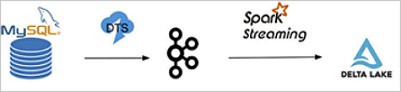
This example uses DTS to export binary logs to Kafka. You can also use open-source Maxwell or Canal to export binary logs. If the binary logs of the source database are not in the standard format, you may need to write a UDF to process them. For example, the format of the binary logs provided by Simple Log Service differs from that of the binary logs provided by ApsaraDB RDS for MySQL.
Prerequisites
Before you begin, ensure that you have:
-
An ApsaraDB RDS for MySQL instance with binlog enabled, with users, databases, and permissions configured
-
An EMR DataLake cluster with SSH access (Log on to a cluster)
-
An EMR Kafka cluster (or an existing Kafka cluster)
-
DTS activated, with a synchronization task configured to publish the source table's binlog to a Kafka topic
Binlog event schema
DTS publishes binlog events to Kafka in Avro format. EMR provides the dts_binlog_parser UDF to decode each message. After decoding, each event contains the following fields.
| Field | Type | Description |
|---|---|---|
recordID |
Long | Unique record identifier |
source |
JSON string | Source database metadata, e.g. {"sourceType": "MySQL", "version": "0.0.0.0"} |
dbTable |
String | Database and table name, e.g. delta_cdc.sales |
recordType |
String | Change type: INIT, INSERT, UPDATE, or DELETE |
recordTimestamp |
Timestamp | Timestamp of the change |
extraTags |
JSON string | Additional metadata |
fields |
JSON array | Column names, e.g. ["id","date","name","sales"] |
beforeImages |
JSON string | Column values before the change (empty for INSERT and INIT) |
afterImages |
JSON string | Column values after the change (empty for DELETE) |
The recordType field drives the merge logic:
-
INIT: initial data load. Write these rows to the Delta table using append mode before starting the streaming job. -
INSERT: insert theafterImagesvalues as a new row. -
UPDATE: update the matching row usingafterImages; match onbeforeImages.idto handle ID changes. -
DELETE: remove the row identified bybeforeImages.id.
Set up the source table and Kafka topic
-
Create the
salestable in the ApsaraDB RDS console and insert initial data.CREATE TABLE `sales` ( `id` bigint(20) NOT NULL, `date` date DEFAULT NULL, `name` varchar(32) DEFAULT NULL, `sales` double DEFAULT NULL, PRIMARY KEY (`id`) ) ENGINE=InnoDB DEFAULT CHARSET=utf8; INSERT INTO sales VALUES (1, '2019-11-11', 'Robert', 323.00), (2, '2019-11-11', 'Lee', 500.00), (3, '2019-11-12', 'Robert', 136.00), (4, '2019-11-13', 'Lee', 211.00);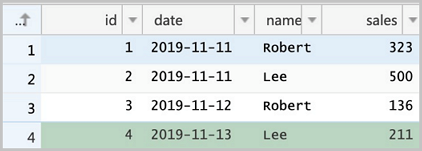
-
Create a Kafka topic named
salesin the EMR Kafka cluster.kafka-topics.sh --create \ --bootstrap-server core-1-1:9092 \ --partitions 1 \ --replication-factor 1 \ --topic sales -
In the DTS console, create a synchronization task. Set Database Type to MySQL in the source section and Datasource Type to Kafka in the destination section. Configure the task to replicate the
salestable's binlog to thesalesKafka topic.
Write and deploy the Spark Streaming job
The job has two phases:
-
Initial load: reads
INITrecords from Kafka and writes them to the Delta table. -
Incremental streaming: reads
INSERT,UPDATE, andDELETErecords and replays them against the Delta table using the merge API.
Choose the Scala or SQL approach based on your preference.
-
Scala
-
Write the Spark code.
import io.delta.tables._ import org.apache.spark.internal.Logging import org.apache.spark.sql.{AnalysisException, SparkSession} import org.apache.spark.sql.expressions.Window import org.apache.spark.sql.functions._ import org.apache.spark.sql.types.{DataTypes, StructField} val schema = DataTypes.createStructType(Array[StructField]( DataTypes.createStructField("id", DataTypes.StringType, false), DataTypes.createStructField("date", DataTypes.StringType, true), DataTypes.createStructField("name", DataTypes.StringType, true), DataTypes.createStructField("sales", DataTypes.StringType, true) )) // Phase 1: load INIT records into the Delta table. def initDeltaTable(): Unit = { spark.read .format("kafka") .option("kafka.bootstrap.servers", "192.168.XX.XX:9092") .option("subscribe", "sales") .option("failOnDataLoss", value = false) .load() .createTempView("initData") // Decode Avro-encoded DTS events using the dts_binlog_parser UDF. val dataBatch = spark.sql( """ |SELECT dts_binlog_parser(value) |AS (recordID, source, dbTable, recordType, recordTimestamp, extraTags, fields, beforeImages, afterImages) |FROM initData """.stripMargin) // Write only INIT records as the initial Delta table state. dataBatch.select(from_json(col("afterImages").cast("string"), schema).as("jsonData")) .where("recordType = 'INIT'") .select( col("jsonData.id").cast("long").as("id"), col("jsonData.date").as("date"), col("jsonData.name").as("name"), col("jsonData.sales").cast("decimal(7,2)")).as("sales") .write.format("delta").mode("append").save("/delta/sales") } try { DeltaTable.forPath("/delta/sales") } catch { case e: AnalysisException if e.getMessage().contains("is not a Delta table") => initDeltaTable() } // Phase 2: stream incremental changes and merge them into the Delta table. spark.readStream .format("kafka") .option("kafka.bootstrap.servers", "192.168.XX.XX:9092") .option("subscribe", "sales") .option("startingOffsets", "earliest") .option("maxOffsetsPerTrigger", 1000) .option("failOnDataLoss", value = false) .load() .createTempView("incremental") // Decode Avro-encoded DTS events using the dts_binlog_parser UDF. val dataStream = spark.sql( """ |SELECT dts_binlog_parser(value) |AS (recordID, source, dbTable, recordType, recordTimestamp, extraTags, fields, beforeImages, afterImages) |FROM incremental """.stripMargin) val task = dataStream.writeStream .option("checkpointLocation", "/delta/sales_checkpoint") .foreachBatch( (ops, id) => { // For each micro-batch, keep only the latest change per record. // Partition by the pre-change ID to handle UPDATE and DELETE correctly. // This also handles out-of-order events: if two updates arrive for the // same record, the one with the higher recordId wins. val windowSpec = Window .partitionBy(coalesce(col("before_id"), col("id"))) .orderBy(col("recordId").desc) val mergeDf = ops .select( col("recordId"), col("recordType"), from_json(col("beforeImages").cast("string"), schema).as("before"), from_json(col("afterImages").cast("string"), schema).as("after")) .where("recordType != 'INIT'") .select( col("recordId"), col("recordType"), // Use beforeImages.id as the lookup key for UPDATE and DELETE. when(col("recordType") === "INSERT", col("after.id")).otherwise(col("before.id")).cast("long").as("before_id"), when(col("recordType") === "DELETE", col("before.id")).otherwise(col("after.id")).cast("long").as("id"), when(col("recordType") === "DELETE", col("before.date")).otherwise(col("after.date")).as("date"), when(col("recordType") === "DELETE", col("before.name")).otherwise(col("after.name")).as("name"), when(col("recordType") === "DELETE", col("before.sales")).otherwise(col("after.sales")).cast("decimal(7,2)").as("sales") ) .select( dense_rank().over(windowSpec).as("rk"), col("recordType"), col("before_id"), col("id"), col("date"), col("name"), col("sales") ) .where("rk = 1") // Merge the micro-batch into the Delta table. val mergeCond = "target.id = source.before_id" DeltaTable.forPath(spark, "/delta/sales").as("target") .merge(mergeDf.as("source"), mergeCond) .whenMatched("source.recordType='UPDATE'") .updateExpr(Map( "id" -> "source.id", "date" -> "source.date", "name" -> "source.name", "sales" -> "source.sales")) .whenMatched("source.recordType='DELETE'") .delete() .whenNotMatched("source.recordType='INSERT' OR source.recordType='UPDATE'") .insertExpr(Map( "id" -> "source.id", "date" -> "source.date", "name" -> "source.name", "sales" -> "source.sales")) .execute() } ).start() task.awaitTermination() -
Package and deploy the code.
-
After debugging locally, package the JAR.
mvn clean install -
Log on to the DataLake cluster via SSH and upload the JAR to the root directory.
-
-
Submit the Spark Streaming job.
spark-submit \ --master yarn \ --deploy-mode cluster \ --driver-memory 1g \ --executor-cores 2 \ --executor-memory 3g \ --num-executors 1 \ --packages org.apache.spark:spark-sql-kafka-0-10_2.12:3.1.2 \ --class com.aliyun.delta.StreamToDelta \ delta-demo-1.0.jarNote: This example uses
delta-demo-1.0.jarand the classcom.aliyun.delta.StreamToDelta. Replace both with the actual JAR name and class name for your implementation.
-
-
SQL
-
Start the streaming-sql client.
streaming-sql --master local -
Run the following SQL statements to load initial data and start the streaming merge job.
-- Create a Kafka source table. CREATE TABLE kafka_sales USING kafka OPTIONS( kafka.bootstrap.servers='192.168.XX.XX:9092', subscribe='sales' ); -- Create the Delta sink table. CREATE TABLE delta_sales(id long, date string, name string, sales decimal(7, 2)) USING delta LOCATION '/delta/sales'; -- Load INIT records as the initial data. INSERT INTO delta_sales SELECT CAST(jsonData.id AS LONG), jsonData.date, jsonData.name, jsonData.sales FROM ( SELECT from_json(CAST(afterImages as STRING), 'id STRING, date DATE, name STRING, sales STRING') as jsonData FROM ( SELECT dts_binlog_parser(value) AS (recordID, source, dbTable, recordType, recordTimestamp, extraTags, fields, beforeImages, afterImages) FROM kafka_sales ) binlog WHERE recordType='INIT' ) binlog_wo_init; -- Define the incremental stream over the Kafka source. CREATE SCAN incremental on kafka_sales USING STREAM OPTIONS( startingOffsets='earliest', maxOffsetsPerTrigger='1000', failOnDataLoss=false ); -- Start the streaming merge job. CREATE STREAM job OPTIONS( checkpointLocation='/delta/sales_checkpoint' ) MERGE INTO delta_sales as target USING ( SELECT recordId, recordType, before_id, id, date, name, sales FROM ( SELECT recordId, recordType, CASE WHEN recordType = "INSERT" then after.id else before.id end as before_id, CASE WHEN recordType = "DELETE" then CAST(before.id as LONG) else CAST(after.id as LONG) end as id, CASE WHEN recordType = "DELETE" then before.date else after.date end as date, CASE WHEN recordType = "DELETE" then before.name else after.name end as name, CASE WHEN recordType = "DELETE" then CAST(before.sales as DECIMAL(7, 2)) else CAST(after.sales as DECIMAL(7, 2)) end as sales, dense_rank() OVER (PARTITION BY coalesce(before.id, after.id) ORDER BY recordId DESC) as rank FROM ( SELECT recordId, recordType, from_json(CAST(beforeImages as STRING), 'id STRING, date STRING, name STRING, sales STRING') as before, from_json(CAST(afterImages as STRING), 'id STRING, date STRING, name STRING, sales STRING') as after FROM ( SELECT dts_binlog_parser(value) AS (recordID, source, dbTable, recordType, recordTimestamp, extraTags, fields, beforeImages, afterImages) FROM incremental ) binlog WHERE recordType != 'INIT' ) binlog_wo_init ) binlog_extract WHERE rank=1 ) as source ON target.id = source.before_id WHEN MATCHED AND source.recordType='UPDATE' THEN UPDATE SET id=source.id, date=source.date, name=source.name, sales=source.sales WHEN MATCHED AND source.recordType='DELETE' THEN DELETE WHEN NOT MATCHED AND (source.recordType='INSERT' OR source.recordType='UPDATE') THEN INSERT (id, date, name, sales) VALUES (source.id, source.date, source.name, source.sales);
-
Verify the pipeline
-
Start a spark-shell session and read the Delta table.
spark-shell --master localspark.read.format("delta").load("/delta/sales").show +---+----------+------+------+ | id| date| name| sales| +---+----------+------+------+ | 1|2019-11-11|Robert|323.00| | 2|2019-11-11| Lee|500.00| | 3|2019-11-12|Robert|136.00| | 4|2019-11-13| Lee|211.00| +---+----------+------+------+ -
Run the following statements in the ApsaraDB RDS console to make changes to the source table.
Row 2 is updated twice. The streaming job uses a
dense_rank()window to keep only the latest change per record within each micro-batch, so the final value ofsalesfor row 2 reflects the second update (175).DELETE FROM sales WHERE id = 1; UPDATE sales SET sales = 150 WHERE id = 2; UPDATE sales SET sales = 175 WHERE id = 2; INSERT INTO sales VALUES (5, '2019-11-14', 'Robert', 233);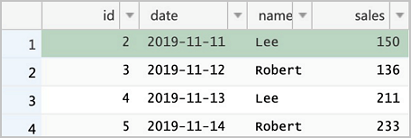
-
Read the Delta table again to confirm the changes have been applied.
spark.read.format("delta").load("/delta/sales").show

+---+----------+------+------+
| id|      date|  name| sales|
+---+----------+------+------+
|  5|2019-11-14|Robert|233.00|
|  3|2019-11-12|Robert|136.00|
|  4|2019-11-13|   Lee|211.00|
|  2|2019-11-11|   Lee|175.00|
+---+----------+------+------+
Row 1 is deleted, row 2 reflects the latest update, and row 5 is inserted.
Best practices
Manage small files in real-time mode
Real-time synchronization writes many small files to the Delta table as each micro-batch commits. Over time, this degrades query performance. Use one or both of the following strategies.
Partition the table by date or another high-cardinality column. Most writes land in the current partition, so you can compact historical partitions without risking transaction conflicts with the active write stream. Partition-pruned queries are also significantly faster than full-table scans.
Compact periodically within the streaming job. Run a compaction (for example, every 10 micro-batches) to merge small files. Keep compaction intervals infrequent enough that the operation completes before the next micro-batch begins; otherwise, in-flight writes may be delayed.
Use batch mode when low latency is not required
If data does not need to be synchronized in real time, collect binlog events to Object Storage Service (OSS) on a schedule rather than processing them in a continuous stream. Use DTS to publish events to Kafka, then use kafka-connect-oss to archive them to OSS. A Spark batch job can then read all accumulated events from OSS and apply them to Delta Lake in a single merge operation. This eliminates the small-file problem and removes the risk of compaction failures caused by transaction conflicts with the streaming writer.
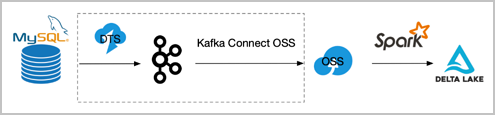
The components framed in dotted lines in the diagram can be replaced with equivalent tools.
Appendix: Inspect binlog events in Kafka
Use the dts_binlog_parser UDF to decode Avro-encoded DTS events and inspect the raw binlog data.
-
Scala
-
Start a spark-shell session.
spark-shell --master local -
Read and decode the Kafka topic.
spark.read .format("kafka") .option("kafka.bootstrap.servers", "192.168.XX.XX:9092") .option("subscribe", "sales") .option("maxOffsetsPerTrigger", 1000) .load() .createTempView("kafkaData") val kafkaDF = spark.sql("SELECT dts_binlog_parser(value) FROM kafkaData") kafkaDF.show(false)
-
-
SQL
-
Start the streaming-sql client.
streaming-sql --master local -
Create a table and query the decoded events.
CREATE TABLE kafkaData USING kafka OPTIONS( kafka.bootstrap.servers='192.168.XX.XX:9092', subscribe='sales' ); SELECT dts_binlog_parser(value) FROM kafkaData;The output looks similar to:
+--------+---------------------------------------------+---------------+----------+-------------------+---------+----------------------------+------------+--------------------------------------------------------------+ |recordid|source |dbtable |recordtype|recordtimestamp |extratags|fields |beforeimages|afterimages | +--------+---------------------------------------------+---------------+----------+-------------------+---------+----------------------------+------------+--------------------------------------------------------------+ |1 |{"sourceType": "MySQL", "version": "0.0.0.0"}|delta_cdc.sales|INIT |1970-01-01 08:00:00|{} |["id","date","name","sales"]|{} |{"sales":"323.0","date":"2019-11-11","name":"Robert","id":"1"}| |2 |{"sourceType": "MySQL", "version": "0.0.0.0"}|delta_cdc.sales|INIT |1970-01-01 08:00:00|{} |["id","date","name","sales"]|{} |{"sales":"500.0","date":"2019-11-11","name":"Lee","id":"2"} | |3 |{"sourceType": "MySQL", "version": "0.0.0.0"}|delta_cdc.sales|INIT |1970-01-01 08:00:00|{} |["id","date","name","sales"]|{} |{"sales":"136.0","date":"2019-11-12","name":"Robert","id":"3"}| |4 |{"sourceType": "MySQL", "version": "0.0.0.0"}|delta_cdc.sales|INIT |1970-01-01 08:00:00|{} |["id","date","name","sales"]|{} |{"sales":"211.0","date":"2019-11-13","name":"Lee","id":"4"} | +--------+---------------------------------------------+---------------+----------+-------------------+---------+----------------------------+------------+--------------------------------------------------------------+
-