Run Alluxio shell commands or Hadoop shell commands to manage files in the Alluxio file system on an E-MapReduce (EMR) Hadoop cluster.
Prerequisites
Before you begin, make sure that you have:
A Hadoop cluster with Alluxio selected as an optional service. See Create a cluster.
Logged on to the cluster. See Log on to a cluster.
Commands at a glance
Each command supports two equivalent forms: an Alluxio shell command (alluxio fs <cmd>) and a Hadoop shell command (hadoop dfs -<cmd> alluxio://).
| Command | Description |
|---|---|
mkdir | Create a directory in the Alluxio file system |
ls | List files and subdirectories in a directory |
cat | Print the contents of a file |
mv | Move a file or directory to a new path |
copyFromLocal | Upload a local file to Alluxio |
copyToLocal | Download a file from Alluxio to local disk |
rm | Delete a file from Alluxio |
For the full command reference, see the Alluxio documentation.
mkdir
Creates a directory in the Alluxio file system. Use mkdir to set up directory structures before uploading files.
Syntax
Alluxio shell:
alluxio fs mkdir <path1> [path2] ... [pathn]Hadoop shell:
hadoop dfs -mkdir alluxio://<path1> [path2] ... [pathn]Examples
Create a /dir directory:
alluxio fs mkdir /dirExpected output:
Successfully created directory /dirCreate a /logs subdirectory inside /dir:
alluxio fs mkdir /dir/logsExpected output:
Successfully created directory /dir/logsls
Lists files and subdirectories in a specified directory. You must use an absolute path.
Syntax
Alluxio shell:
alluxio fs ls <path>Hadoop shell:
hadoop dfs -ls alluxio://<path>Examples
View information about hello.txt in the /tmp directory:
alluxio fs ls /tmp/hello.txt
View information about the /logs subdirectory in /dir:
alluxio fs ls /dir/logs
cat
Prints the contents of a file stored in Alluxio. To save the file to local disk instead, use copyToLocal.
Syntax
Alluxio shell:
alluxio fs cat <path>Hadoop shell:
hadoop dfs -cat alluxio://<path>Example
Print the contents of hello.txt in the /tmp3 directory:
alluxio fs cat hello.txt
mv
Moves a file or directory from one path to another. Use mv to reorganize files within the Alluxio file system.
Syntax
Alluxio shell:
alluxio fs mv <path>Hadoop shell:
hadoop dfs -mv alluxio://<path>Examples
Move hello.txt from /tmp/ to /tmp3/logs/:
alluxio fs mv /tmp/hello.txt /tmp3/logs/hello.txtRun ls to confirm the file was moved.

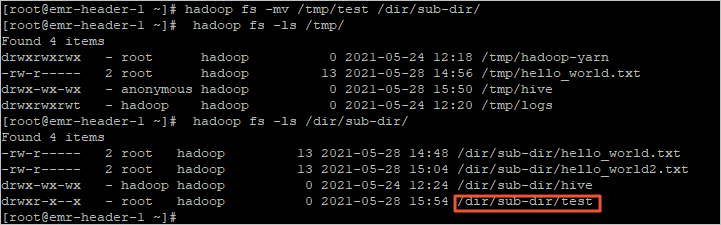
Move the test directory from /tmp/ to /dir/sub-dir/:
hadoop fs -mv /tmp/test /dir/sub-dir/Run ls to confirm the directory was moved.
copyFromLocal
Uploads a local file to a specified directory in Alluxio. Use the Alluxio shell command copyFromLocal or the equivalent Hadoop shell command put.
Syntax
Alluxio shell:
alluxio fs copyFromLocal <src> <remoteDst>Hadoop shell:
hadoop dfs -put <src> alluxio://<remoteDst>Example
Upload hello_world.txt from the local machine to /dir/logs2 in Alluxio:
alluxio fs copyFromLocal hello_world.txt /dir/logs2Expected output:
Copied file:///root/hello_world.txt to /dir/logs2copyToLocal
Downloads a file from Alluxio to a local directory. Use the Alluxio shell command copyToLocal or the equivalent Hadoop shell command get.
Syntax
Alluxio shell:
alluxio fs copyToLocal <src> <localDst>Hadoop shell:
hadoop dfs -get <src> alluxio://<localDst>Example
Download hello_world2.txt from /dir/sub-dir/ in Alluxio to the local directory /emr:
alluxio fs copyToLocal /dir/sub-dir/hello_world2.txt /emrExpected output:
Copied /dir/sub-dir/hello_world2.txt to file:///emrrm
Deletes a file from Alluxio.
Syntax
Alluxio shell:
alluxio fs rm <path>Hadoop shell:
hadoop dfs -rm alluxio://<path>Example
Delete hello_world.txt from /dir/logs2:
alluxio fs rm /dir/logs2/hello_world.txtExpected output:
/dir/logs2/hello_world.txt has been removed