Celeborn processes intermediate data to enhance the stability, flexibility, and performance of big data engines. This topic explains how to use the Celeborn service.
Background information
Existing shuffle solutions have the following disadvantages:
-
In scenarios with large data volumes, shuffle writes can cause data spills, leading to write amplification.
-
During the shuffle read process, a large number of small network packets can cause connection reset errors.
-
The shuffle read process generates numerous small I/O requests and random reads, placing a high load on disks and the CPU.
-
When the number of mappers (M) and reducers (N) reaches the thousands, the M × N connection count makes job completion nearly impossible.
-
The NodeManager and the Spark External Shuffle Service run in the same process. When the shuffle data volume is extremely large, the NodeManager often restarts, which destabilizes YARN scheduling.
Celeborn addresses these shuffle process issues and provides the following benefits:
-
Uses a push-style shuffle instead of a pull-style shuffle to reduce memory pressure on mappers.
-
Supports I/O aggregation, which reduces the number of shuffle read connections from M × N to N and converts random reads into sequential reads.
-
Supports a two-replica mechanism to reduce the probability of fetch failures.
-
Supports a compute-storage separation architecture, allowing the shuffle service to be deployed in a dedicated hardware environment and isolated from the compute cluster.
-
Eliminates the dependency on local disk when running Spark on Kubernetes.
The following figure shows the Celeborn architecture.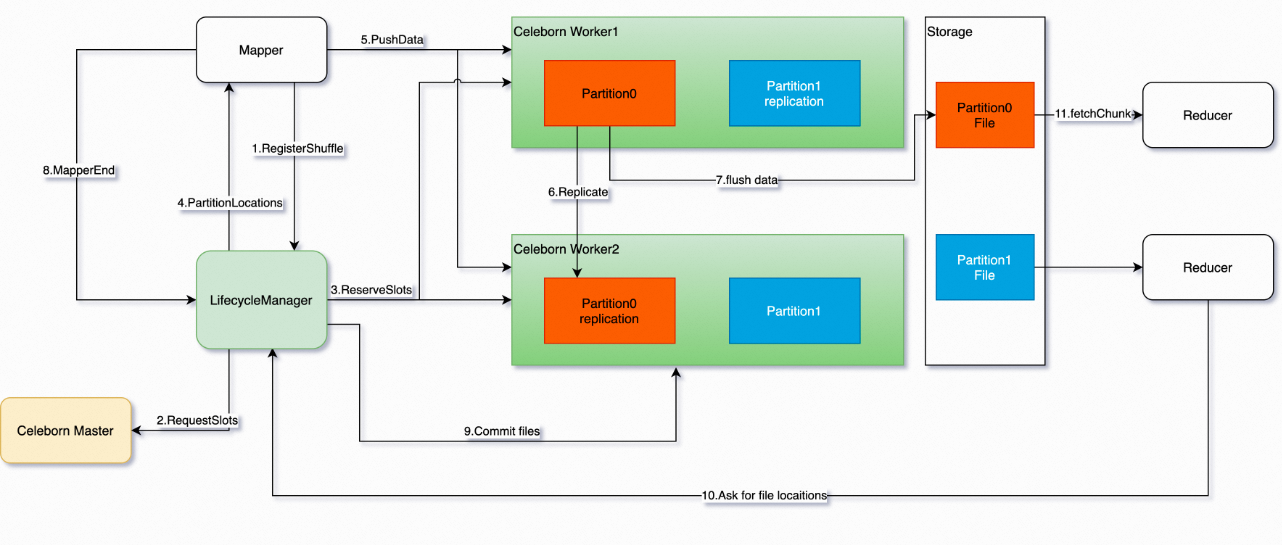
Prerequisites
You have created an EMR DataLake cluster or a custom cluster and selected the Celeborn service. For more information about how to create a cluster, see Create a cluster.
Limitations
This topic applies only to clusters of the following versions.
|
Cluster |
Version |
|
DataLake cluster |
EMR-3.45.0 or later, and EMR-5.11.0 or later. |
|
custom cluster |
EMR-3.45.0 or later, and EMR-5.11.0 or later. |
Procedure
Spark configuration
|
Parameter |
Description |
|
spark.shuffle.manager |
|
|
spark.serializer |
The value must be org.apache.spark.serializer.KryoSerializer. |
|
spark.celeborn.push.replicate.enabled |
Specifies whether to enable the two-replica mechanism. Valid values:
|
|
spark.shuffle.service.enabled |
Set this parameter to false to use Celeborn. To use Celeborn, you must disable the existing External Shuffle Service. Spark's Dynamic Allocation feature works as expected when Celeborn is enabled. Note
|
|
spark.celeborn.shuffle.writer |
Celeborn supports the following writer modes:
|
|
spark.celeborn.master.endpoints |
Specify the endpoints in the format <celeborn-master-ip>:<celeborn-master-port>. Parameters:
For a high-availability cluster, configure the IP addresses of all master nodes. |
|
spark.sql.adaptive.enabled |
Celeborn supports Adaptive Query Execution (AQE). For optimal shuffle performance, disable the local shuffle reader. Set these parameters to true, false, and true, respectively. |
|
spark.sql.adaptive.localShuffleReader.enabled |
|
|
spark.sql.adaptive.skewJoin.enabled |
The Spark service supports one-click configuration to use the Celeborn service.
-
For EMR-5.11.1 and later, and EMR-3.45.1 and later:
On the Status page of the Spark service, in the Service Overview section, you can toggle the enableCeleborn switch.
-
For EMR-5.11.0 and EMR-3.45.0:
On the Status page of the Spark service, in the Components section, find SparkThriftServer. In the Actions column, choose
 > enableCeleborn or > disableCeleborn. This action automatically modifies the Spark configuration parameters listed above, restarts SparkThriftServer, and updates both the spark-defaults.conf and spark-thriftserver.conf files.
-
If you select
> enableCeleborn, all Spark jobs use the Celeborn service. -
If you select
> disableCeleborn, no Spark jobs use the Celeborn service.
-
Celeborn configuration
View and modify all Celeborn configuration parameters on the Celeborn service configuration page.
Parameter values vary by node group (for example, CORE or TASK).
|
Parameter |
Description |
Default |
|
celeborn.worker.flusher.threads |
The number of threads for flushing data to disk (HDD or SSD). |
|
|
CELEBORN_WORKER_OFFHEAP_MEMORY |
The size of worker off-heap memory. |
Automatically calculated based on the cluster configuration. |
|
celeborn.application.heartbeat.timeout |
The application heartbeat timeout. If the timeout is reached, the system releases the application's resources. |
120 s |
|
celeborn.worker.flusher.buffer.size |
The flush buffer size. Flushing is triggered when this size is exceeded. |
256 KB |
|
celeborn.metrics.enabled |
Specifies whether to enable monitoring. Valid values:
|
true |
|
CELEBORN_WORKER_MEMORY |
The size of worker heap memory. |
1 GB |
|
CELEBORN_MASTER_MEMORY |
The size of master heap memory. |
2 GB |
Restart Celeborn components
-
On the Status page of the Celeborn service, in the Actions column for the CelebornMaster component, select
> restart_clean_meta.NoteFor a non-high-availability cluster, you can also click Restart in the Actions column for the CelebornMaster component.
-
In the dialog box, turn off the Rolling Execution switch, enter an execution reason, and click OK.
-
In the confirmation dialog box, click OK.