Delta Lake Change Data Capture (CDC) tracks row-level changes in a Delta Lake table and delivers those changes to downstream processes or systems. This topic describes the parameters, schema, and usage examples for Delta Lake CDC.
How it works
CDC is a set of software design patterns for identifying and capturing data changes in a database table. Delta Lake CDC uses a Delta Lake table as the source and is implemented through Change Data Feed (CDF).
CDF traces data changes at the row level. When enabled, Delta Lake persists change data to a dedicated directory within the table's storage path. You can then read that change data in batch or streaming mode to power incremental data warehouse pipelines.
Use cases
Enable CDF when you need to:
-
Process only what changed: In ETL pipelines, read only the rows that changed since the last run instead of scanning the entire table.
-
Audit data modifications: Capture a full history of inserts, updates, and deletes for compliance and governance.
-
Replicate changes downstream: Propagate changes to downstream tables, caches, or external systems such as Kafka or a relational database.
Version requirements
Delta Lake CDC requires:
-
EMR V3.41.0 or later (Delta Lake 0.6.1)
-
EMR V5.9.0 or later (Delta Lake 2.0)
Parameters
SparkConf parameters
| Parameter | Description |
|---|---|
spark.sql.externalTableValuedFunctions |
A custom EMR Spark parameter that extends the table-valued function of Spark 2.4.X. Set to table_changes to run CDF queries with Spark SQL. |
spark.databricks.delta.changeDataFeed.timestampOutOfRange.enabled |
Controls behavior when a CDF query timestamp is out of range. false (default): returns an error if the start or end timestamp is invalid. true: returns empty data for an invalid start timestamp; returns the current snapshot for an invalid end timestamp. Effective only in Delta Lake 2.X. |
CDC write parameters
| Parameter | Description |
|---|---|
delta.enableChangeDataFeed |
Enables CDF for a table. false (default): CDF is disabled. true: CDF is enabled. |
CDC read parameters
The following parameters apply when reading CDF data with DataFrame or Spark Streaming.
| Parameter | Description |
|---|---|
readChangeFeed |
Set to true to read change data. Requires startingVersion or startingTimestamp. |
startingVersion |
The table version at which to start reading change data. Requires readChangeFeed=true. |
endingVersion |
The table version at which to stop reading change data. Requires readChangeFeed=true. |
startingTimestamp |
The timestamp at which to start reading change data. Requires readChangeFeed=true. |
endingTimestamp |
The timestamp at which to stop reading change data. Requires readChangeFeed=true. |
Schema
The CDF result set includes all columns from the original table plus the following metadata columns:
| Column | Description |
|---|---|
_change_type |
The operation that caused the change: insert, delete, update_preimage (row value before update), or update_postimage (row value after update). |
_commit_version |
The Delta Lake table version in which the change was committed. |
_commit_timestamp |
The timestamp when the change was committed. |
Enable CDF
CDF is disabled by default. Set the delta.enableChangeDataFeed property when creating the table:
CREATE TABLE cdf_tbl (id INT, name STRING, age INT)
USING delta
TBLPROPERTIES ("delta.enableChangeDataFeed" = "true");
Read change data
Query with Spark SQL
Spark SQL CDF syntax is supported only in EMR Spark 2 with Delta Lake 0.6.1. Start the Spark SQL session with the following configuration:
spark-sql --conf spark.sql.externalTableValuedFunctions=table_changesUse the table_changes function to query change data. The function accepts a table name and a starting version or timestamp, with an optional ending version or timestamp.
Query by version:
-- All changes from version 0 onwards
SELECT * FROM table_changes("cdf_tbl", 0);

-- Changes in version 4 only
SELECT * FROM table_changes("cdf_tbl", 4, 4);
Query by timestamp:
-- All changes from 2023-02-03 15:33:34 (the commit time of version 0) onwards
SELECT * FROM table_changes("cdf_tbl", '2023-02-03 15:33:34');

-- Changes committed at 2023-02-03 15:34:06 (version 4) only
SELECT * FROM table_changes("cdf_tbl", '2023-02-03 15:34:06', '2023-02-03 15:34:06');
Query with DataFrame (batch)
// Query by version
spark.read.format("delta")
  .option("readChangeFeed", "true")
  .option("startingVersion", 0)
  .option("endingVersion", 4) // Optional: omit to read to the latest version
  .table("cdf_table")

// Query by timestamp
spark.read.format("delta")
  .option("readChangeFeed", "true")
  .option("startingTimestamp", "2023-02-03 15:33:34")
  .option("endingTimestamp", "2023-02-03 15:34:06") // Optional
  .table("cdf_table")
Query with Spark Streaming
// Streaming CDF Query
spark.read.format("delta")
  .option("readChangeFeed", "true")
  .option("startingVersion", 0)
  .option("endingVersion", 4) // The endingVersion parameter is optional.
  .table("cdf_table")
End-to-end example: Spark SQL
The following example demonstrates a complete CDF workflow using Spark SQL: create a CDF-enabled table, perform write operations, and query the resulting change data.
-- Create a CDF-enabled table
CREATE TABLE cdf_tbl (id INT, name STRING, age INT)
USING delta
TBLPROPERTIES ("delta.enableChangeDataFeed" = "true");

-- Insert rows (version 0 -> 1)
INSERT INTO cdf_tbl VALUES (1, 'XUN', 32), (2, 'JING', 30);

-- Overwrite all rows (version 2)
INSERT OVERWRITE TABLE cdf_tbl VALUES (1, 'a1', 30), (2, 'a2', 32), (3, 'a3', 32);

-- Update all rows (version 3)
UPDATE cdf_tbl SET age = age + 1;

-- Merge from a source table (version 4)
CREATE TABLE merge_source (id INT, name STRING, age INT) USING delta;
INSERT INTO merge_source VALUES (1, 'a1', 31), (2, 'a2_new', 33), (4, 'a4', 30);

MERGE INTO cdf_tbl target USING merge_source source
ON target.id = source.id
WHEN MATCHED AND target.id % 2 == 0 THEN UPDATE SET name = source.name
WHEN MATCHED THEN DELETE
WHEN NOT MATCHED THEN INSERT *;

-- Delete rows (version 5)
DELETE FROM cdf_tbl WHERE age >= 32;

-- Query all changes from version 0
SELECT * FROM table_changes("cdf_tbl", 0);
Figure 1. Result for the first query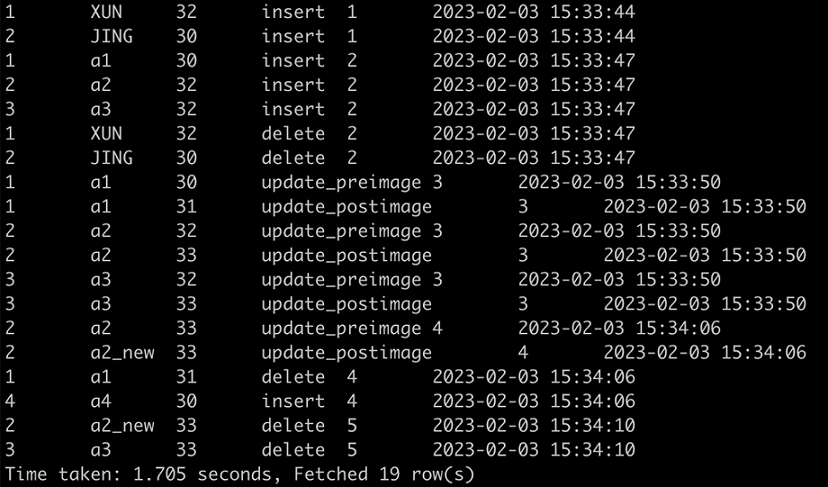
-- Query changes in version 4 only
SELECT * FROM table_changes("cdf_tbl", 4, 4);
Figure 2. Result for the second query
End-to-end example: DataFrame
The following example demonstrates a complete CDF workflow using the DataFrame API.
// Create a CDF-enabled table and write initial data
val df = Seq((1, "XUN", 32), (2, "JING", 30)).toDF("id", "name", "age")
df.write.format("delta")
  .mode("append")
  .option("delta.enableChangeDataFeed", "true") // Enable CDF on first write; not required for subsequent writes
  .saveAsTable("cdf_table")

// Read change data from version 0 to version 4
spark.read.format("delta")
  .option("readChangeFeed", "true")
  .option("startingVersion", 0)
  .option("endingVersion", 4) // Optional
  .table("cdf_table")