Elastic IP addresses (EIPs) protected by Anti-DDoS Pro/Premium can mitigate DDoS attacks at the Tbit/s level. You do not need to perform additional configurations for Anti-DDoS Pro/Premium or change your service IP addresses to use this protection. EIPs protected by Anti-DDoS Pro/Premium are suitable for scenarios that require high security and low latency, such as large-scale gaming and important livestreaming activities.
This topic describes how to purchase and use EIPs protected by Anti-DDoS Pro/Premium.
How Anti-DDoS Pro/Premium differs from Anti-DDoS Origin Basic
By default, all EIPs are protected by Anti-DDoS Origin Basic, which can mitigate DDoS attacks at up to 5 Gbit/s. The free mitigation threshold varies with the region. For more information, see View the thresholds that trigger blackhole filtering in Anti-DDoS Origin Basic.
When you need protection beyond the Basic tier, you can select Anti-DDoS Pro/Premium when you create an EIP. EIPs protected by Anti-DDoS Pro/Premium can mitigate DDoS attacks at the Tbit/s level and require no additional configuration or IP address changes on your part.
You can select the Anti-DDoS (Enhanced) security protection option only when you purchase an EIP. You cannot change the security protection configuration after purchase.
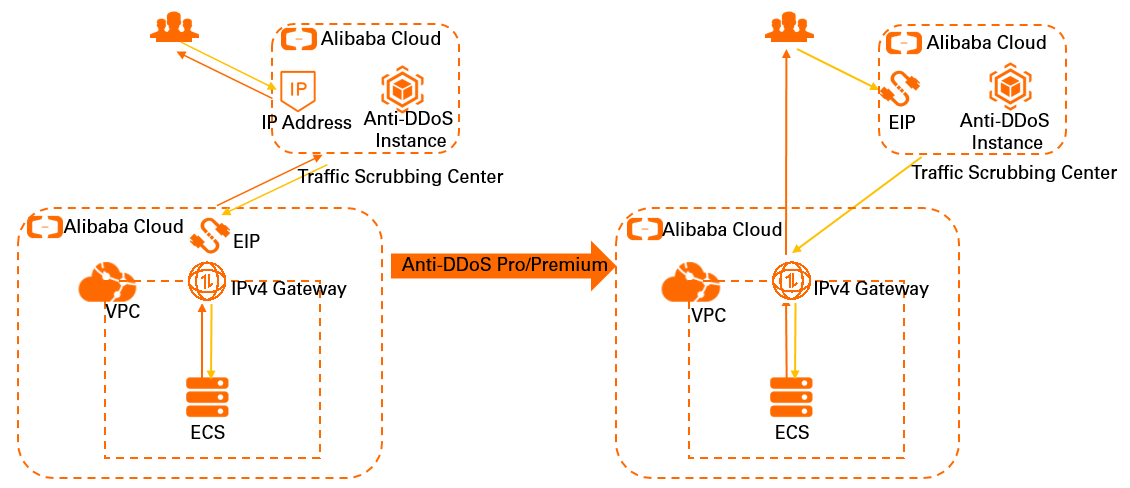
The following figure shows the architecture of an EIP protected by Anti-DDoS Pro/Premium.
Billing
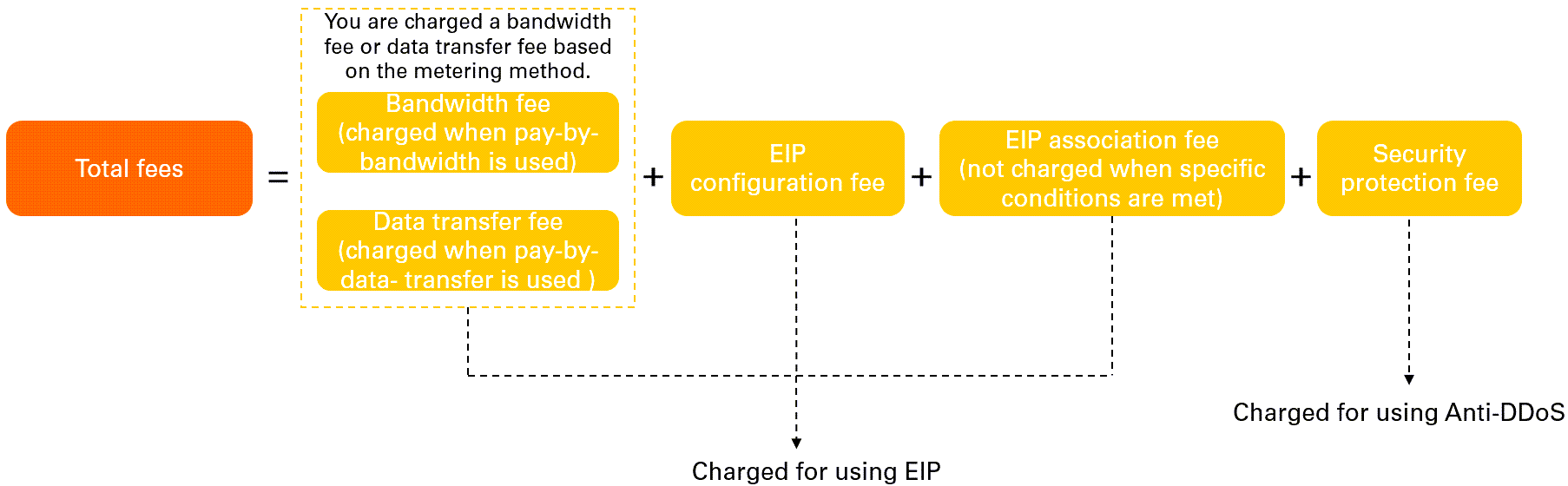
Only pay-as-you-go EIPs support Anti-DDoS Pro/Premium. After you purchase an EIP protected by Anti-DDoS Pro/Premium, you are charged a security protection fee in addition to the standard EIP fees. The following figure shows the billable items.
-
For more information about the bandwidth fee or data transfer fee of a pay-as-you-go EIP, or the billing rules of EIP configuration fees (public IP retention fees), see Pay-as-you-go EIPs.
-
For more information about the billing rules of security protection, see Billing.
The security protection fee is charged additionally and does not affect the billing of EIPs.
Prerequisites
Before you purchase an EIP protected by Anti-DDoS Pro/Premium, you must activate Anti-DDoS Origin (Pay-as-you-go) for your Alibaba Cloud account. To activate the service, go to Anti-DDoS Origin (Pay-As-You-Go). If Anti-DDoS Origin (Pay-as-you-go) is already activated, skip this step.
Anti-DDoS Origin (Pay-as-you-go) is activated on a monthly basis for at least 30 days. You cannot deactivate the service within 30 days after the service is activated. After you activate Anti-DDoS Origin (Pay-as-you-go) and add a service to be protected, the billing starts. For more information about the billing rules of security protection, see Billing.
Procedure
You can allocate EIPs protected by Anti-DDoS Pro/Premium through either of the following methods:
-
Method 1: Allocate from the default IP address pool.
-
Method 2: Specify a custom IP address pool of the Anti-DDoS Pro/Premium type.
The following figure illustrates the overall process.

Method 1: Allocate from the default IP address pool
-
On the EIP buy page, purchase an EIP protected by Anti-DDoS Pro/Premium. For more information, see Apply for an EIP.
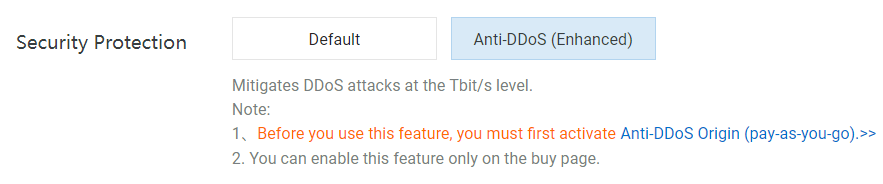
On the buy page, configure the following settings:
-
Billing Method: Select Pay-as-you-go.
-
Line Type: Select BGP (Multi-ISP).
-
Security Protection: Select Anti-DDoS (Enhanced).
-
IP Address Pool: Select Default.
-
-
Optional: Log on to the Traffic Security console. On the Traffic Security > Network Security > Anti-DDoS Native > Billing Management page, click Details to apply for an adjustment to the bandwidth.
Method 2: Specify a custom IP address pool
-
Create an IP address pool of the Anti-DDoS Pro/Premium type and add CIDR blocks. For more information, see Create an IP address pool and add CIDR blocks.
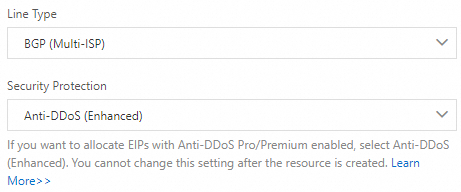
When you create the IP address pool, configure the following settings:
-
Line Type: Select BGP (Multi-ISP).
-
Security Protection: Select Anti-DDoS (Enhanced).
-
-
On the EIP buy page, purchase an EIP protected by Anti-DDoS Pro/Premium. For more information, see Apply for an EIP.
On the buy page, configure the following settings:
-
Billing Method: Select Pay-as-you-go.
-
Line Type: Select BGP (Multi-ISP).
-
Security Protection: Select Anti-DDoS (Enhanced).
-
IP Address Pool: Select the IP address pool of the Anti-DDoS Pro/Premium type.
-
-
Optional: Log on to the Traffic Security console. On the Traffic Security > Network Security > Anti-DDoS Native > Billing Management page, view the usage. You can also click Change Bandwidth Specification to apply for an adjustment to the bandwidth.
FAQ
Q: Can I use subscription EIPs with Anti-DDoS Pro/Premium?
A: No. Only pay-as-you-go EIPs support Anti-DDoS Pro/Premium.
Q: Do I need to change my service IP addresses to use Anti-DDoS Pro/Premium?
A: No. You do not need to change your service IP addresses or perform additional configurations when you use EIPs protected by Anti-DDoS Pro/Premium.
Q: What level of protection does the default Anti-DDoS Origin Basic provide?
A: Anti-DDoS Origin Basic can mitigate DDoS attacks at up to 5 Gbit/s. The exact free mitigation threshold varies by region. For more information, see View the thresholds that trigger blackhole filtering in Anti-DDoS Origin Basic.
Q: Can I deactivate Anti-DDoS Origin (Pay-as-you-go) immediately after activation?
A: No. Anti-DDoS Origin (Pay-as-you-go) is activated on a monthly basis for at least 30 days. You cannot deactivate the service within 30 days after activation.