The IDV NFC Authentication service provides an iOS client SDK that you can use to add NFC authentication to your mobile app. This topic walks you through the integration steps and includes sample code.
Limits
Supports iOS 13 or later on iPhone or iPad.
Requires the following privacy permissions: Camera (for OCR-based passport data capture), Network, and NFC.
SDK Download and Configuration
Get the SDK
Download the iOS SDK, extract the ZIP file, and copy all framework packages into your Xcode project folder.
Add Required Permissions
Add the following permissions to your Info.plist file. Descriptions are for reference only.

Add the Privacy - NFC Scan Usage Description permission and a usage description.
Add the ISO7816 application identifiers for NFC Tag Reader Session configuration. In item0, enter
A0000002471001(for travel documents).
Add Frameworks in Xcode
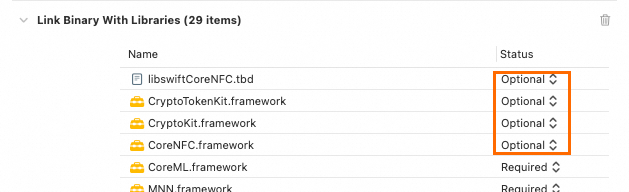
In your Xcode project settings, go to Build Settings > Build Phases > Link Binary With Libraries, and add the required frameworks.
Add all SDK frameworks:
AliyunIdentityFace.framework
AliyunIdentityPlatform.framework
AliyunIdentityUtils.framework
AliyunIdentityOcr.framework
AliyunIdentityNFC.framework
AliyunOSSiOS.framework
faceguard.framework
IDVMNN.framework
OpenSSL.framework
Add system dependency libraries:
AudioToolbox.framework
CoreMedia.framework
CoreML.framework
AVFoundation.framework
SystemConfiguration.framework
UIKit.framework
CoreTelephony.framework
CoreMotion.framework
Accelerate.framework
libresolv.tbd
libsqlite3.tbd
libc++.tbd
libz.tbd
CryptoKit.framework
CryptoTokenKit.framework
CoreNFC.framework
libswiftCoreNFC.tbd
Set NFC-related system libraries as optional. Otherwise, apps may crash on devices without NFC support due to missing libraries.
Copy Resource Files
In your Xcode project settings, go to Build Settings > Build Phases > Copy Bundle Resources, and copy the required resource files.
AliyunIdentityPlatform.bundle: located inside
AliyunIdentityPlatform.framework.AliyunIdentityFace.bundle: located inside
AliyunIdentityFace.framework.AliyunIdentityOCR.bundle: located inside
AliyunIdentityOcr.framework.AliyunIdentityNFC.bundle: located inside
AliyunIdentityNFC.framework.
Configure Linker Flags
In your Xcode project settings, go to Build Settings > Other Linker Flags, and add -ObjC.
If your project uses Objective-C only, also add -L$(DEVELOPER_DIR)/Toolchains/XcodeDefault.xctoolchain/usr/lib/swift/$(PLATFORM_NAME.
Add Capabilities
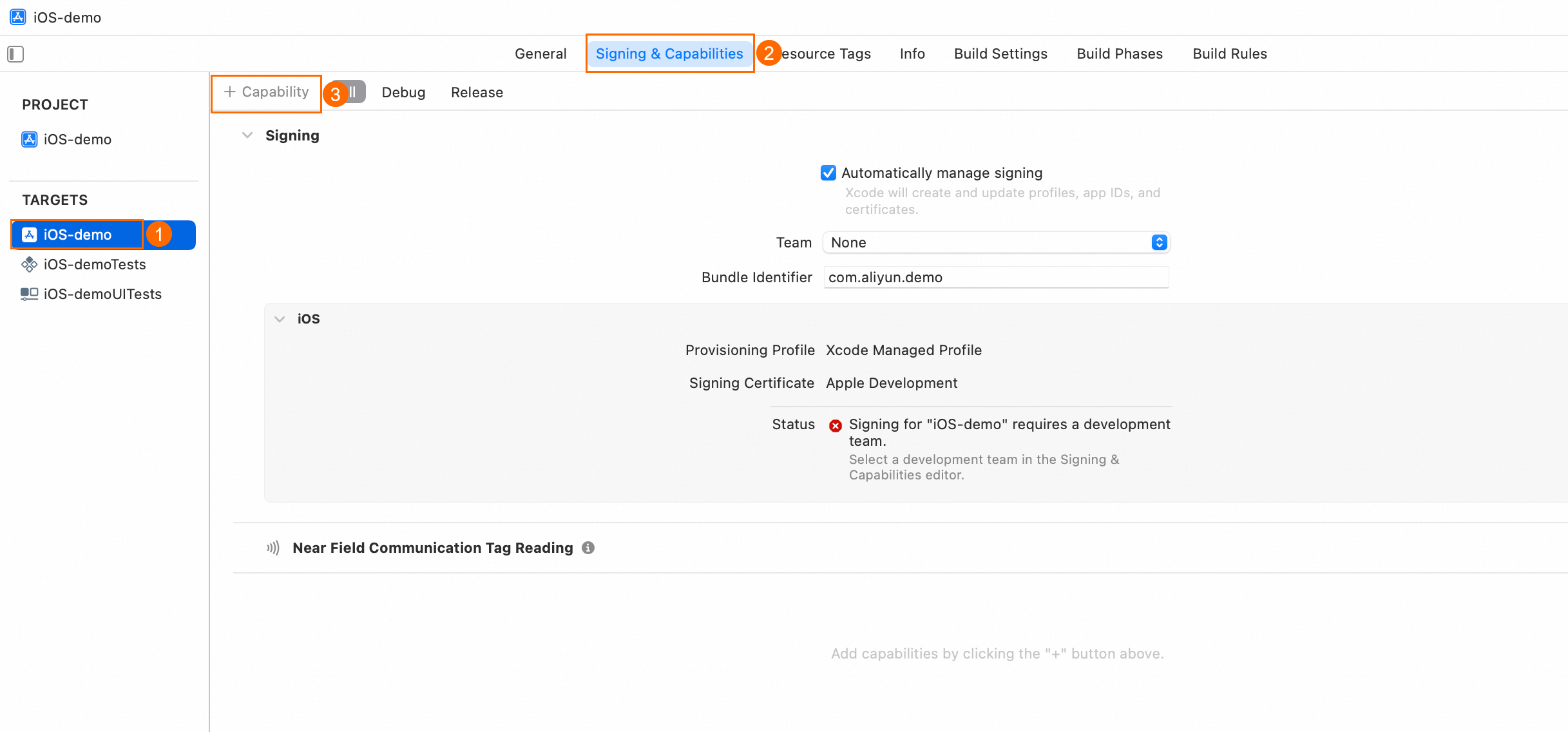
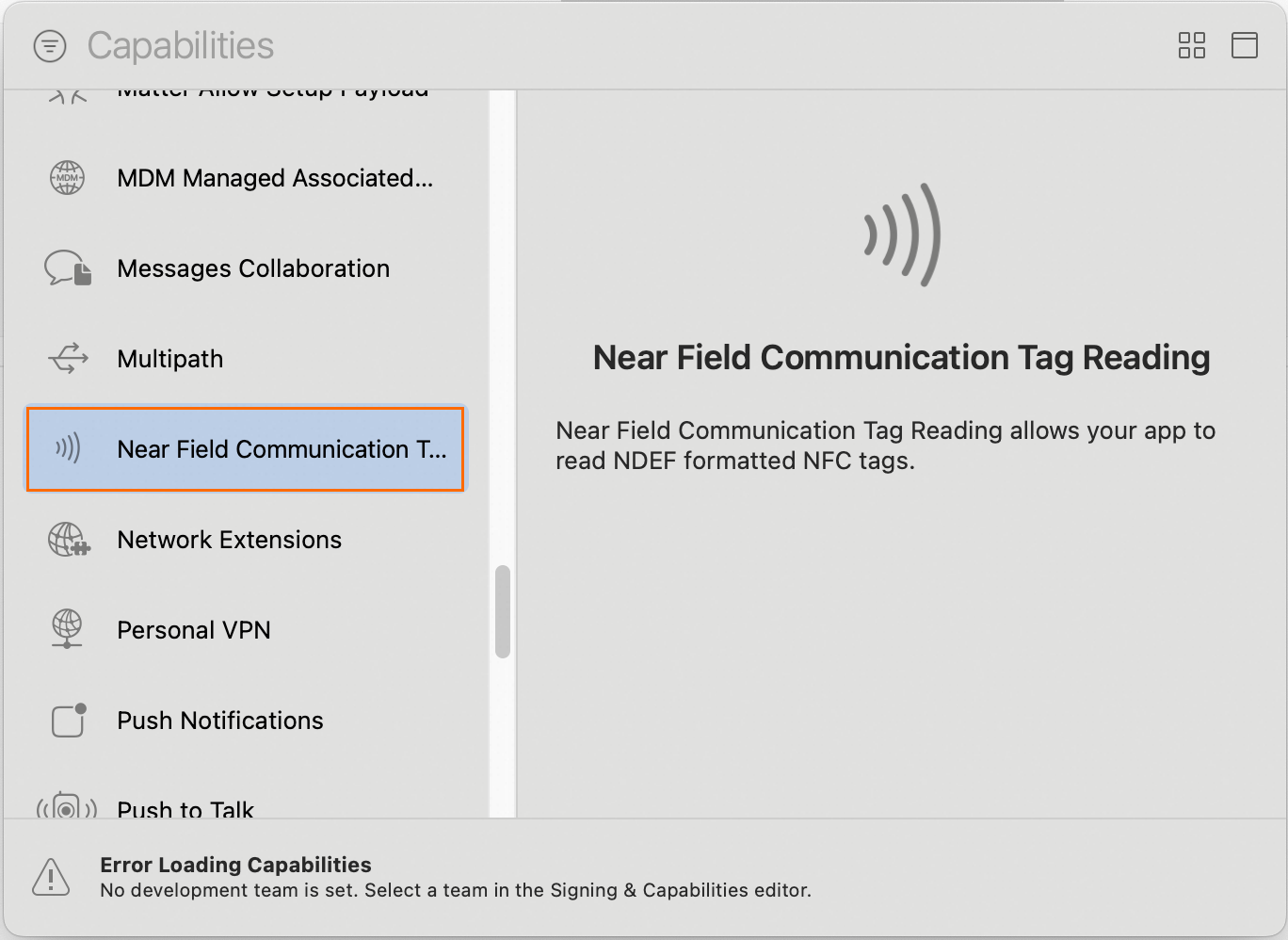
In your Xcode project, select TARGETS > Signing & Capabilities > + Capability, and choose NFC.
|
|
Call the SDK
Import Header Files
#import <AliyunIdentityPlatform/AliyunIdentityPlatform.h>Initialize the SDK
- (void)install;Get metaInfo Data
- (NSString *)getMetaInfo;Start Authentication
Before calling the SDK to start authentication, send the MetaInfo to your server. Then call the server-side Initialize API to obtain a transactionId.
Pass the transactionId returned by your server as the certifyId parameter in this method.
- (void)verifyWithCertifyId:(NSString *)certifyId
  withCurrentViewController:(UIViewController *)viewController
              withExtParams:(NSDictionary *)extParams
                   complete:(AliyunIdentityVerifyBlock)completeBlock;
Parameter descriptions:
Name
Type
Description
certifyId
NSString
Pass the transactionId returned by your server’s Initialize API.
viewController
UIViewController
The current view controller of your app.
extParams
NSDictionary
Custom parameters. Pass nil unless you need special behavior.
For supported keys, see extParams configuration reference.
completeBlock
AliyunIdentityVerifyBlock
A callback that returns the authentication result. Look up the return code in the return code table.
extParams configuration reference:
Key Name
Description
Example (String)
kIdentityParamKeyNextButtonColor
Color of the bottom button on the OCR result screen.
#FF0000
kIdentityParamKeyRoundProgressColor
Color of the circular progress indicator during face capture.
#FF0000
kIdentityParamKeyOcrSelectPhoto
Show photo library upload option during document OCR:
1 (default): Show
0: Hide
1
kIdentityParamKeyMaxRetryCount
Maximum retry count. Range: 3–10. Default: 10.
10
kIdentityParamKeyCardOcrTimeOutPeriod
Timeout for document OCR. Range: 20–60 seconds. Default: 20 seconds.
20
kIdentityParamKeyFaceVerifyTimeOutPeriod
Timeout for liveness collection. Range: 20–60 seconds. Default: 20 seconds.
20
kIdentityParamKeyCardOcrEditTimeOutPeriod
Editable duration on the OCR result screen. Range: 60–180 seconds. Default: unlimited.
180
kIdentityParamKeyLanguage
This section describes the custom language settings for the SDK. By default, the SDK uses the language of the mobile device's operating system.
NoteFor a list of languages supported by the SDK, see Custom languages for Android and iOS SDKs.
zh-Hans
kIdentityParamKeyDefaultLanguage
Default SDK language. See values for kIdentityParamKeyLanguage.
Default: en (English).
en
kIdentityParamKeyCloseButtonPosition
Position of the Close button:
left (default): Left side
right: Right side
left
kIdentityParamKeyWatermark
Watermark text shown after successful OCR.
Test watermark text
kIdentutyParamKeyProtocol
SDK protocol string.
NoteGet this value from your server’s Initialize API response. Pass it in extParams to reduce internal SDK network calls and improve performance.
968412EB*******...
Return code table:
Error code
Billing
subCode
Result code description
1000
Yes
A1000_1
The user completed the face scan process. The recommended verification result is 'pass'. This result is for reference only. Call the server-side CheckResult API to get the final verification result for further processing.
1001
Yes
A1001_1
The user completed the face scan process. The recommended verification result is 'fail'. This result is for reference only. Call the server-side CheckResult API to get the final verification result and the detailed reason for the failure for further processing.
1002
No
A1002_1
Failed to load the model.
A1002_3
An error occurred while loading the module.
A1002_4
The iOS version is earlier than 9.0.
A1002_5
A network API error occurred.
1003
No
A1003_1
Initialization API: The content is empty.
A1003_2
Initialization API: The content format is incorrect.
A1003_3
Failed to parse the client initialization protocol.
A1003_4
Initialization API: Failed to decrypt the content.
A1003_5
The initialization API call failed.
A1003_6
Initialization API: OSS is empty.
A1003_7
The context is empty.
1004
No
A1004_1
An error occurred with the device's front-facing camera.
A1004_2
An error occurred while opening the camera.
A1004_3
Camera permission was denied.
1005
No
A1005_1
A network error occurred with the initialization API.
A1005_2
A network error occurred with the verification API.
1006
No
A1006_1
The user exited.
A1006_2
The user exited due to a 15-minute inactivity timeout.
1007
No
A1007_1
Invalid verification ID.
1014
No
A1014_1
The number of errors exceeded the upper limit.
1017
No
A1017_1
An error occurred with the productCode.
Sample Code
#import "ViewController.h"
#import <AliyunIdentityPlatform/AliyunIdentityPlatform.h>

@interface ViewController ()
@end

@implementation ViewController

- (void)viewDidLoad {
    [super viewDidLoad];

    // Initialize the SDK
    [[AliyunIdentityPlatform sharedInstance] install];

    [self initUI];
}

// Implement this function to send metaInfo and get transactionId from your server
- (NSString *)sentMetaInfoAndGetTransactionId:(NSString*) metaInfo {
    return @"Get TransactionId from your server."; // Replace with your implementation.
}

- (void)onClickStart:(id) sender {
    NSString *metaInfo = [[AliyunIdentityPlatform sharedInstance] getMetaInfo];
    NSString *transactionId = [self sentMetaInfoAndGetTransactionId:metaInfo];

    // Set SDK language and protocol
    NSDictionary *extParams = @{
        kIdentityParamKeyLanguage:@"en",
        kIdentutyParamKeyProtocol:@"968412EB......................." // Adding this protocol improves network performance
    };
    // Start authentication
    [[AliyunIdentityPlatform sharedInstance] verifyWithCertifyId:transactionId
                                       withCurrentViewController:self
                                                   withExtParams:extParams
                                                        complete:^(AliyunIdentityVerifyRes *response) {
        NSString *resContent = [NSString stringWithFormat:@"Code=%d Message=%@", response.code, response.message];
    }];
}

- (void)initUI {
    // ......
}

@end
Demo Project
Download the iOS NFC Demo to try it out.