Integrate the ID Verification SDK into your iOS application using Swift Package Manager (SPM) to enable eKYC remote identity verification.
Requirements
iOS 12 or later (iPhone or iPad).
Privacy permissions: camera, network.
Download and configure the SDK
Download the SDK
Download the SDK from Client SDK release notes, extract the package, and import it through SPM.
Add required permissions
Add the following permissions to your Info.plist file. The description strings are examples only.

Import the package
Add the package.
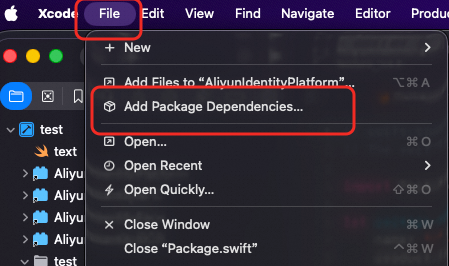
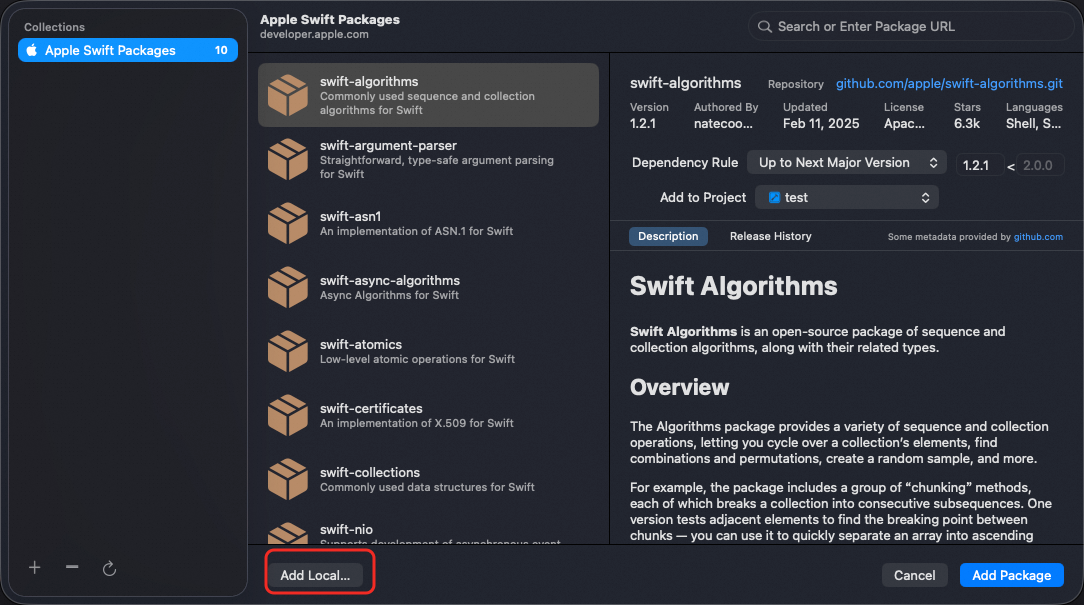
Import it locally.
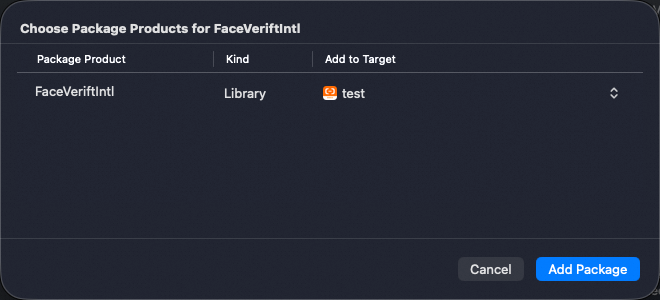
Confirm the addition.
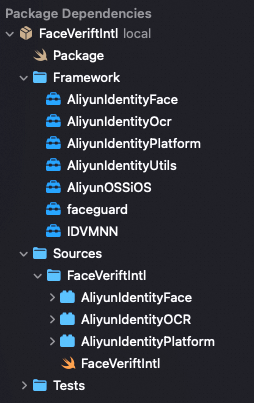
Resulting directory structure:
Invoke the SDK
Import the header file
#import <AliyunIdentityPlatform/AliyunIdentityPlatform.h>Initialize the SDK
- (void)install;
- (void)installWithOptions:(NSMutableDictionary *)options;
Parameters:
options: Optional parameters for data collection. Defaults to null. It accepts the following parameters:
The ID Verification client includes a built-in device helper security module. To comply with data collection requirements across different regions, the client supports multiple data reporting sites. You can use the
CustomUrlandCustomHostparameters to specify a reporting site based on user attributes.You can specify only one data reporting region per application session lifecycle. This region must match the one used for your server-side queries. Server-side region support varies by product. For details, see Supported regions.
Regional
CustomUrlvalues:China (Hong Kong):
https://cloudauth-device.cn-hongkong.aliyuncs.comSingapore:
https://cloudauth-device.ap-southeast-1.aliyuncs.comIndonesia (Jakarta):
https://cloudauth-device.ap-southeast-5.aliyuncs.comUS (Silicon Valley):
https://cloudauth-device.us-west-1.aliyuncs.comGermany (Frankfurt):
https://cloudauth-device.eu-central-1.aliyuncs.comMalaysia (Kuala Lumpur):
https://cloudauth-device.ap-southeast-3.aliyuncs.com
Parameter | Description | Example |
IPv6 | Specifies whether to use an IPv6 domain name to report device information:
| "1" |
DataSwitch | Specifies when to report device information.
Note We recommend using the default setting. | "1" |
CustomUrl | The domain name of the data reporting server. | For details, see Regional CustomUrl values. |
CustomHost | The host of the data reporting server. | "cloudauth-device.ap-southeast-1.aliyuncs.com" Note This example is for the Singapore region. Hosts for other regions can be derived from the URLs listed in Regional CustomUrl values. |
Retrieve metaInfo
- (NSString *)getMetaInfo;Your server uses metaInfo to initialize a session with Alibaba Cloud and obtain a transactionId for verification.
Call getMetaInfo, send the result to your server, and use the returned transactionId to start verification.
Start verification
- (void)verifyWithCertifyId:(NSString *)certifyId
  withCurrentViewController:(UIViewController *)viewController
              withExtParams:(NSDictionary *)extParams
                   complete:(AliyunIdentityVerifyBlock)completeBlock;
Parameters
Name | Type | Description |
transactionId | NSString | Returned by the server-side Initialize API. |
viewController | UIViewController | The current ViewController. |
extParams | NSDictionary | Custom parameters. Pass null if not required. For currently supported fields, see extParams Configuration. |
completeBlock | AliyunIdentityVerifyBlock | Callback with the verification result. |
extParams Configuration
Key | Description | Example (string) |
kIdentityParamKeyNextButtonColor | Color of the bottom button on the OCR recognition result page. | #FF0000 |
kIdentityParamKeyRoundProgressColor | Color of the circular progress indicator during the face scan. | #FF0000 |
kIdentityParamKeyOcrSelectPhoto | Whether to show the photo album upload option during ID OCR recognition:
| 1 |
kIdentityParamKeyShowOcrResult | Whether to show the recognition result page after ID OCR recognition:
| 1 |
kIdentityParamKeyEditOcrResult | Whether the recognition result page is editable during ID OCR recognition:
| 1 |
kIdentityParamKeyMaxRetryCount | Maximum number of retries. Valid values: 3 to 10. Default value: 10. | 10 |
kIdentityParamKeyCardOcrTimeOutPeriod | Timeout for OCR recognition, in seconds. Valid values: 20 to 60. Default value: 20. | 20 |
kIdentityParamKeyFaceVerifyTimeOutPeriod | Timeout for liveness detection, in seconds. Valid values: 20 to 60. Default value: 20. | 20 |
kIdentityParamKeyCardOcrEditTimeOutPeriod | Duration (in seconds) that the OCR recognition result page remains editable. Valid values: 60 to 180. By default, the duration is unlimited. | 180 |
kIdentityParamKeyLanguage | SDK display language. By default, the SDK uses the system language. Note For a list of supported languages, see Android and iOS SDK Language Customization. | zh-Hans |
kIdentityParamKeyDefaultLanguage | Default SDK language. For valid values, refer to kIdentityParamKeyLanguage. The default value is en (English). | en |
kIdentityParamKeyCloseButtonPosition | Position of the close button in the SDK UI:
| left |
kIdentityParamKeyWatermark | Watermark text displayed after successful OCR recognition. | Test watermark text |
kIdentityParamKeyProtocol | Pre-fetched SDK protocol content. Note Obtain the protocol from the server-side Initialize API and pass it here to reduce internal SDK API calls and improve startup performance. | 968412EB*******... |
Result codes
For more information about result codes and messages, see Native SDK client result codes and sub-codes.
Sample code
#import "ViewController.h"
#import <AliyunIdentityPlatform/AliyunIdentityPlatform.h>

@interface ViewController ()
@end

@implementation ViewController

- (void)viewDidLoad {
    [super viewDidLoad];

    // Initialize the sdk
    [[AliyunIdentityPlatform sharedInstance] install];

    [self initUI];
}

// This function needs to be implemented by the user
- (NSString *)sentMetaInfoAndGetTransactionId:(NSString*) metaInfo {
    return @"Get TransactionId from your server."; // replace it.
}

- (void)onClickStart:(id) sender {
    NSString *metaInfo = [[AliyunIdentityPlatform sharedInstance] getMetaInfo];
    NSString *transactionId = [self sentMetaInfoAndGetTransactionId:metaInfo];

    // Set the sdk language
    NSDictionary *extParams = @{
        kIdentityParamKeyLanguage:@"en",
        kIdentityParamKeyProtocol:@"968412EB......................."// Configure this protocol to optimize network latency. Obtain it from the server-side initialization API.
    };
    // start Verify
    [[AliyunIdentityPlatform sharedInstance] verifyWithCertifyId:transactionId
                                       withCurrentViewController:self
                                                   withExtParams:extParams
                                                        complete:^(AliyunIdentityVerifyRes *response) {
        NSString *resContent = [NSString stringWithFormat:@"Code=%d Message=%@", response.code, response.message];
    }];
}

- (void)initUI {
    // ......
}

@end
SDK components
Clippable | Module | Module Description | Incremental Package |
Clippable | AliyunIdentityNFC | NFC unavailable after removal. | 3.7M |
Clippable | OpenSSL | NFC unavailable after removal. | |
Clippable | AliyunIdentityOcr | OCR and eKYC authentication are unavailable after removal. | 0.8M |
Clippable | faceguard | Secures the client-side environment during face recognition. Removal weakens security. | 0.74M |
Clippable | AliyunIdentityFace | Facial liveness detection unavailable after removal. | 2.2M |
Not Clippable | AliyunIdentityPlatform | Not Clippable | 0.04M |
Not Clippable | AliyunIdentityUtils | Not Clippable | 0.04M |
Clippable | IDVMNN | Far/near liveness detection, facial quality, and OCR auto-scan are unavailable after removal. | 0.09M |
Not Clippable | AliyunOSSiOS | Not Clippable | 0.23M |