Host multiple services on a single ECS instance by associating multiple EIPs with a secondary ENI in NAT mode.
You can associate multiple EIPs with both a primary ENI and a secondary ENI. This topic uses a secondary ENI as an example.
How it works
Associate multiple EIPs: Attach a secondary ENI with multiple private IP addresses to an ECS instance, then associate each EIP with a private IP address in NAT mode.
Configure policy-based routing to ensure symmetric traffic paths:
Inbound: The system automatically forwards traffic destined for an EIP to the corresponding private IP address.
Outbound: Policy-based routing determines the next hop and egress interface based on the source private IP address, ensuring responses leave through the correct EIP and preventing routing conflicts.

Usage notes
The number of ENIs and secondary private IP addresses you can assign depends on the instance family.
For example, creating an
ecs.c6.largeinstance supports up to 2 ENIs (including the primary ENI) with up to 6 private IP addresses each. Each ENI can associate 1 EIP via its primary private IP and up to 5 EIPs via secondary private IPs.NAT mode does not support NAT ALG protocols.
If the VPC uses an IPv4 gateway, ensure you configure a route entry to allow the ECS instance to access the internet.
Step 1: Set up the secondary ENI
Create and attach
If you already have a secondary ENI with sufficient private IP addresses, skip creation and bind it directly to the ECS instance.
In the ECS console, select the instance's region and click Create ENI.
Configure the ENI:
Keep the default settings for the other parameters. After creation, click Manage ENI IP Addresses in the Operation column of the target ENI to add, delete, or modify private IP addresses.
Select the same VPC, vSwitch, and security group as your ECS instance.
Primary Private IP Address: Specify an unused IP address in the vSwitch, or leave blank for auto-assignment. This cannot be changed after creation.
Secondary Private IPv4 Addresses: Select Auto Assign and enter the number of addresses to match how many EIPs you plan to associate.
Click Bind to Instance in the Operation column and select the target ECS instance.
Configure the OS
The following uses Alibaba Cloud Linux 3.2. For other operating systems, see Configure the operating system of the instance to recognize the secondary private IP addresses.
Log on and run
ip ato verify the secondary ENI (eth1) is present. If the state isDOWN, configure the OS to recognize the ENI.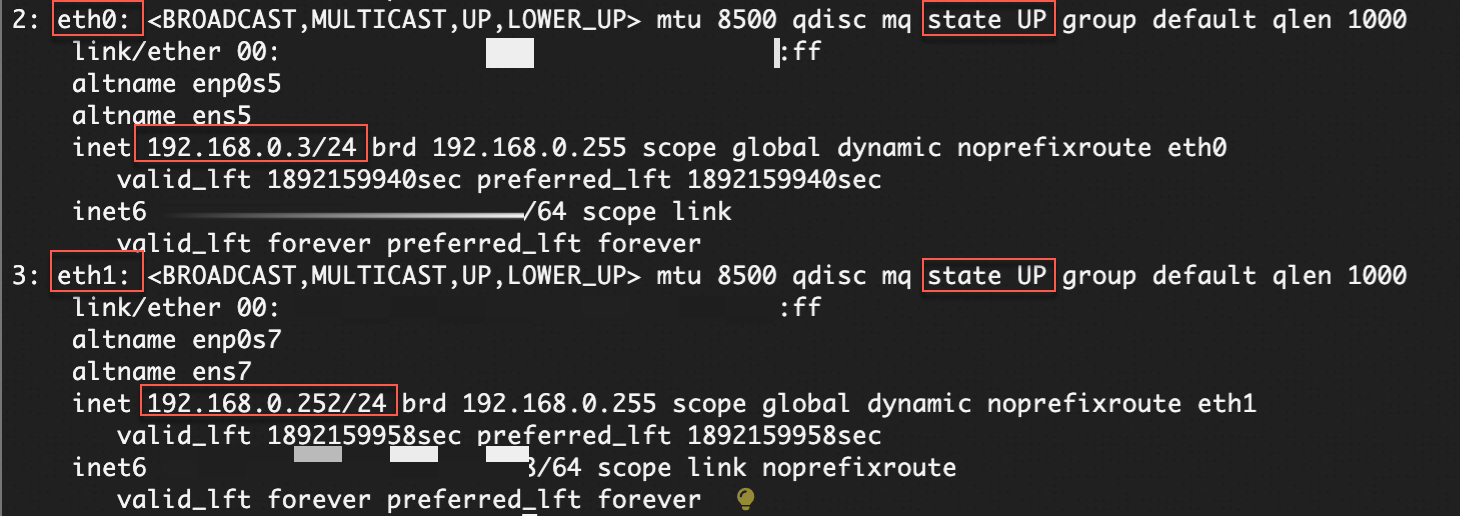
Disable cloud-init network initialization to prevent the configuration from resetting after a reboot:
echo "network: {config: disabled}" | sudo tee /etc/cloud/cloud.cfg.d/99-disable-network-config.cfgFind the
eth1connection name withnmcli con show, then configure the secondary private IP addresses:sudo nmcli con modify "<eth1 connection name>" ipv4.addresses <Secondary private IPv4 address 1>,<Secondary private IPv4 address 2> sudo nmcli con modify "<eth1 connection name>" ipv4.gateway <default gateway> sudo nmcli con up "<eth1 connection name>"Use
route -nto find the default gateway. Runip ato verify the secondary private IPs are configured.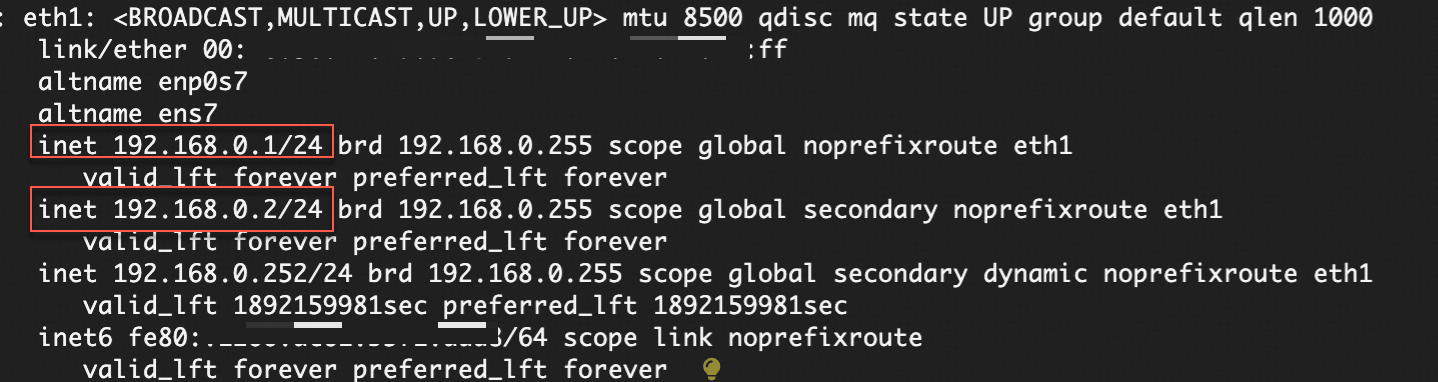
Step 2: Allocate and associate EIPs
Allocate EIPs from the EIP buy page. The region must match the ECS instance. Set the quantity to match the number of private IP addresses on the secondary ENI.
For detailed selection guidelines, see Elastic IP addresses.
In the Elastic IP Addresses console, find each EIP and click Associate with Resource.
Select ENI and NAT Mode, then choose one of the secondary private IP addresses.
Repeat this process until every EIP is mapped to a unique private IP address.
Step 3: Configure policy-based routing
On the ECS instance, create a route table and routing rules so that outbound traffic exits through the correct EIP.
Add the default route for
eth1and configure policy-based routing for each private IP address:ip -4 route add default via <Default gateway> dev eth1 metric 1001 && \ ip -4 route add default via <Default gateway> dev eth1 table 1001 && \ ip -4 rule add from <Private IPv4 address 1 of the secondary ENI> lookup 1001 && \ ip -4 rule add from <Private IPv4 address 2 of the secondary ENI> lookup 1001 && \ ip -4 rule add from <Private IPv4 address 3 of the secondary ENI> lookup 1001Verify the route table and rules:
ip route list table 1001 && ip rule list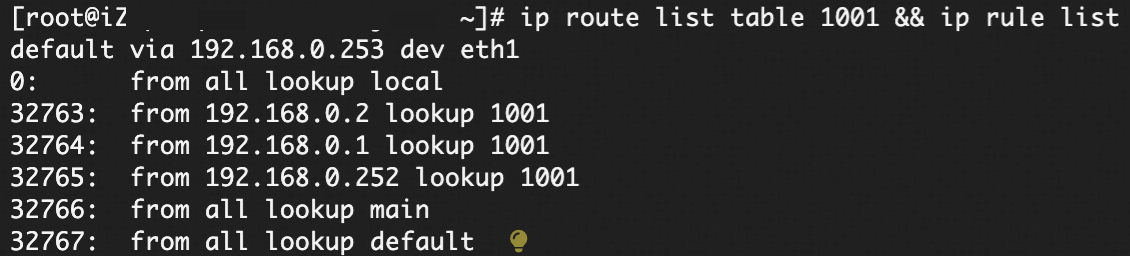
To keep these rules active after a reboot, add the routing commands to
/etc/rc.localand runsudo chmod +x /etc/rc.local.
Verify configuration
Verify outbound IPs
From the ECS instance, confirm that each private IP egresses through its associated EIP:
curl --interface <Private IP address of the secondary ENI> https://ifconfig.me
Verify symmetric routing
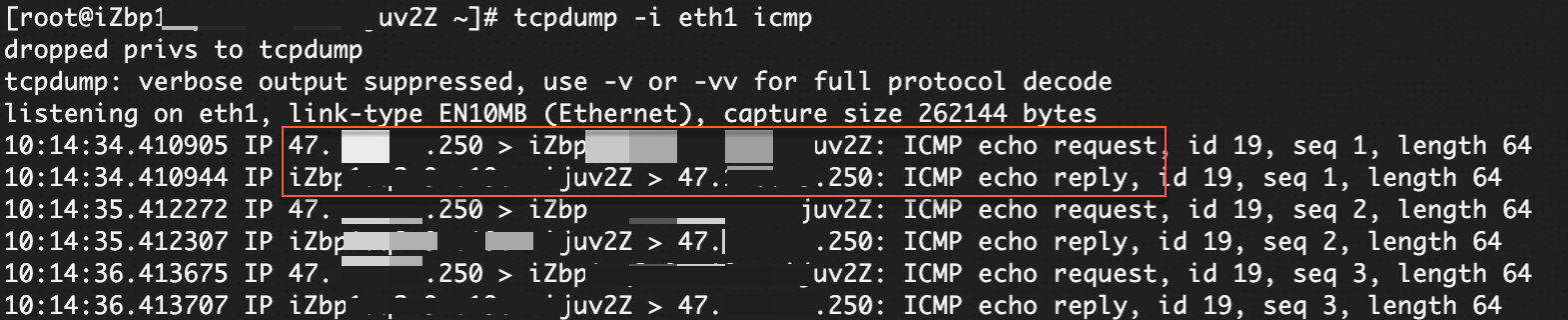
Ping the EIP from another machine and capture ICMP packets on the target instance:
tcpdump -i eth1 icmpPackets should both enter and exit through eth1.
Production tips
Availability: This configuration targets a single instance. Consider placing a load balancer in front of the instances for redundancy instead of binding EIPs directly if high availability is required.
Monitoring: Monitor network traffic, CPU, and memory utilization on the secondary ENI to quickly locate issues.
Security: Tighten the security group rules on your secondary ENI to allow only required ports and IP blocks.
Billing
Item | Fee |
Pay-as-you-go EIP | A EIP configuration fee applies even without traffic when associated with a secondary ENI. Bandwidth and data transfer fees also apply based on the selected metering method. |
Subscription EIP | No EIP configuration fee. You pay for bandwidth usage. |
Other resource | Resources such as ECS instances are billed according to their own rules. Secondary ENIs are free of charge. |