You must integrate the SDK into your application to configure scenario-specific rules for app bot management in the Bots console. This topic describes how to integrate the protection SDK into an Android application.
Limitations
For Android, the SDK supports the arm64-v8a and armeabi-v7a architectures.
The Android API level must be 16 or higher.
The init method can be time-consuming. To ensure full protection, wait at least 2 seconds between calling the init method and the vmpSign method. This delay is recommended for optimal protection but is not mandatory. You can adjust this delay based on your business needs, but a shorter delay might prevent the security features from being fully effective.
When using ProGuard for code obfuscation, use the -keep option to preserve the SDK's methods. For example:
-keep class com.aliyun.TigerTally.** {*;}
-keep class com.aliyun.captcha.* {*;}
-keepclassmembers,allowobfuscation class * {
     @com.alibaba.fastjson.annotation.JSONField <fields>;
}
-keep class com.alibaba.fastjson.** {*;}
Prerequisites
You have obtained the SDK for your Android application.
To obtain the SDK, submit a ticket.
NoteThe Android SDK includes two AAR files: AliTigerTally_X.Y.Z.aar and AliCaptcha_X.Y.Z.aar, where X.Y.Z is the version number.
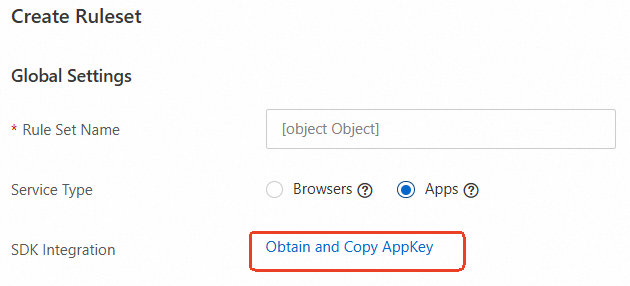
You have obtained the SDK authentication key (appkey).
When you create a Bots rule set, click Obtain and Copy AppKey to get the SDK authentication key. This key is required for SDK initialization.
Step 1: Create a project
In Android Studio, follow the configuration wizard to create a new Android project. The project directory structure is as follows:
tigertally-demo-apk [TigerTallyDemo]
  .gradle
  .idea
  app
    build
    libs
      AliCaptcha_xxx.aar
      AliTigerTally_xxx.aar
    src
      androidTest
      main
      test [unitTest]
    .gitignore
    build.gradle
    proguard-rules.pro
  gradle
    wrapper
      gradle-wrapper.jar
      gradle-wrapper.properties
  .gitignore
  .java-version
  build.gradle
  gradle.properties
  gradlew
  gradlew.bat
  local.properties
  settings.gradle
  tigertally.jks
  External Libraries
  Scratches and Consoles
Step 2: Integrate AAR
Extract the tigertally-X.Y.Z-xxxxxx-android.tgz SDK file, and copy all AAR files from the extracted folder to your main module's libs directory (the exact path depends on your project configuration).
Open your app's build.gradle file and add dependencies on AliTigerTally_X.Y.Z.aar and AliCaptcha_X.Y.Z.aar from the
libsdirectory.ImportantReplace X.Y.Z in the AliTigerTally_X.Y.Z.aar and AliCaptcha_X.Y.Z.aar filenames with your AAR files' version number.
The configuration is as follows:
dependencies {
    // ...
    implementation files('libs/AliTigerTally_X.Y.Z.aar')
    implementation files('libs/AliCaptcha_X.Y.Z.aar')

    // third-party library dependencies
    implementation 'com.alibaba:fastjson:1.2.83_noneautotype'
    implementation 'com.squareup.okhttp3:okhttp:3.11.0'
    implementation 'com.squareup.okio:okio:1.14.0'
}
Step 3: Filter SO CPU architectures
If your project hasn't used SO files, add the following configuration to your build.gradle file.
android {
    defaultConfig {
        ndk {
            abiFilters 'arm64-v8a', 'armeabi-v7a'
        }
    }
}
Step 4: Request permissions
Required permission
<uses-permission android:name="android.permission.INTERNET"/>Optional permissions
<uses-permission android:name="android.permission.BLUETOOTH"/>
<uses-permission android:name="android.permission.READ_PHONE_STATE"/>
<uses-permission android:name="android.permission.ACCESS_WIFI_STATE"/>
<uses-permission android:name="android.permission.ACCESS_NETWORK_STATE"/>
<uses-permission android:name="android.permission.READ_EXTERNAL_STORAGE"/>
<uses-permission android:name="android.permission.WRITE_EXTERNAL_STORAGE"/>
For Android 6.0 and later, you must dynamically request android.permission.READ_EXTERNAL_STORAGE and android.permission.WRITE_EXTERNAL_STORAGE.
Step 5: Add integration code
1. Add header file
For the IDFA version, add the following import statement:
#import <AliTigerTally_IDFA/AliTigerTally.h>For the non-IDFA version, add the following import statement:
#import <AliTigerTally_NOIDFA/AliTigerTally.h>
2. Configure data signing
Set a custom end-user identifier for your business. This allows you to configure WAF protection policies with greater flexibility.
/**
* Sets the user account.
*
* @param account   The account information.
*/
- (void)setAccount:(NSString *)account;
Parameters:
account: Type: NSString. A string that identifies a user. We recommend using a desensitized format.
Return value: None.
Example:
// For guest users, you can skip setAccount and initialize directly. After a user logs in, call setAccount and re-initialize.
[[AliTigerTally sharedInstance] setAccount:@"testAccount"];
Initialize the SDK to perform data collection.
Each initialization collects device information once. You can call the init function again to re-initialize data collection for different business scenarios.
Initialization supports three data collection modes: full, custom privacy, and non-privacy. The non-privacy mode excludes fields related to end-user privacy, such as IDFA and IDFV.
NoteTo comply with your internal requirements, select a suitable data collection mode that ensures data integrity. More complete data improves threat detection.
// Initialization callback. Returns the status code of the interface call.
typedef void (^TTInitListener)(int);

/**
 * Initializes the SDK.
 *
 * @param appkey        The key.
 * @param options       Optional parameters.
 * @param onInitFinish  The callback for when initialization is complete.
 * @return Indicates whether the initialization was successful.
 */
- (int)init:(NSString *)appkey collectType:(TTCollectType)type options:(NSMutableDictionary *_Nullable)options listener:(TTInitListener _Nullable)onInitFinish;
Parameters:
appkey: Type: NSString. Your SDK authentication key.
collectType: Type: TTCollectType. The data collection mode. Valid values:
Field
Description
Example
TT_DEFAULT
Collects all data.
TT_DEFAULT
TT_NO_BASIC_DATA
Does not collect basic device data.
This includes device name, OS version, and screen resolution.
TT_NO_X | TT_NO_Y
(where X and Y represent the data field types to exclude)
TT_NO_UNIQUE_DATA
Does not collect unique identifier data.
This includes IDFV and IDFA.
TT_NO_EXTRA_DATA
Does not collect extended device data.
This includes connected Wi-Fi information (SSID, BSSID) and the list of nearby Wi-Fi networks.
TT_NOT_GRANTED
Does not collect any of the preceding privacy-related data.
TT_NOT_GRANTED
options: Type: NSMutableDictionary. Optional parameters for data collection. The default value is nil. The following parameters are available:
Field
Description
Example
IPv6
Specifies whether to use an IPv6 domain name to report device information.
0 (default): Uses an IPv4 domain name.
1: Uses an IPv6 domain name.
1
Intl
Specifies whether to use a domain name outside the Chinese mainland to report device information.
0 (default): Reports to the Chinese mainland.
1: Reports to regions outside the Chinese mainland.
1
CustomUrl
Sets the domain name of the data reporting server.
https://cloudauth-device.us-west-1.aliyuncs.com
CustomHost
Sets the host of the data reporting server.
cloudauth-device.us-west-1.aliyuncs.com
NoteFor most international sites, set only the Intl parameter. To report data to a specific site, set the CustomUrl and CustomHost parameters. Available sites include:
If
Intlis set to0, data is reported to the default site in China (Shanghai): https://cloudauth-device.cn-shanghai.aliyuncs.comIf
Intlis set to1:The default site is Singapore: https://cloudauth-device.ap-southeast-1.aliyuncs.com
Indonesia (Jakarta): https://cloudauth-device.ap-southeast-5.aliyuncs.com
US (Silicon Valley): https://cloudauth-device.us-west-1.aliyuncs.com
Germany (Frankfurt): https://cloudauth-device.eu-central-1.aliyuncs.com
China (Hong Kong): https://cloudauth-device.cn-hongkong.aliyuncs.com
listener: Type: TTInitListener. The SDK initialization callback interface. You can use this callback to determine the status of the initialization. The default value is nil.
TTCode
Code
Description
TT_SUCCESS
0
Initialization successful.
TT_NOT_INIT
-1
The SDK is not initialized.
TT_NOT_PERMISSION
-2
Required iOS permissions have not been granted.
TT_UNKNOWN_ERROR
-3
An unknown system error occurred.
TT_NETWORK_ERROR
-4
A network error occurred.
TT_NETWORK_ERROR_EMPTY
-5
A network error occurred. The returned content is an empty string.
TT_NETWORK_ERROR_INVALID
-6
The format of the network response is invalid.
TT_PARSE_SRV_CFG_ERROR
-7
Failed to parse the server configuration.
TT_NETWORK_RET_CODE_ERROR
-8
The gateway returned a failure response.
TT_APPKEY_EMPTY
-9
The appkey is empty.
TT_PARAMS_ERROR
-10
Other parameter errors occurred.
TT_FGKEY_ERROR
-11
A key calculation error occurred.
TT_APPKEY_ERROR
-12
The SDK version does not match the appkey version.
Return value: Type: int. An error code.
0indicates success, and a negative number indicates failure.Example:
// The appkey is the authentication key assigned to you on the Alibaba Cloud console.
NSString *appKey = @"xxxxxxxxxxxxxxxxxxxxx";
// Optional parameters. You can configure IPv6 and reporting from outside the Chinese mainland.
NSMutableDictionary *options = [[NSMutableDictionary alloc] init];
[options setValue:@"0" forKey:@"IPv6"];     // Use IPv4.
[options setValue:@"0" forKey:@"Intl"];     // Report data from within the Chinese mainland.
// [options setValue:@"1" forKey:@"Intl"];  // Report data from outside the Chinese mainland.
// Report data to the US (West) region.
// [options setValue:@"https://cloudauth-device.us-west-1.aliyuncs.com" forKey:@"CustomUrl"];
// [options setValue:@"cloudauth-device.us-west-1.aliyuncs.com" forKey:@"CustomHost"];

// An initialization call collects device information once. You can call the init function again to collect information for different business scenarios.
// Full data collection.
if (0 == [[AliTigerTally sharedInstance] init:appkey collectType:TT_DEFAULT options:options listener:nil]) {
    NSLog(@"Initialization successful");
} else {
    NSLog(@"Initialization failed");
}

// To collect specific types of private data, use the "|" operator to specify multiple types.
TTCollectType collectPrivacy = TT_NO_BASIC_DATA | TT_NO_EXTRA_DATA;
int ret = [[AliTigerTally sharedInstance] init:appkey collectType:collectPrivacy options:options listener:nil];

// Do not collect private data.
int ret = [[AliTigerTally sharedInstance] init:appkey collectType:TT_NOT_GRANTED options:options listener:nil];
Data hashing.
This custom signing interface hashes the input data to generate a
whashstring, which serves as a custom signature. For POST, PUT, and PATCH requests, use the request body as input. For GET and DELETE requests, use the full URL. You must also add the generatedwhashstring to the ali_sign_whash field in the HTTP request header.NoteTo use the
vmpHashfunction to generate custom signature data, you must configure the custom signature field asali_sign_whashin the console. (Navigate to Bot Feature Recognition → Enable Custom Signature Field → Select Field Name asheader→ Set the Value toali_sign_whash)// Request type: typedef NS_ENUM(NSInteger, TTRequestType) { TT_GET=0, TT_POST, TT_PUT, TT_PATCH, TT_DELETE }; /** * Hashes the custom signature data. * @param type The data type. * @param input The data to be signed. * @return The whash string. */ - (NSString *)vmpHash:(TTRequestType)type input:(NSData *)input;Parameters:
type: Type: TTTypeRequest. The data type. Valid values:
GET: GET request data.
POST: POST request data.
PUT: PUT request data.
PATCH: PATCH request data.
DELETE: DELETE request data.
input: Type: NSData. The data to be signed. Pass the body or URL based on the type.
Return value: Type: NSString. The
whashstring.Example:
// GET request
NSString *url = @"https://tigertally.aliyun.com/apptest";
NSString *whash = [[AliTigerTally sharedInstance] vmpHash:TT_GET input:[url dataUsingEncoding:NSUTF8StringEncoding]];
NSLog(@"whash: %@", whash);

// POST request
NSString *body = @"hello world";
NSString *whash = [[AliTigerTally sharedInstance] vmpHash:TT_POST input:[body dataUsingEncoding:NSUTF8StringEncoding]];
NSLog(@"whash: %@", whash);
NoteCalling this interface is only required if you have enabled the custom signing option in the WAF console. If you use the default signature configuration, you can skip this step.
Data signing.
This method uses VMP technology to sign the input data and returns a
wtokenstring for request authentication./** * Signs the data. * @param input The data to be signed. * @return The wtoken string. */ - (NSString *)vmpSign:(NSData *)input;Parameters:
input: Type: NSData. The data to be signed. This is typically the entire request body or the
whashfrom custom signing.
Return value: Type: NSString. The
wtokenstring.Example:
// Default signature configured in the console (custom signing is not selected). NSString *body = @"hello world"; NSString *wtoken = [[AliTigerTally sharedInstance] vmpSign:[body dataUsingEncoding:NSUTF8StringEncoding]]; NSLog(@"wtoken: %@", wtoken); // Custom signing configured in the console. // Custom signing for a POST request. NSString *whash = [[AliTigerTally sharedInstance] vmpHash:TT_POST input:[body dataUsingEncoding:NSUTF8StringEncoding]]; NSString *wtoken = [[AliTigerTally sharedInstance] vmpSign:[whash dataUsingEncoding:NSUTF8StringEncoding]]; NSLog(@"whash: %@, wtoken: %@", whash, wtoken); // Custom signing for a GET request. NSString *url = @"https://tigertally.aliyun.com/apptest"; NSString *whash = [[AliTigerTally sharedInstance] vmpHash:TT_GET input:[url dataUsingEncoding:NSUTF8StringEncoding]]; NSString *wtoken = [[AliTigerTally sharedInstance] vmpSign:[whash dataUsingEncoding:NSUTF8StringEncoding]]; NSLog(@"whash: %@, wtoken: %@", whash, wtoken);NoteWhen using custom signing, the input for the vmpSign interface must be the
whashstring generated by vmpHash. When you configure a scenario-based policy for App Protection, you must set the Custom Signing Field toali_sign_whash.When you call vmpHash to generate a
whashfor a GET request, ensure the input URL is identical to the final network request URL. Pay close attention to URL encoding, as some frameworks automatically encode characters or parameters.The input for the vmpHash interface cannot be a byte array or an empty string. If the input is a URL, it must include a path or a parameter.
When calling vmpSign, if the request body is empty (for example, in a GET request or a POST request with no body), pass
nilor the NSData representation of an empty string, such as[@"" dataUsingEncoding:NSUTF8StringEncoding].If
whashorwtokenreturns one of the following strings, it indicates an error:you must call init first: The
initfunction was not called.you must input correct data: The input data is invalid.
you must input correct type: The input type is invalid.
3. Secondary verification
Check the result.
To determine if secondary verification is needed, check the cookie and body from the response. If the header contains multiple Set-Cookie fields, merge them into a single cookie string before calling this interface.
/**
 * Checks whether to perform secondary verification.
 *
 * @param cookie  The response cookie.
 * @param body    The response body.
 * @return 0: Pass, 1: Secondary verification required.
 */
- (int)cptCheck:(NSString *)cookie body:(NSData *)body;
Parameters:
cookie: Type: NSString. All cookies in the request response.
body: Type: NSData. The entire body of the request response.
Return value: Type: int. The decision result.
0indicates that the request passed, and1indicates that secondary verification is required.Example:
NSString *cookie = @"key1=value1;key2=value2;";
NSData *body = xxx;
int recheck = [[AliTigerTally sharedInstance] cptCheck:cookie body:body];
NSLog(@"recheck: %d", recheck);
Create a slider.
If the result from cptCheck indicates a need for verification, create a slider object. The TTCaptcha object provides the
showanddismissmethods to control the slider window. Use TTOption to configure its parameters and TTDelegate to handle its status callbacks. To customize the slider window, you must provide a URL to a custom page, which can be a local HTML file or a remote page./** * Displays the slider for verification. * * @param view The parent component. * @param option The parameters. * @param detegate The callback protocol. */ - (TTCaptcha *)cptCreate:(UIView *)view option:(TTOption *)option delegate:(id<TTDelegate>)detegate; @protocol TTDelegate <NSObject> @required // Slider verification is successful. - (void)success:(TTCaptcha *)captcha data:(NSString *)data; // Slider verification failed. - (void)failed:(TTCaptcha *)captcha code:(NSString *)code; @end @interface TTOption : NSObject // Tap to cancel. @property (nonatomic, assign) BOOL cancelable; // Custom page. @property (nonatomic, strong) NSString *customUri; // Language. @property (nonatomic, strong) NSString *language; @end @interface TTCaptcha : NSObject - (instancetype)init:(UIView *)view option:(TTOption *)option delegate:(id<TTDelegate>)delegate; // Obtains the slider traceId for data analytics. - (NSString *)getTraceId; // Displays the slider. - (void)show; // Dismisses the slider. - (void)dismiss; @endParameters:
view: Type: View. The current page view.
option: Type: TTOption. The slider configuration parameters.
delegate: Type: TTDelegate. The slider status callback.
Return value: Type: TTCaptcha. The slider object.
Example:
#pragma mark - TTDelegate - (void)failed:(TTCaptcha *)captcha code:(nonnull NSString *)code { NSLog(@"captcha failed: %@", code); } - (void)success:(TTCaptcha *)captcha data:(nonnull NSString *)data { NSLog(@"captcha success: %@", data); } TTOption *option = [[TTOption alloc] init]; // option.customUri = @"ali-tt-captcha-demo-ios"; option.language = @"cn"; option.cancelable = true; TTCaptcha *captcha = [[AliTigerTally sharedInstance] cptCreate:[self view] option:option delegate:self]; [captcha show];NoteA "Verification failed" error indicates that an exception was detected during or after user interaction with the slider.
The following table describes the error codes.
1001: Verification challenge failed.
1002: A system exception occurred.
1003: An invalid parameter was specified.
1005: The verification was canceled.
8001: Failed to display the slider.
8002: An exception occurred in the slider verification data.
8003: An internal exception occurred during slider verification.
8004: A network error occurred.
Best practice example
package com.aliyun.tigertally.apk;

import androidx.appcompat.app.AppCompatActivity;
import android.os.Bundle;
import android.util.Log;
import com.aliyun.TigerTally.TigerTallyAPI;
import com.aliyun.TigerTally.captcha.api.TTCaptcha;
import okhttp3.MediaType;
import okhttp3.OkHttpClient;
import okhttp3.Request;
import okhttp3.RequestBody;
import okhttp3.Response;

public class DemoActivity extends AppCompatActivity {
    private final static String TAG = "TigerTally-Demo";

    private final static String APP_HOST = "******";
    private final static String APP_URL  = "******";
    private final static String APP_KEY  = "******";

    private final static OkHttpClient okHttpClient = new OkHttpClient();

    @Override
    protected void onCreate(Bundle savedInstanceState) {
        super.onCreate(savedInstanceState);
        setContentView(R.layout.activity_demo);

        doTest();
    }

    private void doTest() {
        Log.d(TAG, "captcha flow");
        new Thread(() -> {
            // Initialize the SDK.
            Map<String, String> options = new HashMap<>();
            //options.put("Intl", "1"); // To enable international reporting.
            // Use full data collection mode.
            int ret = TigerTallyAPI.init(this, APP_KEY, TigerTallyAPI.TT_DEFAULT, options, null);
            // Alternatively, do not collect privacy fields.
            // int ret = TigerTallyAPI.init(this, APP_KEY, TigerTallyAPI.TT_NOT_GRANTED, null, null);
            Log.d(TAG, "tiger tally init: " + ret);

            // Wait for initialization to complete.
            try {
                Thread.sleep(2000);
            } catch (InterruptedException e) {
                e.printStackTrace();
            }


            // Sign the data.
            String data = "hello world";
            String whash = null, wtoken = null;
            // Use custom signing.
            whash = TigerTallyAPI.vmpHash(TigerTallyAPI.RequestType.POST, data.getBytes());
            wtoken = TigerTallyAPI.vmpSign(1, whash.getBytes());
            Log.d(TAG, "tiger tally vmp: " + whash + ", " + wtoken);

            // Use standard signing.
            // wtoken = TigerTallyAPI.vmpSign(1, data.getBytes());
            // Log.d(TAG, "tiger tally vmp: " + wtoken);


            // Send the request.
            doPost(APP_URL, APP_HOST, whash, wtoken, data, (code, cookie, body) -> {
                // Check if the slider is required.
                int recheck = TigerTallyAPI.cptCheck(cookie, body);
                Log.d(TAG, "captcha check result: " + recheck);

                if (recheck == 0) return;
                this.runOnUiThread(this::doShow);
            });
        }).start();
    }

    // Display the slider.
    public void doShow() {
        Log.d(TAG, "captcha show");

        TTCaptcha.TTOption option = new TTCaptcha.TTOption();
        // option.customUri = "file:///android_asset/ali-tt-captcha-demo.html";
        option.language   = "cn";
        option.cancelable = false;

        TTCaptcha captcha = TigerTallyAPI.cptCreate(this, option, new TTCaptcha.TTListener() {
            @Override
            public void success(TTCaptcha captcha, String data) {
                Log.d(TAG, "captcha check success:" + data);
            }

            @Override
            public void failed(TTCaptcha captcha, String code) {
                Log.d(TAG, "captcha check failed:" + code);
            }
        });

        captcha.show();
    }

    // Send the request.
    public static void doPost(String url, String host, String whash, String wtoken, String body, Callback callback) {
        Log.d(TAG, "start request post");

        int responseCode = 0;
        String responseBody = "";
        StringBuilder responseCookie = new StringBuilder();
        try {
            Request.Builder builder = new Request.Builder()
                    .url(url)
                    .addHeader("wToken", wtoken)
                    .addHeader("Host",   host)
                    .post(RequestBody.create(MediaType.parse("text/x-markdown"), body.getBytes()));

            if (whash != null) {
                builder.addHeader("ali_sign_whash", whash);
            }
            Response response = okHttpClient.newCall(builder.build()).execute();

            responseCode = response.code();
            responseBody = response.body() == null ? "" : response.body().string();
            for (String item : response.headers("Set-Cookie")) {
                responseCookie.append(item).append(";");
            }

            Log.d(TAG, "response code:" + responseCode);
            Log.d(TAG, "response cookie:" + responseCookie);
            Log.d(TAG, "response body:" + (responseBody.length() > 100 ? responseBody.substring(0, 100) : ""));

            if (response.isSuccessful()) {
                Log.d(TAG, "success: " + response.code() + ", " + response.message());
            } else {
                Log.e(TAG, "failed: " + response.code() + ", " + response.message());
            }

            response.close();
        } catch (Exception e) {
            e.printStackTrace();
            responseCode = -1;
            responseBody = e.toString();
        } finally {
            if (callback != null) {
                callback.onResponse(responseCode, responseCookie.toString(), responseBody);
            }
        }
    }

    public interface Callback {
        void onResponse(int code, String cookie, String body);
    }
}