Instant logs is a lightweight, easy-to-use log service that requires no additional setup. It lets you view real-time site access logs in the ESA console to locate attacks, troubleshoot system failures, and debug or test site network connectivity.
Why use instant logs
Traditional Content Delivery Network (CDN) products often rely on offline logs to locate and verify business anomalies. However, offline logs have significant limitations in the following scenarios:
Locating cross-region faults: When users report access issues in a specific region, traditional methods, such as using single-node logs or high-latency network-wide logs, make it difficult to quickly find the root cause.
Verifying phased releases: After you configure a feature, you need to verify its effect on a small portion of traffic. Offline logs cannot quickly filter specific request records from the phased release.
Analyzing real-time attack features: To defend against new malicious attacks, you need to analyze network-wide request features in real time to create mitigation policies. The high latency of offline logs leads to delayed responses.
Monitoring business in seconds: During promotional events, you need to monitor request volume changes in real time. Statistics with minute-level latency are not responsive enough for dynamic policy adjustments.
Verifying new service onboarding: After a new customer configures a site, log latency makes it impossible to promptly confirm that the connection is working correctly. This impacts onboarding efficiency.
ESA instant logs provide real-time log viewing. You can monitor detailed site access information in the console at any time. This is similar to using the tail -f command in Linux or Unix to track file changes in real time.
Limits
A site can have only one active monitoring window at a time. A monitoring window can stay active for a maximum of 60 minutes.
Instant logs can store a maximum of 40 records at a time. Records are arranged chronologically, and the newest records overwrite the oldest ones.
After you start monitoring, the session is stopped by any of the following actions. To continue monitoring, click Start Monitoring again:
Expanding a log record, clicking Stop Monitoring, or clicking the
 Export button stops the monitoring session. The historical log records remain on the Instant Logs page.
Adding a filter, switching to another page (such as the Offline Logs page), or refreshing the page stops the monitoring session. The historical log records are also deleted.
Start monitoring instant logs
In the ESA console, choose Websites. In the Website column, click the target site.
In the left navigation pane, choose .
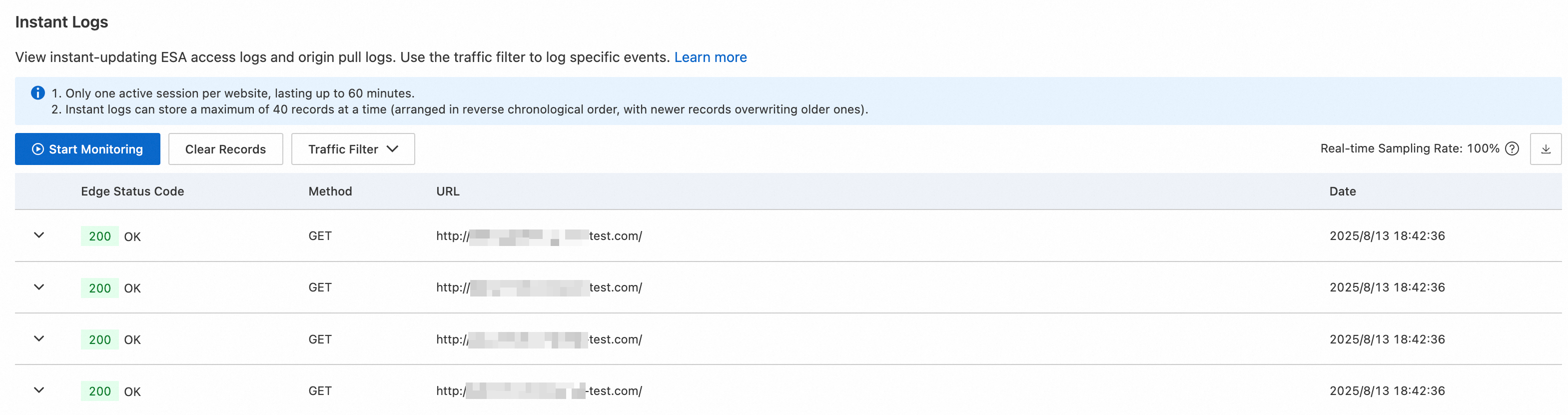
On the Instant Logs page, click Start Monitoring to collect logs.
You can add Traffic Filter to narrow the scope of the logs and help locate anomalies.
After you stop monitoring, you can expand a log record to view detailed log fields. You can also click the
Export button on the right to download the data as a JSON file.
Instant log fields
Field name | Data type | Description |
BotTag | string | The traffic type of the client request. Examples:
|
ClientASN | string | The autonomous system number (ASN) parsed from the client IP address. |
ClientCountryCode | string | The ISO-3166 Alpha-2 code parsed from the client IP address. |
ClientIP | string | The IP address of the client that connects to the ESA node. |
ClientISP | string | The Internet Service Provider (ISP) information parsed from the client IP address. |
ClientRegionCode | string | The ISO-3166-2 code parsed from the client IP address. |
ClientRequestBytes | int | The size of the client request, in bytes. |
ClientRequestHeaderRange | string | The value of the |
ClientRequestHost | string | The |
ClientRequestID | string | The unique identifier of the client request. |
ClientRequestMethod | string | The |
ClientRequestPath | string | The path of the client request. |
ClientRequestProtocol | string | The protocol of the client request. |
ClientRequestQuery | string | The |
ClientRequestReferer | string | The |
ClientRequestURI | string | The |
ClientRequestUserAgent | string | The |
ClientSrcPort | int | The port used by the client to connect to the ESA node. |
ClientSSLCipher | string | The Secure Sockets Layer (SSL) encryption suite of the client. |
ClientSSLProtocol | string | The SSL protocol version of the client. A hyphen ( |
ClientXRequestedWith | string | The |
EdgeCacheStatus | string | The cache status of the client request. |
EdgeEndTimestamp | Timestamp ISO8601 | The timestamp when the ESA node finished sending the response to the client. Example: |
EdgeRequestHost | string | The |
EdgeResponseBodyBytes | int | The size of the response |
EdgeResponseBytes | int | The size of the response that the ESA node returns to the client, in bytes. |
EdgeResponseCompressionAlgo | string | The compression algorithm of the response from the ESA node. |
EdgeResponseCompressionRatio | float | The compression ratio of the response from the ESA node. |
EdgeResponseContentType | string | The |
EdgeResponseStatusCode | int | The status code that the ESA node returns to the client. |
EdgeResponseTime | int | The time elapsed from when the ESA node receives the client request to when the client finishes receiving the server response, in ms. |
EdgeServerID | string | The unique identifier of the ESA node server that the client accessed. |
EdgeServerIP | string | The IP address of the ESA node that the client accessed. |
EdgeStartTimestamp | Timestamp ISO8601 | The timestamp when the ESA node received the client request. Example: |
JA3Hash | string | The hash value of the client's JA3 fingerprint. |
JA4Hash | string | The hash value of the client's JA4 fingerprint. |
EdgeTimeToFirstByteMs | int | The time to first byte (TTFB). This is the time from when the ESA node receives the client request to when the ESA node sends the first byte of the response to the client, in ms. |
OriginDNSResponseTimeMs | int | The time taken to receive the DNS resolution response from the origin server. If no back-to-origin request is made, the value is |
OriginIP | string | The origin IP address accessed during the back-to-origin request. If no back-to-origin request is made, the value is a hyphen ( |
OriginResponseDurationMs | int | The time to first byte from the origin server. If no back-to-origin request is made, the value is |
OriginResponseHeaderRange | string | The Range information in the response from the origin server. If no back-to-origin request is made, the value is a hyphen ( |
OriginResponseHTTPExpires | string | The Expires information in the response from the origin server. If no back-to-origin request is made, the value is a hyphen ( |
OriginResponseHTTPLastModified | string | The Last-Modified information in the response from the origin server. If no back-to-origin request is made, the value is a hyphen ( |
OriginResponseStatusCode | int | The status code from the origin server's response. If no back-to-origin request is made, the value is |
OriginSSLProtocol | string | The SSL protocol version used to request the origin server. If no back-to-origin request is made, the value is a hyphen ( |
OriginTCPHandshakeDurationMs | int | The time taken to complete the TCP handshake when requesting the origin server. If no back-to-origin request is made, the value is |
OriginTLSHandshakeDurationMs | int | The time taken to complete the TLS handshake when requesting the origin server. If no back-to-origin request is made, the value is |
SecAction | string | The final mitigation action executed for this request. |
SecActions | string | All mitigation actions executed for this request. |
SecRuleID | string | The ID of the final mitigation rule executed for this request. |
SecRuleIDs | string | The IDs of all mitigation rules executed for this request. |
SecSource | string | The final mitigation rule executed for this request. |
SecSources | string | All mitigation rules executed for this request. |
SiteName | string | The site name. |
SmartRoutingStatus | string | The status of the smart routing feature. |
TlsHash | string | The MD5 hash value that describes the SSL/TLS client fingerprint. |
SampleInterval | float | The sample rate for the current log record. |
Feature availability by edition
Entrance | Pro | Premium | Enterprise |