API token compliance validation verifies the JSON Web Token (JWT) in incoming requests against the token configurations that you define. You can add a custom JWT, bind it to the APIs that require validation, and let Edge Security Acceleration (ESA) validate incoming requests to secure your business APIs.
Limits
The following limits apply to API token compliance validation:
Supported token type — Only JSON Web Token (JWT) is currently supported.
Public key format — Only the JWK format is supported. The JWT public key must contain the
kidandalgfields.Signature algorithm — The following signature algorithms are currently supported:
ES256(ECDSA with SHA-256);RS256(RSA with SHA-256).
Prerequisites
A site is added to ESA.
A JWT public key in JWK format. To generate a key pair, see How do I generate a JWT?.
Configure API token rules
To enable API token compliance validation, complete two stages in order: first you add a token configuration, and then you create an API rule that applies the token configuration to your APIs.
To add a token configuration
Log on to the ESA console.
In the ESA console, selectWebsites, and in the Websitecolumn, click the target site.
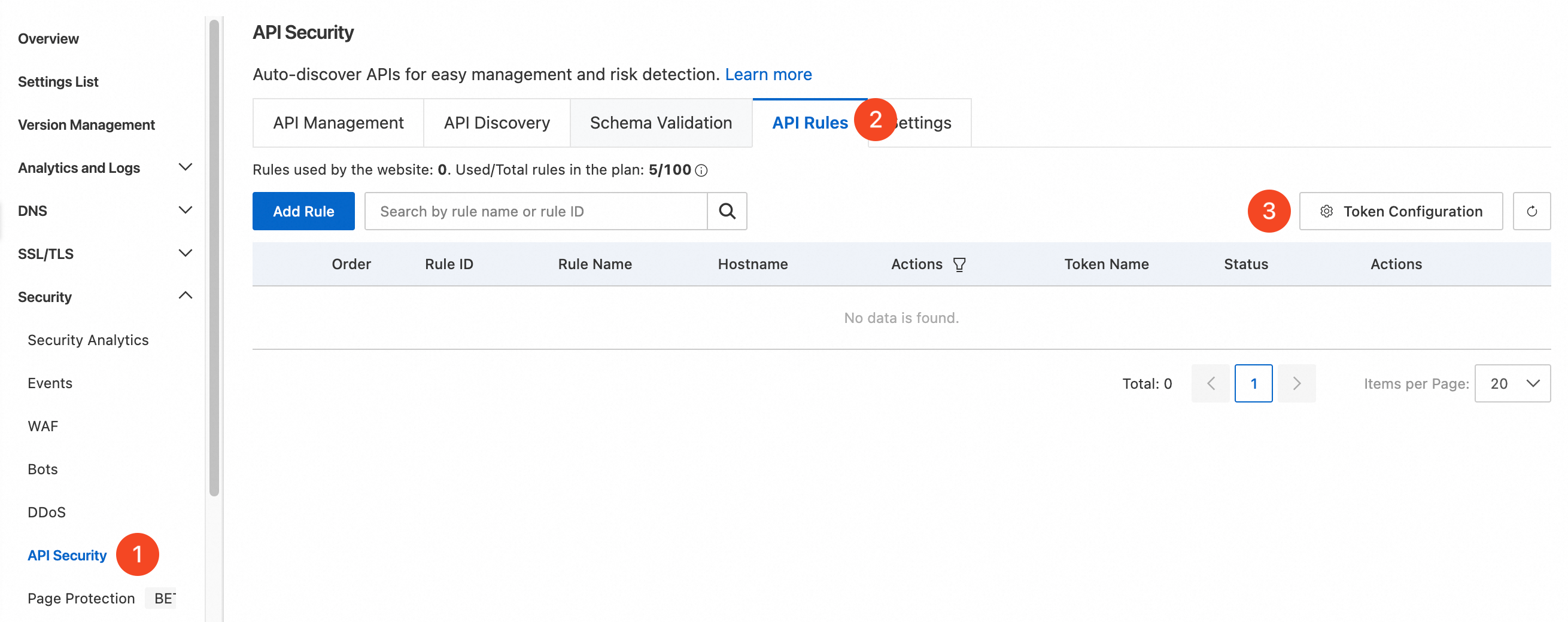
In the left navigation pane, choose SecurityAPI Security.
On the API Securitypage, select the API Rulestab, and then click Token Configuration.
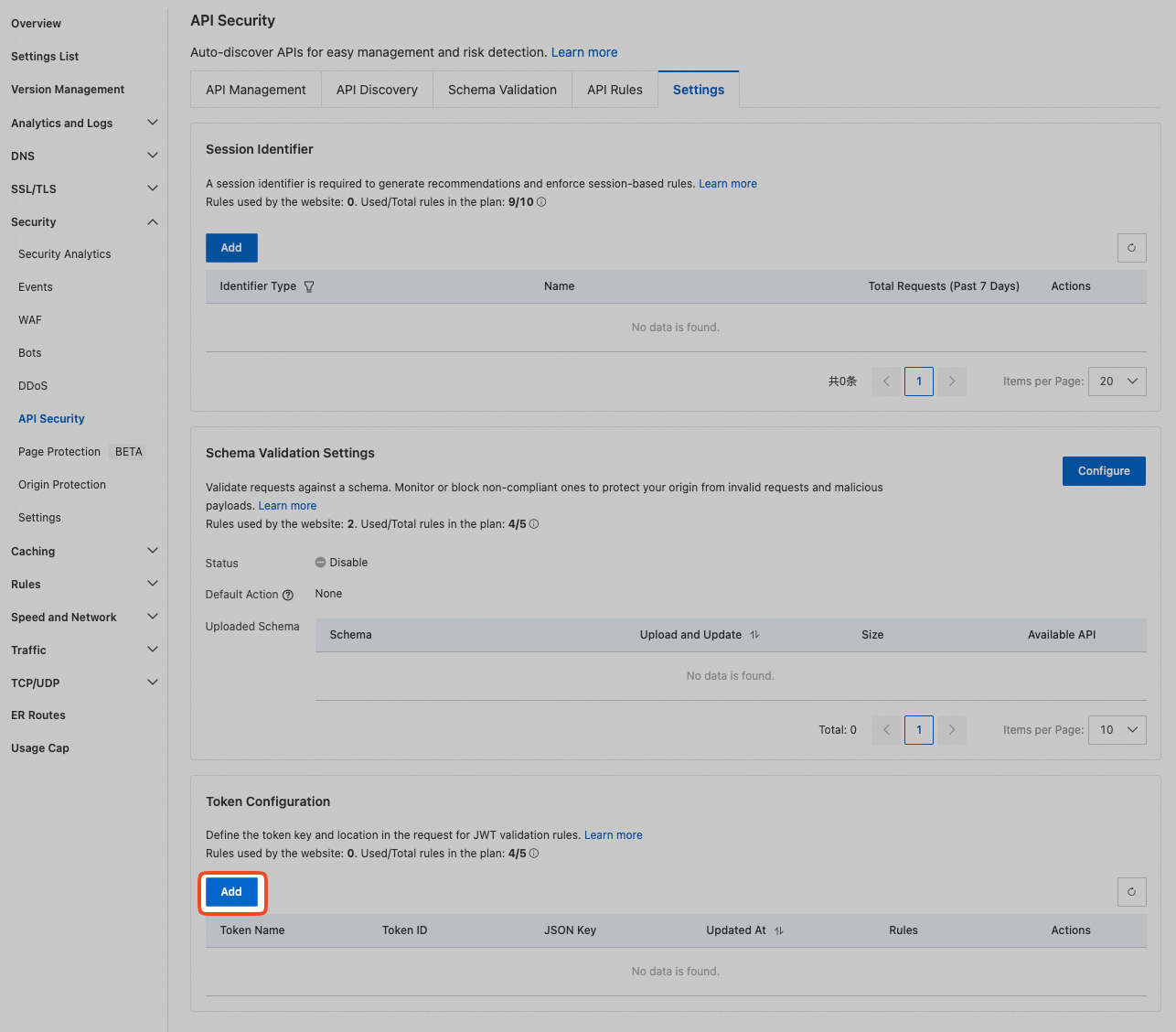
On the settings page, click Addto add token information.
Specify the following token parameters based on your business requirements.
Name: Enter a custom token name, such as
JWT-Demo.Token Location: Select where the token is located in the request. You can select the Headeror Cookiefield, and then enter the corresponding key. To accommodate JWTs that reside in different locations across your business, click Orto create a logical
ORcondition. You can evaluate up to four token locations at the same time.Secret Key: Add the token key by entering it manually or by uploading a JSON file. For key requirements, see JWK fields. If you configure multiple keys, ESA selects a key based on the
kidfield for validation. Validation passes if any one of the keys validates the token successfully.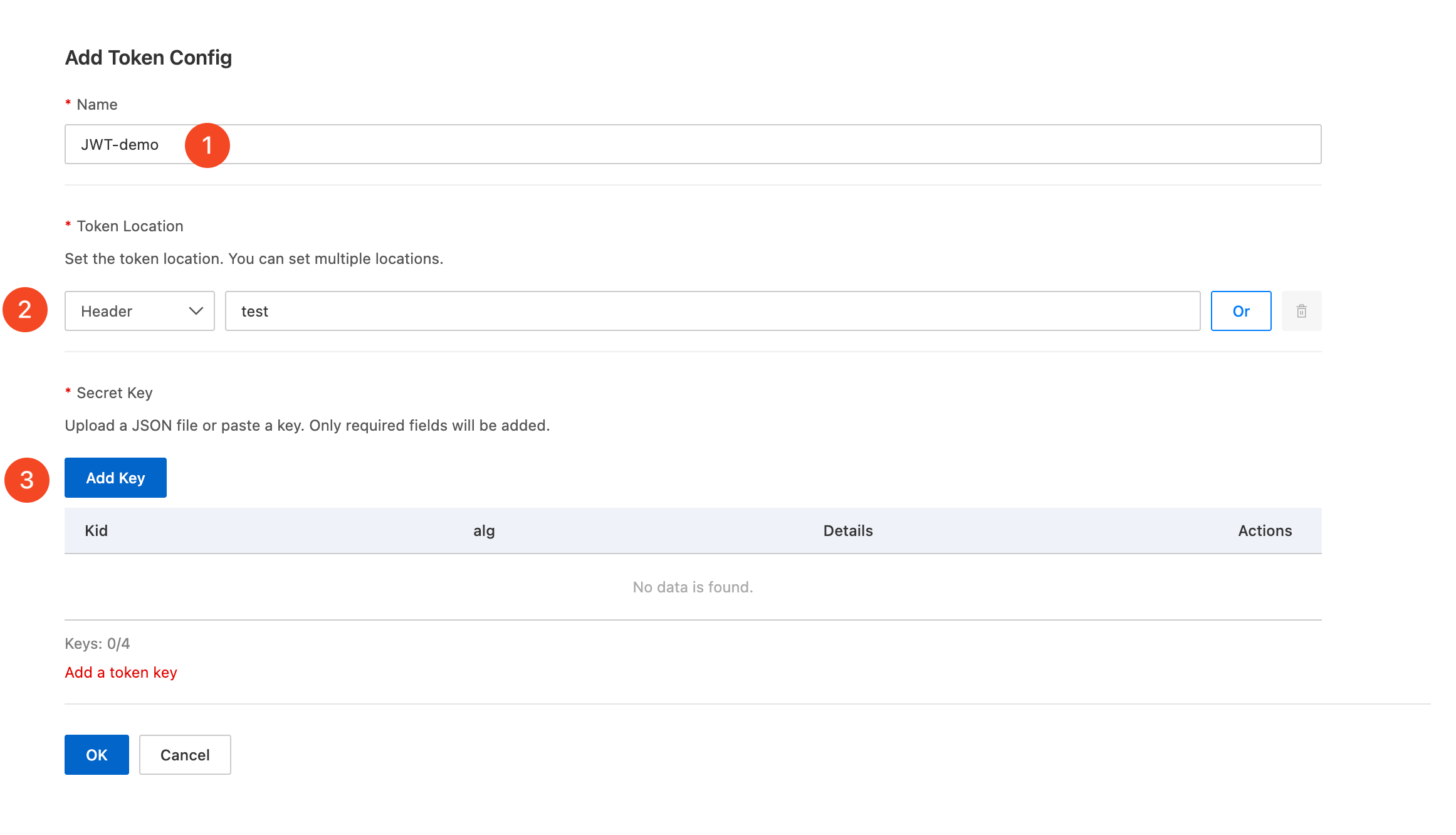
Click OK.
To create an API rule
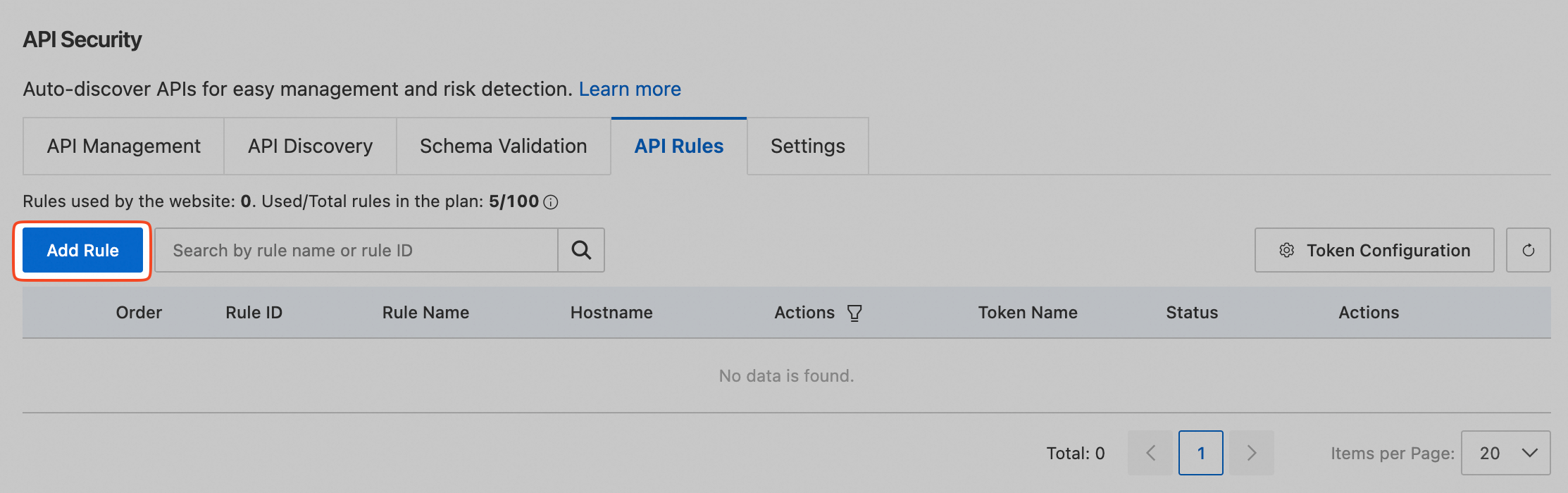
Return to the API Rulestab and click the Add Rulebutton.
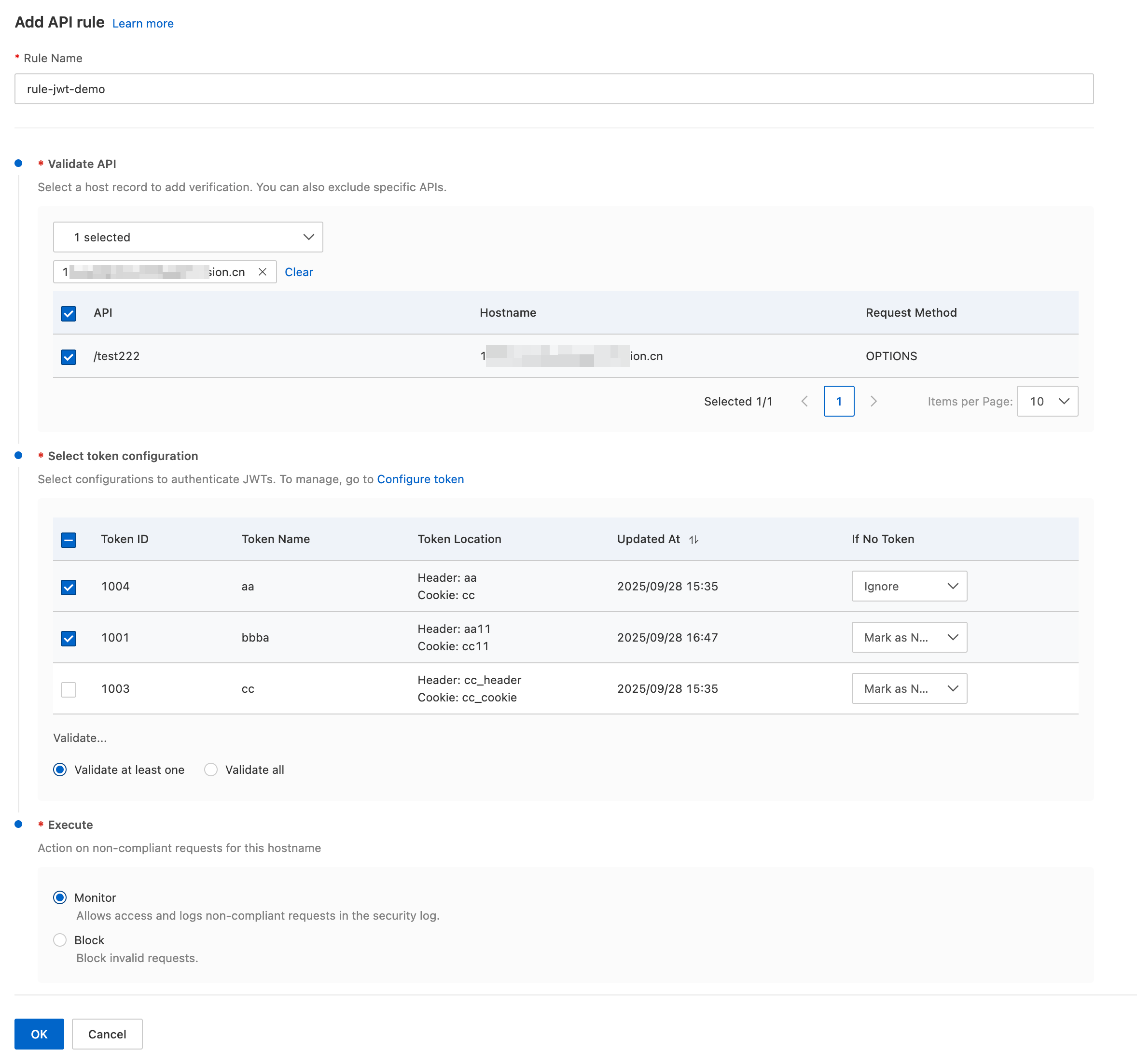
Configure the token validation parameters based on your business requirements.
Rule Name: Enter a custom rule name, such as
rule-jwt-demo.Validate API: From the drop-down list, select the host record that requires token compliance validation. ESA then displays the API list under the selected host record. Review the list and select the APIs that you want to validate.
Select Token Configuration: Select one or more tokens to validate. If you select multiple tokens, choose one of the following options:
Validate at least one configuration: A request must match at least one of the token configurations. Otherwise, the request is considered non-compliant.
Validate all: A request must match all token configurations. Otherwise, the request is considered non-compliant.
By default, a request that does not contain a token is marked as non-compliant. If you have special requirements, go to the If No Tokencolumn to the right of the token and select Ignorefrom the drop-down list.
Execute: Select the action to apply to requests that fail token validation:
Monitor: Allow non-compliant requests and record logs. You can view the details in Event analysis.
Block: Block non-compliant requests and record block logs. You can view the details in Event analysis.
Protection results
After you create an API rule, choose SecurityEventsin the left navigation pane. On the event analysis page, use the filter to select API Rulesas the protection rule. Then, scroll down to the Sampling Logsarea to view detailed protection logs.
JWK fields
The key that you submit must not contain comments.
A JWK public key contains the following fields:
kty: the key type. For example,ECindicates an elliptic curve key;RSAindicates an RSA key.use: the purpose of the public key. For example,sigindicates that the key is used for digital signatures.crv: the elliptic curve type. For example,P-256indicates the P-256 elliptic curve defined by NIST.kid: a custom key identifier, such asesa. A JWK must contain thekidfield, which is used to select the key. Likewise, the claims in the JWT of the request must also contain thekidfield. You can use this field to rotate token keys.n: the modulus of the RSA key.e: the public exponent of the RSA key.x: the x coordinate of the elliptic curve public key.y: the y coordinate of the elliptic curve public key.alg: the algorithm identifier. The following values are currently supported:ES256(ECDSA with SHA-256);RS256(RSA with SHA-256).
Example
The following example shows a JWK public key in RSA form. When you use an RSA key, leave the crv, x, and y fields as empty strings.
{
  "kty": "RSA",
  "use": "sig",
  "kid": "esa",
  "n": "wR8LJDq2pM1uPD5KfmMaasmV20nwgVYnDlsxRjmryLStQeqW-3fe-ELV1tlYHq2-hl8HNNxz5eud8olmqxtrgpihPN9c_pbLY-Jc04_tdpWs10ms1vgoz0S11JEVCK6q9EJ_QCTAxO6GBCdI9t0oUTpBz6QuQCIJAOQdW2k7gZr8CmCn_ianTU1nTxBzAoBxO_r32kl7lx9RTFCZHBJsm8twJ7o0ZXpUjbjhOY2LgdDx3t09YDDOMDYzEOZ86NVzm8qXSekBJFf5-FGNe0Lkht1lsMlBnqlfmWz8q5zUkPZ6XslpgyVqqSaw4DGxXV8aGWRFcOB0Ac2bush6McBAhQ",
  "e": "AQAB",
  "alg": "RS256",
  "crv": "",
  "x": "",
  "y": ""
}
FAQ
What is a JWT?
A JSON Web Token (JWT) is an open, JSON-based token format defined in RFC7519 for passing claims between web applications. A JWT is typically used as a standalone authentication token. It can carry information such as the user identifier, user roles, and permissions so that a client can get resources from a resource server. It can also carry additional claims that other business logic requires. This makes JWTs well suited to logon scenarios for distributed sites.
A JWT consists of three parts: Header, Payload, and Signature. Each part is Base64URL-encoded, and the parts form a string in the Header.Payload.Signature format:
Header: the header of the JWT. It carries the claim type (JWT) and the algorithm used to sign the token.
Payload: the data part of the JWT. It stores the effective information and can include custom fields that your user system requires.
Signature: the signature part of the JWT. It verifies the content of the header and the payload.
The following example shows a JWT:
eyJhbGciOiJIUzI1NiIsInR5cCI6IkpXVCJ9.eyJzdWIiOiIxMjM0NTY3ODkwIiwibmFtZSI6IkpvaG4gRG9lIiwiYWRtaW4iOnRydWV9.TJVA95OrM7E2cBab30RMHrHDcEfxjoYZgeFONFh7HgQHow do I generate a JWT?
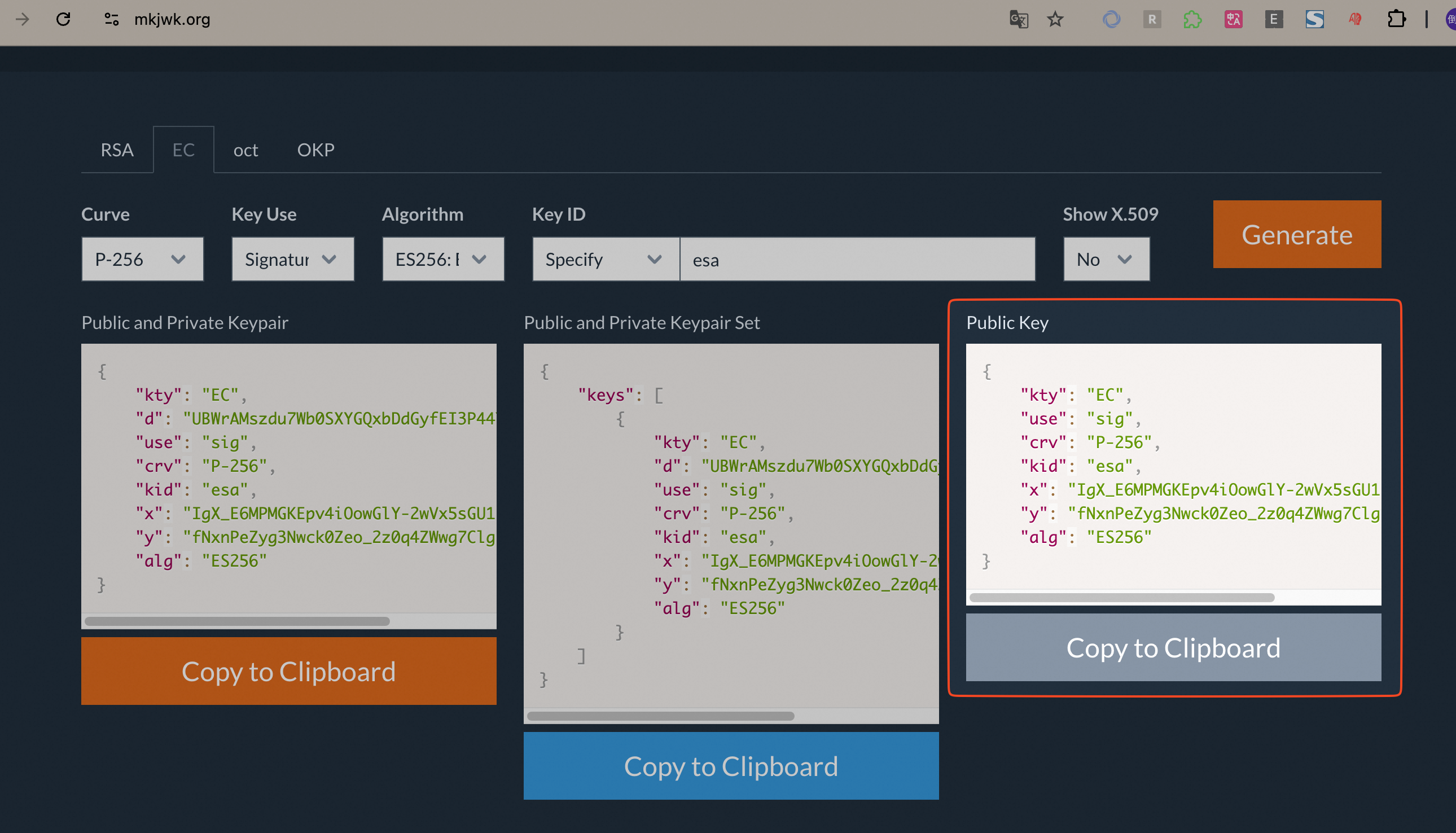
Use https://mkjwk.org to generate the private key and the public key. The private key is used to generate tokens, and the public key is used to validate tokens.
Use a browser to visit https://mkjwk.org.
Click the EC tab.
Specify the following parameters:
Curve: Select
P-256.Key Use: Select
Signatureas the purpose of the public key.Algorithm: Select
ES256: ECDSA using P-256 and SHA-256as the algorithm identifier.KeyID: Enter a custom key identifier, such as
esa.
Click Generate. Then, select Public Key and click Copy to Clipboard to copy the public key.