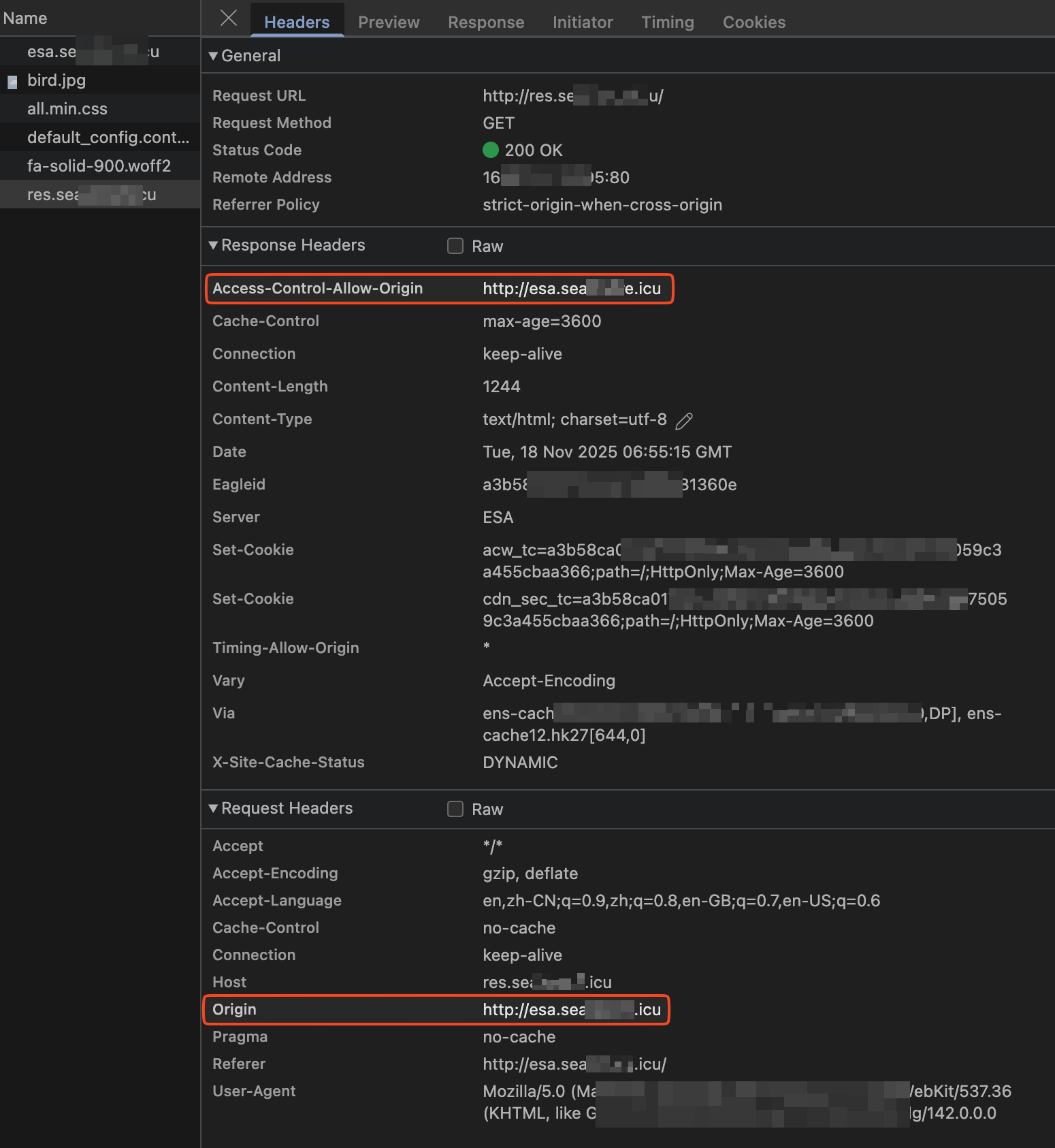
Configure HTTP response headers in Edge Security Acceleration (ESA) to enable cross-origin resource sharing (CORS), allowing browsers to load resources from different origins.
Why configure cross-origin resource sharing

Web applications typically separate frontend and backend. A frontend at http://example.com needs data from a backend API at http://example.org/api. The browser's same-origin policy blocks these cross-origin requests, preventing the frontend from working correctly.
A CORS policy on a point of presence (POP) resolves this issue. It lets the browser validate responses from http://example.org/api and allows scripts from http://example.com to access the response data, ensuring only authorized origins reach your resources.
Solution overview
CORS uses HTTP header negotiation between the browser and server. Deploying the configuration on an ESA POP handles cross-origin logic before requests reach your origin, providing unified policy management at the ESA edge.

-
Initiate request: The frontend application at
http://example.comrequests thehttp://example.com/index.htmlresource. -
Process at POP: The ESA POP checks its cache. If cached, it returns the content directly. Otherwise, it fetches from the origin server, caches the response, and returns it.
-
Respond from POP: The POP sends the requested content (the
index.htmlfile) to the client with a200 OKstatus. -
Process at client: The client executes the script in the HTML file.
-
Initiate cross-origin request: The client's script sends a cross-origin request,
GET http://example.org/api, that includes theOrigin:http://example.comrequest header. -
Process cross-origin request at POP: The POP checks if the request matches the rule conditions. For example, it checks if the value of the
Originheader ishttp://example.com. If the conditions are met, the POP adds theAccess-Control-Allow-Origin:http://example.comCORS header to the response. -
Respond to cross-origin request: The POP returns
200 OKfor the cross-origin request. -
Process cross-origin request at client: The browser verifies that the
Access-Control-Allow-Originheader matches the page's origin (http://example.com). If matched, the browser processes the response and displays the content.
Configuration example
If you use OSS as the origin server and configure CORS in both the OSS and ESA consoles, the ESA configuration overwrites the OSS CORS settings.
Apply to all requests
Use case
Allow all requests from your site (example.com) to access resources from any origin.
Steps
-
In the ESA console, select Websites. In the Website column, click the target site.
-
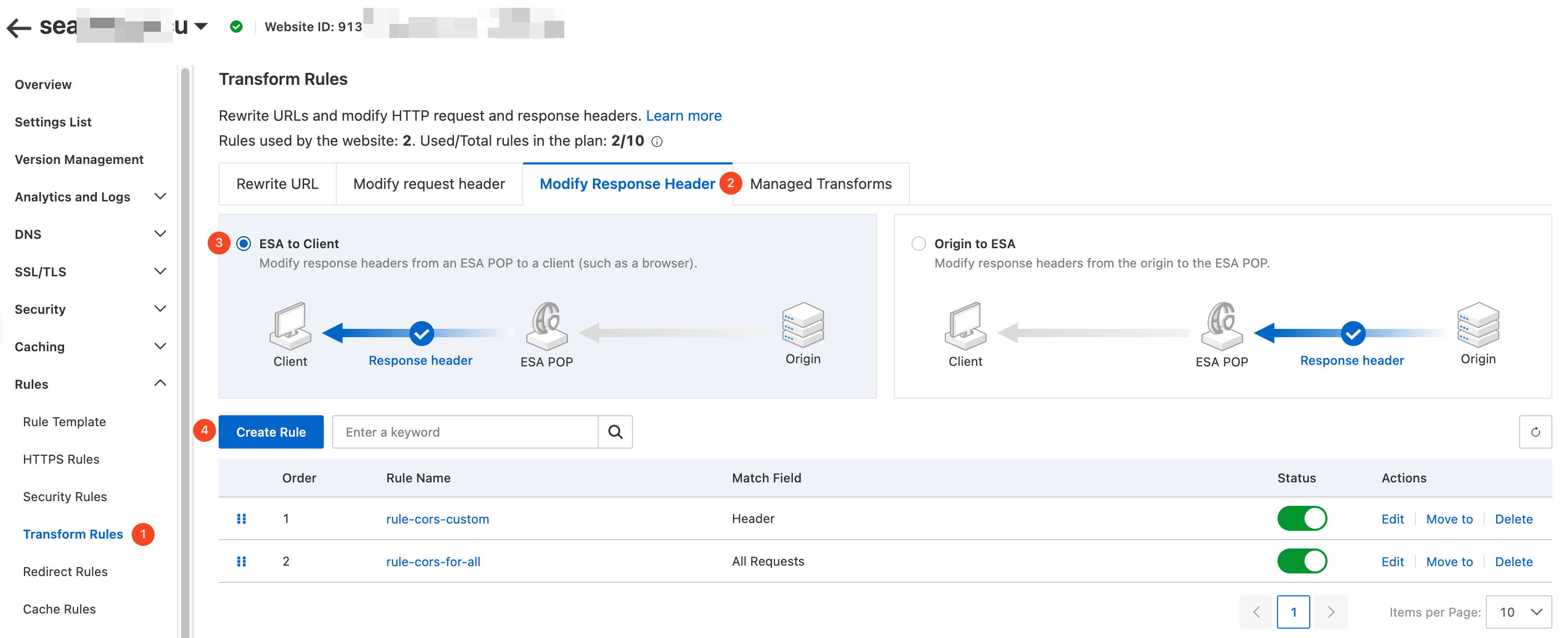
In the navigation pane on the left, choose . On the Transform Rules page, click the Modify Response Header tab. Set Response Header Position to ESA to Client, and then click the Create Rule button.
-
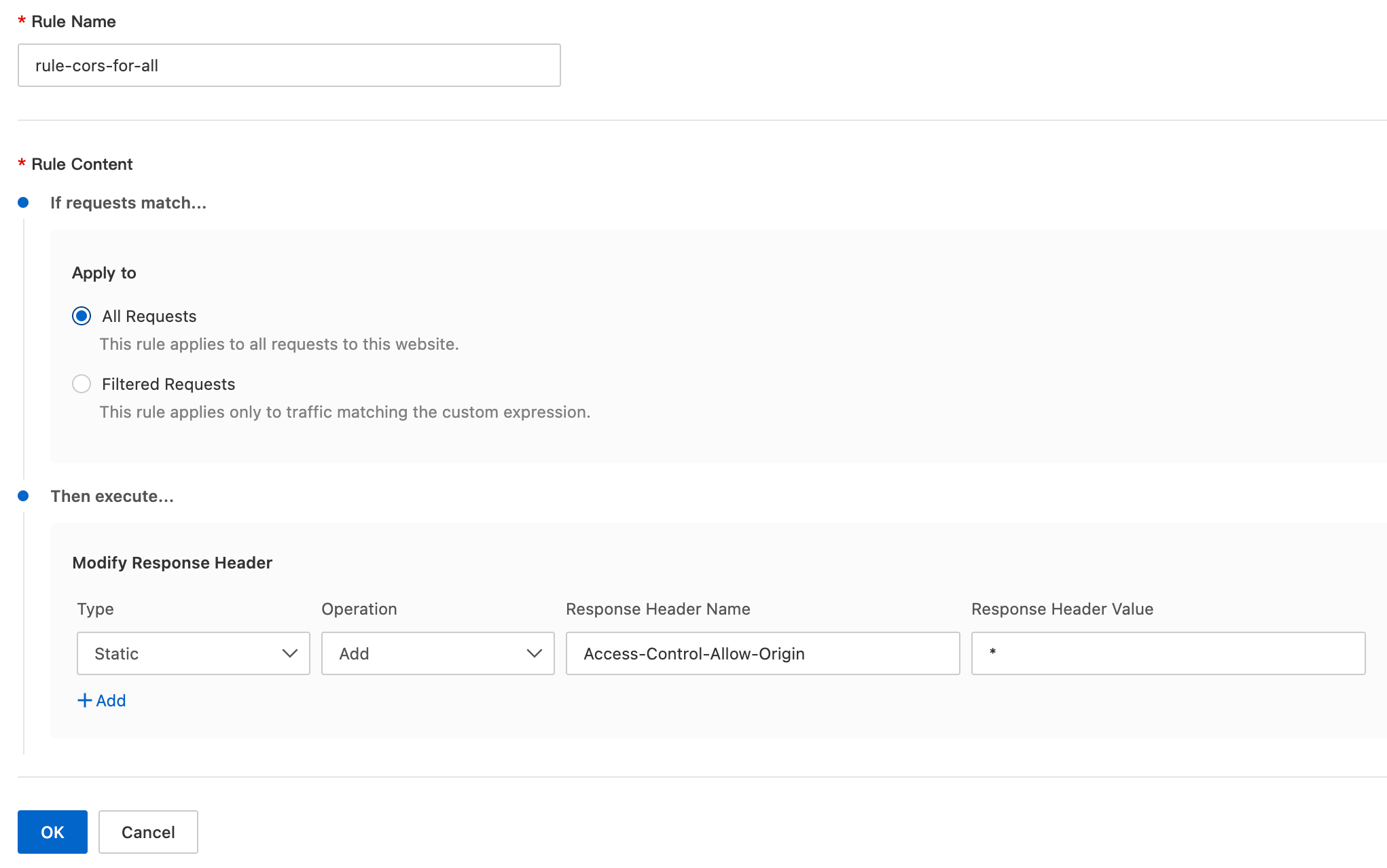
On the Create Response Header Modification Rule page, configure the parameters as follows:
-
Rule Name: Enter a custom rule name, such as
rule-cors-for-all. -
If requests match...: Select All Requests.
-
Then execute...: Configure the following parameters:
-
Type: Select Static.
-
Operation: Select Add.
-
Response Header Name: Enter
Access-Control-Allow-Origin. -
Response Header Value: Enter
*.
-
-
Result
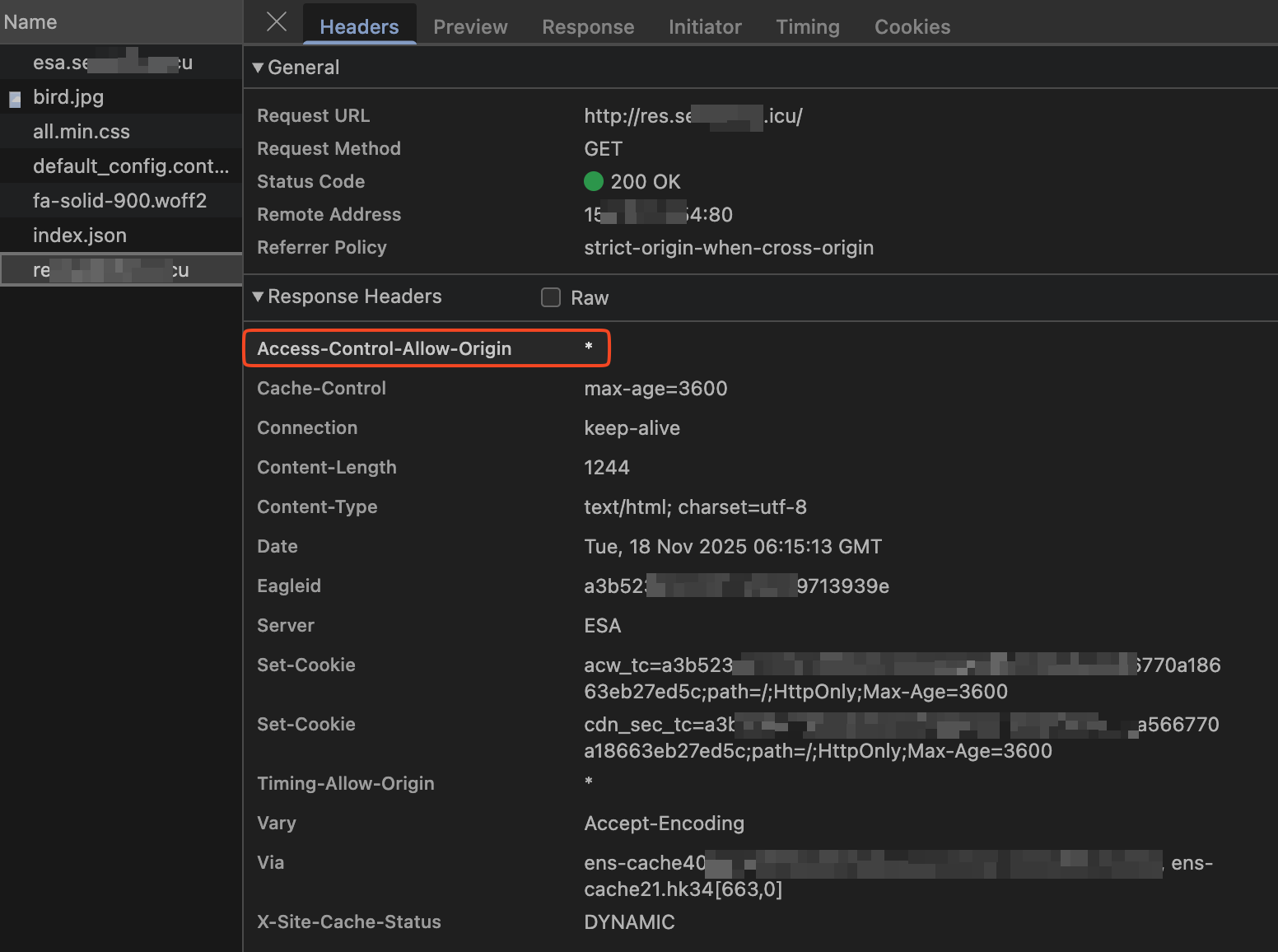
For any cross-origin request, ESA adds the Access-Control-Allow-Origin: * header to the response, allowing the browser to display the cross-origin resource.
Apply to specific requests
Use case
Allow cross-origin access when the origin header matches a subdomain of example.com over HTTP or HTTPS. For example:
-
origin:http://www.example.com -
origin:https://www.example.com -
origin:http://image.example.com -
origin:https://image.example.com
The CORS response header value must match the origin header in the request.
Configuration steps
-
In the ESA console, select Websites. In the Website column, click the target site.
-
In the navigation pane on the left, choose . On the Transform Rules page, click the Modify Response Header tab. Set Response Header Position to ESA to Client, and then click the Create Rule button.
-
On the Create Response Header Modification Rule page, configure the parameters as follows:
-
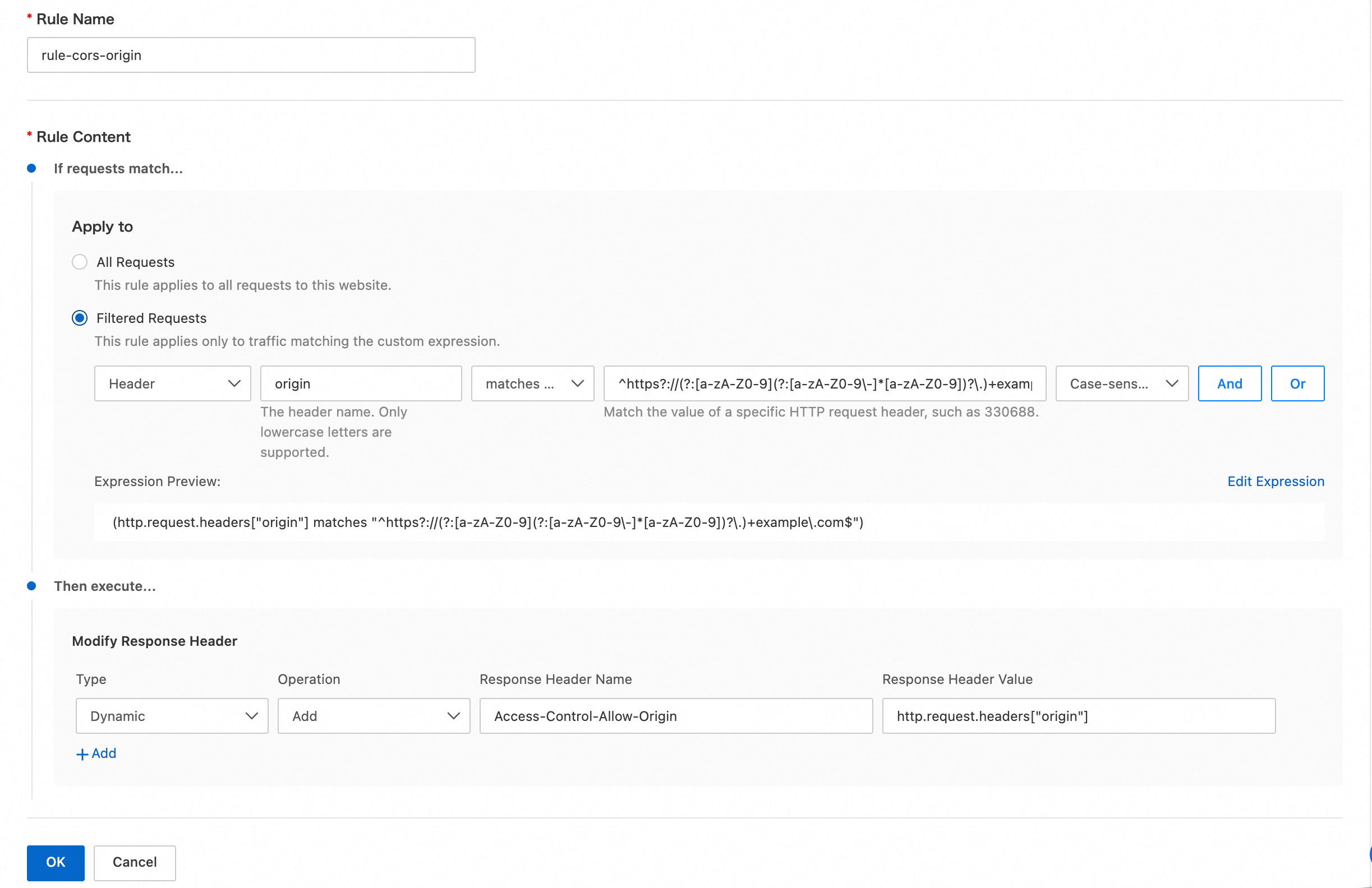
Rule Name: Enter a custom rule name, such as
rule-cors-origin. -
If requests match...: For this example, set the condition to
Header Value of origin matches regex ^https?://(?:[a-zA-Z0-9](?:[a-zA-Z0-9\-]*[a-zA-Z0-9])?\.)+example\.com$.You can also directly edit the expression as follows:
(http.request.headers["origin"] matches "^https?://(?:[a-zA-Z0-9](?:[a-zA-Z0-9\-]*[a-zA-Z0-9])?\.)+example\.com$")NoteIf your plan does not support matching with regular expressions, use the
is inoperator and list the allowed origin header values.You can also directly edit the expression as follows:
(http.request.headers["origin"] in {"http://www.example.com" "https://www.example.com" "http://image.example.com" "https://image.example.com"})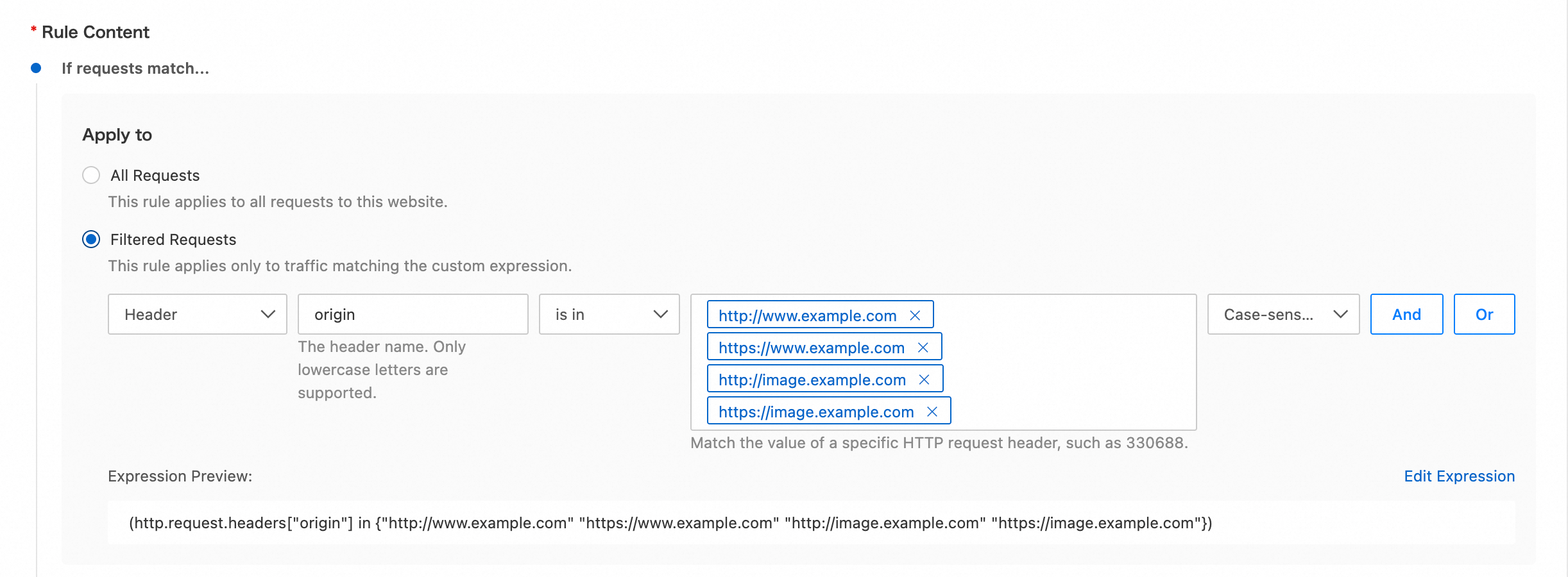
-
Then execute...: Configure the following parameters:
-
Type: Select Dynamic.
-
Operation: Select Add.
-
Response Header Name: Enter
Access-Control-Allow-Origin. -
Response Header Value: Enter
http.request.headers["origin"].
-
-
Result
When the origin header in a cross-origin request matches the rule, ESA adds the Access-Control-Allow-Origin header with the value from the client's Origin header. The browser then processes the response and displays the cross-origin resource.