This topic describes how to manage domain names whose ICP numbers are expired. You can use the solutions described in this topic to keep these domain names accessible.
Challenge
According to relevant laws and regulations in the Chinese mainland, Dynamic Route for CDN (DCDN) cannot provide the acceleration service to domain names that are deployed in the Chinese mainland and do not have a valid ICP number. If the accelerated region of your domain name is Chinese Mainland Only or Global, and the ICP number of the domain name expires, DCDN suspends the acceleration service for the domain name.
Solutions
- Solution 1: Change the accelerated region of the domain name. If you want to accelerate the delivery of content from origin servers that are deployed outside the Chinese mainland, you can change the accelerated region of the domain name to Global (Excluding the Chinese Mainland). This way, content delivery is accelerated only by DCDN nodes deployed outside the Chinese mainland. The pricing strategies vary based on the accelerated region. For more information, see DCDN Pricing.
- Log on to the DCDN console.
- In the left-side navigation pane, click Domain Names.
- On the Domain Names page, find the domain name that you want to manage and click Configure in the Actions column.
- In the Basic Information section, click Modify.
- In the Location dialog box, set Location to Global (Excluding the Chinese Mainland).
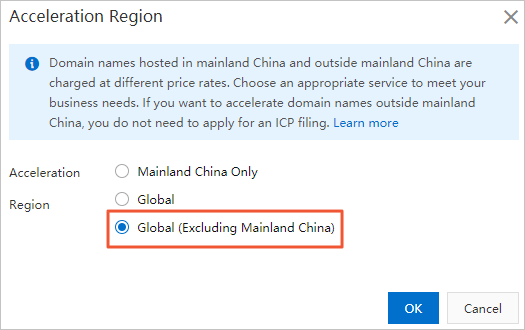
- Click OK.
- Method 2: Temporarily resolve your domain name to the origin server. You can resume content acceleration after the domain name obtains a valid ICP number.
The following steps take a domain name registered with Alibaba Cloud as an example. If your domain name is registered with another provider, the configuration procedure is similar.
- Log in to the Alibaba Cloud DNS console.
- On the Manage DNS page, find your domain name and click Configure in the Actions column.
- Click Add Record and create an A record to replace the CNAME record.
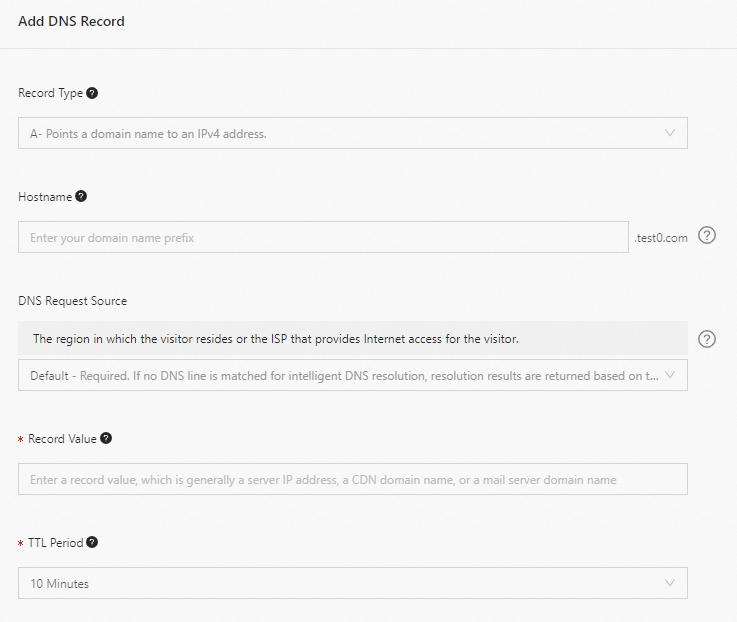
Parameter Description Example Type Select A. A Host The prefix of the accelerated domain name. - If the accelerated domain name is
www.aliyun.com, enterwww. - If the accelerated domain name is
aliyun.com, enter@. - If the accelerated domain name is
*.aliyun.com, enter*.
ISP Line The resolution line for DNS requests. Keep the default value. Value The IP address (IPv4) or domain name of the origin server. 10.10.10.10 TTL The cache duration. The smaller the value, the faster the record change takes effect. The default value is 10 minutes. Keep the default value. - If the accelerated domain name is
- Click Confirm.