This topic guides you through the process of using EdgeRoutine, from enabling the service to deploying your first routine.
Alibaba Cloud DCDN will stop offering the EdgeRoutine feature to new users at 00:00 (UTC+8) on May 1, 2025. Existing users are not affected.
If you need this feature, we recommend upgrading to the ESA service and using the Functions and Pages feature of ESA.
Workflow
To use EdgeRoutine, you must first activate DCDN. The following figure shows the workflow.

EdgeRoutine is currently in beta and is available only to select customers. If the daily peak bandwidth of your or DCDN service exceeds 500 Mbps, you can submit a ticket to request access. After your application is approved, the EdgeRoutine menu item appears in the navigation pane.
Enable the EdgeRoutine service
-
Log on to the DCDN console.
In the navigation pane on the left, click EdgeRoutine.
Click to enable the service.
Create and configure a routine
-
Log on to the DCDN console.
In the navigation pane on the left, click EdgeRoutine.
If you are using EdgeRoutine for the first time, you must first create a subdomain.
On the EdgeRoutine page, click Create Subdomain.
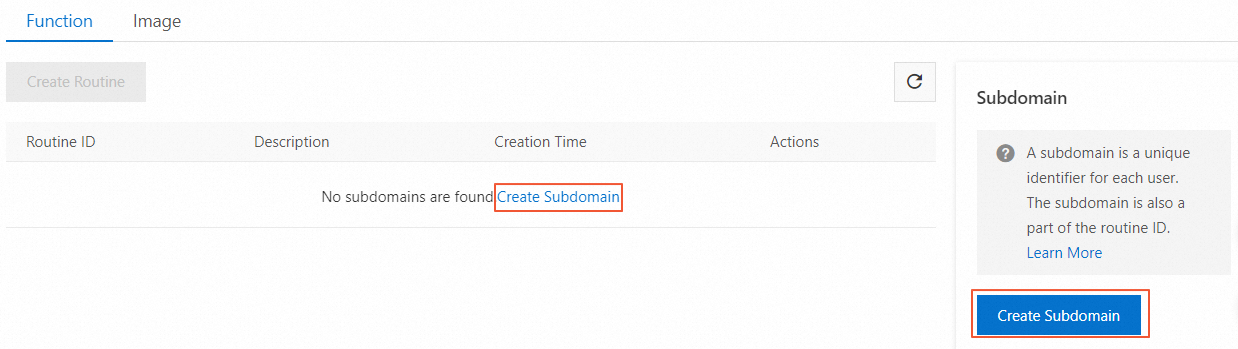
In the Create Subdomain dialog box, enter a subdomain name.
NoteA subdomain acts as a repository for all your routines. The subdomain cannot be changed once it is created.
The subdomain is a unique identifier for each user and forms part of the routine ID.
The name must contain only lowercase letters, digits, and hyphens (-), and must be at least two characters long, for example,
subdomain-name.
Click OK.
On the EdgeRoutine page, click Create Routine.
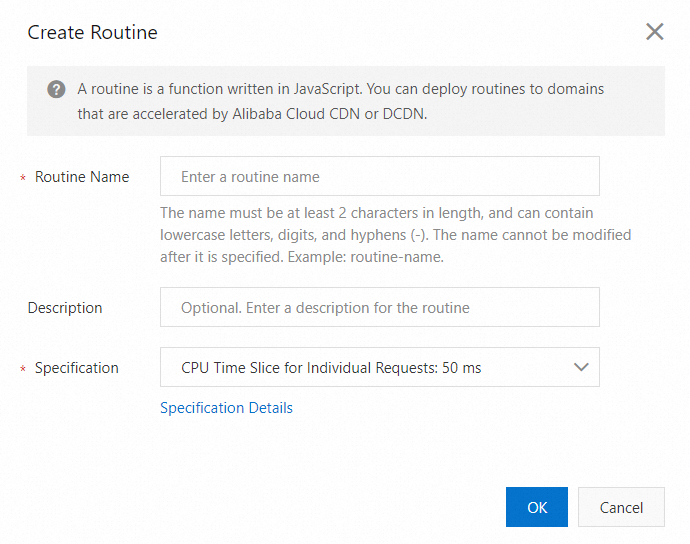
Parameter
Description
Routine Name
Enter a name for the routine.
NoteThe name can contain lowercase letters, digits, and hyphens (-). The name cannot be less than 2 characters in length. Example: routine-name. The routine name cannot be modified after it is created.
Description
(Optional) A description of the routine.
Specification
The maximum CPU time for a single routine execution, excluding I/O wait time for network responses. The maximum runtime is 120 seconds, and the available memory is 128 MB. Fees vary based on the selected specification. The 50 ms specification is selected by default. For more information, see Billing of EdgeRoutine.
CPU Time Slice for Individual Requests: 5 ms
CPU Time Slice for Individual Requests: 50 ms (Default)
CPU Time Slice for Individual Requests: 100 ms
After creating the routine, click Details in the Actions column to open its details page. Each environment (production, staging, and optional canary) has an independent configuration that you can modify.
Parameter
Description
Routine Specifications
The maximum CPU time for a single routine execution, excluding I/O wait time for network responses. The maximum runtime is 120 seconds, and the available memory is 128 MB. The 50 ms specification is selected by default.
CPU Time Slice for Individual Requests: 5 ms
CPU Time Slice for Individual Requests: 50 ms (Default)
CPU Time Slice for Individual Requests: 100 ms
Domain Name Whitelist
Specifies the domains that can be associated with this routine.
Wildcard domains are supported.
By default, the domain name whitelist is empty, allowing any domain to be associated with the routine.
NoteFor example, if you add
example.comto the whitelist, only requests fromexample.comcan trigger this routine. Requests from other domains are rejected by the routine.
Associate a domain with a routine
A routine requires a domain to serve as an entry point for client requests. You can use a domain accelerated by Alibaba Cloud CDN or DCDN. After you create and configure the routine, you must associate your or DCDN domain with it. Client requests to this domain will then trigger the routine. The procedure varies depending on the console where your domain is hosted.
-
Log on to the DCDN console.
-
In the left-side navigation pane, click Domain Names.
-
On the Domain Names page, find the target domain name and click Configure.
In the navigation pane on the left for the domain, click EdgeRoutine.
On the EdgeRoutine page, enable the feature and configure the Routine ID.
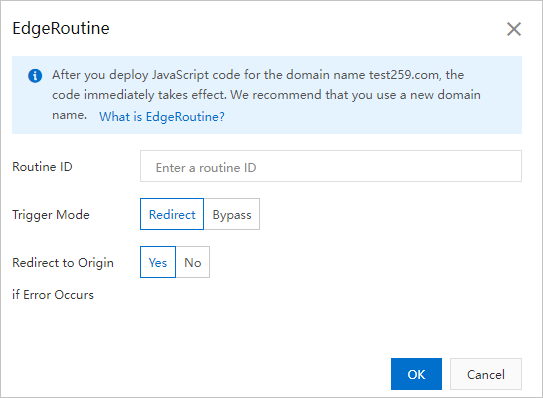
Parameter
Description
Routine ID
The unique identifier for each routine. The format is
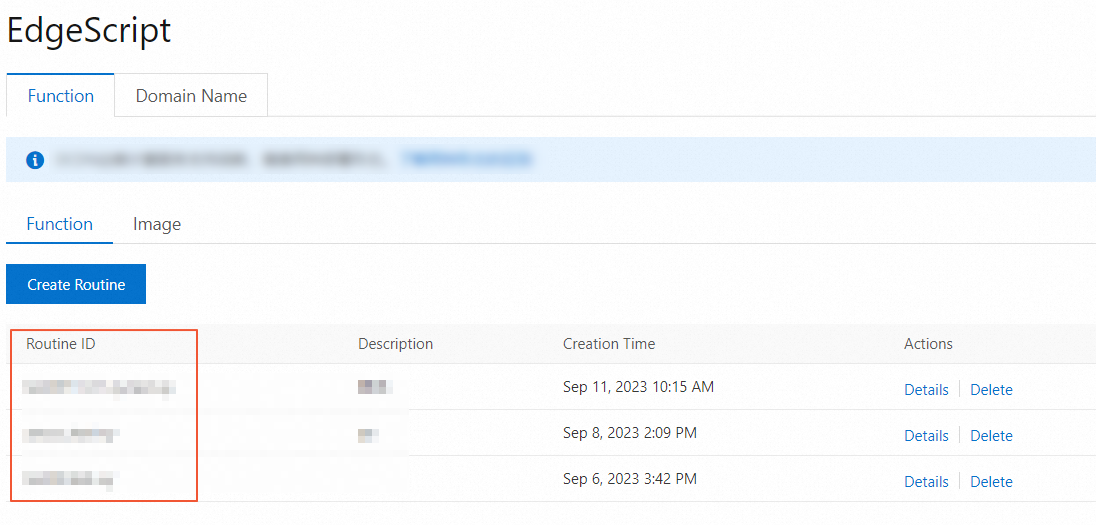
routine-name.subdomain.NoteIn the navigation pane on the left of the DCDN console, click EdgeRoutine. You can find the ID of the corresponding routine on the Function page.
Trigger Mode
Requests to the or DCDN domain trigger the routine. Two modes are available:
Redirect: Requests to the or DCDN domain are fully handled by the routine. You can write your own code to directly respond to the client, read from the cache by using the Cache API, or fetch content from the origin.
Bypass: Requests to the or DCDN domain only trigger the routine execution, and then proceed with the regular or DCDN configuration to redirect to origin. This mode is suitable for scenarios such as authentication or logging.
Redirect to Origin if Error Occurs
Yes: If a routine execution fails, the point of presence (POP) forwards the client request to the origin server of the or DCDN domain. This allows you to implement fallback and disaster recovery mechanisms on your origin server.
No: If a routine execution fails, the POP returns a 5xx status code directly to the client.
Note-
The first time you use a routine, we recommend that you set the Redirect to Origin if Error Occurs parameter to No. You can use the HTTP 5xx status code that is returned to troubleshoot issues.
-
If an exception occurs, you are charged for the number of back-to-origin requests. The percentage of abnormal back-to-origin requests is very low and can be ignored.
-
Develop and debug a routine
-
Log on to the DCDN console.
In the navigation pane on the left, click EdgeRoutine.
Select the routine that you created and click Details.
On the Details page, select the Code tab to develop your EdgeRoutine in JavaScript. The editor includes a default "Hello World" example.
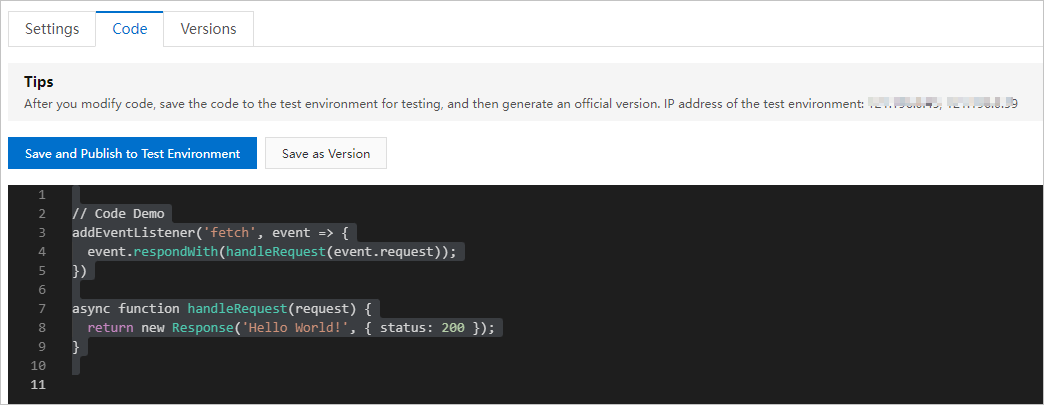
After writing the code, click Release to Staging Environment. You can then use any of the provided staging environment IP addresses to map in your local hosts file for testing and debugging the routine.
NoteTo test, modify the hosts file on your local machine to map the domain to one of the provided staging IP addresses. For example:
10.10.10.10 example.com. Replace the IP address with one of the provided IPs and the domain name with the or DCDN domain associated with the routine.
Create a version
After debugging the code, on the Code tab, click Save as Version.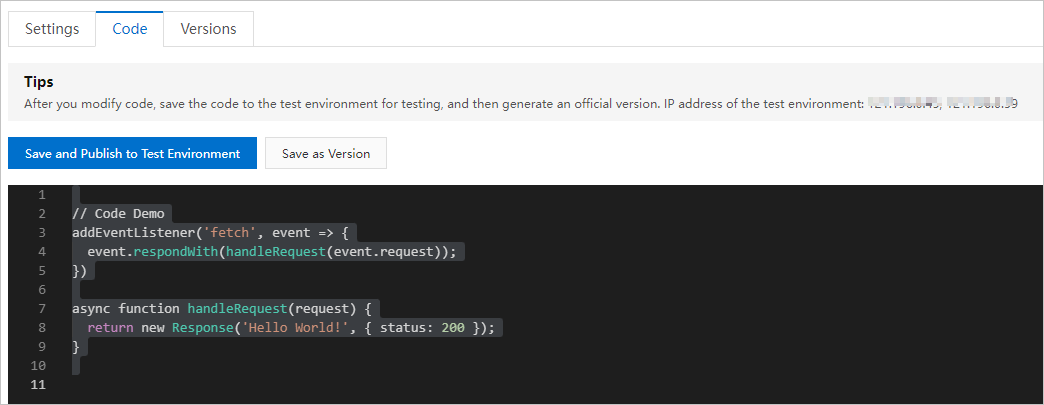
Publish a version
To reduce the impact of cold starts on business performance, EdgeRoutine uses a lazy update mechanism for version publishing. After a new version is published, it is asynchronously updated and takes effect when the first request arrives at each POP. As a result, you may receive responses from the previous version for a short period after publishing. This is expected behavior, not a bug.
On the Details page, select the Versions tab. Choose a version ID and click Release in the Actions column.
Select the environment to publish to: Staging Environment, Production Environment, or Canary Environment.
NoteWe recommend that you release a routine to the canary environments before you release it to the production environments.
Click OK. The new version will be deployed to POPs in the selected environment.
Routine maintenance
The preceding steps describe how to configure and publish a "Hello World" example routine.
To update and iterate on routine code, follow the steps in the "Develop and debug a routine", "Create a version", and "Publish a version" sections.
To adjust routine configurations, such as specifications or the domain name whitelist, see "Create and configure a routine".
To disable the EdgeRoutine feature for an or DCDN domain, remove the EdgeRoutine configuration from the domain association settings.
