When your accelerated domain name has multiple origins, you can assign a unique origin host to each origin to route requests to the correct virtual site.
Background
The configuring the Default Origin Host topic explains how an origin host works. With multiple origins, the Default Origin Host feature sends the same Host header to all of them, requiring each origin to have a matching virtual site. The Specify Origin Host feature lets you assign a different origin host to each origin for greater flexibility.
If you configure both Default Origin Host and Specify Origin Host, when a DCDN point of presence (POP) accesses an origin, it uses the origin host configured for that origin.
Procedure
-
Log on to the DCDN console.
-
In the left-side navigation pane, click Domain Names.
-
On the Domain Names page, click Configure for the target domain name.
-
In the domain's navigation pane, click Origin Fetch.
-
In the Specify Origin Host section, click Add.
-
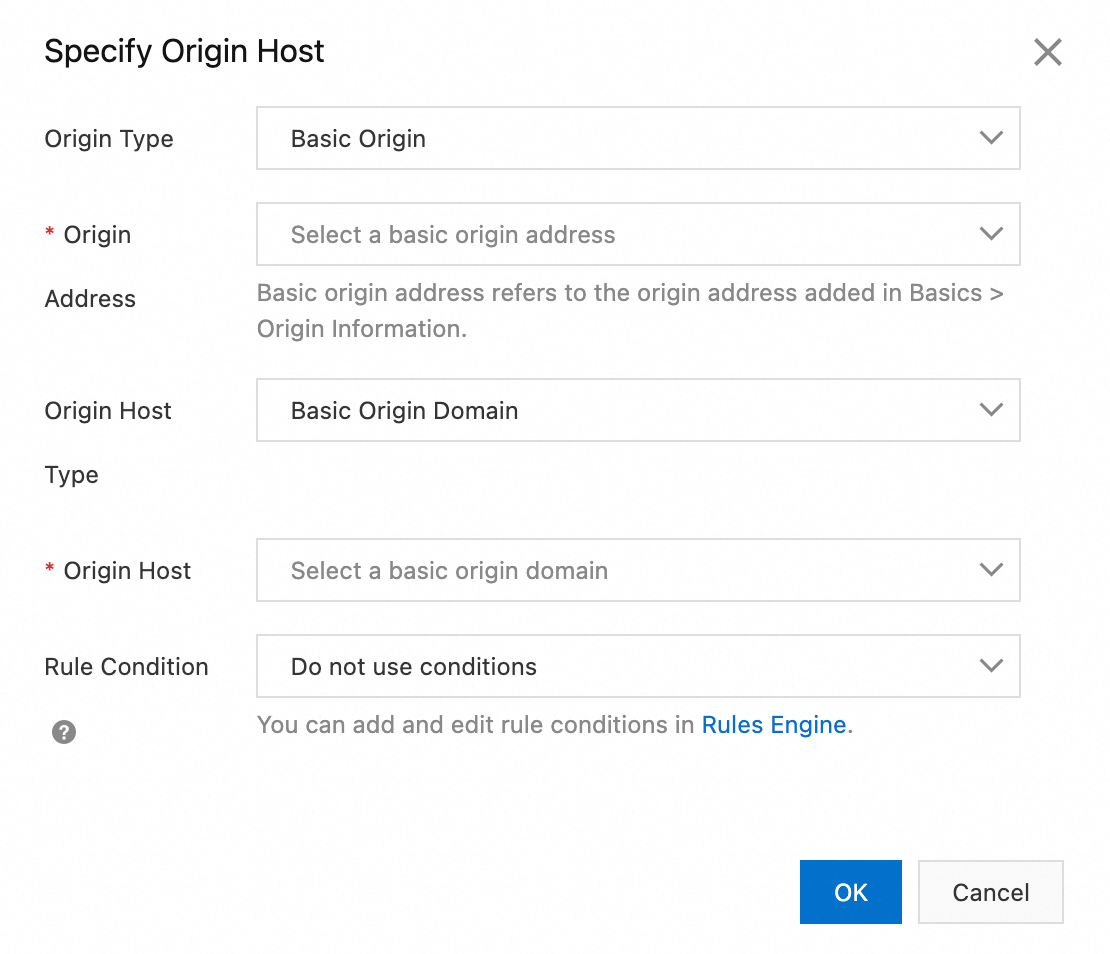
In the Specify Origin Host dialog box, configure the parameters.
Parameter
Description
Origin type
Select the type of origin:
-
Basic Origin: The origin address that you added when you add an accelerated domain name.
-
All Origins: Any origin address to which DCDN forwards requests. If you select All Origins, the origin host is automatically set to Follow Origin Address and cannot be changed.
-
Custom Origin: If the desired origin address is not in the list, you can add it as a Custom Origin.
Origin address
The available options depend on the selected Origin type:
-
If you select Basic Origin for Origin type, you can select an origin address from the drop-down list.
-
If you select All Origins for Origin type, you do not need to configure an origin address.
-
If you select Custom Origin for Origin type, you can enter a custom origin address.
Origin host type
Select the type of origin host:
-
Basic Origin Domain: The origin address that you added when you added a service domain (excluding IP-based origins).
-
Accelerated Domain Name: The current DCDN accelerated domain name.
-
Custom Origin Host: Specify a custom origin host.
Origin host
The available options depend on the selected Origin host type:
-
If you select Basic Origin Domain for Origin host type, you can select an origin host from the drop-down list.
-
If you select Accelerated Domain Name for Origin host type, the current DCDN accelerated domain name is used. You do not need to configure this parameter.
-
If you select Custom Origin Host for Origin host type, you can enter a custom origin host.
Rule condition
A rule condition determines whether this configuration applies to a request based on request parameters.
ImportantWhen a feature references rule conditions configured in the rules engine, the execution order follows the priority of the associated rule conditions, not the order of the feature configurations.
-
Do not use conditions: Disables conditional rules.
-
You can add or edit conditional rules in Rules engine.
-
-
Click OK.