After adding your domain to Alibaba Cloud DCDN, you can configure custom HTTP response headers to enable cross-origin resource sharing (CORS) and access resources from different origins.
What is CORS?
Cross-origin resource sharing (CORS) is a standard cross-origin solution that is provided by HTML5 to allow web pages to access and load resources from different origin servers. This ensures data transmission security. For more information, see Cross-Origin Resource Sharing (CORS).
Benefits
For security purposes, browsers use the same-origin policy. This restricts web pages from initiating requests to access and load resources from different domains or subdomains, or over different protocols or ports. For example, example.com cannot access resources on example.org. When you configure CORS, you can specify response headers on the DCDN server. If a request to access DCDN resources carries headers that comply with the allowed rules, cross-origin resources can be loaded and accessed.
How CORS works
CORS disabled

A client sends a request for
http://example.com/index.htmltoexample.com.example.comreturns theindex.htmlfile to the client. The file URL contains the URL to a resource from another origin server:http://example.org/image_01.png.The client sends a request for
http://example.org/image_01.pngtoexample.org.example.orgreturns a cross-origin header, such asAccess-Control-Allow-Origin: *.The client receives the response and the browser checks the header value. The header value is an asterisk (*), which indicates that cross-origin requests from all origins are allowed. Then, the browser displays the response.
CORS enabled

A client sends a request for
http://example.com/index.htmlto DCDN.DCDN returns the
index.htmlfile to the client. The file URL contains the URL to a resource from another origin server:http://example.org/image_01.png.The client sends a request for
http://example.org/image_01.pngto DCDN. The request includes theOrigin:http://example.comheader.DCDN receives the request and then compares the value of the
Originheader in the request with the configured value ofAccess-Control-Allow-Origin. You can specify one or more values, or a wildcard domain name forAccess-Control-Allow-Origin.Access-Control-Allow-Originis returned to the client only if the preceding header values match.DCDN returns a cross-origin header, such as
Access-Control-Allow-Origin:http://example.com, to the client.The client receives the response and the browser checks the header value. The header value is
http://example.com, which indicates that cross-origin requests fromhttp://example.comare allowed. Then, the browser displays the response.
Usage notes
If the origin server is an Object Storage Service (OSS) bucket and CORS is configured in both the OSS and DCDN consoles, the CORS settings in the DCDN console are used. For more information about CORS settings in the OSS console, see CORS.
HTTP response headers configured in the DCDN console, such as the
Access-Control-Allow-OriginCORS header, apply to all resource types, including dynamic API requests.
Enable CORS
-
Log on to the DCDN console.
-
In the left-side navigation pane, click Domain Names.
-
On the Domain Names page, find the target domain name and click Configure.
-
In the left-side navigation tree of the domain name, click Caching.
Click the Modify Outgoing Response Header tab, and then click Add to configure the HTTP response header that DCDN nodes add to responses.
Set the following parameters to specify the allowed origins for cross-origin requests, and then click OK.
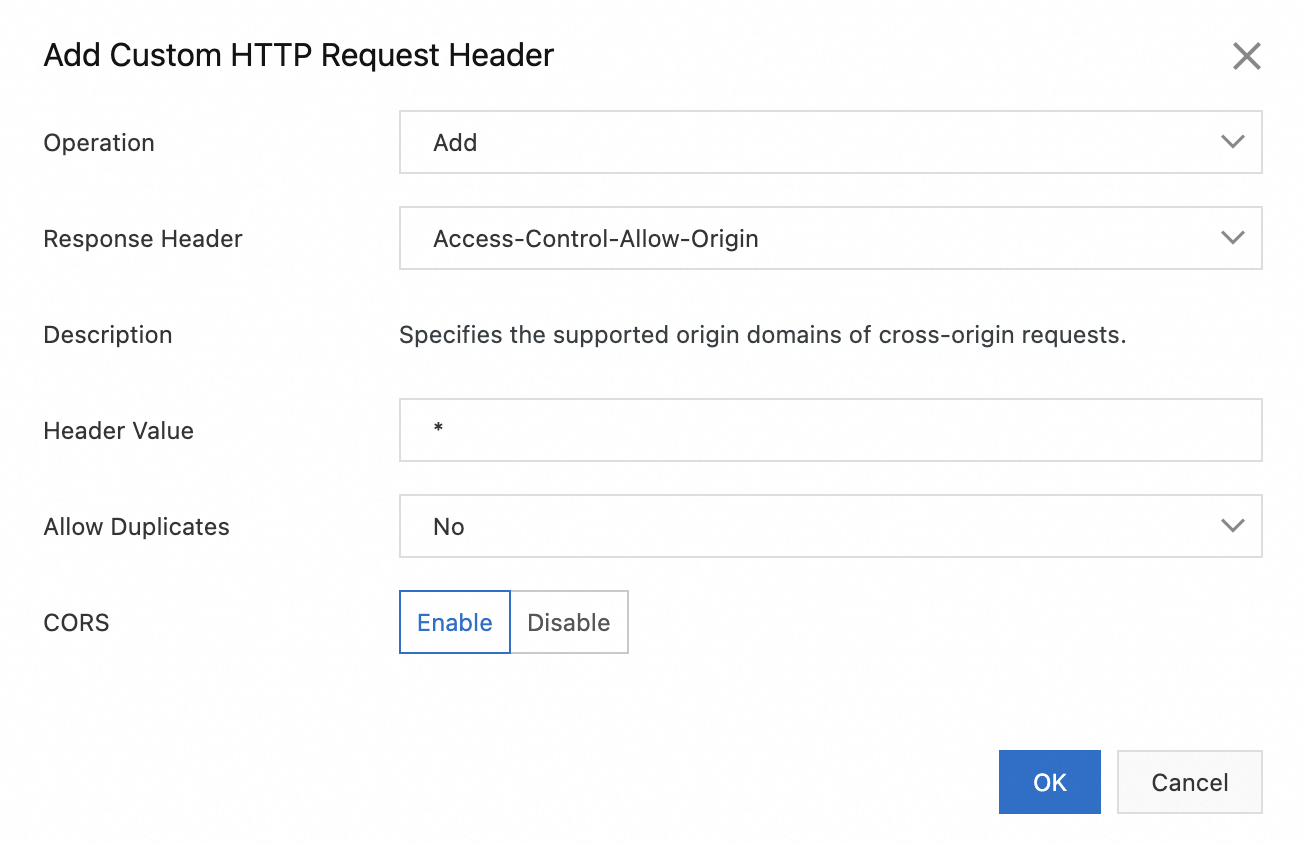
Parameter
Description
Example
Operation
You must set this parameter to Add to use the CORS feature.
Add
Response Header
You must set this parameter to
Access-Control-Allow-Originto use the CORS feature.Access-Control-Allow-Origin
Header Value
CORS disabled: You can only configure a wildcard or a single specified origin.
Wildcard (
*): A wildcard is configured, indicating that resources can be accessed from all origins.Single specified origin: A single origin (domain name) is specified, indicating that resources can be accessed only from the specified origin.
CORS enabled: You can configure a wildcard, a single specified origin, multiple specified origins, and wildcard domain names.
Wildcard (
*): A wildcard is configured, indicating that resources can be accessed from all origins.Single specified origin: A single origin (domain name) is specified, indicating that resources can be accessed only from the specified origin.
Multiple specified origins: Multiple origins (domain names) are specified and separated with commas (
,), indicating that resources can be accessed from origins within the specified range.Wildcard domain names: A wildcard domain name is configured, indicating that resources can be accessed from all origins that match the specified wildcard domain name.
*http://www.aliyun.comhttps://aliyun.com,http://www.aliyun.comhttp://*.aliyun.com
Allow Duplicates
Yes: Duplicate headers are allowed. The header that is returned from the origin server and the header that is added to the response are returned to the client.
No: Duplicate headers are not allowed. The header that is returned from the origin server is overwritten by the header that is added to the response.
ImportantThe Allow Duplicates and CORS settings are mutually exclusive. If you set Allow Duplicates to Yes, the setting of CORS becomes invalid.
No
CORS
You can configure the CORS parameter only if you set Operation to Add and Response Header to
Access-Control-Allow-Origin.Valid values of CORS: Disable and Enable. Default value: Disable.
Disable: DCDN POPs do not check the
Originheader in user requests. In this case, POPs return the configured value ofAccess-Control-Allow-Origin.Enable: DCDN POPs check the
Originheader in user requests and specify a value for theAccess-Control-Allow-Originheader based on the following rules:Wildcard pattern match: If you set the
Access-Control-Allow-Originheader to an asterisk (*),Access-Control-Allow-Origin:*is returned, regardless of whether user requests contain theOriginheader or the value that is specified for theOriginheader.Exact match: You can specify one or more values for the
Access-Control-Allow-Originheader. Separate multiple values with commas (,):If the value of the
Originheader in a user request matches a value of theAccess-Control-Allow-Originheader, the matched value of theAccess-Control-Allow-Originheader is returned.If the value of the
Originheader in a user request does not match a value of theAccess-Control-Allow-Originheader, theAccess-Control-Allow-Originheader is not returned.
Wildcard domain name match: If you set the
Access-Control-Allow-Originheader to a wildcard domain name, the value of theOriginheader is matched against the wildcard domain name.
If you set the CORS parameter to Enable and the value that you want to specify for the Header Value parameter contains a hyphen (
-), you need to escape the hyphen (-) to%-. Examples:Original response header value:
http://doc.aliyun-example.com.Escaped response header value:
http://doc.aliyun%-example.com.
Enable
Configure the following parameters to specify the allowed methods for cross-origin requests, and then click OK.
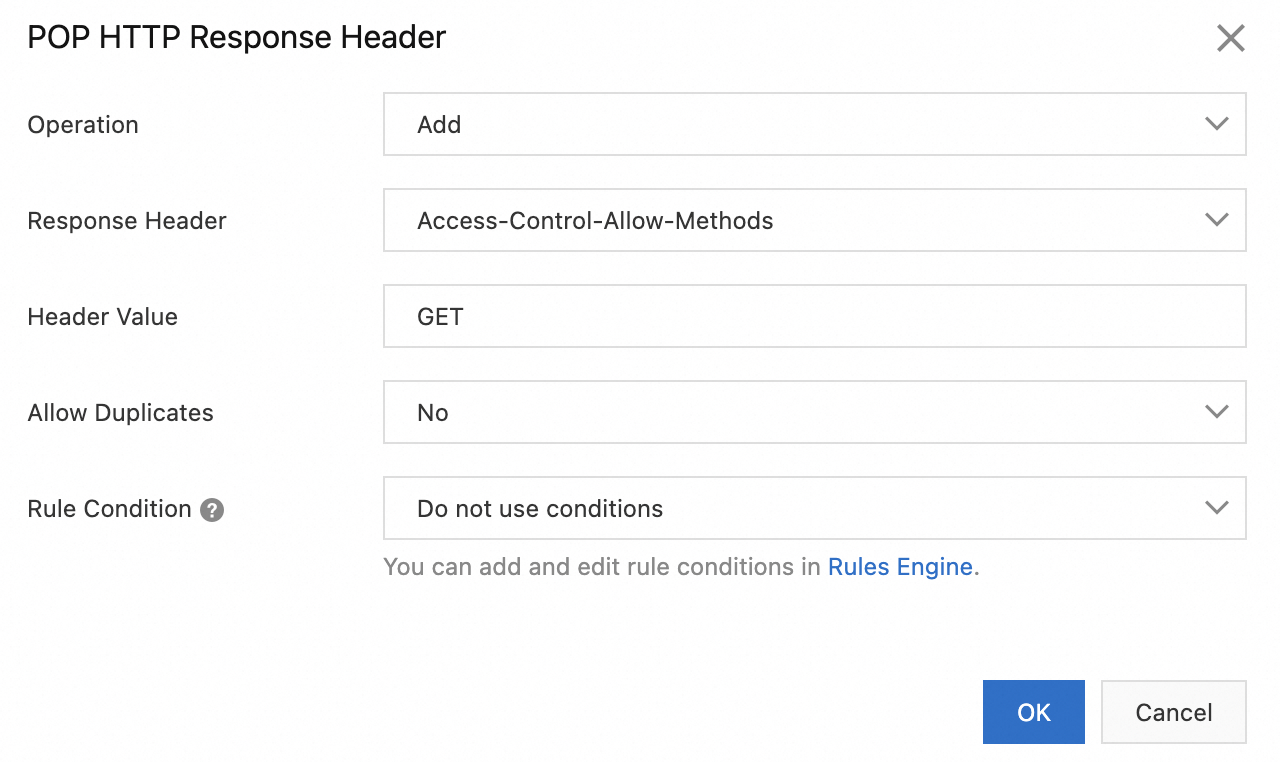
Parameter
Description
Example
Operation
You must set this parameter to Add.
Add
Response Header
You must set this parameter to
Access-Control-Allow-Methods.Access-Control-Allow-Methods
Header Value
Valid values:
GET,POST, andPUT. If you addGET,POST, andPUTat the same time, separate them with commas (,).GETAllow Duplicates
Yes: Duplicate headers are allowed. The header that is returned from the origin server and the header that is added to the response are returned to the client.
No: Duplicate headers are not allowed. The header that is returned from the origin server is overwritten by the header that is added to the response.
No
Configuration examples
Example 1
If the response header value for CORS is set to one or more specific origins separated by commas (,):
If the
Originheader value in the user's request exactly matches one of the specified origins, the DCDN POP responds with the corresponding CORS header.If no exact match is found, the CORS header is not included in the response.
On /DCDN, set: Access-Control-Allow-Origin: http://example.com,https://aliyundoc.com.
The
Originheader of the user request ishttp://example.com, and the DCDN Point of Presence (POP) responds withAccess-Control-Allow-Origin: http://example.com.The
Originheader in the user request ishttps://aliyundoc.com, and the DCDN node responds withAccess-Control-Allow-Origin: https://aliyundoc.com.The DCDN node will not respond to a user request with the Origin header
http://aliyundoc.com(due to a protocol mismatch: the user request uses HTTP, while the DCDN is configured for HTTPS).If the
Originheader of a request ishttp://aliyun.com, the DCDN POP will not respond (domain mismatch).
Example 2
If the response header value for CORS is set to a wildcard domain, the POP checks if the Origin value in the request header matches the wildcard pattern.
On /DCDN, set: Access-Control-Allow-Origin: http://*.aliyundoc.com.
The user request contains the Origin header
http://demo.aliyundoc.com, and the DCDN POP responds withAccess-Control-Allow-Origin: http://demo.aliyundoc.com.If the Origin header of a request is
http://demo.example.com, the DCDN POP will not respond because the domain name does not match.The DCDN node does not respond to a user request with the Origin header
https://demo.aliyundoc.combecause the request uses the HTTPS protocol, but the DCDN is configured with the HTTP protocol.