After you add an origin server to the DCDN service, use the IP Check feature to check whether an IP address is a DCDN point of presence (POP) and verify that acceleration is active.
Use cases
You can use the IP Check feature in the following scenarios:
Scenario 1: After configuring DCDN, check whether an IP address accessed by clients is an Alibaba Cloud DCDN POP to verify that the service is configured correctly.
Scenario 2: If a page access error occurs, use this feature to check whether a specific IP address is an Alibaba Cloud DCDN POP to help identify the cause.
If the IP address belongs to an Alibaba Cloud or DCDN node, you can include the or DCDN node IP address in your ticket to help us quickly locate the problem. If the IP address does not belong to an Alibaba Cloud or DCDN node, the issue may be caused by an ISP network problem. Please contact the corresponding ISP for assistance.
Procedure
-
Log on to the DCDN console.
In the left-side navigation pane, choose Tools>IP Check. Select the tab that corresponds to the service type you want to check.
IP Check: Checks for DCDN POPs.
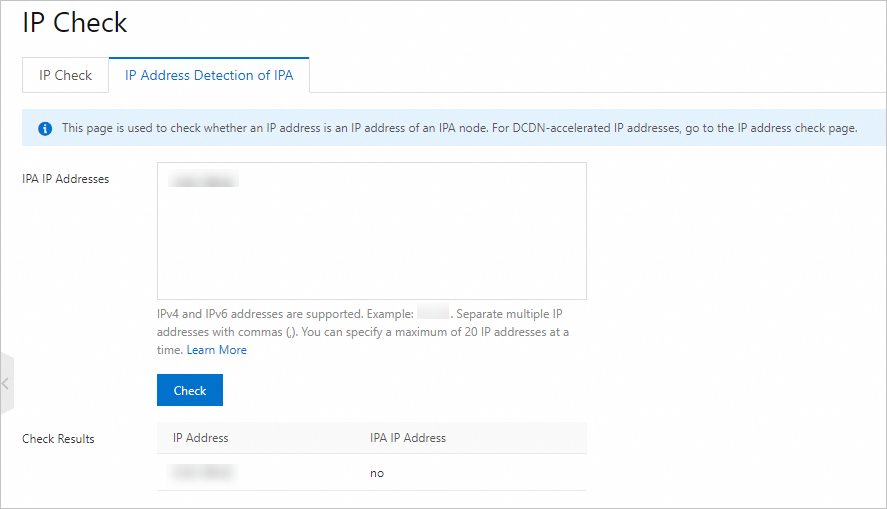
IP Address Detection of IPA: Checks for IP Application Acceleration (IPA) POPs.
In the text box, enter the IP address to check, and then click Check or Check.
NoteBoth IPv4 and IPv6 addresses are supported.
On the IP Check tab, you can check one IP address at a time. On the IP Address Detection of IPA tab, you can check up to 20 IP addresses at a time. Separate multiple IP addresses with a comma (,).
View the results.
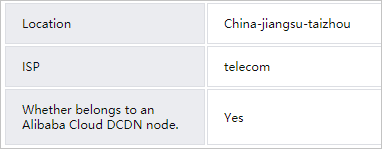
On the IP Check tab: If the IP address is a DCDN POP, the result displays Is a DCDN POP with its Location and ISP. If the IP address is not a DCDN POP, the message No records found appears.
On the IP Address Detection of IPA tab: If the IP address is an IPA POP, the result is Yes. Otherwise, the result is No.
Verify DCDN service status
To verify that the DCDN service is working as expected, follow these steps:
Log in to the DCDN console. In the left-side navigation pane, choose Domain Names and check the status of your accelerated domain name. If the status is Running, the DCDN service is working as expected. If the status is Disabled, you must enable the domain name to use the acceleration service.
Use the IP Check feature to check the IP address that clients are accessing. If the result shows that the IP address is a DCDN POP, DCDN acceleration is active.
If the DCDN service is suspended due to an overdue payment, the service automatically resumes after you pay the outstanding bill. No further action is required.