Dynamic Content Delivery Network (DCDN) supports whitelist configurations for cross-origin resource sharing (CORS). This topic describes how to configure CORS for DCDN and the relevant notes.
Details
Log on to the DCDN console.
In the navigation pane on the left, click Domain Names.
On the Domain Name page, find the domain name that you want to manage and click Configure.
In the navigation pane on the left of the page that appears, click Caching.
On the Modify Outgoing Response Header tab, click Add.
In the Add Custom HTTP Header dialog box, add the
Access-Control-Allow-OriginandAccess-Control-Allow-Methodscustom response header parameters. For more information about other parameters, see Custom HTTP response header parameters.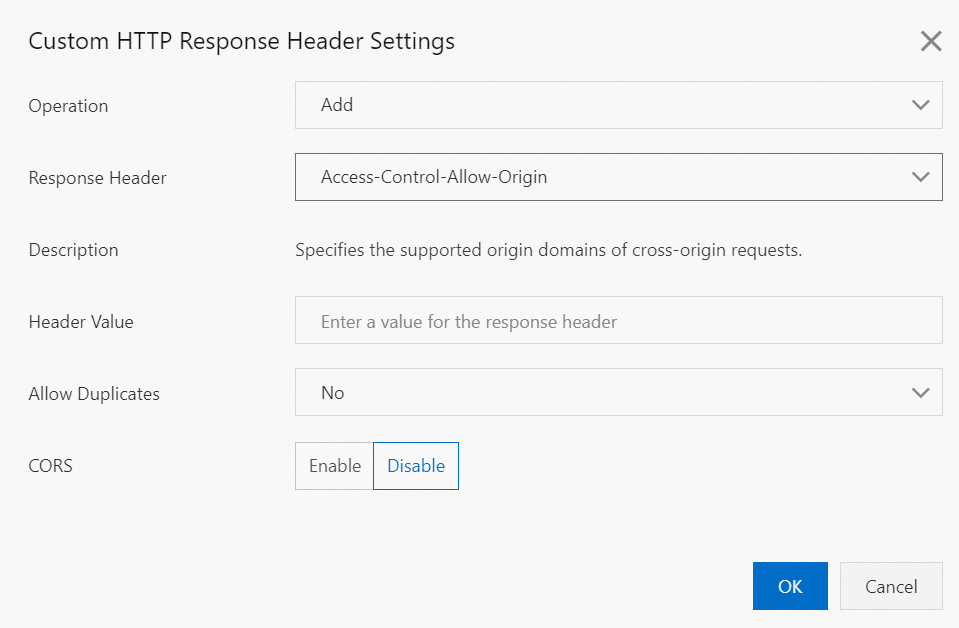
Click OK.
Notes
When you configure CORS whitelists, pay attention to the following:
Wildcard domain names are not supported, such as
*.aliyundoc.com. You must specify the exact domain names.Only one domain name can be configured in a whitelist for an account.
If the origin server uses an OSS domain name and CORS is configured in the OSS and DCDN consoles, the CORS settings in DCDN overwrite the settings in OSS.