When you first add a domain name to the Dynamic Content Delivery Network (DCDN) console, you must verify domain ownership. After verification, subdomains of the same domain do not require separate verification.
Method 1: Verify ownership with a DNS record (recommended)
This example uses the domain name image.example.com to demonstrate DNS-based ownership verification.
-
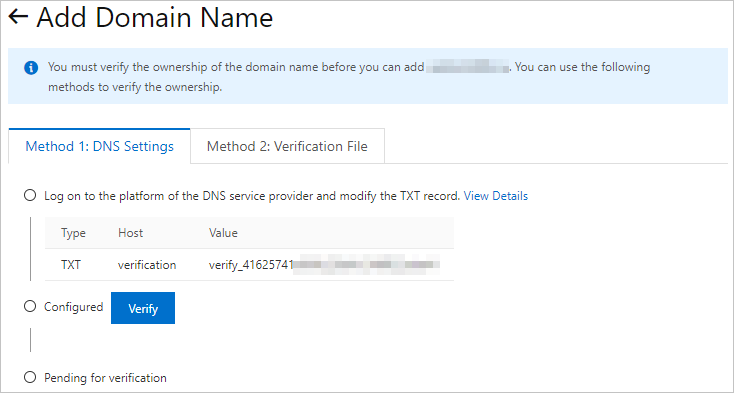
On the verification page, click the Method 1: DNS Settings tab to obtain the values of the Host and Value parameters.
ImportantKeep the verification page open until verification completes. If DNS verification fails, try Method 2: Verification File.
-
Add a TXT record with your DNS service provider.
The following example uses Alibaba Cloud DNS. The steps are similar for other DNS providers such as Tencent Cloud and Xinnet.
-
Log on to the Alibaba Cloud DNS console.
-
On the Public Zone page, find the root domain
example.comand click Settings in the Actions column. -
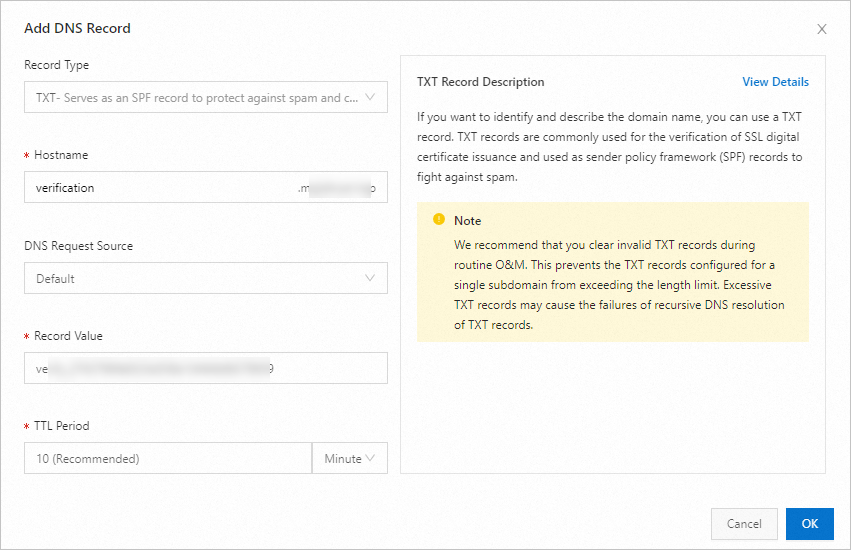
Click Add Record. Set Record Type to TXT, and set Hostname and Record Value to the values from Step 1. Use the default values for other parameters.
-
Click OK.
-
-
After the TXT record takes effect, log on to the DCDN console and click Verify.
If verification fails, check the TXT record. Wait for propagation and try again.
Use the accelerated domain name
image.example.comto verify the TXT record:Note-
New TXT records take effect immediately. Modified TXT records take effect based on the TTL (default: 10 minutes).
-
If nslookup is not installed on Linux, run
yum install bind-utilson CentOS orapt-get install dnsutilson Ubuntu.
Windows
Open Command Prompt and run the
nslookup -type=TXT verification.example.comcommand. Verify the TXT record based on the output.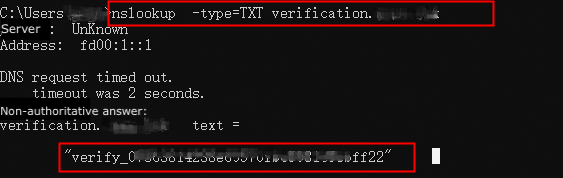
Linux
Run the
nslookup -type=TXT verification.example.comcommand. Verify the TXT record based on the output.
-
Method 2: Verify ownership with a verification file
-
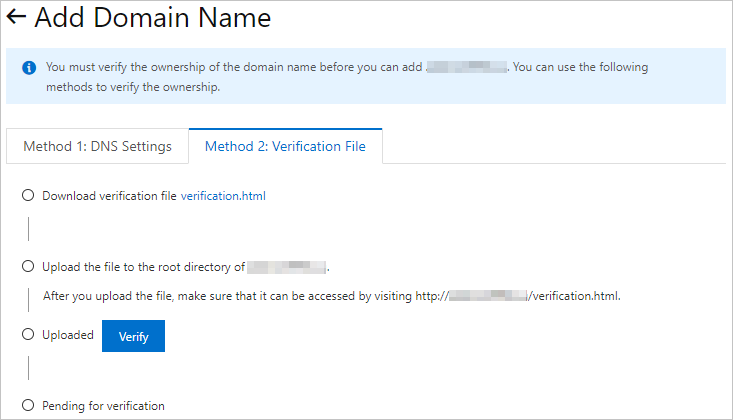
On the verification page, click the Method 2: Verification File tab.
ImportantKeep the verification page open until verification completes.
-
Click
verification.htmlto download the verification file. -
Upload the verification file to the root directory of your origin server. The server can be an ECS instance, an OSS bucket, a CVM instance, a COS instance, or an EC2 instance. For example, if the domain name is
image.example.com, upload the file to the root directory ofexample.com. -
Verify that the file is accessible at
http://example.com/verification.html, then click Verify.DCDN accesses
http://example.com/verification.htmlon your server to complete verification.-
If the record value matches the verification file, verification succeeds.
-
Otherwise, verification fails. Ensure the URL is accessible and the uploaded file is valid.
-
FAQ
Common questions about domain name ownership verification: