When multiple microservices share a namespace, any consumer can call any provider path by default. Service authentication restricts this access by letting you define whitelist and blacklist rules that control which consumer applications can reach specific provider paths. This protects sensitive endpoints -- such as those that handle core business logic or core data -- from unauthorized internal calls.
How it works
Service authentication evaluates incoming calls against two types of rules: global rules and path-specific rules.
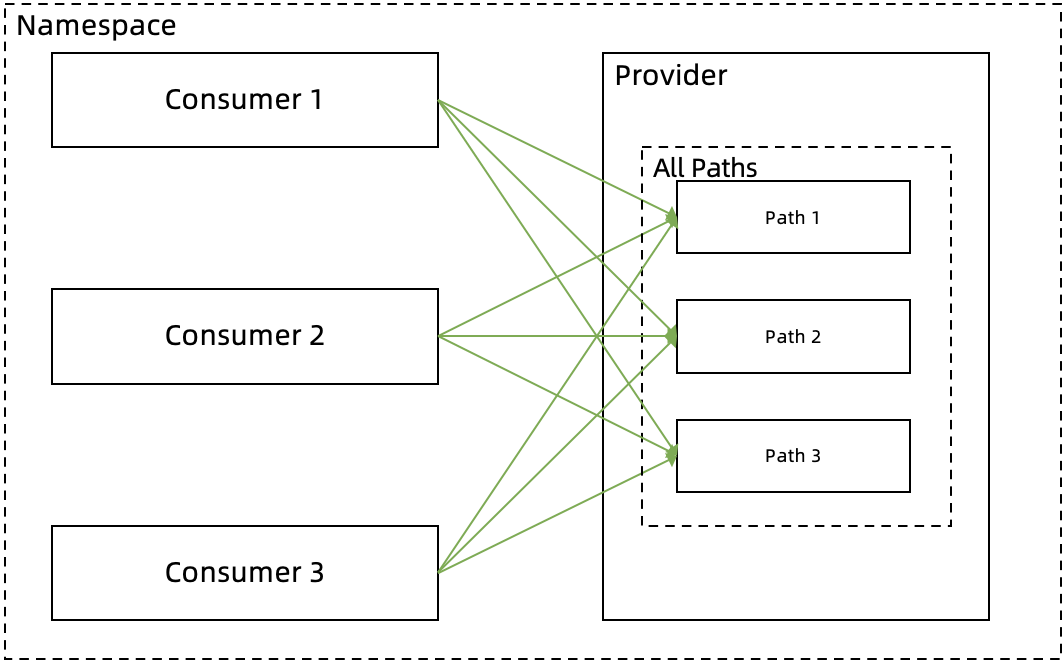
Without service authentication, all consumers in a namespace can call all paths of a provider:
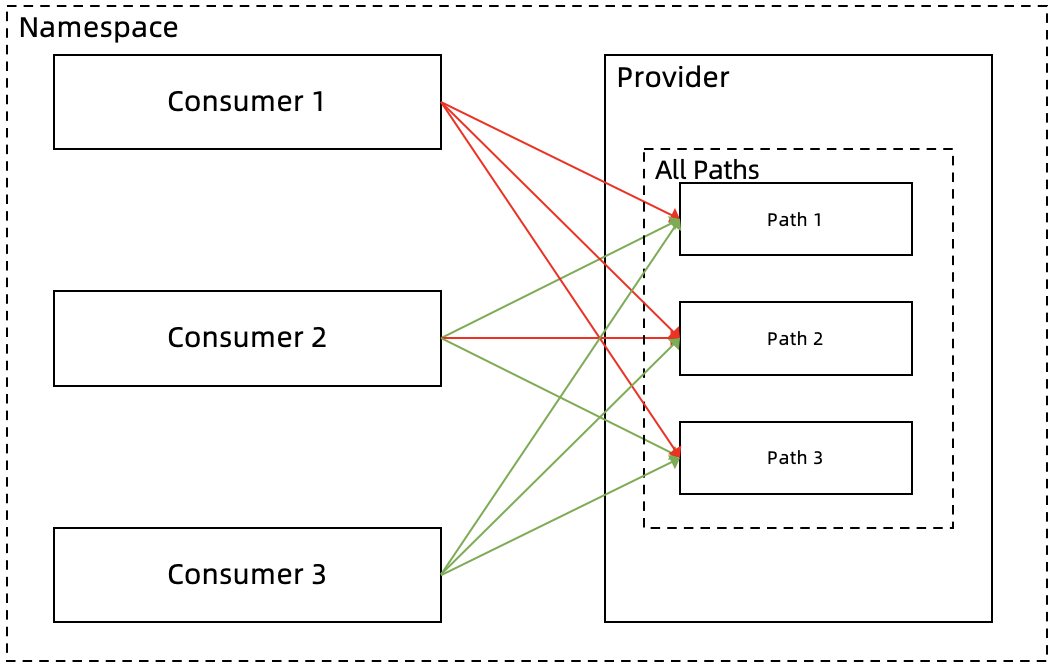
With service authentication, you control access at two levels:
Rule type | Scope | Limit |
Global rule | All paths of a provider | One per provider |
Path-specific rule | A single path of a provider | Multiple allowed |
For example, you can:
Create a global rule that blacklists Consumer 1 (blocked from all paths) and whitelists Consumers 2 and 3 (allowed to call all paths).
Create a path-specific rule that blacklists Consumer 2 from Path 2 (which involves core business or core data), so Consumer 2 can only call Paths 1 and 3.
Rule override behavior
A path-specific rule fully replaces the global rule for that path -- it does not append to it.
Scenario | Global rule | Path-specific rule (Path 2) | Result for Path 2 |
Path-specific narrows access | Whitelist: Consumers 2, 3 | Whitelist: Consumer 3 only | Consumer 2 loses access to Path 2; Consumer 3 retains access |
Path-specific blocks one consumer | Whitelist: Consumers 2, 3 | Blacklist: Consumer 2 | Consumer 2 is blocked from Path 2; Consumer 3 follows global rule |
No path-specific rule | Whitelist: Consumers 2, 3 | (none) | Consumers 2 and 3 can call Path 2 per the global rule |
When you create a path-specific rule, carefully re-specify all consumers that should have access to that path. The global rule no longer applies to the path.
Create a service authentication rule
Prerequisites
Before you begin, make sure that you have:
An EDAS account with access to the EDAS console
At least one Spring Cloud provider application deployed in a microservice namespace
At least one consumer application deployed in the same namespace
Procedure
Log on to the EDAS console.
In the left-side navigation pane, choose Traffic Management > Microservices Governance > Spring Cloud.
In the left-side navigation tree of Spring Cloud, click Service Authentication.
On the Service Authentication page, click Create rules.
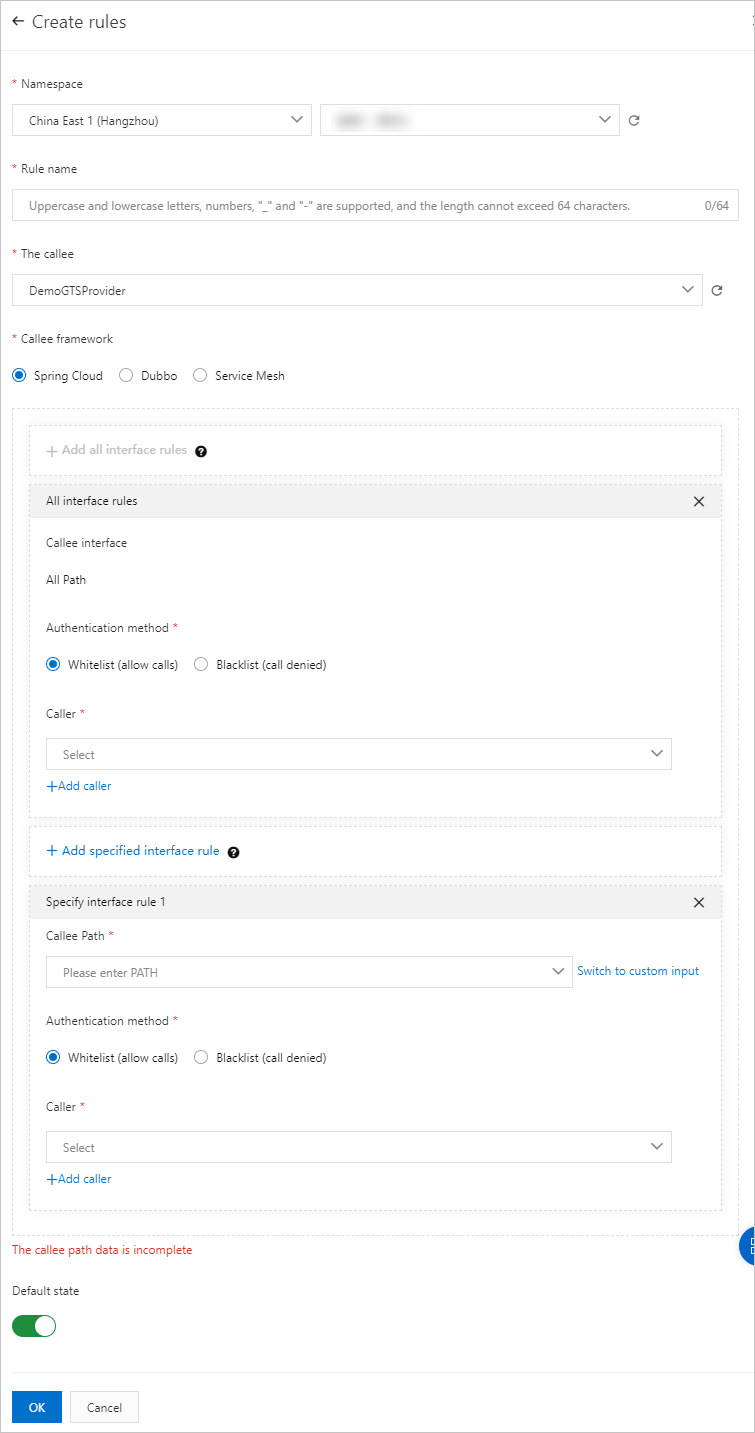
On the Create rules page, configure the parameters described in the following sections, and then click OK.
Basic parameters
Parameter | Description |
Microservice Namespaces | The region and microservice namespace where the provider is deployed. |
Rule name | A name for the rule. Maximum 64 characters. Supports letters, digits, underscores (_), and hyphens (-). |
The callee | The provider application to protect. |
Callee framework | The framework of the provider. Select Spring Cloud. |
Default State | On (default): The rule takes effect immediately after creation. Off: The rule is saved but not enforced. To enable it later, click Open in the Operation column on the Service Authentication page. |
Global rule parameters (Add all interface rules)
Click Add all interface rules to define a rule that applies to all paths of the provider. Only one global rule is allowed per provider.
Parameter | Description |
Callee interface | Fixed to All Path. |
Authentication method | Whitelist (allow calls): Only listed consumers can call the provider. Blacklist (call denied): Listed consumers are blocked from calling the provider. |
Caller | The consumer applications to authenticate. Click Add caller to select multiple applications. |
Path-specific rule parameters (Add specified interface rule)
Click Add specified interface rule to define a rule that targets a single path. This rule overrides the global rule for that path.
Parameter | Description |
Callee Path | The specific path to protect. |
Authentication method | Whitelist (allow calls) or Blacklist (call denied). |
Caller | The consumer applications to authenticate. Click Add caller to select multiple applications. |
Verify the result
After the rule is created and enabled, confirm that it works as expected:
Send a request from a blocked consumer to the provider. The request should fail with an authentication error.
Send a request from an allowed consumer to the same provider path. The request should return a successful response.
If you configured a path-specific rule, verify that the blocked consumer can still access other paths not covered by that rule.
Manage existing rules
On the Service Authentication page, use the Operation column to manage rules:
Action | Description |
Edit | Modify the rule configuration. |
Close | Disable an active rule. The rule is preserved but no longer enforced. |
Open | Re-enable a disabled rule. |
Delete | Permanently remove the rule. |