ECS secures operating systems through access control, OS hardening, and compliance auditing.
Secure access to instances
ECS supports key pair authentication, password-free logon through Session Manager, and security group rules to restrict access to or from 0.0.0.0/0 over ports.
Use key pairs for instance logon
A key pair which consists of a public key and a private key, used for ECS instance authentication instead of passwords. Alibaba Cloud generates default key pairs with RSA 2048-bit encryption. Benefits:
-
Prevents brute-force attacks.
-
Requires one-time setup with no subsequent password entry.
See Log on to a Linux instance using Workbench and Connect to a Linux instance with OpenSSH or Xshell.
Use Session Manager for password-free logon
Session Manager, a Cloud Assistant feature, provides secure password-free access to ECS instances:
-
Uses the WebSocket Secure (WSS) protocol to encrypt connections between Session Manager Client, Cloud Assistant server, and Cloud Assistant Agent.
-
Authenticates through Resource Access Management (RAM), eliminating password management and associated security risks.
-
Connects through Cloud Assistant Agent without opening inbound ports, reducing the attack surface.
Restrict port access from 0.0.0.0/0
Linux uses SSH (port 22) and Windows uses RDP (port 3389) for remote connections. Allowing 0.0.0.0/0 access on these ports exposes instances to unauthorized logons. Use security groups as instance-level virtual firewalls to enforce network access control. See Overview of security groups and Manage resources associated with security groups.
Operating system hardening
Automate patch updates with OOS patch baseline
CloudOps Orchestration Service (OOS) scans and installs patches for ECS instances based on default or custom patch baselines. You can select specific update categories such as security-related updates for automatic installation. See Patch Management Overview.
Kernel Live Patching for Alibaba Cloud Linux
Alibaba Cloud Linux Kernel Live Patching (KLP) applies hotfixes for CVEs and critical kernel bugs without restarting servers, interrupting processes, or migrating workloads. See Kernel Live Patching.
Use free basic security services
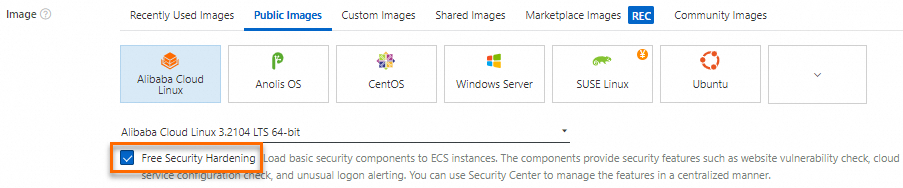
Alibaba Cloud provides basic security services with new ECS instances using public images, including Security Center Basic Edition. This edition provides security hardening features such as server vulnerability scanning and abnormal login alerts. For advanced security needs, Security Center Advanced Edition and Enterprise Edition are available. See Basic security services.
Log auditing and compliance
ECS integrates with log auditing services and compliance standards to strengthen system security.
Log audit
Enable logon audit
Use Session Manager for instance logon and enable Session Record Delivery to store, query, and audit session records in Simple Log Service (SLS) or Object Storage Service (OSS). See Deliver session records.
Enable ActionTrail
ECS integrates with ActionTrail to query management events triggered by ECS operations. ActionTrail delivers events to SLS Logstores or OSS buckets for real-time auditing and troubleshooting. See Audit events of ECS.
Enable Log Audit Service
Enable Log Audit Service, built on Simple Log Service (SLS), for real-time, automated, centralized log collection across multiple accounts and cloud products for audit compliance.
Compliance
Level 3 compliance images
Alibaba Cloud provides images that meet national Level 3 compliance standards for Multi-Level Protection Scheme (MLPS) 2.0, with built-in identity authentication, access control, and intrusion prevention.
Compliance check
Security Center provides classified protection compliance check and ISO 27001 compliance check to verify whether your system meets these standards. See