When a local disk of an Elastic Compute Service (ECS) instance cannot be read or written normally due to hardware failures, data abnormalities, or other reasons, Alibaba Cloud sends you a local disk damage event. You can isolate or repair the damaged local disk through the console or OpenAPI.
Isolating or repairing a disk causes data loss on the damaged local disk, and the data cannot be recovered. Back up your data in advance.
During disk isolation or repair, you can choose to redeploy the instance with local disks at any time to quickly restore full disk usage, but this operation will cause all disk data to be lost.
Operation procedure

Modify configuration files: For Linux instances, you need to log on to the instance and modify the /etc/fstab configuration file in the operating system, and unmount the damaged local disk device to avoid the risk of reading or writing to the wrong disk during disk replacement.
Isolate a damaged disk: Isolate the damaged local disk. After isolation, the instance can continue to operate normally.
Replace the disk: Alibaba Cloud replaces the damaged disk.
Restore the disk: Log on to the ECS instance to modify the /etc/fstab configuration file in the operating system and mount the new local disk device.
Currently, only big data instance families d1, d2, d3 series and local SSD instance family i4 support online disk isolation and replacement. Local SSD instance families i3 and i2 support local disk isolation but do not support local disk replacement. Additionally, whether you need to isolate or restore a local disk depends on the extent of damage to the local disk. Please follow the actual process displayed on the page.
Procedure
Modify configuration files (Linux only)
Not all instances require configuration file modifications. If your instance operating system is not Linux, skip this step. If it is Linux, before isolating the damaged local disk, you need to modify the /etc/fstab file and unmount the damaged local disk in the operating system:
Isolate a damaged disk
ECS console
Visit ECS Console-Events.
In the left-side navigation pane of the Events page, click , and click Repair Disk in the Actions column of the target event.
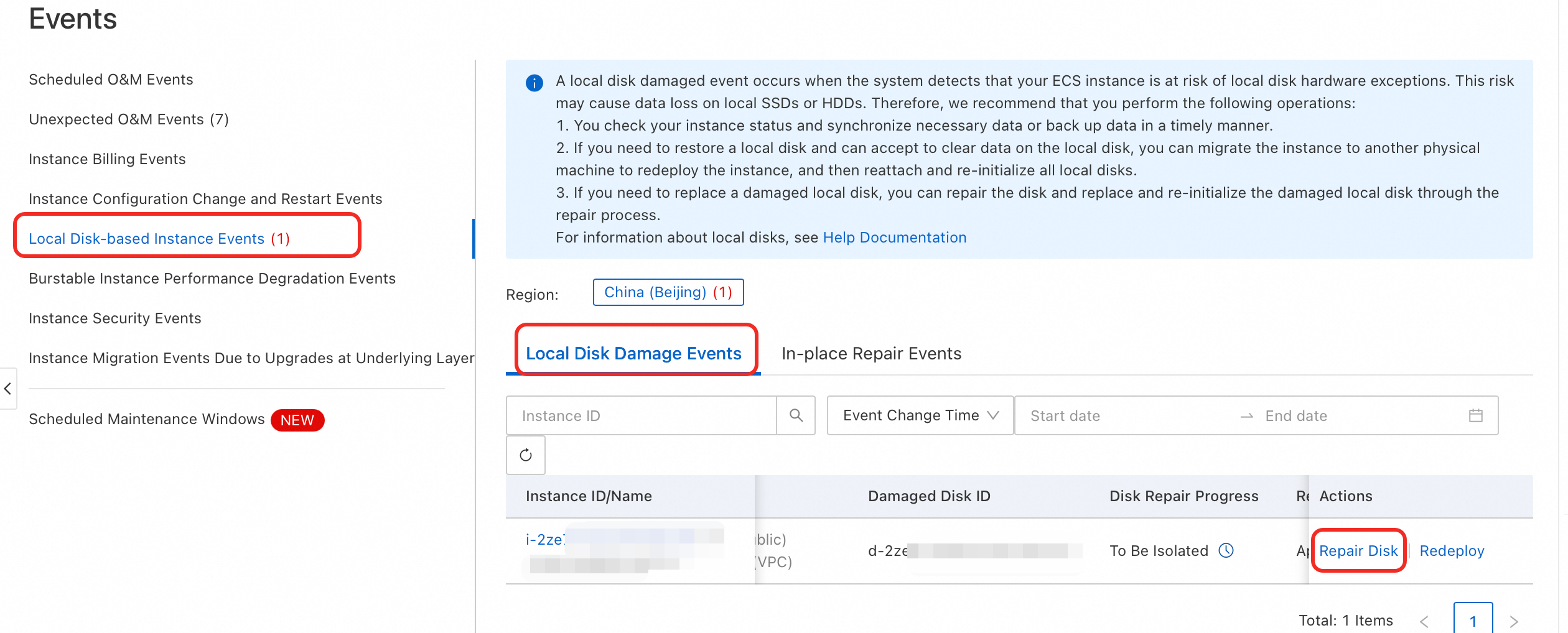
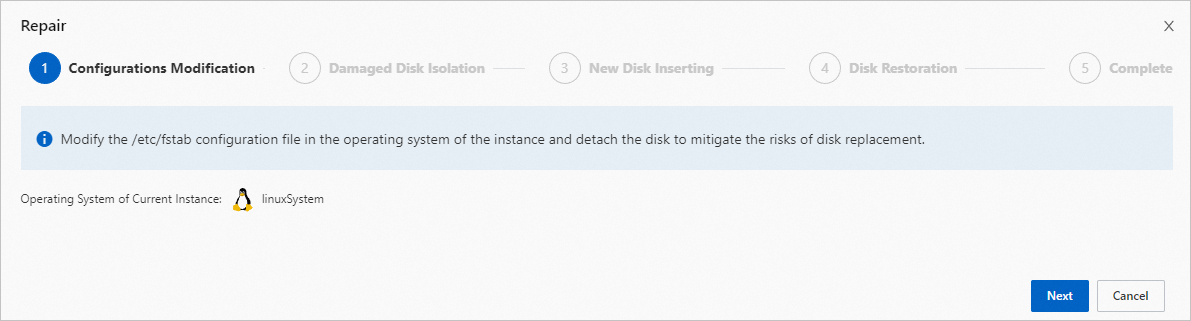
In the Configurations Modification step, confirm that you have completed modifying the configuration file, and click Next.
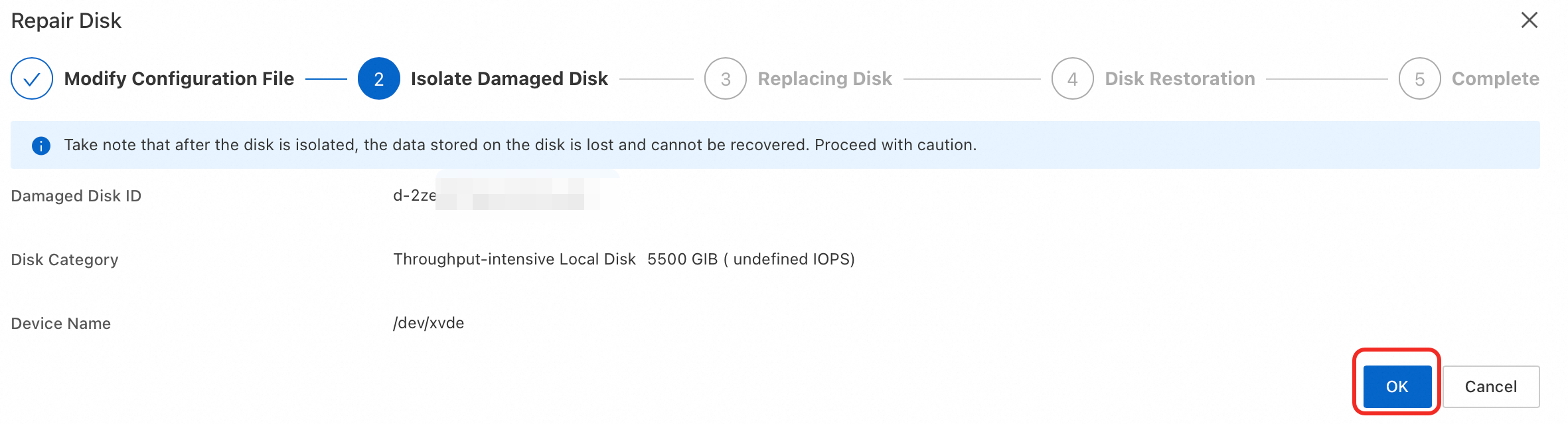
In the Isolate Damaged Disk step, click OK. Wait for the isolation to complete. If your guide page shows an Instance Restart step, you need to restart the instance.
 Note
NoteIf the next step is not displayed after a few minutes, try refreshing the page.
API operation
Query system events.
Call DescribeInstanceHistoryEvents to query system events in the Inquiring (
Inquiring) state in the specified region, and record the returned EventId (EventId) and event name (Name).Authorize and execute the isolation of damaged disks.
Call AcceptInquiredSystemEvent to authorize Alibaba Cloud to perform disk isolation operations.
When the event name is
SystemMaintenance.IsolateErrorDisk:If only RequestId is returned, you do not need to restart the instance. Wait for Alibaba Cloud to perform the disk replacement operation.
If
code:SwitchToOffline.OnlineIsolateFailis returned, you need to restart the instance.
When the event name is
SystemMaintenance.RebootAndIsolateErrorDisk: After calling AcceptInquiredSystemEvent, you need to restart the instance.
After the instance is restarted, the isolated damaged local disk is temporarily converted to a 1 MiB dummy hard disk. You need to continuously isolate read and write operations on the damaged local disk at the application layer and maintain the nofail and barrier settings in the /etc/fstab file.
Replace the disk
You do not need to perform any operations. Please wait for Alibaba Cloud to replace the damaged local disk. The replacement operation is expected to be completed within five business days. You can check the processing progress on the Local Disk Events page.
Restore the disk
ECS console
When the Disk Repair Progress changes to To Be Restored, indicating that the event is in the Disk Restoration stage, click Repair Disk in the Actions column, and then click the Restore button in the popup window.
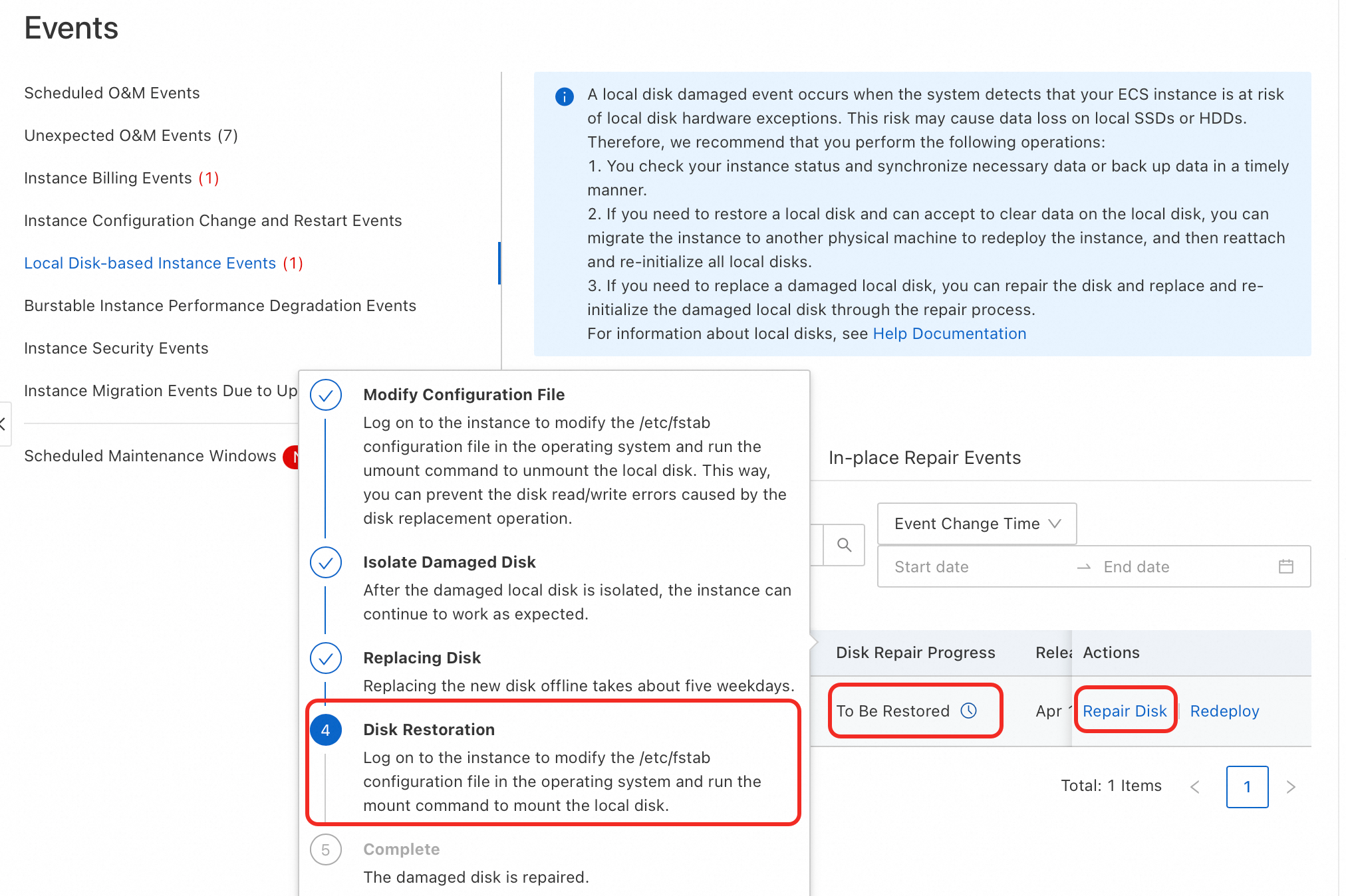
If your guide page shows an Instance Restart step, you need to restart the instance.
When the Disk Repair Progress changes to Handled, it indicates that the event has been completely processed.
API
Query system events.
Call DescribeInstanceHistoryEvents to query system events. After Alibaba Cloud completes the disk replacement, it will publish a
SystemMaintenance.ReInitErrorDiskorSystemMaintenance.RebootAndReInitErrorDiskevent.Authorize disk restoration.
Call AcceptInquiredSystemEvent to authorize the execution of disk restoration operations.
When the event name is
SystemMaintenance.ReinitErrorDisk:If only RequestId is returned, you do not need to restart the instance.
If
code=SwitchToOffline.OnlineReInitFailis returned, you need to restart the instance.
When the event name is
SystemMaintenance.RebootAndReinitErrorDisk: After calling AcceptInquiredSystemEvent, you need to restart the instance.
What to do next
After the disk is repaired, check the status of your ECS instance and local disk. At this point, the replaced local disk is new and needs to be initialized before it can be used. For more information, see Initialize a data disk on a Windows instance or Initialize a data disk on a Linux instance.