Custom images are based on snapshots and support the snapshot encryption feature. The encryption processes described in this topic allow you to change the encryption status of disks and snapshots, or rotate keys.
The encryption processes for custom images apply to two scenarios:
Instance creation: When you create an Elastic Compute Service (ECS) instance, you can use an encrypted image to create encrypted disks. You can also use a non-encrypted image and select the encryption option to create encrypted disks.
Image copy: When you copy an image, you can create an encrypted image from a non-encrypted one. You can also copy an existing encrypted image to create a new encrypted image and rotate the key.
An encrypted image is a custom image that is associated with one or more encrypted snapshots.
Encryption is irreversible. This means you can change a resource from non-encrypted to encrypted or re-encrypt an existing encrypted resource. However, you cannot change a resource from encrypted to non-encrypted. For more information about encryption principles and keys, see Encryption overview.
Create an instance with encrypted disks from an image
When creating an instance, you can create encrypted disks using an encrypted image. Alternatively, you can use a non-encrypted image that contains a system disk snapshot, or both system and data disk snapshots, and then select the encryption option to create encrypted disks.

Create encrypted disks from a non-encrypted image (non-encrypted to encrypted)
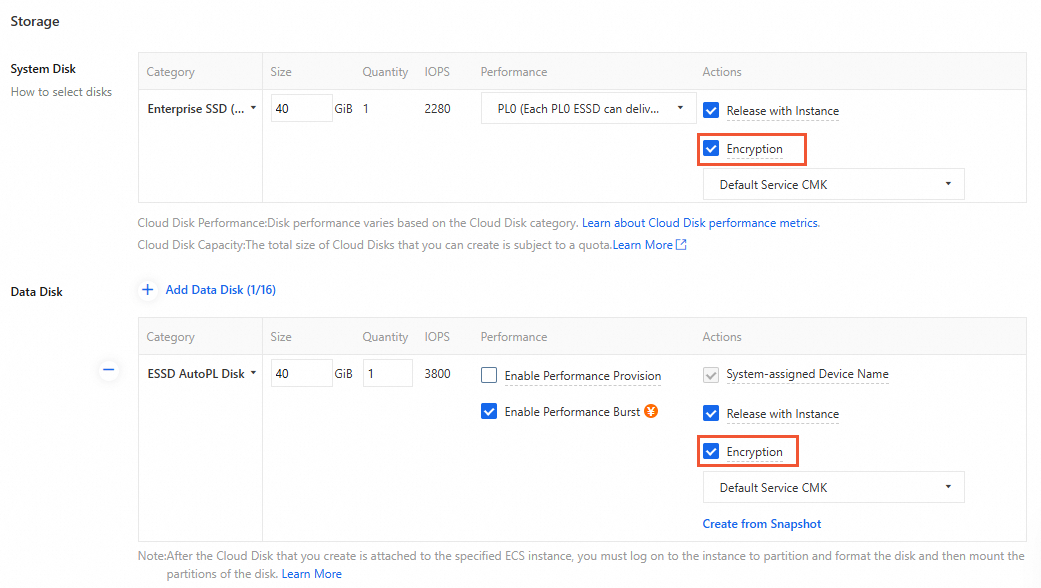
When you create an ECS instance from a non-encrypted image, you can create encrypted disks by enabling encryption for each disk and specifying a key. To do this, set the `Encrypted` parameter to `true` and specify a value for the `KMSKeyId` parameter. If you enable encryption but do not specify a key, the service key is used to encrypt the disk.
Create encrypted disks from an encrypted image (encrypted to encrypted)
When you create an ECS instance from an encrypted image, encryption is enabled by default for disks that correspond to the encrypted snapshots in the image. You cannot disable this option. If you call an API, you must set the `Encrypted` parameter to `true`. For these encrypted disks, you can specify a key (`KMSKeyId`).
When you use an encrypted custom image, you can specify a key (`KMSKeyId`) for the disks that correspond to the encrypted snapshots. If you have enabled the account-level default encryption for Elastic Block Storage feature and configured a default key, the default key is used. If you have not configured a default key, the service key is used.
When you use a shared encrypted image, you, as the recipient, can specify a key (`KMSKeyId`) for the disks that correspond to the encrypted snapshots. If you have enabled the account-level default encryption for Elastic Block Storage feature and configured a default key, the default key is used. If you have not configured a default key, the service key is used.
Console
When you create an ECS instance on the instance buy page, enable encryption for the disks and select a key.
API
Call the RunInstances or CreateInstance operation to encrypt the disks.
If you create an ECS instance from a shared encrypted image, you must set the `Encrypted` parameter to `true`. Otherwise, the call fails.
Encrypt an image by copying it
When you copy an image, you can choose to encrypt the copy. This lets you change a non-encrypted image to an encrypted one, or re-encrypt an existing encrypted image. The encryption applies to all snapshots associated with the image.
Copy a non-encrypted image to an encrypted image (non-encrypted to encrypted)

When you copy a non-encrypted image, which is an image that contains no encrypted snapshots, you can choose to encrypt the copy. To do this, set the `Encrypted` parameter to `true` and specify a key (the value of `KMSKeyId`) for all snapshots in the image. If you do not specify a key, the service key is used to encrypt all associated snapshots.
Copy an encrypted image to another encrypted image (encrypted to encrypted)

When you copy an encrypted image, which is an image that contains one or more encrypted snapshots, you can only create an encrypted copy. To do this, set the `Encrypted` parameter to `true` and specify a key (the value of `KMSKeyId`) to re-encrypt all snapshots in the image. If you do not specify a key, any non-encrypted snapshots are encrypted using the service key, and the existing encrypted snapshots inherit their original keys.
Console
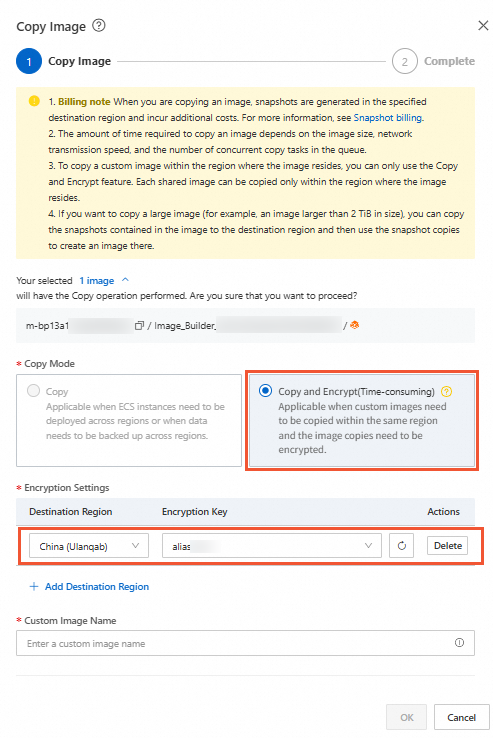
On the Images page of the ECS console, set the copy type to Copy and Encrypt, and set the Destination Region and Encryption Key. For more information, see Copy and encrypt a custom image.
API
Call the CopyImage operation to encrypt an image by copying it.
References
You can share encrypted images with other Alibaba Cloud accounts. You can use the shared images to deploy ECS instances across accounts in the same region. For more information, see Share a custom image.
Custom images created from encrypted snapshots are encrypted by default. The key is inherited from the original snapshot. For more information, see Create a custom image from a snapshot.