Understand RHEL lifecycle phases and mitigate risks when RHEL 7 enters the Extended Life phase by upgrading or purchasing an ELS subscription.
RHEL lifecycle overview
Red Hat Enterprise Linux (RHEL) is an enterprise-grade, open source Linux operating system widely used in server and data center environments. See Red Hat Enterprise Linux Life Cycle.
RHEL public images on Alibaba Cloud are sourced from Red Hat, with technical support jointly provided by Alibaba Cloud and Red Hat. On June 30, 2024, RHEL 7 transitioned from Maintenance Support to Extended Life phase for four years. The following table lists the lifecycle phases of RHEL.
|
Version |
Release date |
Mainstream Support phase |
Extended Support End Date |
||
|
Full Support End Date |
Maintenance Support 1 End Date |
Maintenance Support 2 End Date |
|||
|
Maintenance Support End Date |
|||||
|
Red Hat 10 |
2025-05-20 |
2030-05-31 |
2035-05-31 |
2038-05-31 |
|
|
Red Hat 9 |
2022-05-18 |
2027-05-31 |
2032-05-31 |
2035-05-31 |
|
|
Red Hat 8 |
2019-05-7 |
2024-05-31 |
2029-05-31 |
2032-05-31 |
|
|
Red Hat 7 |
2014-06-10 |
2019-08-06 |
2020-08-06 |
2024-06-30 |
2029-05-31 |
|
Red Hat 6 |
2010-11-10 |
2016-05-10 |
2017-05-10 |
2020-11-30 |
2024-06-30 |
|
Red Hat 5 |
2007-03-15 |
2013-01-08 |
2014-01-31 |
2017-03-31 |
2020-11-30 |
|
Red Hat 4 |
2005-02-14 |
2009-03-31 |
2011-02-16 |
2012-02-29 |
2017-03-31 |
Impacts of the RHEL 7 Extended Life phase
During the Extended Life phase, Red Hat no longer provides vulnerability fixes, security patches, hardware enablement, or root cause analysis for RHEL 7. Support is limited to existing installations.
Recommended solutions
Evaluate the impact based on your business needs. Applications scheduled for decommission can disregard this event. Private network applications face manageable risk. Internet-facing applications that require high stability and security must evaluate end-of-service risks and develop a response plan.
For new services
Do not use RHEL 7 images to create new ECS instances. Instead, choose an operating system in a mainstream support phase, such as RHEL 8 or RHEL 9.
For existing applications
-
Short term: purchase an ELS subscription for RHEL 7 to continue receiving security updates and bug fixes.
-
Long term: upgrade to a later version (recommended). Perform an in-place upgrade from RHEL 7 to RHEL 8, or from RHEL 8 to RHEL 9, using your existing RHEL 7 subscription. Newer versions provide additional security updates, new features, and broader hardware and software compatibility.
Upgrade to a later version
An in-place upgrade upgrades your RHEL system from one major version to another (for example, RHEL 7 to RHEL 8) without a fresh installation. It retains your existing applications, configurations, and data while ensuring continued security updates and technical support.
Red Hat provides the Leapp tool for in-place upgrades with pre-upgrade checks. You can perform the upgrade by remotely logging on to an ECS instance.
-
For a RHEL 7 system from an Alibaba Cloud Marketplace image (with a RHEL 7 subscription) or a self-imported RHEL 7 image with an Alibaba Cloud subscription, see Upgrade from RHEL 7 to RHEL 8.
-
For a RHEL 7 system with a subscription purchased directly from Red Hat, see Upgrading from RHEL 7 to RHEL 8.
Purchase an Extended Life Cycle Support (ELS) subscription
The RHEL Extended Life Cycle Support (ELS) Add-On provides critical security fixes and urgent bug fixes during the Extended Life phase. ELS applies only to RHEL 7.9 and is valid until June 30, 2028. To purchase RHEL 7 ELS on Alibaba Cloud, see Purchase a software license for an ECS instance.
RHEL 7 ELS Add-on pricing:
-
1 to 8 vCPUs: monthly subscription (USD 5.24 per vCPU per month), yearly subscription (USD 54.52 per vCPU per year), and pay-as-you-go (USD 0.0084 per vCPU per hour)
-
9 to 127 vCPUs: monthly subscription (USD 3.93 per vCPU per month), yearly subscription (USD 40.89 per vCPU per year), and pay-as-you-go (USD 0.006 per vCPU per hour)
-
128 vCPUs or more: monthly subscription (USD 3.41 per vCPU per month), yearly subscription (USD 35.44 per vCPU per year), and pay-as-you-go (USD 0.0048 per vCPU per hour)
FAQ
After RHEL 7 enters the ELS phase, am I required to purchase a RHEL ELS Add-on subscription for my RHEL 7 instances?
After RHEL 7 enters the ELS phase, will my instances be stopped if I do not purchase a RHEL ELS Add-on subscription?
After RHEL 7 enters the ELS phase, can I renew my instances as normal if I do not purchase a RHEL ELS Add-on subscription?
After RHEL 7 enters the ELS phase, will I still be charged license fees for RHEL images?
How do I upgrade from RHEL 7 to RHEL 8?
If your application must remain on RHEL 7.9, first purchase an Alibaba Cloud RHEL ELS Add-On subscription to continue receiving security updates and bug fixes. See Purchase an Extended Life Cycle Support (ELS) subscription.
-
The RHEL instance meets the Red Hat Enterprise Linux Technology Capabilities and Limits.
-
Your RHEL instance is a RHEL 7 system from an Alibaba Cloud public image (with a RHEL 7 subscription) or a self-imported RHEL 7 system with an Alibaba Cloud RHEL 7 subscription.
Note-
An Alibaba Cloud RHEL subscription provides licensed access to the software, security updates, and technical support for RHEL on Alibaba Cloud.
-
For a RHEL system with a subscription purchased directly from Red Hat, see Upgrading from RHEL 7 to RHEL 8.
-
-
Back up data by creating a snapshot to prevent data loss if the upgrade fails. See Create a snapshot.
-
Log on to the ECS instance as the root user.
See Connect to a Linux instance using Workbench.
ImportantRoot permissions are required for the upgrade.
-
Check whether your RHEL instance uses an Alibaba Cloud RHEL subscription.
rpm -q client-rhel7-
If no response is returned, your system does not use an Alibaba Cloud RHEL subscription. Purchase a subscription first, then perform the upgrade.
-
If a response similar to
client-rhel7-3.0-1.el7_9.noarchis returned, your system uses an Alibaba Cloud RHEL subscription. Proceed with the upgrade.
-
-
Prepare the upgrade environment.
-
Upgrade the RHEL system to the latest version and restart the system.
yum -y update reboot -
Install the Leapp upgrade tool.
yum -y install leapp leapp-rhui-alibaba --enablerepo="*" -
Verify that Leapp is installed.
leapp --versionA response similar to
leapp version xxxconfirms Leapp is installed.
-
-
Perform a pre-upgrade check.
System configurations vary. Use the Leapp tool to run a pre-upgrade check and resolve any reported issues before upgrading.
-
Perform a pre-upgrade check.
-
Pre-upgrade to the latest version of RHEL 8.
leapp preupgrade --no-rhsm -
Pre-upgrade to a specific target version. For example, upgrade RHEL 7 to RHEL 8.8.
leapp preupgrade --no-rhsm --target 8.8NoteRun
leapp preupgrade -hto view supported target versions.
-
-
View the pre-upgrade check results.
Leapp pre-upgrade check logs:
-
/var/log/leapp/leapp-preupgrade.log: Leapp tool logs
-
/var/log/leapp/leapp-report.txt: Pre-upgrade check report in text format
-
/var/log/leapp/leapp-report.json: Pre-upgrade check report in JSON format
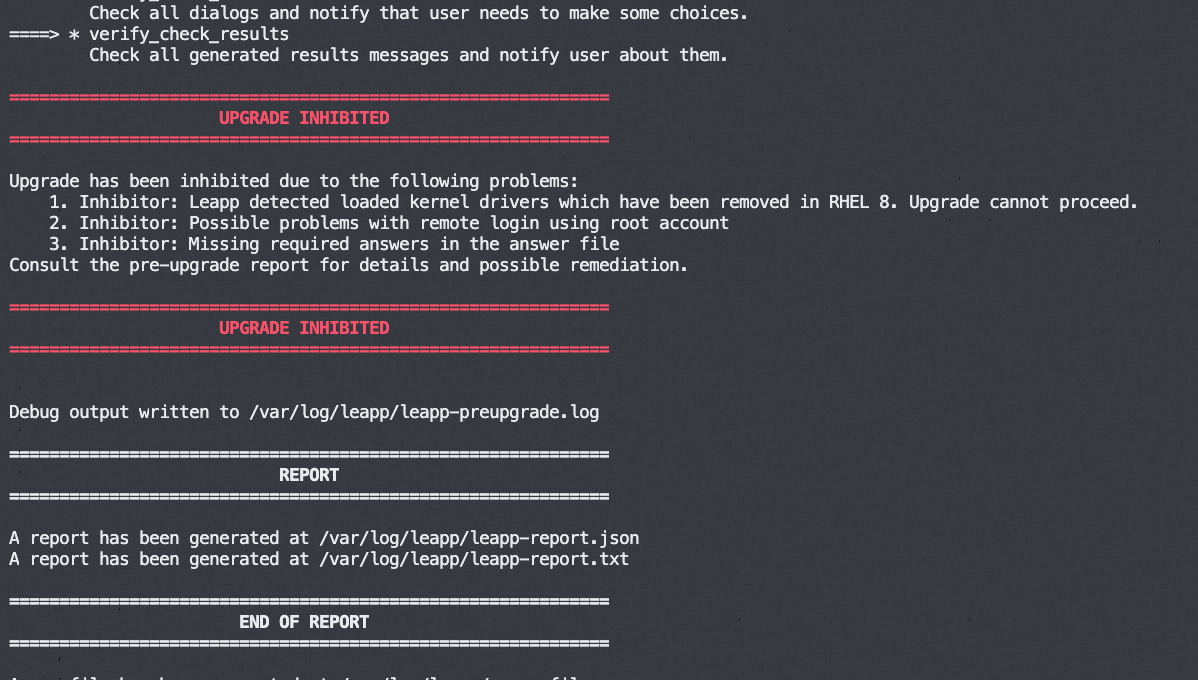
If the pre-upgrade check fails, the failed items are displayed:
-
-
(Conditional) Handle pre-upgrade errors.
Check
/var/log/leapp/leapp-report.txtfor error messages and resolve them based on the Leapp tool's suggestions. Common errors by risk level:-
high (inhibitor): Blocks the upgrade. Must be resolved before proceeding.
-
-
-
-
Risk Factor: high (inhibitor)
Title: Missing required answers in the answer file
Summary: One or more sections in answerfile are missing user choices: remove_pam_pkcs11_module_check.confirm
For more information consult https://leapp.readthedocs.io/en/latest/dialogs.html
Remediation: [hint] Please register user choices with leapp answer cli command or by manually editing the answerfile.
[command] leapp answer --section remove_pam_pkcs11_module_check.confirm=True
Solution: Delete the unsupported pam module. Confirm deletion in the
/var/log/leapp/answerfilefile by settingconfirmtoTrue:leapp answer --section remove_pam_pkcs11_module_check.confirm=True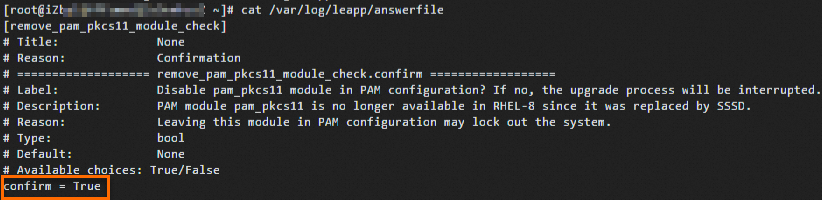
-
-
high: Does not block the upgrade but must be resolved before or after the upgrade.
-
-
medium: Does not block the upgrade but should be resolved to prevent potential issues.
-
low: Minor impact. Should be resolved to ensure stable operation.
-
info: Informational. No action required. Review the report to understand changes during the upgrade.
-
-
-
Perform the upgrade.
-
Upgrade to the latest version of RHEL 8.
leapp upgrade --no-rhsm -
Upgrade to a specific target version. For example, upgrade RHEL 7 to RHEL 8.8.
leapp upgrade --no-rhsm --target 8.8
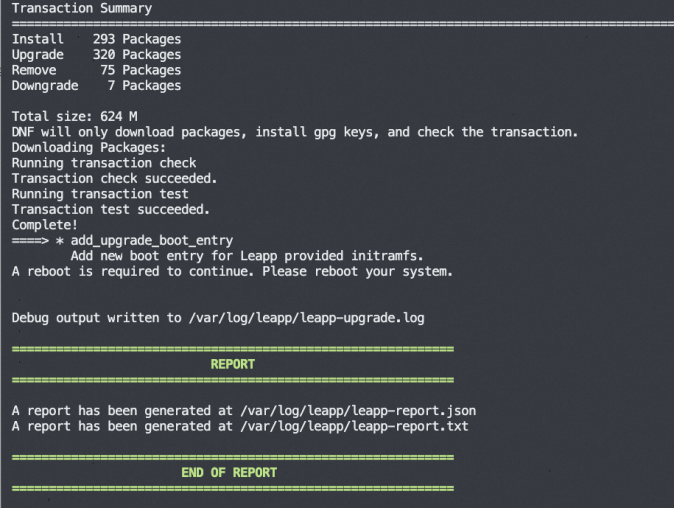
A successful upgrade looks like this:
-
-
Restart the instance to boot into the new system.
reboot -
Verify the upgrade result.
-
Run the
cat /etc/redhat-releasecommand to check whether the system version is updated. -
Check the upgrade execution logs or reports for any errors.
-
Observe whether your application runs correctly on the RHEL 8 system.
-
-
(Conditional) Configure the RHEL source.
After the Leapp upgrade, the
/etc/dnf/vars/releaseverfile locks the system to a specific minor version. For example, RHEL 8.8 points tohttps://xxxx/8.8/xxx. To access the latest RHEL 8 packages, delete the releasever file and rebuild the metadata cache.rm -f /etc/dnf/vars/releasever dnf clean all && dnf makecacheThe repository source updates to
https://xxxx/8/xxx, enabling automatic access to the latest RHEL 8 security patches and feature updates.
How do I upgrade from RHEL 8 to RHEL 9?
-
The RHEL instance meets the Red Hat Enterprise Linux Technology Capabilities and Limits.
-
Your RHEL instance is a RHEL 8 system from an Alibaba Cloud public image (with a RHEL 8 subscription) or a self-imported RHEL 8 system with an Alibaba Cloud RHEL 8 subscription.
Note-
An Alibaba Cloud RHEL subscription provides licensed access to the software, security updates, and technical support for RHEL on Alibaba Cloud.
-
For a RHEL system with a subscription purchased directly from Red Hat, see Upgrading from RHEL 8 to RHEL 9.
-
-
Back up data by creating a snapshot to prevent data loss if the upgrade fails. See Create a snapshot.
-
Log on to the ECS instance as the root user.
See Connect to a Linux instance using Workbench.
ImportantRoot permissions are required for the upgrade.
-
Check whether your RHEL instance uses an Alibaba Cloud RHEL subscription.
rpm -qa |grep aliyun-
If no response is returned, your system does not use an Alibaba Cloud RHEL subscription. Purchase a subscription first, then perform the upgrade.
-
If the response contains a minor version, such as
rhel8.6, submit a ticket to obtain the latest RPM package, install it, then perform the upgrade. Note
NoteWhen running RHEL on Alibaba Cloud, the system accesses Red Hat software repositories through Alibaba Cloud's RHUI service. A minor-version-specific package, such as
aliyun_rhel8.6-2.0-1.noarch, may prevent RHUI connections, blocking software updates and upgrades. -
If a subscription package similar to
aliyun_rhui_rhel8-2.0-3.x86_64is returned, your system uses an Alibaba Cloud RHEL subscription. Proceed with the upgrade.
-
-
Prepare the upgrade environment.
-
Upgrade the RHEL system to the latest version and restart the system.
yum -y update reboot -
Install the Leapp upgrade tool.
yum -y install leapp leapp-rhui-alibaba --enablerepo="*" -
Verify that Leapp is installed.
leapp --versionA response similar to
leapp version xxxconfirms Leapp is installed.
-
-
Perform a pre-upgrade check.
System configurations vary. Use the Leapp tool to run a pre-upgrade check and resolve any reported issues before upgrading.
-
Perform a pre-upgrade check.
-
systemctl stop systemd-resolved systemctl disable systemd-resolved -
Pre-upgrade to the latest version of RHEL 9.
leapp preupgrade --no-rhsm -
Pre-upgrade to a specific target version. For example, upgrade RHEL 8 to RHEL 9.4.
leapp preupgrade --no-rhsm --target 9.4NoteRun
leapp preupgrade -hto view supported target versions.
-
-
View the pre-upgrade check results.
Leapp pre-upgrade check logs:
-
/var/log/leapp/leapp-preupgrade.log: Leapp tool logs
-
/var/log/leapp/leapp-report.txt: Pre-upgrade check report in text format
-
/var/log/leapp/leapp-report.json: Pre-upgrade check report in JSON format
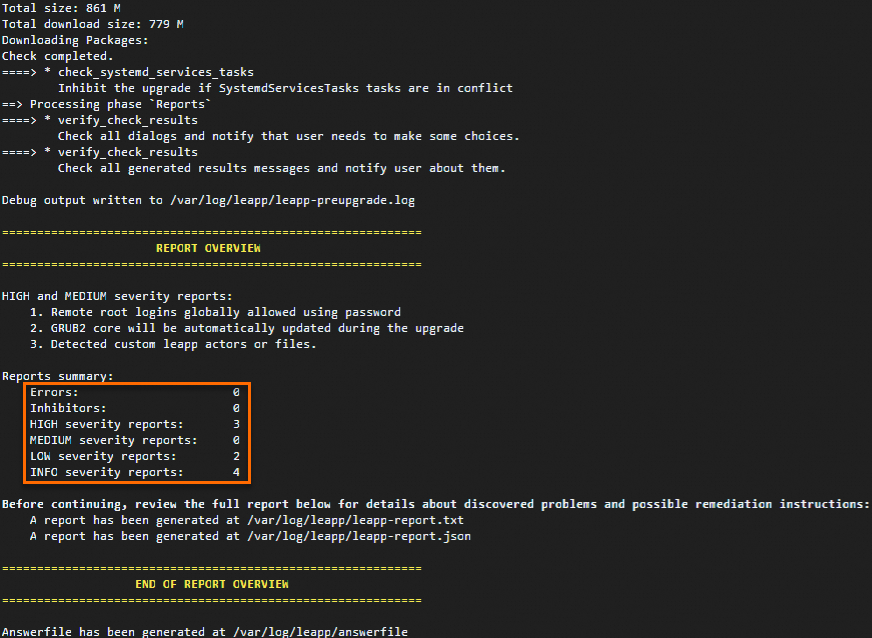
If the pre-upgrade check fails, the failed items are displayed:
-
-
(Conditional) Handle pre-upgrade errors.
Check
/var/log/leapp/leapp-report.txtfor error messages and resolve them based on the Leapp tool's suggestions. Common errors by risk level:-
high: Does not block the upgrade but must be resolved before or after the upgrade.
-
-
low: Minor impact. Should be resolved to ensure stable operation.
-
info: Informational. No action required. Review the report to understand changes during the upgrade.
-
-
-
Perform the upgrade.
-
Upgrade to the latest version of RHEL 9.
leapp upgrade --no-rhsm -
Upgrade to a specific target version. For example, upgrade RHEL 8 to RHEL 9.4.
leapp upgrade --no-rhsm --target 9.4
A successful upgrade looks like this:

-
-
Restart the instance to boot into the new system.
reboot -
Verify the upgrade result.
-
Run the
cat /etc/redhat-releasecommand to check whether the system version is updated. -
Check the upgrade execution logs or reports for any errors.
-
Observe whether your application runs correctly on the RHEL 9 system.
-
-
(Conditional) Configure the RHEL source.
After the Leapp upgrade, the
/etc/dnf/vars/releaseverfile locks the system to a specific minor version. For example, RHEL 9.4 points tohttps://xxxx/9.4/xxx. To access the latest RHEL 9 packages, delete the releasever file and rebuild the metadata cache.rm -f /etc/dnf/vars/releasever dnf clean all && dnf makecacheThe repository source updates to
https://xxxx/9/xxx, enabling automatic access to the latest RHEL 9 security patches and feature updates.
How do I upgrade from RHEL 9 to RHEL 10?
-
Back up data by creating a snapshot to prevent data loss if the upgrade fails. See Create a snapshot.
-
Log on to the ECS instance as the root user. See Connect to a Linux instance using Workbench.
ImportantRoot permissions are required for the upgrade.
Check whether your RHEL instance uses the Alibaba Cloud RHEL subscription:
-
Run
rpm -qa |grep aliyunto check whether your RHEL instance uses an Alibaba Cloud RHEL subscription. If a subscription package similar toaliyun_rhui_rhel9-2.0-1.x86_64is returned, your system uses an Alibaba Cloud RHEL subscription. Proceed with the upgrade.-
If no response is returned, your system does not use an Alibaba Cloud RHEL subscription. Purchase a software license for an ECS instance first, then perform the upgrade.
-
-
Prepare the upgrade environment.
-
Upgrade the RHEL system to the latest version and restart the system.
yum -y update reboot -
Install the Leapp upgrade tool.
yum -y install leapp leapp-rhui-alibaba --enablerepo="*" -
Verify that Leapp is installed. If a response similar to
leapp version xxxis returned, Leapp is installed.leapp --version
-
-
Perform a pre-upgrade check.
System configurations vary. Use the Leapp tool to run a pre-upgrade check and resolve any reported issues before upgrading.
-
Perform a pre-upgrade check for the latest version of RHEL 10.
leapp preupgrade --no-rhsmNoteRun
leapp preupgrade -hto view supported target versions. -
View the pre-upgrade check results.
Leapp pre-upgrade check logs:
-
/var/log/leapp/leapp-preupgrade.log: Leapp tool logs.
-
/var/log/leapp/leapp-report.txt: Pre-upgrade check report in text format.
-
/var/log/leapp/leapp-report.json: Pre-upgrade check report in JSON format.
If the pre-upgrade check fails, specific failed items are displayed as shown in the following figure.
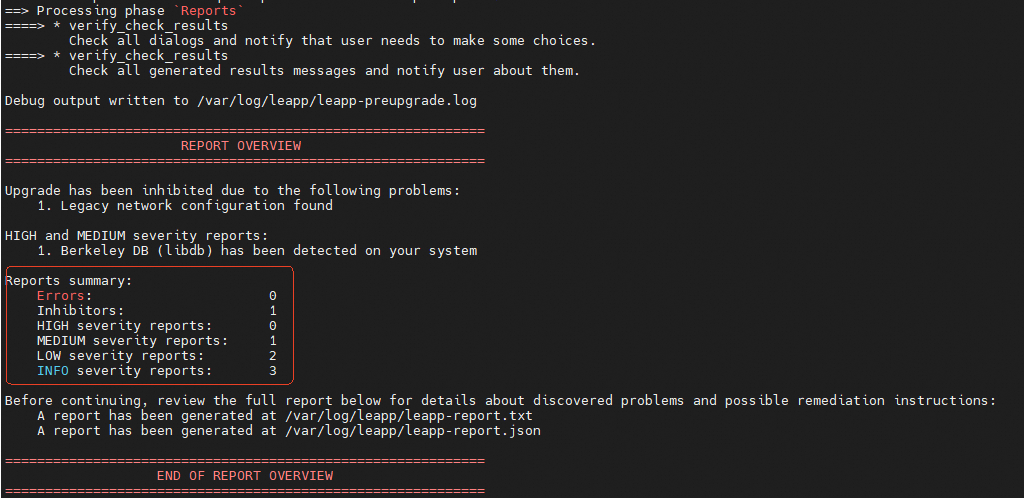 Check the log file for error messages and resolve them based on Leapp's recommendations. Resolve any inhibitor-level NIC errors — otherwise, the network may become unavailable after the upgrade.
If the inhibitor-level error
"title": "Legacy network configuration found"is reported, run the suggested command, such asnmcli connection migrate /etc/sysconfig/network-scripts/ifcfg-eth0. Otherwise, the network may become unavailable after the upgrade.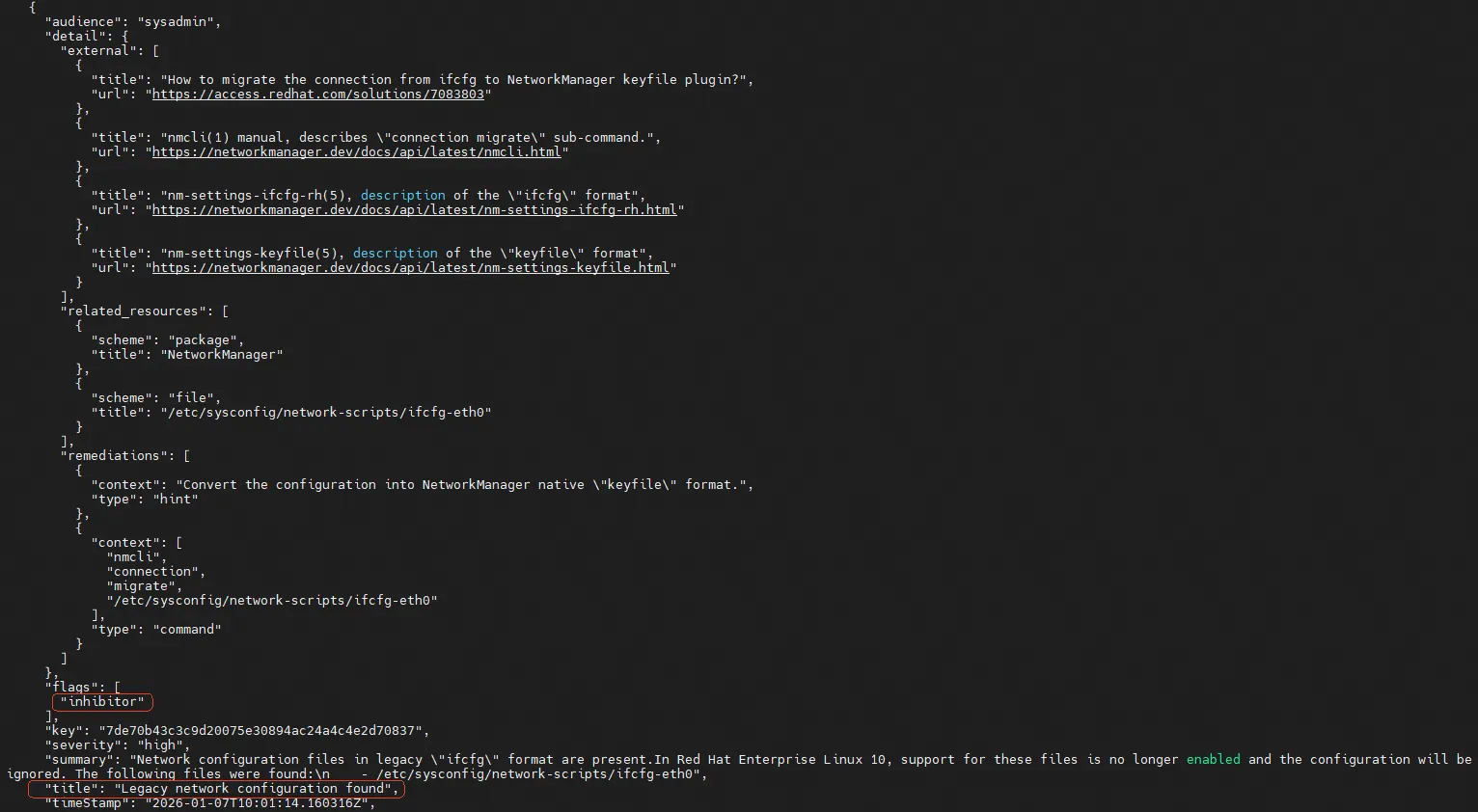
-
-
(Conditional) Handle pre-upgrade errors.
Check /var/log/leapp/leapp-report.txt for error messages and resolve them based on Leapp's suggestions. Common errors by risk level:
-
high: Does not block the upgrade but must be resolved before or after the upgrade.
-
Case 1: Custom Leapp actors or files were detected.
-
Case 2: The GRUB2 configuration will be automatically updated during the upgrade.
-
-
low: Minor impact. Should be resolved to ensure stable operation.
-
Case: SELinux will be set to permissive mode.
-
Case: Some target system repositories are excluded.
-
-
-
-
Perform the upgrade. The following figure indicates a successful upgrade.
leapp upgrade --no-rhsm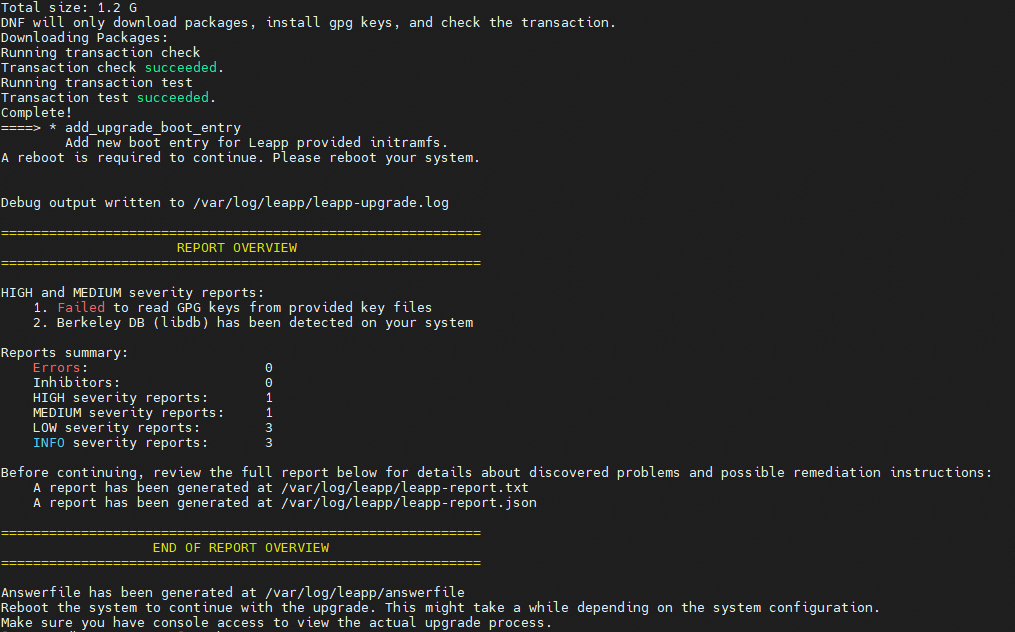
-
Run the
rebootcommand to restart the instance and boot into the new system. -
Verify the upgrade result.
-
Run the
cat /etc/redhat-releasecommand to check whether the system version is updated. -
Check the upgrade execution logs or reports for any errors.
-
Monitor your services on the RHEL 9 system to verify proper operation.
-
-
(Conditional) Configure the RHEL source.
After the Leapp upgrade, the
/etc/dnf/vars/releaseverfile locks the system to a specific minor version. For example, RHEL 10.1 points tohttps://xxxx/10.1/xxx. To access the latest RHEL 10 packages, delete the releasever file and rebuild the metadata cache.rm -f /etc/dnf/vars/releasever dnf clean all && dnf makecacheThe repository source updates to
https://xxxx/10/xxx, enabling automatic access to the latest RHEL 10 security patches and feature updates.
References
For operating system lifecycle details and general end-of-life solutions, see Operating system lifecycle.