Network packet capture is widely used in scenarios such as troubleshooting and security auditing. This topic describes common issues you might encounter when using tcpdump or Wireshark for packet capture and explains how to solve them.
Background
tcpdump and Wireshark are powerful network protocol analysis tools. Wireshark supports most mainstream operating systems, including Linux, Windows, and macOS. Typically, Linux instances in cloud environments do not have a graphical user interface (GUI) installed by default. Therefore, when you need to capture network packets on Linux instances in cloud environments, we recommend using the tcpdump tool. For more information about how to install and use the two tools, see Use packet capture tools to capture network packets.
Common tcpdump messages and solutions
[Packet size limited during capture]
Issue: As shown in the following figure, the packet is 171 bytes in length, but only the first 96 bytes are captured.
Possible cause: This message indicates that the full packet was not captured. This typically happens because of the default settings of the packet capture tool.
Solution: In some operating systems, tcpdump captures only the first 96 bytes of each frame by default. You can use the -s parameter to specify the number of bytes to capture. The following is an example command:
sudo tcpdump -i eth0 -s 1000 -w tcpdump.capCommon Wireshark messages and solutions
[TCP Previous segment not captured]
Issue: Packet loss or missed packets occur during packet capture. The following figure shows an example.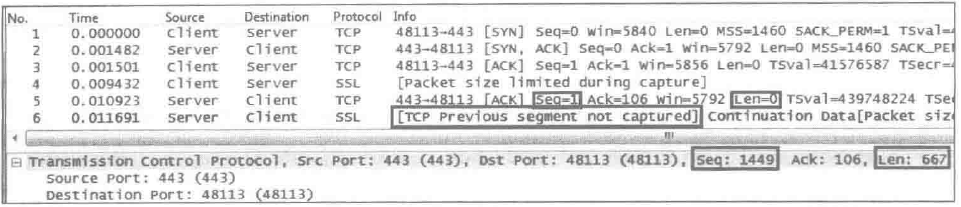
Possible cause: This message indicates that the previous TCP segment was not captured and the captured data segment is incomplete. This is usually caused by packet loss or missed packets by the capture tool.
Solution: Analyze the packet capture results based on the example above to determine the specific situation.
During data transmission using the TCP protocol, data segments sent from the same host should be continuous. Specifically, the Seq of a subsequent data segment should equal the Seq of the previous data segment plus the data payload length (i.e., Seq + Len - TCP header length), and the Ack field value of the receiver equals the Seq of the sender's data segment plus the data payload length, indicating the sequence number of the next byte expected to be received (except in three-way handshake or four-way handshake scenarios). If the Seq of a subsequent data segment is greater than the Seq of the previous one plus the data payload length, and no intermediate data segment is observed, the following situations may exist:
Missed packet capture (TCP Previous segment not captured): If subsequent
Ackincludes the uncapturedSeqrange (e.g., the sender sendsSeq=1000andSeq=2000, and the receiver returnsAck=2000), it indicates that the intermediate data has been acknowledged by the receiver, but the capture tool missed it.Packet loss: If subsequent
Ackdoes not cover the uncapturedSeqrange (e.g., the sender sendsSeq=1000andSeq=2000, and the receiver returnsAck=1000), it indicates that the intermediate data has not been acknowledged by the receiver, and packet loss may have occurred.Data segments in the network may be out of order (later segments arrive before earlier ones). In this case, the receiver will repeatedly acknowledge the continuous
Ackthat has been received throughSequntil the missing segment is received.
The processing logic for out-of-order and window mechanisms is as follows:
If the data segment
Seqexceeds the receive window (Window) range, the receiver will discard the segment, and recovery will depend on timeout retransmission or fast retransmission mechanisms.If the data segment Seq exceeds the receive window (Window) range, the receiver will discard the segment, and recovery will depend on timeout retransmission or fast retransmission mechanisms.
[TCP ACKed unseen segment]
Issue: The [TCP ACKed unseen segment] message appears during packet capture, as shown in the following figure.

Possible cause: This message indicates that the ACKed packet was not captured. According to the information in line 32 in the figure above, the value of the sequence number (Seq) plus the length (Len) is 6889 plus 1448, which equals 8337. It is expected that the sequence number of the server's next packet should be 8337. However, line 35 shows a sequence number of 11233, indicating that information between 8337 and 11232 was not captured. Only the subsequent acknowledgment packet was captured, but the preceding data packet was not. The information between 8337 and 11232 should have appeared before line 34.
Solution: This is perhaps the most common Wireshark message. You need to analyze the packet capture results based on the example above to determine the specific situation.
[TCP Out-of-Order]
Issue: The [TCP Out-of-Order] message appears during packet capture, as shown in the following figure.

Possible cause: This message indicates that the data packets are out of order. When Wireshark detects that the Seq of a subsequent packet is smaller than the Seq plus Len of the previous packet, it is considered out of order. Small spans of out-of-order packets have little impact, such as when the original order of 1, 2, 3, 4, 5 is scrambled to 2, 1, 3, 4, 5. However, large spans can trigger fast retransmission. For example, if the order is scrambled to 2, 3, 4, 5, 1, it will trigger enough "Dup ACK" messages to cause packet retransmission.
Solution: Analyze the packet capture results based on the example above. Occasional small-span out-of-order packets can be ignored. However, if large-span out-of-order packets occur frequently, you can use tools such as MTR for further analysis and troubleshooting, or check the logs of intermediate devices such as switches and routers for further analysis.
[TCP Dup ACK]
Issue: The [TCP Dup ACK] message appears during packet capture, as shown in the following figure.

Possible cause: This message indicates that duplicate ACKs have occurred. When out-of-order packets or packet loss occurs, the receiver receives packets with Seq values greater than expected. For each such packet received, the receiver responds with the expected Seq value to remind the sender, resulting in duplicate ACKs.
Solution: If this situation occurs frequently, you can use tools such as MTR for further analysis and troubleshooting, or check the logs of intermediate devices such as switches and routers for further analysis.
[TCP Retransmission]
Issue: The [TCP Retransmission] message appears during packet capture, as shown in the following figure.

Possible cause: This message indicates that data packets are being retransmitted. If a packet is lost and there are no subsequent packets that can trigger "Dup ACK" at the receiver, fast retransmission will not occur. In this case, the sender can only wait for timeout retransmission. As shown in the figure above, the client sent the original packet number 1053 and kept waiting for the corresponding ACK. It had to retransmit packet 1225 after more than 100 milliseconds.
Solution: If this situation occurs frequently, you can use tools such as MTR for further analysis and troubleshooting, or check the logs of intermediate devices such as switches and routers for further analysis.
TCP provides reliable transmission by setting a timer when sending data to address the issue of packet acknowledgment. If no acknowledgment is received when the timer expires, it retransmits the data. Regarding how the retransmission time is calculated, RFC2988 provides a solution that Linux still uses today. For detailed information, refer to the RTT and RTO sections in the TCP-IP documentation.
[TCP Fast Retransmission]
Issue: The [TCP Fast Retransmission] message appears during packet capture, as shown in the following figure.
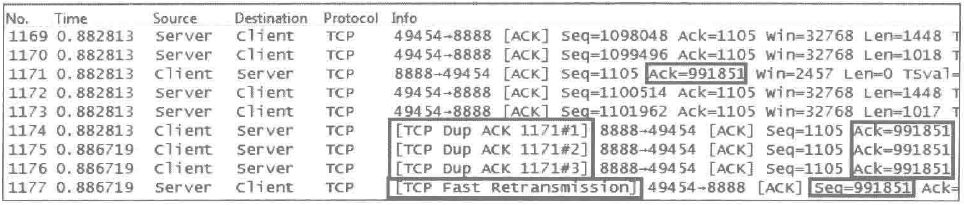
Possible cause: This message indicates that data packets are being fast retransmitted. When the sender receives three or more "TCP Dup ACK" messages, it realizes that a previously sent packet may have been lost and initiates fast retransmission. As shown in the figure above, when the server received three "TCP Dup ACK" messages, it retransmitted packet 1177 with Seq equal to 991851.
Solution: If this situation occurs frequently, you can use tools such as MTR for further analysis and troubleshooting, or check the logs of intermediate devices such as switches and routers for further analysis.
The fast retransmission mechanism implements another standard for packet loss assessment. When the receiver receives three consecutive duplicate ACKs, the sender does not need to wait for the retransmission timer to expire and can retransmit the unacknowledged segment earlier.
[TCP zerowindow]
Issue: The [TCP zerowindow] message appears during packet capture, as shown in the following figure.
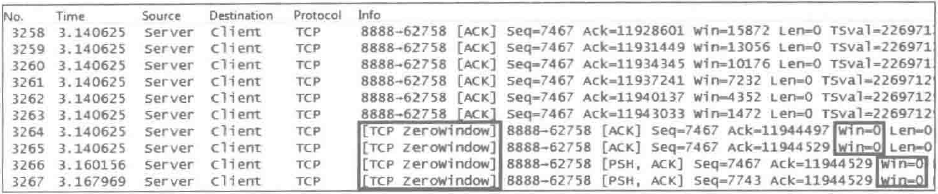
Possible cause: This message indicates that the receive window is 0, the buffer is full, and no more data will be accepted. "win=" indicates how much buffer space the sender of this packet has available to receive data. "Win=0" indicates that the buffer is full, informing the other party that it will no longer receive data, as shown in the figure above.
Solution: Possible causes of this issue include insufficient processing capacity at the receiving end or insufficient network bandwidth resources. Further analysis is needed to identify the specific cause.
[TCP window Full]
Issue: The [TCP window Full] message appears during packet capture, as shown in the following figure.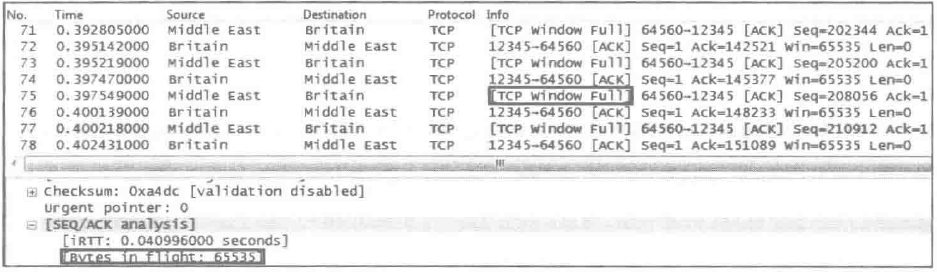
Possible cause: This message indicates that the send window is full. As shown in the figure above, it indicates that the sender of the packet has exhausted the receive window declared by the other party and cannot send more data temporarily.
Solution: Possible causes of this issue include insufficient processing capacity at the receiving end or insufficient network bandwidth resources. Further analysis is needed to identify the specific cause.
Bytes in flight equals the receive window of the other party, indicating that the value sent by the sender minus the value of the most recent acknowledgment by the other party equals how many values have been acknowledged. That is, Seq plus Len equals Ack, which is the most recent Ack. The following two fields indicate that transmission has paused and should be given attention.
Bytes in flight equals the receive window of the receiver, indicating that the number of bytes sent by the sender minus the number of bytes most recently acknowledged by the receiver equals the number of bytes acknowledged. That is, Seq plus Len equals Ack, which is the most recent Ack. The following two fields indicate that transmission has paused and should be given high attention.
[TCP segment of a reassembled PDU]
Issue: The [TCP segment of a reassembled PDU] message appears during packet capture, as shown in the following figure.
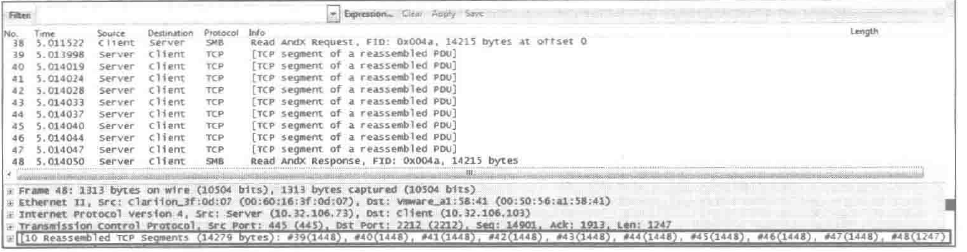
Possible cause: This message indicates TCP protocol segments of a reassembled PDU. It indicates that Wireshark can virtually group TCP packets that belong to the same application layer PDU.
Solution: You need to configure the software by selecting Edit > Preferences > Protocol > TCP, and confirming that "Allow sub dissector to reassemble TCP streams" is enabled. The ACK confirmation packet numbers are the same.
[Continuation to #X]
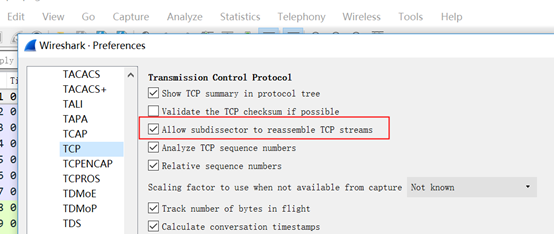
Issue: The [Continuation to #X] message appears during packet capture, as shown in the following figure.

Possible cause: This message indicates that "Allow sub dissector to reassemble TCP streams" is disabled. Enable it according to your actual situation.
Solution: You need to configure the software by selecting Edit > Preferences > Protocol > TCP, and confirming that "Allow sub dissector to reassemble TCP streams" is enabled.
Time-to-live exceeded (Fragment reassembly time exceeded)
Issue: The Time-to-live exceeded (Fragment reassembly time exceeded) message appears during packet capture, as shown in the following figure.
Possible cause: This message indicates that the Time-to-Live (TTL) has been exceeded, specifically that the fragment reassembly time has been exceeded. It indicates that the sender of this packet previously received some fragments but could not reassemble them for some reason. As shown in the figure above, because some packets from Shanghai to Beijing were transmitted in fragments, and some were lost in transit, Beijing could not reassemble them and had to use this ICMP error to inform the other party.
Solution: If this issue persists for a long time, you can resolve it by checking routing tables, using MTR tools to troubleshoot network loops, adjusting the initial TTL value, adjusting the MTU, or optimizing network bandwidth.
References
For more information about Wireshark, see the Wireshark official documentation.
For more information about how to use packet capture tools, see Use packet capture tools to capture network packets.
For more information about how to troubleshoot issues where you can ping an instance but cannot connect to its ports, see Troubleshooting methods for issues where you can ping an ECS instance but cannot connect to its ports.
For more information about how to use the MTR tool to analyze network links, see Use the MTR tool to analyze network links.