RabbitMQ is an open source message broker that supports multiple messaging protocols, such as AMQP, MQTT, STOMP, HTTP, and WebSockets. RabbitMQ is easy to use, extensible, and highly available. It coordinates and manages communication in distributed systems and uses asynchronous messaging to improve system decoupling, scalability, concurrent processing, and fault tolerance. Due to its stable performance, rich feature set, and active community support, RabbitMQ is widely used for messaging and task processing in enterprise applications. This topic describes how to deploy open source RabbitMQ on an Elastic Compute Service (ECS) instance.
Deploy RabbitMQ
Manual deployment: Suitable for users who have a basic knowledge of Linux commands and want to customize their RabbitMQ deployment.
Quick deployment: Skips the installation and configuration of RabbitMQ, which greatly reduces deployment time.
Manual deployment
This section describes how to install the latest version of RabbitMQ. For more information about other versions and installation methods, see Installing RabbitMQ.
Prerequisites
Before you manually deploy RabbitMQ, create an ECS instance that meets the following requirements:
The instance has an assigned public IP address or an associated Elastic IP Address (EIP). For more information, see Elastic IP Address.
Operating system: Ubuntu 20.04, Ubuntu 22.04, or Debian 11.0 to 12.5.
For more information about other supported systems and installation methods, see Installing RabbitMQ.
Security group rules: Add inbound rules to the security group to allow traffic on ports 22, 80, and 15672.
NoteTo connect to the RabbitMQ server using an MQ tool, you must also allow traffic on port 5672.
Procedure
A remote connection requires an instance with RabbitMQ deployed.
For more information, see Connect to a Linux instance using Workbench.
Install RabbitMQ.
Install basic RabbitMQ dependencies.
sudo apt-get install curl gnupg apt-transport-https -yDownload the GPG public keys for RabbitMQ and Erlang, and add the public keys to the system's trusted keyring.
curl -1sLf "https://keys.openpgp.org/vks/v1/by-fingerprint/0A9AF2115F4687BD29803A206B73A36E6026DFCA" | sudo gpg --dearmor | sudo tee /usr/share/keyrings/com.rabbitmq.team.gpg > /dev/null
curl -1sLf https://github.com/rabbitmq/signing-keys/releases/download/3.0/cloudsmith.rabbitmq-erlang.E495BB49CC4BBE5B.key | sudo gpg --dearmor | sudo tee /usr/share/keyrings/rabbitmq.E495BB49CC4BBE5B.gpg > /dev/null
curl -1sLf https://github.com/rabbitmq/signing-keys/releases/download/3.0/cloudsmith.rabbitmq-server.9F4587F226208342.key | sudo gpg --dearmor | sudo tee /usr/share/keyrings/rabbitmq.9F4587F226208342.gpg > /dev/null
Add the official Advanced Package Tool (APT) repositories for RabbitMQ and Erlang to the
/etc/apt/sources.list.d/rabbitmq.listfile.sudo tee /etc/apt/sources.list.d/rabbitmq.list <<EOF deb [signed-by=/usr/share/keyrings/rabbitmq.E495BB49CC4BBE5B.gpg] https://ppa1.novemberain.com/rabbitmq/rabbitmq-erlang/deb/ubuntu jammy main deb-src [signed-by=/usr/share/keyrings/rabbitmq.E495BB49CC4BBE5B.gpg] https://ppa1.novemberain.com/rabbitmq/rabbitmq-erlang/deb/ubuntu jammy main deb [signed-by=/usr/share/keyrings/rabbitmq.E495BB49CC4BBE5B.gpg] https://ppa2.novemberain.com/rabbitmq/rabbitmq-erlang/deb/ubuntu jammy main deb-src [signed-by=/usr/share/keyrings/rabbitmq.E495BB49CC4BBE5B.gpg] https://ppa2.novemberain.com/rabbitmq/rabbitmq-erlang/deb/ubuntu jammy main deb [signed-by=/usr/share/keyrings/rabbitmq.9F4587F226208342.gpg] https://ppa1.novemberain.com/rabbitmq/rabbitmq-server/deb/ubuntu jammy main deb-src [signed-by=/usr/share/keyrings/rabbitmq.9F4587F226208342.gpg] https://ppa1.novemberain.com/rabbitmq/rabbitmq-server/deb/ubuntu jammy main deb [signed-by=/usr/share/keyrings/rabbitmq.9F4587F226208342.gpg] https://ppa2.novemberain.com/rabbitmq/rabbitmq-server/deb/ubuntu jammy main deb-src [signed-by=/usr/share/keyrings/rabbitmq.9F4587F226208342.gpg] https://ppa2.novemberain.com/rabbitmq/rabbitmq-server/deb/ubuntu jammy main EOFUpdate the local package indexes.
sudo apt-get update -yInstall the required Erlang packages.
sudo apt-get install -y erlang-base \
                        erlang-asn1 erlang-crypto erlang-eldap erlang-ftp erlang-inets \
                        erlang-mnesia erlang-os-mon erlang-parsetools erlang-public-key \
                        erlang-runtime-tools erlang-snmp erlang-ssl \
                        erlang-syntax-tools erlang-tftp erlang-tools erlang-xmerl
Install RabbitMQ.
sudo apt-get install rabbitmq-server -y --fix-missing
Configure RabbitMQ.
Enable RabbitMQ to start on boot and then start the RabbitMQ service.
sudo systemctl enable rabbitmq-server
sudo systemctl start rabbitmq-server
To ensure data security, run the following command to delete the default user.
The default username and password for RabbitMQ are both
guest.sudo rabbitmqctl delete_user guestCreate a RabbitMQ administrator user.
Create a new user.
sudo rabbitmqctl add_user <username> <password>Replace
<username>and<password>with your desired username and password.Set the new user as an administrator.
sudo rabbitmqctl set_user_tags <username> administratorGrant all permissions to the newly created user.
sudo rabbitmqctl set_permissions -p / <username> ".*" ".*" ".*"
Enable the RabbitMQ management web interface.
sudo rabbitmq-plugins enable rabbitmq_management
Quick deployment
Use an Alibaba Cloud Marketplace image for quick deployment
Using an Alibaba Cloud Marketplace image for quick deployment skips the installation and configuration process, which greatly reduces deployment time. The price of the Alibaba Cloud Marketplace image is specified on the image product page.
Click Cloud Native MQ for Apache RabbitMQ to open the image details page.
On the image product page, you can view image information and user guides.
Click or Choose Your Plan.
On the Custom Launch page, complete the configuration items and purchase the ECS instance by following the prompts.
Pay attention to the following parameters during configuration. You can configure other parameters as needed. For more information about the parameters, see Create an instance on the Custom Launch tab.
Image: The Image section is already set to the image you purchased.
Public IP: Select Assign Public IPv4 Address.
Security Group: The security group rules must allow traffic on ports 22, 80, and 15672.
Retrieve the username and logon password for RabbitMQ.
Remotely connect to the RabbitMQ server.
For more information, see Connect to a Linux instance using Workbench.
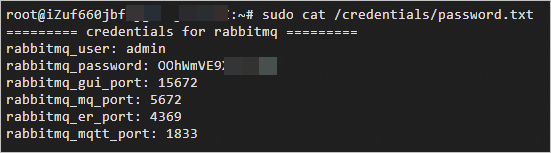
Run the following command to retrieve the username and logon password for RabbitMQ.
sudo cat /credentials/password.txtThe command returns an output similar to the following.
rabbitmq_user: The username to log on to RabbitMQ.
rabbitmq_password: The logon password for RabbitMQ.
rabbitmq_gui_port: The web server port for RabbitMQ.
rabbitmq_mq_port: The remote connection port for RabbitMQ.
rabbitmq_er_port: The internal port used by the RabbitMQ server for Erlang inter-process communication.
rabbitmq_mqtt_port: The listening port for the MQTT service provided by the RabbitMQ server.
Use Terraform for quick deployment
Terraform is an Infrastructure as Code (IaC) tool. It helps developers and operations and maintenance (O&M) teams automate the creation, deployment, and management of infrastructure. You can write simple code to define and configure cloud infrastructure without manual operations or configuration.
Procedure
Click Run with one click to open Terraform Explorer and automatically load the following Terraform code.
Modify the parameters as needed. By default, one VPC, one vSwitch, one security group, and one pay-as-you-go ECS instance are created in the cn-beijing region. For more information about the billing of ECS instances, see Billing overview.
Click Initiate Debugging to preview the details of the resources to be created. If the resource information is correct, click Plan & Apply to start creating the resources. After the task is successfully executed, the deployment is complete.
Log on to the RabbitMQ management interface
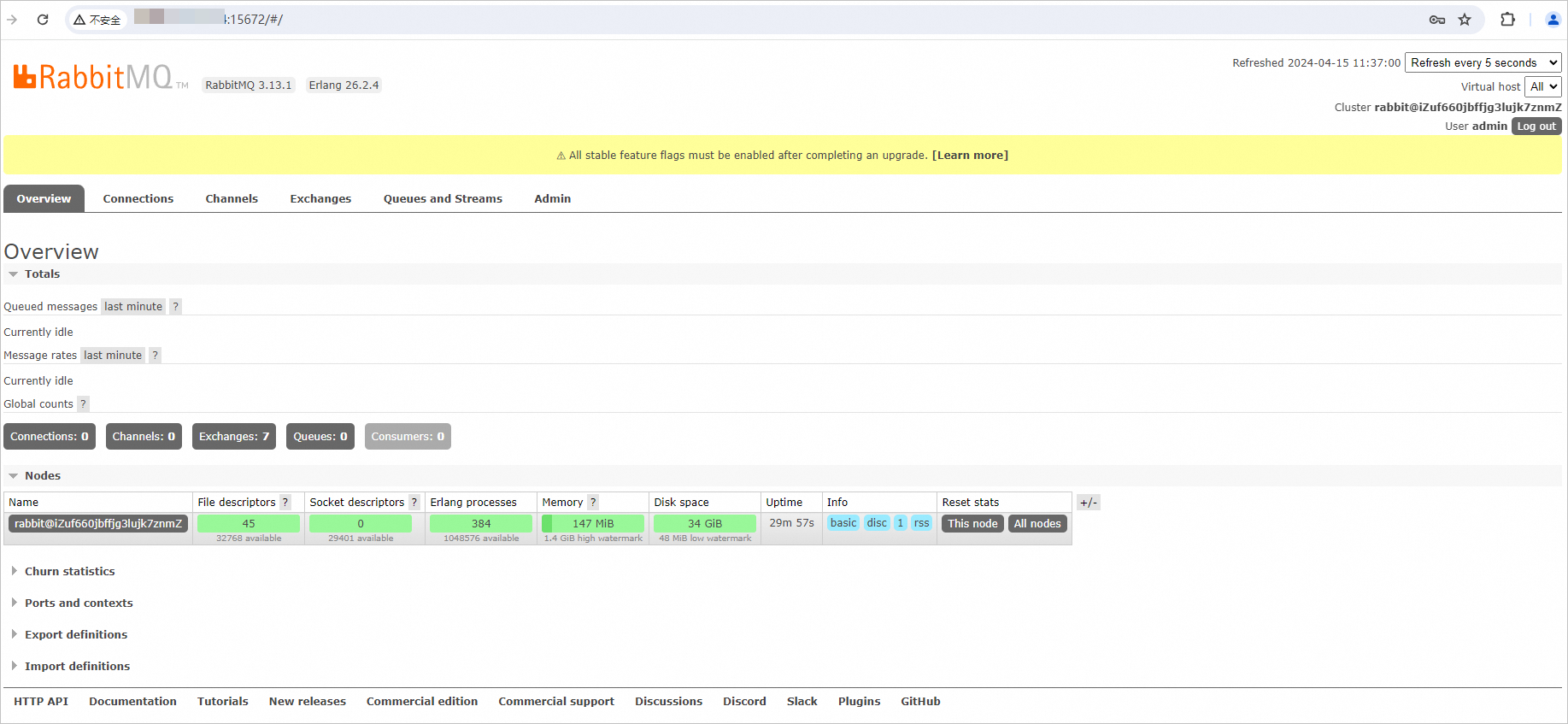
In your local browser, enter
http://<Public IP address of the Linux instance>:15672.The following page appears, which indicates that RabbitMQ has been successfully installed.

Enter the username and password of the RabbitMQ administrator that you created, and then click Login to access the RabbitMQ management interface.
The RabbitMQ management interface displays the following information:
Migrate open source RabbitMQ to the cloud
If you want to address stability issues in RabbitMQ clusters, such as message accumulation and split-brain, and achieve high concurrency, distributed deployment, and flexible scaling, you can migrate your open source RabbitMQ cluster to ApsaraMQ for RabbitMQ. For more information, see Migrate open source RabbitMQ to the cloud.