Dear Alibaba Cloud customer, Alibaba Cloud will retire services for classic network ECS instances on February 28, 2025. We recommend migrating your classic network instances to a VPC promptly to prevent them from being released or becoming unavailable.
Instances in a VPC are not affected.
Background
Since the launch of Alibaba Cloud's public cloud services in 2011, the classic network architecture has provided network support for ECS and served many customers. In 2014, Alibaba Cloud introduced new cloud products based on the VPC architecture, offering customers a better choice in terms of security, stability, flexibility, and performance. Over the years, the VPC architecture has become the default choice for most cloud users. Therefore, we are retiring classic network ECS instances.
To minimize the impact on your workloads, Alibaba Cloud is providing an ample time window for you to migrate ECS instances from the classic network to a VPC. This transition period allows you to plan, test, and execute your migration strategy. Alibaba Cloud will also provide migration tools, documentation, and professional support to ensure a smooth migration.
Retirement timeline and impact
Scope | Milestone | Impact |
All regions | Starting 00:00 on July 25, 2024 (UTC+8): Shortened renewal period | The renewal period for your existing subscription classic network ECS instances cannot extend beyond February 27, 2025. The maximum subscription duration for new purchases is shortened to six months. If you require a longer subscription, you must migrate the instances to a VPC. |
Starting 00:00 on August 27, 2024 (UTC+8): New purchase restrictions | The sale of subscription classic network ECS instances will be discontinued. You can still purchase pay-as-you-go ECS instances in the classic network or purchase new ECS instances in a VPC. | |
Starting 00:00 on September 24, 2024 (UTC+8): All new purchases stopped | The sale of all classic network ECS instances, including pay-as-you-go and spot instances, will be discontinued. All Alibaba Cloud accounts will be unable to create classic network resources. | |
Starting 00:00 on October 30, 2024 (UTC+8): Renewals stopped | Renewals for subscription classic network ECS instances will be disabled. You will no longer be able to renew these instances. | |
Starting 00:00 on February 28, 2025 (UTC+8): Service discontinuation | Alibaba Cloud will discontinue all services for classic network ECS instances. If you still have classic network instances that have not been migrated:
|
Migration plan
Step 1: Find your classic network instances
Starting August 1, 2024, Alibaba Cloud will begin sending event notifications. If you have not yet received a notification, you can use Method 1 or Method 2 to check for affected instances.
Method 1: ECS console
Log in to the ECS console.
In the left-side navigation pane, choose .
In the upper-left corner of the page, select a region and resource group.

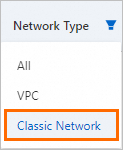
On the Instances page, find the Network Type column and set the filter to Classic Network to list all classic network ECS instances in the current region.
NoteMake sure to check for instances in all of your regions.
Method 2: OpenAPI
Go to the OpenAPI Portal and call the DescribeInstances API operation.
Configure the following request parameters and call the operation to query all classic network ECS instances in a specific region.
NoteMake sure to check for instances in all of your regions.
Parameter
Description
Example
RegionId
The region ID of the instance. You can call DescribeRegions to view the latest list of Alibaba Cloud regions.
cn-hangzhou
InstanceNetworkType
The network type of the instance. Valid values:
classic: The classic network.
vpc: A VPC.
classic
Method 3: Event notifications
Log in to the ECS console.
In the left-side navigation pane, click Events.
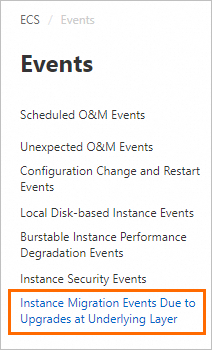
On the events page, select the Instance migration events due to upgrades at underlying layer tab. You can view all classic network instances that require migration.
If a number appears on the Instance migration events due to upgrades at underlying layer tab, it indicates that you have pending events, as shown in the following figure.
The following table describes the event details.
Event code | Event name | Event level | CloudMonitor event name | Description and impact | Recommended action |
SystemUpgrade.Migrate | Instance migration due to underlying infrastructure upgrade | Critical | Undefined | This system event is sent in advance when Alibaba Cloud upgrades or modifies its physical infrastructure that may affect instances in the affected region and zone. | Log on to the ECS console to view the details of the system event and migrate the instance as prompted. For more information, see Step 2: Migrate an ECS instance from the classic network to a VPC. |
Step 2: Migrate to a VPC
To avoid disruptions to your business, we recommend migrating your classic network ECS instances to a VPC, which is free of charge. Compared to the classic network, instances in a VPC are more secure, support a richer set of features and instance types, and provide a more secure and flexible cloud computing experience.
Migration scenario | Recommended solution and considerations |
The instance is in the classic network. |
|
Other cloud products, such as ApsaraDB RDS or ApsaraDB for Redis, are also in the classic network. | An ECS instance in a VPC cannot directly access an ApsaraDB RDS instance in the classic network over the internal network. Therefore, you must switch the RDS instance to a VPC and enable hybrid access mode. This provides the RDS instance with both a classic network endpoint and a VPC endpoint. For more information, see Best practices for migrating all instances from the classic network to a VPC, Hybrid access to ApsaraDB services. |
Migrating instances with older images (such as Windows Server 2003 and CentOS 5.8 or earlier). | After migrating an instance that uses an older image, such as Windows Server 2003 or CentOS 5.8 or earlier, you may encounter issues such as a kernel panic, a blue screen error, or an INACCESSIBLE_BOOT_DEVICE error. For solutions, see How do I troubleshoot instance downtime after migration? |
For more information, see Instance migration events.