Asynchronously deletes an Elastic Network Interface (ENI).
Operation description
When you call this operation, take note of the following items:
-
The ENI must be in the Available state.
-
If the ENI is attached to an ECS instance, you must first detach it from the instance (DetachNetworkInterface) before you can delete the ENI.
-
After the ENI is deleted:
-
All private addresses (including the primary private IP address and secondary private IP addresses) of the ENI are automatically released.
-
The deleted ENI is removed from all associated security groups.
-
-
This is an asynchronous operation. After you call the operation successfully, you can check the ENI status or listen for network interface controller (NIC) operation events to determine the result. The ENI state machine is shown in the following figure:
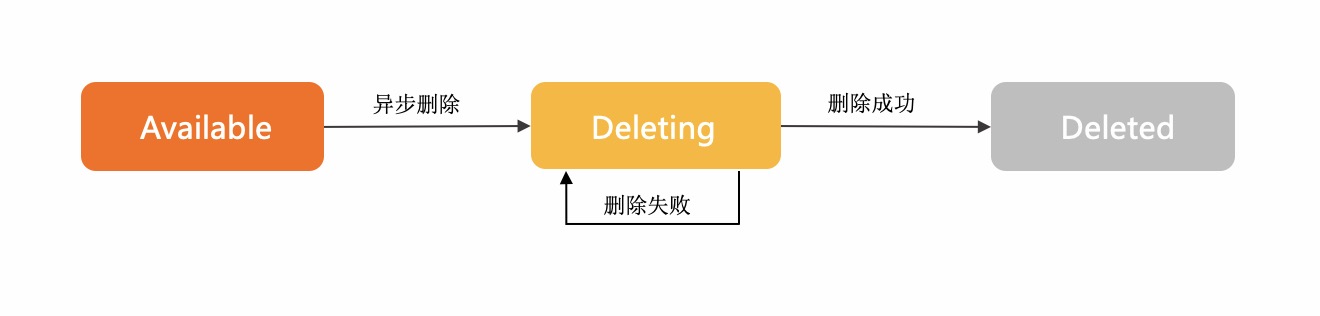
The Deleting state indicates that the delete request was sent successfully and the ENI is being deleted.
If the ENI cannot be found, the ENI is deleted.
If the ENI remains in the Deleting state for an extended period of time, the deletion failed. In this case, you can send a new delete request for the ENI.
For details about sample code, see Delete an ENI.
Try it now
 Test
Test
RAM authorization
|
Action |
Access level |
Resource type |
Condition key |
Dependent action |
|
ecs:DeleteNetworkInterface |
delete |
*NetworkInterface
|
None | None |
Request parameters
|
Parameter |
Type |
Required |
Description |
Example |
| RegionId |
string |
Yes |
The region ID. You can call DescribeRegions to query the most recent region list. |
cn-hangzhou |
| NetworkInterfaceId |
string |
Yes |
The ID of the ENI. |
eni-bp14v2sdd3v8htln**** |
Response elements
|
Element |
Type |
Description |
Example |
|
object |
|||
| RequestId |
string |
The request ID. |
F3CD6886-D8D0-4FEE-B93E-1B73239673DE |
Examples
Success response
JSON format
{
  "RequestId": "F3CD6886-D8D0-4FEE-B93E-1B73239673DE"
}
Error codes
|
HTTP status code |
Error code |
Error message |
Description |
|---|---|---|---|
| 400 | InvalidOperation.HasSlaveEniBonded | %s | This network card also has a SLAVE network card bound to it. |
| 400 | MissingParameter | %s | A parameter is not specified. |
| 400 | UnsupportedParameter | %s | The parameter is not supported. |
| 400 | InvalidParameter | %s | The specified parameter is invalid. |
| 400 | InvalidInstanceID.Malformed | %s | The specified InstanceId parameter is invalid. |
| 400 | InvalidOperation.InvalidEcsState | %s | The current status of the instance does not support this operation. |
| 400 | InvalidOperation.InvalidEniState | %s | The current status of the ENI does not allow modifying ENI attributes. |
| 400 | InvalidOperation.DetachPrimaryEniNotAllowed | %s | Detaching the primary ENI from an instance is not allowed. |
| 400 | Forbidden.RegionId | %s | The service is unavailable in the current region. |
| 400 | InvalidParams.EniId | %s | The specified EniId parameter is invalid. |
| 500 | InternalError | The request processing has failed due to some unknown error, exception or failure. | An internal error has occurred. Try again later. |
| 500 | InvalidSecurityGroupId.EniMustHaveSecurityGroup | The specified network card does not have an associated security group. | The specified NIC is not associated with a security group. |
| 403 | InvalidUserType.NotSupported | %s | Your account does not support this operation. |
| 403 | Abs.InvalidAccount.NotFound | %s | Your Alibaba Cloud account does not exist or your AccessKey pair has expired. |
| 403 | Forbidden.NotSupportRAM | %s | RAM users are not authorized to perform this operation. |
| 403 | Forbidden.SubUser | %s | You are not authorized to manage this resource. Contact the owner of the Alibaba Cloud account for authorization. |
| 403 | MaxEniCountExceeded | %s | The maximum number of ENIs that can be managed has been reached. |
| 403 | EniPerInstanceLimitExceeded | %s | The maximum number of ENIs that can be attached to the specified instance has been reached. |
| 403 | InvalidOperation.AvailabilityZoneMismatch | %s | The operation is invalid. |
| 403 | InvalidOperation.VpcMismatch | %s | The operation is invalid. Check whether the VPC in the operation corresponds to other parameters. |
| 403 | SecurityGroupInstanceLimitExceed | %s | The number of instances in the security group has reached the maximum limit. |
| 403 | InvalidSecurityGroupId.NotVpc | %s | The specified SecurityGroupId parameter is invalid and the network type of the security group is not VPC. |
| 403 | InvalidOperation.InvalidEniType | %s | The current type of the Elastic Network Interface (ENI) does not support this operation. |
| 403 | InvalidEniId.NotFound | %s | The specified ENI ID does not exist. |
| 403 | InvalidOperation.EniServiceManaged | %s | The operation is invalid. |
| 403 | InvalidOperation.TrunkingIsNotAllowed | The account is not authorized to use trunk ENI or perform trunking operation. | Operation of the trunk card is not allowed. You need to make sure that your account allows you to operate the trunk network card. If you have any questions, please submit the work order. |
| 404 | InvalidEcsId.NotFound | %s | The specified instance ID does not exist. |
| 404 | InvalidEniId.NotFound | %s | |
| 404 | InvalidVSwitchId.NotFound | %s | The specified vSwitch does not exist. |
| 404 | InvalidSecurityGroupId.NotFound | %s | The specified security group ID does not exist. |
See Error Codes for a complete list.
Release notes
See Release Notes for a complete list.