Calls the AttachNetworkInterface operation to attach an Elastic Network Interface (ENI) to a VPC-connected ECS instance. You can specify parameters such as NetworkInterfaceId, InstanceId, and NetworkCardIndex.
Operation description
When you call this operation, take note of the following items:
-
The Elastic Network Interface (ENI) must be in the active (
Available) state. An ENI can be attached to only one instance that resides in the same zone and VPC as the network interface controller (NIC). -
The ECS instance must be in the Running or Stopped state. Some ECS instance types require the ECS instance to be in the Stopped state when you attach an Elastic Network Interface (ENI). For more information, see the section about ECS instance types that require the ECS instance to be stopped in Attach an ENI.
NoteIf the instance was last started before April 1, 2018 (including but not limited to starting a newly purchased instance, restarting, or powering on), you must invoke RebootInstance to restart the instance that has been in the Running state. Otherwise, the network interface controller (NIC) cannot be attached.
-
Multiple Elastic Network Interfaces (ENIs) can be attached to a single instance at the same time. For more information, see ENI overview.
-
The vSwitch to which the network interface controller (NIC) belongs must be in the same zone and VPC as the instance.
-
This is an asynchronous operation. After a successful invocation, you can check the Elastic Network Interface (ENI) status or listen for network interface controller (NIC) operation events to obtain the result. The ENI state machine is shown in the following figure:
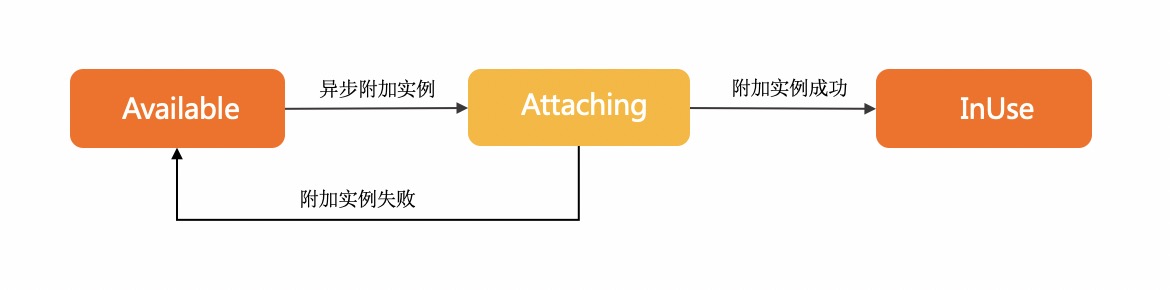
Attaching indicates that the request to attach the ENI was sent successfully and the ENI is being attached to the ECS instance.
InUse indicates that the ENI has been attached to the ECS instance.
Available indicates that the ENI failed to be attached to the ECS instance.
For details, see Attach a network interface controller (NIC).
Try it now
 Test
Test
RAM authorization
|
Action |
Access level |
Resource type |
Condition key |
Dependent action |
|
ecs:AttachNetworkInterface |
update |
*NetworkInterface
*Instance
|
None | None |
Request parameters
|
Parameter |
Type |
Required |
Description |
Example |
| RegionId |
string |
Yes |
The region ID of the instance. You can call DescribeRegions to query the most recent region list. |
cn-hangzhou |
| RegionId |
string |
Yes |
The network interface controller (NIC) ID. |
cn-hangzhou |
| NetworkInterfaceId |
string |
Yes |
The instance ID. |
eni-bp17pdijfczax1huji**** |
| InstanceId |
string |
Yes |
The ID of the trunk ENI. Note
This parameter is not yet available. |
i-bp16qstyvxj9gpqw**** |
| TrunkNetworkInstanceId |
string |
No |
Note
This parameter is deprecated. |
eni-f8zapqwj1v1j4ia3**** |
| WaitForNetworkConfigurationReady |
boolean |
No |
The index of the network card specified for the ENI. Note
Valid values of NetworkCardIndex depend on the instance family. If the instance type does not support network cards, you cannot specify this parameter. If the instance type supports network cards, see Instance families for valid values. |
null |
| NetworkCardIndex |
integer |
No |
The index of the network interface controller (NIC). Note
The value of this parameter varies based on the instance family of the specified instance. If the instance type of the specified instance does not support NICs, leave this parameter empty. If the instance type of the specified instance supports NICs, set this parameter to a valid value. For information about the valid values of this parameter, see Instance families. |
0 |
Response elements
|
Element |
Type |
Description |
Example |
|
object |
|||
| RequestId |
string |
The request ID. |
473469C7-AA6F-4DC5-B3DB-A3DC0DE3C83E |
Examples
Success response
JSON format
{
  "RequestId": "473469C7-AA6F-4DC5-B3DB-A3DC0DE3C83E"
}
Error codes
|
HTTP status code |
Error code |
Error message |
Description |
|---|---|---|---|
| 400 | MissingParameter | %s | A parameter is not specified. |
| 400 | UnsupportedParameter | %s | The parameter is not supported. |
| 400 | InvalidParameter | %s | The specified parameter is invalid. |
| 400 | InvalidInstanceID.Malformed | %s | The specified InstanceId parameter is invalid. |
| 400 | InvalidOperation.InvalidRegion | %s | The specified RegionId parameter is invalid. |
| 400 | InvalidOperation.InvalidEcsState | %s | |
| 400 | InvalidOperation.InvalidEniState | %s | |
| 400 | InvalidOperation.DetachPrimaryEniNotAllowed | %s | |
| 400 | Forbidden.RegionId | %s | The service is unavailable in the current region. |
| 400 | InvalidOperation.InvalidGeneration | %s | |
| 400 | InvalidParams.EniId | %s | The specified EniId parameter is invalid. |
| 400 | InvalidOperation.UserNotSupportNetworkCard | User not support network card. | |
| 400 | InvalidOperation.ConnectionTrackingConfigNotSupportMemberEni | Member eni not support ConnectionTrackingConfiguration. | Network connection configurations cannot be specified for member network interfaces. |
| 400 | InvalidParameter.NetworkCardIndexInvalid | The network card index is invalid or the current ECS/ENI type does not support the value. | Physical NIC properties do not meet the NIC or instance type restrictions |
| 400 | InvalidOperation.InstanceTypeNotSupportRss | The ECS instance type does not support Rss. | The ECS instance type does not support Rss. |
| 400 | OperationDenied.NoEniStock | The requested resource of ENI is insufficient in the specified ECS, please retry or upgrade to enterprise-level computing instance types. | The requested resource of ENI is insufficient in the specified ECS, please retry or upgrade to enterprise-level computing instance types. |
| 400 | InvalidOperation.InstanceTypeNotSupportSriov | The specified instance type does not support ENI Sriov. | The specified instance type does not support ENI Sriov. |
| 500 | InternalError | The request processing has failed due to some unknown error, exception or failure. | An internal error has occurred. Try again later. |
| 500 | InvalidSecurityGroupId.EniMustHaveSecurityGroup | The specified network card does not have an associated security group. | The specified NIC is not associated with a security group. |
| 403 | InvalidUserType.NotSupported | %s | Your account does not support this operation. |
| 403 | Abs.InvalidAccount.NotFound | %s | Your Alibaba Cloud account does not exist or your AccessKey pair has expired. |
| 403 | Forbidden.NotSupportRAM | %s | RAM users are not authorized to perform this operation. |
| 403 | Forbidden.SubUser | %s | You are not authorized to manage this resource. Contact the owner of the Alibaba Cloud account for authorization. |
| 403 | MaxEniCountExceeded | %s | The maximum number of ENIs that can be managed has been reached. |
| 403 | EniPerInstanceLimitExceeded | %s | The maximum number of ENIs that can be attached to the specified instance has been reached. |
| 403 | InvalidOperation.AvailabilityZoneMismatch | %s | The operation is invalid. |
| 403 | InvalidOperation.VpcMismatch | %s | The operation is invalid. Check whether the VPC in the operation corresponds to other parameters. |
| 403 | SecurityGroupInstanceLimitExceed | %s | |
| 403 | InvalidSecurityGroupId.NotVpc | %s | The specified SecurityGroupId parameter is invalid and the network type of the security group is not VPC. |
| 403 | InvalidOperation.InvalidEniType | %s | |
| 403 | InvalidInstanceId.NotFound | %s | The specified instance does not exist. Check whether the InstanceId parameter is valid. |
| 403 | InvalidEni.NotSameVpc | %s | The specified resource and the specified ENI do not belong to the same VPC. For more information, see the return value of the %s placeholder in the error message. |
| 403 | InvalidOperation.Ipv4CountExceeded | %s | The operation is valid because the maximum number of IPv4 addresses has been reached. |
| 403 | InvalidOperation.EniServiceManaged | %s | The operation is invalid. |
| 403 | InvalidOperation.MultiGroupType | The specified instance can't join different types of security group. | |
| 403 | InvalidOperation.NotSupportEnterpriseGroup | The specified instance type doesn't support enterprise level security group. | |
| 403 | InvalidOperation.EniCountExceeded | The maximum number of eni in a enterprise level security group is exceeded. | The number of NICs in the enterprise security group exceeds the limit. |
| 403 | InvalidOperation.EipBindModel | %s | |
| 403 | InvalidOperation.Ipv6NotSupport | %s | |
| 403 | InvalidOperation.HotPlugNotSupport | %s | The operation is not supported while the specified resource is running. For more information, see the return value of the %s placeholder in the error message. |
| 403 | InvalidInstance.NetworkType | %s | |
| 403 | InvalidOperation.InvalidTrunkEniStatus | %s | |
| 403 | InvalidOperation.TrunkingIsNotAllowed | %s | The trunk network card is not operational. |
| 403 | InvalidOperation.InstanceTypeNotSupportEniTrunking | %s | |
| 403 | InvalidOperation.EniTypeNotSupportTrunking | %s | The type of the ENI does not support operations related to the trunk mode. For more information, see the return value of the %s placeholder in the error message. |
| 403 | InvalidOperation.EniTrunkDeviceFull | %s | |
| 403 | InvalidParameter.EniNotBelongTrunk | %s | The specified ENI is not in trunk mode. For more information, see the return value of the %s placeholder in the error message. |
| 403 | InvalidOperation.EniTypeNotSupportAttachToTrunk | %s | |
| 403 | InvalidParameter.EniNotBelongEcs | %s | |
| 403 | InvalidParameter.InvalidEniQueueNumber | %s | |
| 403 | InvalidOperation.MaxEniQueueNumberExceeded | %s | |
| 403 | InvalidOperation.ExceedInstanceTypeQueueNumber | %s | The maximum number of queues for all ENIs on an instance has been exceeded. For more information, see the return value of the %s placeholder in the error message. |
| 403 | InvalidOperation.HighPerformanceTrafficModeNotSupportTrunkEni | %s | |
| 403 | InvalidOperation.HighPerformanceTrafficModeNotSupportMemberEni | %s | |
| 403 | InvalidOperation.InstanceTypeNotSupportHighPerformanceTrafficMode | %s | The instance type of the specified instance does not support the NIC of the RDMA communication mode. |
| 403 | InvalidOperation.EniTrafficModeNotSupportIpv6 | %s | |
| 403 | InvalidOperation.MaxEniQueuePairNumberExceed | %s | |
| 403 | InvalidParameter.InvalidQueuePairNumber | %s | |
| 403 | InvalidOperation.EniQueuePairNumberOverflow | %s | |
| 403 | InvalidOperation.HighPerformanceEniPerInstanceLimitExceeded | %s | |
| 403 | InvalidOperation.Ipv6CountExceeded | %s. | The operation is invalid because the number of IPv6 has reached the upper limit. |
| 403 | InvalidOperation.PrimaryEniNotExist | Primary Eni Not Exist. | The primary NIC of the instance does not exist. |
| 404 | InvalidEcsId.NotFound | %s | The specified instance ID does not exist. |
| 404 | InvalidEniId.NotFound | %s | |
| 404 | InvalidVSwitchId.NotFound | %s | The specified vSwitch does not exist. |
| 404 | InvalidSecurityGroupId.NotFound | %s | The specified security group ID does not exist. |
See Error Codes for a complete list.
Release notes
See Release Notes for a complete list.