This topic describes how to use the Windows SDK C++ edition for Cloud Phone.
1. Getting Started
1.1 Get the SDK and demo
Integration environment requirements
Windows x64 release
Import the SDK
Visual Studio 2019 example:
Open Project Properties > Configuration Properties > VC++ Directories. Add the asp-client-sdk include directory to Include Directories.
Open Project Properties > Configuration Properties > VC++ Directories. Add the asp-client-sdk lib directory to Library Directories.
Open Project Properties > Configuration Properties > Linker > General. Add the asp-client-sdk lib directory to Additional Library Directories.
Open Project Properties > Configuration Properties > Linker > Input. Add asp-client-sdk.lib, asp-engine.lib, and glog.lib to Additional Dependencies.
Qt Creator example:
Add the following lines to your project .pro file:
INCLUDEPATH+=$$PWD/asp-client-sdk/include \
LIBS+=$$PWD/asp-client-sdk/lib/asp-client-sdk.lib \
      $$PWD/asp-client-sdk/lib/asp-engine.lib \
      $$PWD/asp-client-sdk/lib/glog.lib \
Quickly run the demo
Download Windows_Demo_Release and decompress it to obtain two directories: server and client. These directories contain the server-side and client-side demos, respectively.
Start the server
Modify the configuration file:
{
    "httpPort": "8328",
    "accessKeyId": "AK",
    "accessKeySecret": "SK",
    "androidRegionId": "cn-hangzhou"
}
Replace AK and SK with your actual AccessKey ID and AccessKey Secret. Set androidRegionId to the region ID of your instance.
Run server/run_server.bat. The following message appears:
2024-11-01T13:48:27.002Z Server is running on http://127.0.0.1:8328/listAicThe server has started successfully.
Run the client
{
  "CLOUD_SCREENSIZE_HEIGHT": 100,
  "CLOUD_SCREENSIZE_WIDTH": 100,
  "DEBUG_MODE": 2,
  "DISPLAY_COL": 11,
  "DISPLAY_GROUP": 20,
  "GROUPIDS": [
       "ag-1jknz4zyznleim503"
  ],
  "GROUP_SCREENSIZE_HEIGHT": 100,
  "GROUP_SCREENSIZE_WIDTH": 100,
  "LOCAL_SCREENSIZE_HEIGHT": 720,
  "LOCAL_SCREENSIZE_WIDTH": 480,
  "DISPLAY_SCALE": 1,
  "GROUP_SCALE": 8,
  "MAX_PHONE_NUM": 0,
  "PROXY_CONN_TYPE": 0,
  "QUIC_OPTION": false,
  "PHONE_URL": "http://127.0.0.1",
  "PORT": 8328,
  "AUDIO_ENABLE": false,
  "USE_DUMP": false,
  "USE_OPENGL": true
}
Replace GROUPIDS with the ID of the Cloud Phone instance group you want to control. The ID must start with ag-. You can specify multiple group IDs. Save the file after updating it with your ag- prefixed Cloud Phone instance group ID.
Configuration parameter descriptions:
CLOUD_SCREENSIZE_HEIGHT: Initial cloud screen height
CLOUD_SCREENSIZE_WIDTH: Initial cloud screen width
DEBUG_MODE: Log level (0 = no logs, 1 = debug, 2 = info)
DISPLAY_COL: Maximum number of columns displayed (10)
GROUPIDS: Instance groups (supports a list)
GROUP_SCREENSIZE_HEIGHT: Initial local thumbnail window height
GROUP_SCREENSIZE_WIDTH: Initial local thumbnail window width
LOCAL_SCREENSIZE_HEIGHT: Initial local main control window height
LOCAL_SCREENSIZE_WIDTH: Initial local main control window width
DISPLAY_SCALE: Main control scaling ratio
GROUP_SCALE: Thumbnail scaling ratio
MAX_PHONE_NUM: Maximum number of connections
PROXY_CONN_TYPE: Connection type (fixed value)
QUIC_OPTION: Whether to use QUIC (fixed value)
PHONE_URL: Server address
PORT: Server port
AUDIO_ENABLE: Whether to enable audio
EndUserId: Collaborative streaming username
IS_COO: Whether collaborative streaming is enabled
SALE_MODE: Whether CPS is enabled
SHOW_INSTENCE_NAME: Whether to display the instance name or ID
USE_OPENGL: Whether to enable OpenGL rendering
Run client/WuyingDemo.exe.
1.2 Integration flow

1.3 Best practices
For detailed integration guidance, see Best practices for quickly integrating Cloud Phone. The overall Cloud Phone integration architecture is shown in the following diagram:

Multiple logon methods are available to obtain the ticket required for SDK integration. The following flowchart shows the process:

For specific implementation details, refer to the sample code in the Lifecycle interfaces section.
2. Lifecycle interfaces
2.1 Create a thumbnail connection
Function prototype: static AspClient* create(AspTicket& ticket, wuying::asp::shared_ptr<IAspClientCallback> callback);
Parameter descriptions:
Parameter name | Parameter type | Description |
ticket | AspTicket | AspTicket contains information about whether it is a thumbnail, instance details, and connection credentials. For more information, see 4.1 AspTicket. |
callback | IAspClientCallback | Connection callback. For more information, see 2.5.1 Connection callback proxy IAspClientCallback. |
Function description: This interface establishes a thumbnail connection to a Cloud Phone.
Code example:
AspTicket ticket;
// Set ticket
ticket.ticket = "";
// Set AppInstanceId
ticket.id = "";//AppInstanceId;
// Set user
ticket.user = "";//Cloud Phone name
// uuid must match the backend uuid
ticket.uuid = "wyClient";
// Fixed for Windows
ticket.systemType = "Windows";
// Fixed to 0
ticket.partner = 0;
// Whether thumbnail mode is enabled. Fixed to true.
ticket.isThumbnailEnable = true;

// Add connection callback. See below for details.
shared_ptr<AspClientCbImpl> iClient(new AspClientCbImpl(cert.Id));
AspClient *client=AspClient::create(ticket, iClient);

// Clipboard callback. See below for details.
shared_ptr<AspClipboardlmpl> clipboardCallback(new AspClipboardlmpl());
client->setClipboardCallback(clipboardCallback);

// Shell command callback. See below for details.
shared_ptr<AspShellCmdlmpl> shellCmdCallBack(new AspShellCmdlmpl());
client->setShellCmdCallback(shellCmdCallBack);

// Set thumbnail display size: width (int), height (int), fps (int)
client->setThumbnailDisplay(with, height, 1);

// Set connection type. Fixed to socket and false.
client->setProxyConnType(ASP_CONN_SOCKET);
client->setQuicOption(false);

// Set display callback
shared_ptr<IAspDisplayCallback> iDisplay(nullptr);
auto display = client->addDisplay(iDisplay);

// Connect to the phone
client->open();
2.2 Create a main control connection
Function prototype: static AspClient* create(AspTicket& ticket, wuying::asp::shared_ptr<IAspClientCallback> callback);
Parameter descriptions:
Parameter name | Parameter type | Description |
ticket | AspTicket | AspTicket contains instance information and connection credentials. For more information, see 4.1 AspTicket. |
callback | IAspClientCallback | Connection callback. For more information, see 2.5.1 Connection callback proxy IAspClientCallback. |
Function description: This interface establishes a main control connection to a Cloud Phone.
Code example:
AspTicket ticket;
// Set the ticket.
ticket.ticket = "";
// Set the AppInstanceId.
ticket.id = "";//AppInstanceId;
// Set the user.
ticket.user = "";// The name of the cloud phone.
// The UUID must be the same as the one on the backend.
ticket.uuid = "wyClient";
// Set to a fixed value: Windows.
ticket.systemType = "Windows";
// Set to a fixed value: 0.
ticket.partner = 0;
// Enable the thumbnail feature. Set to a fixed value: true.
ticket.isThumbnailEnable = true;

// Add a connection callback. For more information, see the subsequent sections.
shared_ptr<AspClientCbImpl> iClient(new AspClientCbImpl(cert.Id));
AspClient *client=AspClient::create(ticket, iClient);

// Clipboard callback. For more information, see the subsequent sections.
shared_ptr<AspClipboardlmpl> clipboardCallback(new AspClipboardlmpl());
client->setClipboardCallback(clipboardCallback);

// Add a Shell command callback. For more information, see the subsequent sections.
shared_ptr<AspShellCmdlmpl> shellCmdCallBack(new AspShellCmdlmpl());
client->setShellCmdCallback(shellCmdCallBack);

// Set the thumbnail window size. Parameters: width (int), height (int), and fps (int).
client->setThumbnailDisplay(with, height, 1);

// Set the connection type. The type is fixed to socket and the QUIC option is set to false.
client->setProxyConnType(ASP_CONN_SOCKET);
client->setQuicOption(false);

// Set the window callback.
shared_ptr<IAspDisplayCallback> iDisplay(nullptr);
auto display = client->addDisplay(iDisplay);

// Connect to the cloud phone.
client->open();
2.3 reopen
Function prototype: void reopen(std::string& ticket)
Function description: Reopens a connection or reconnects after disconnection. Only valid after calling close(false).
Parameter descriptions:
Parameter name | Parameter type | Description |
ticket | std::string | Ticket is the connection credential. It is typically valid for 10 minutes. |
Code example:
client->reopen(ticket);2.4 close
Function prototype: void close(bool destroyClient = false)
Function description: Closes the connection.
Parameter descriptions:
Parameter name | Parameter type | Description |
destroyClient | bool | Whether to clean up resources. Default is false. |
Code example:
client->close(false)2.5 Callback descriptions
2.5.1 Connection callback proxy IAspClientCallback
Proxy interface descriptions:
Interface | Description |
void onThumbnailUpdate(void* buffer, uint32_t width, uint32_t height, AspImageFormat format) | Called when a thumbnail is successfully updated for a Cloud Phone connection. For format details, see 5.2 AspImageFormat. |
void onConnectEvent(ConnectEvent& event) | Called when a connection event occurs. For event details, see 4.2 ConnectEvent. |
Code example:
class AspClientCbImpl : public IAspClientCallback
{
public:
    AspClientCbImpl() {}
    // Thumbnail update callback
    void onThumbnailUpdate(void* buffer, uint32_t width, uint32_t height, AspImageFormat format) override {

    }
    // Connection event callback
    void onConnectEvent(ConnectEvent& event) override {
       switch(event.type) {
          case ConnectEventType::EVENT_CONNECT_SUCCESS:

              break;
          case ConnectEventType::EVENT_CONNECT_FAILED:

              break;
          case ConnectEventType::EVENT_DISCONNECT_SUCCESS:

              break;
          case ConnectEventType::EVENT_RECONNECT_START:

              break;
          case ConnectEventType::EVENT_RECONNECT_FAILED:

              break;
          default:

              break;
        }
    }
};
2.5.2 Main control stream callback proxy IAspDisplayCallback
Proxy interface descriptions:
Interface | Description |
void onImageFrameReady(AspImageFrame& frame) | Called when the main control stream is ready after a successful Cloud Phone connection. For frame details, see 4.3 AspImageFrame. |
Code example:
class AspDisplayCbImpl : public IAspDisplayCallback
{
public:
    void onImageFrameReady(AspImageFrame& frame) override {
        // Pointer to the main control image byte array (length = width × height × 4)
        uint8_t* ptr = static_cast<uint8_t*>(frame.buffer);
        // Image width
        int width = frame.width;
        // Image height
        int height = frame.height;
        // Must manually release
        frame.releaseBuffer();
    }
};
2.5.3 Audio callback proxy AspAudio
Proxy interface descriptions:
Interface | Description |
void onAudioFrameRender(AspAudioFrame &frame) | No implementation required. For frame details, see 4.4 AspAudioFrame. Audio rendering is handled internally by the SDK. |
void onAudioVolumeUpdate(uint32_t volume) | No implementation required. Audio rendering is handled internally by the SDK. |
void onAudioMuteUpdate(bool isMute) | No implementation required. Audio rendering is handled internally by the SDK. |
void onAudioPlaybackUpdate(AspAudioPlayback &playback) | No implementation required. For playback details, see 4.5 AspAudioPlayback. Audio rendering is handled internally by the SDK. |
void onAudioPlaybackStart() | No implementation required. Audio rendering is handled internally by the SDK. |
void onAudioPlaybackStop() | No implementation required. Audio rendering is handled internally by the SDK. |
Code example:
class AspAudioImpl : public AspAudio
{
public:
    void onAudioFrameRender(AspAudioFrame &frame) override{

    }
    void onAudioVolumeUpdate(uint32_t volume) override{

    }
    void onAudioMuteUpdate(bool isMute) override{

    }

    void onAudioPlaybackUpdate(AspAudioPlayback &playback) override{

    }

    void onAudioPlaybackStart() override{

    }
    void onAudioPlaybackStop() override{

    }
};
3. Business interfaces
3.1 Logging interfaces
3.1.1 Initialization
Function description: This interface prints internal SDK logs for troubleshooting.
Code example:
// Initialize logging. AspLogSinkImpl is the log callback.
auto logSinkImpl = std::make_shared<AspLogSinkImpl>();
AspLogSink::setLogSink(logSinkImpl.get());
3.1.2 Callback proxy AspLogSink
Proxy interface descriptions:
Interface | Description |
void debug(const std::string& tag, const std::string& msg) | SDK debug log callback |
void info(const std::string& tag, const std::string& msg) | SDK info log callback |
void warning(const std::string& tag, const std::string& msg) | SDK warning log callback |
void fatal(const std::string& tag, const std::string& msg) | SDK fatal log callback |
void error(const std::string& tag, const std::string& msg) | SDK error log callback |
Code example:
#include "AspLogSink.h"

using namespace wuying::asp;

class AspLogSinkImpl : public AspLogSink
{
public:
    AspLogSinkImpl() {

    }

    void debug(const std::string& tag, const std::string& msg) override {
        // Print debug log
    }
    void info(const std::string& tag, const std::string& msg) override {
        // Print info log
    }
    void warning(const std::string& tag, const std::string& msg) override {
        // Print warning log
    }
    void fatal(const std::string& tag, const std::string& msg) override {
        // Print fatal log
    }
    void error(const std::string& tag, const std::string& msg) override {
        // Print error log
    }
};
3.2 Thumbnail business interfaces
3.2.1 suspendThumbnailDisplay
Function prototype: void suspendThumbnailDisplay()
Function description: Suspends thumbnail image streaming.
Code example:
client->suspendThumbnailDisplay();3.2.2 resumeThumbnailDisplay
Function prototype: void resumeThumbnailDisplay()
Function description: Resumes thumbnail streaming and can force-push a single frame.
Code example:
client->resumeThumbnailDisplay();3.3 Main control additional features
3.3.1 setOutputImageFormat
Function prototype: void setOutputImageFormat(AspImageFormat format)
Function description: Sets the main control callback frame format.
Parameter descriptions:
Parameter name | Parameter type | Description |
format | AspImageFormat | Main control callback frame format. For details, see 5.2 AspImageFormat. |
Code example:
client->setOutputImageFormat(AspImageFormat::BGRA);3.3.2 requestGraphicsKeyFrame
Function prototype: void requestGraphicsKeyFrame(AspDisplay* display) = 0;
Function description: Pushes a single keyframe for the main control stream. The parameter is AspDisplay.
Parameter descriptions:
Parameter name | Parameter type | Description |
display | AspDisplay* | Display class pointer |
Code example:
client->requestGraphicsKeyFrame(display);3.3.3 setGraphicsQuality
Function prototype: void setGraphicsQuality(AspImageQuality quality) = 0;
Function description: Sets image quality. Quality depends on the resolution. Generally, set this parameter to AUTO. For detailed parameters, see the struct definition.
Parameter descriptions:
Parameter name | Parameter type | Description |
quality | AspImageQuality | Image quality. For details, see 5.4 AspImageQuality. |
client->setGraphicsQuality(ASP_IMAGE_QUALITY_AUTO)3.3.4 setGraphicsFps
Function prototype: void setGraphicsFps(int fps) = 0;
Function description: Sets frames per second (FPS).
Parameter descriptions:
Parameter name | Parameter type | Description |
fps | int | Frame rate |
Code example:
client->setGraphicsFps(30)3.3.5 setGraphicsBitrate
Function prototype: void setGraphicsBitrate(int32_t bps) = 0;
Function description: Sets the bitrate, which affects image size.
Parameter descriptions:
Parameter name | Parameter type | Description |
bps | int32_t | Bitrate |
The following bitrates are for reference only:
Image quality | Bitrate |
Low quality | 1×1024 |
Medium | 5×1024 |
High Quality | 10×1024 |
Lossless | 50×1024 |
Code example:
client->setGraphicsBitrate(1*1024)3.4 Mouse
3.4.1 sendMouseClick
Function prototype: void sendMouseClick(AspAction action, uint32_t button, uint32_t buttonState) = 0;
Function description: Sends a mouse click event.
Parameter descriptions:
Parameter name | Parameter type | Description |
action | AspAction | For details, see 5.5 AspAction. |
button | uint32_t | For details, see 5.6 AspMouseButtonMask. |
buttonState | uint32_t | For details, see 5.7 AspMouseButton. |
Code example:
// Mouse left button press
display->sendMouseClick(AspAction::ACTION_DOWN, ASP_MOUSE_BUTTON_MASK_L, ASP_MOUSE_BUTTON_LEFT);
// Mouse left button release
display->sendMouseClick(AspAction::ACTION_UP, ASP_MOUSE_BUTTON_MASK_L, ASP_MOUSE_BUTTON_LEFT);
3.4.2 sendMouseMove
Function prototype: virtual void sendMouseMove(uint32_t x, uint32_t y, uint32_t buttonState) = 0;
Function description: Sends a mouse move event.
Parameter descriptions:
Parameter name | Parameter type | Description |
x | uint32_t | Cloud Phone horizontal coordinate |
y | uint32_t | Cloud Phone vertical coordinate |
buttonState | uint32_t | For details, see 5.6 AspMouseButtonMask. |
Code example:
// x and y are the Cloud Phone coordinates
sendMouseMove(x, y, ASP_MOUSE_BUTTON_MASK_L)
3.5 Keyboard
3.5.1 sendKeyEvent
Function prototype: virtual void sendKeyEvent(AspAction action, int scancode) = 0;
This feature describes keyboard events.
Parameter descriptions:
Parameter name | Parameter type | Description |
action | AspAction | Action type. For details, see 5.5 AspAction. |
scancode | int | Key scan code |
Code example:
// Key press
display->sendKeyEvent(AspAction::ACTION_DOWN,scanCode);
// Key release
display->sendKeyEvent(AspAction::ACTION_UP,scanCode);
3.6 Clipboard
From on-premises to the cloud
Cloud to on-premises
3.6.1 setClipBoardTypes
Function prototype: virtual void setClipBoardTypes(std::vector<AspClipboardType> types) = 0;
Sends the data format of clipboard content when you copy to the clipboard or paste by pressing Ctrl+V. Only text is supported.
Parameter descriptions:
Parameter name | Parameter type | Description |
types | std::vector<AspClipboardType> | Array of clipboard types. For details, see 5.8 AspClipboardType. |
Code example:
std::vector<AspClipboardType> types;
types.push_back(AspClipboardType::CLIPBOARD_UTF8_TEXT);
client->setClipBoardTypes(types);
3.6.2 notifyClipboardReadComplete
Function prototype: virtual void notifyClipboardReadComplete(AspClipboardType type, uint8_t* buf, size_t len) = 0;
Function description: Sends content to the Cloud Phone. This function is called when onClipboardRead(uint8_t selection, AspClipboardType type) is triggered.
Parameter descriptions:
Parameter name | Parameter type | Description |
type | AspClipboardType | Clipboard type. Currently supports only text. |
buf | uint8_t* | Pointer to the clipboard content byte array |
len | size_t | Size of buf |
Code example:
void onClipboardRead(uint8_t selection, AspClipboardType type) override {
        // Triggered when copying from local to Cloud Phone via client->setClipBoardTypes(types)
        // Call notifyClipboardReadComplete to send clipboard content
        client->notifyClipboardReadComplete(type, reinterpret_cast<uint8_t *>(utf8Data.data()), utf8Data.size());
}
3.6.3 Callback proxy IClipboardCallback
Proxy interface descriptions:
Interface | Description |
void onClipboardRead(uint8_t selection, AspClipboardType type) | Triggered when copying from local to Cloud Phone via setClipBoardTypes(types). Call notifyClipboardReadComplete to send clipboard content. For type details, see 5.8 AspClipboardType. |
void onClipboardWrite(std::vector<AspClipboardData> dataV) | Triggered when copying from Cloud Phone to local. Write dataV to the local clipboard. For data details, see 4.6 AspClipboardData. |
Code example:
class AspClipboardlmpl :public IClipboardCallback
{
public:
    AspClipboardlmpl() {};

    void onClipboardRead(uint8_t selection, AspClipboardType type) override {
        // Triggered when copying from local to Cloud Phone via client->setClipBoardTypes(types)
        // Call notifyClipboardReadComplete to send clipboard content
        //client->notifyClipboardReadComplete(type, reinterpret_cast<uint8_t *>(utf8Data.data()), utf8Data.size());
    }
    void onClipboardWrite(std::vector<AspClipboardData> dataV) override {
        // Write dataV to the local clipboard when copying from Cloud Phone
    }
};
3.7 Shell command channel
3.7.1 sendStringDataToShell
Function prototype: virtual bool sendStringDataToShell(const std::string& val) = 0;
Function description: Sends a Shell command.
Parameter descriptions:
Parameter name | Parameter type | Description |
val | std::string | ADB Shell command in JSON format: {"id":"","cmd":""} |
Code example:
client->sendStringDataToShell(jsonString)Common ADB commands:
Function | Command |
Back | input keyevent KEYCODE_BACK |
Home | input keyevent KEYCODE_HOME |
Switch key | input keyevent KEYCODE_APP_SWITCH |
Mute | input keyevent 164 |
Volume up | input keyevent KEYCODE_VOLUME_UP |
Volume down | input keyevent KEYCODE_VOLUME_DOWN |
Hide navigation bar | setprop persist.wy.hasnavibar false; killall com.android.systemui |
Show navigation bar | setprop persist.wy.hasnavibar true; killall com.android.systemui |
Screenshot | screencap -p /sdcard/Download/abc.png |
3.7.2 Callback proxy IShellCmdCallback
Proxy interface descriptions:
Interface | Description |
void onReceiveStringData(const std::string& val) | Receives string-based Shell command responses |
void onReceiveRawData(const std::vector<uint8_t> val) | Receives raw byte-based Shell command responses |
Code example:
class AspShellCmdlmpl :public IShellCmdCallback
{
public:
    AspShellCmdlmpl() {};

    void onReceiveStringData(const std::string& val) override {
        // Callback for string responses
    }
    void onReceiveRawData(const std::vector<uint8_t> val) override {
       // Callback for raw byte responses
    }
};
4. Parameter details
4.1 AspTicket
struct AspTicket {
    std::string ticket; 		// Ticket string for accessing a Cloud Phone
    std::string id;			// Desktop ID
    std::string user;			// Username
    std::string uuid;			// Local UUID (must match the UUID used when requesting the ticket)
    std::string systemType;		// Operating system type
    uint8_t partner;			// Partner ID
    bool isThumbnailEnable = false;	// Whether thumbnail mode is enabled
};
4.2 ConnectEvent
struct ConnectEvent {
    ConnectEventType type;	// Event type such as connection success or failure
    int reason;				// Reason for the event trigger
};
4.3 AspImageFrame
struct AspImageFrame {
    uint32_t frameId;
    void* buffer;
    uint32_t width;
    uint32_t height;
    AspImageFormat format;
    ReleaseBuffer releaseBuffer;
};
4.4 AspAudioFrame
struct AspAudioFrame {
    int sample;				// Sample rate
    int channels;			// Channels
    int size;				// Data size
    uint8_t *data;			// Data address

    ReleaseBuffer releaseBuffer;	// Function to release data. Must be called after using data.
};
4.5 AspAudioPlayback
struct AspAudioPlayback {
    AspAudioReadType readType;	// Audio data retrieval method: PUSH or PULL
    AspAudioMode mode;		// PCM or OPUS
    uint32_t channels;		// Number of channels
    uint32_t frequency;		// Sample rate
    AspAudioFormat format;	// RAW or OPUS

    AudioReader audioReader;	// Function for data reading in PULL mode. Refer to the demo implementation.
};
4.6 AspClipboardData
struct AspClipboardData {
    AspClipboardType type;
    uint8_t* data;
    uint32_t size;
};
5. Enumerations
5.1 AspConnType
enum AspConnType {
    ASP_CONN_SOCKET = 0,
    ASP_CONN_SOCKPAIR = 1,
    ASP_CONN_PIPE = 2,
    ASP_CONN_SOCKET_UNIX = 3,
    ASP_CONN_END = ASP_CONN_PIPE,
};
5.2 AspImageFormat
enum class AspImageFormat {
    YUV420P,
    YUV422P,
    YUV444P,
    RGB24,
    RGBA,
    BGRA,
    ARGB,
    ABGR,
    NV12
};
5.3 ConnectEventType
enum ConnectEventType {
    EVENT_CONNECT_SUCCESS,
    EVENT_CONNECT_FAILED,
    EVENT_DISCONNECT_SUCCESS,
    EVENT_RECONNECT_START,
    EVENT_RECONNECT_FAILED
};
5.4 AspImageQuality
enum AspImageQuality {
    ASP_IMAGE_QUALITY_LOSSLESS = 0,
    ASP_IMAGE_QUALITY_HIGH = 1,
    ASP_IMAGE_QUALITY_MEDIUM = 2,
    ASP_IMAGE_QUALITY_LOW = 3,
    ASP_IMAGE_QUALITY_AUTO = 4,
};
5.5 AspAction
enum AspAction {
    ACTION_UP,
    ACTION_DOWN
};
5.6 AspMouseButtonMask
enum AspMouseButtonMask {
    ASP_MOUSE_BUTTON_MASK_L = (1 << 0),
    ASP_MOUSE_BUTTON_MASK_M = (1 << 1),
    ASP_MOUSE_BUTTON_MASK_R = (1 << 2),
    ASP_MOUSE_BUTTON_MASK_F = (1 << 3),
    ASP_MOUSE_BUTTON_MASK_B = (1 << 4),

    ASP_MOUSE_BUTTON_MASK = 0x1f
};
5.7 AspMouseButton
enum AspMouseButton {
    ASP_MOUSE_BUTTON_INVALID,
    ASP_MOUSE_BUTTON_LEFT,
    ASP_MOUSE_BUTTON_MIDDLE,
    ASP_MOUSE_BUTTON_RIGHT,
    ASP_MOUSE_BUTTON_UP,
    ASP_MOUSE_BUTTON_DOWN,
    ASP_MOUSE_BUTTON_SIDE_FORWARD,
    ASP_MOUSE_BUTTON_SIDE_BACK,

    ASP_MOUSE_BUTTON_ENUM_END
};
5.8 AspClipboardType
enum AspClipboardType {
    CLIPBOARD_NONE = 0,
    CLIPBOARD_UTF8_TEXT,
    CLIPBOARD_IMAGE_PNG,  /* All clients with image support should support this one */
    CLIPBOARD_IMAGE_BMP,  /* optional */
    CLIPBOARD_IMAGE_TIFF, /* optional */
    CLIPBOARD_IMAGE_JPG,  /* optional */
    CLIPBOARD_FILE,       /* optional, single file */
    CLIPBOARD_DIRECTORY,  /* optional, support directory recursive */
    CLIPBOARD_HTML,
    CLIPBOARD_RTF,
    CLIPBOARD_XML_SPREAD_SHEET,
};
6. Error codes
Error code | Error message ( | Module | Cause |
Error codes 2–26 are primarily related to network issues. | |||
2 | Failed to connect to %s. | ASP SDK | Invalid MAGIC value. |
3 | Failed to connect to %s. | ASP SDK | Invalid data. |
4 | The client and server versions do not match. | ASP SDK | Version mismatch. |
5 | A TLS connection is required. | ASP SDK | The server requires a TLS connection, but the client did not initiate one. |
6 | Unexpected TLS connection. | ASP SDK | The connection does not require TLS, but it was used. |
7 | Permission denied to connect to %s. | ASP SDK | Insufficient permissions. |
8 | Invalid client ID during migration. | ASP SDK | Invalid client ID during migration. |
9 | Failed to connect to %s. | ASP SDK | The channel does not exist. |
20 | Failed to connect to the ASP server. | ASP SDK | Channel connection error. |
21 | A TLS authentication error occurred. | ASP SDK | TLS authentication error. |
22 | Failed to connect to %s. | ASP SDK | Channel link error. |
23 | Failed to connect to %s. | ASP SDK | Connection authentication error. |
24 | Failed to connect to %s. | ASP SDK | Connection I/O error. |
25 | Failed to connect to %s. | ASP SDK | Ticket validation failed. This error also occurs when reusing a ticket from a terminated session. |
26 | xquic handshake failed. | ASP SDK | xquic handshake failed. |
1206 | The ticket is already in use. | ASP SDK | A ticket can be reused, but only for one connection at a time. This error occurs if you attempt to establish a new connection while the cloud phone is already in use. |
1207 | Ticket invalidated by instance restart. | ASP SDK | The instance was restarted, which invalidated the ticket. |
SDK error codes for collaborative mode | |||
1000 | Token is empty. | ASP SDK | These errors occur only in collaborative mode when the secondary validation between the client and the server fails. |
1001 | User is empty. | ASP SDK | |
1200 | Token is invalid. | ASP SDK | |
1201 | VM is invalid. | ASP SDK | |
1202 | An admin internal error occurred. | ASP SDK | |
1203 | User is invalid. | ASP SDK | |
1204 | The token has expired. | ASP SDK | |
1500 | A server internal error occurred. | ASP SDK | |
1501 | A server network error occurred. | ASP SDK | |
Connection interruptions and other errors | |||
2000 | Disconnected from the server because fetching data from %s timed out. | ASP SDK | Data fetch timeout. |
2001 | %s disconnected from the server, possibly because its process was terminated. | ASP SDK | This typically occurs when the process on the client-side is terminated. For example, an Android app is closed by the user pressing the Home button. |
2002 | Another user has connected to the current %s from a different terminal. | ASP SDK | The session was taken over by another user in preemptive mode. |
2003 | %s is shutting down or restarting. This is usually an administrator-initiated action. | ASP SDK | The cloud phone was shut down or restarted, typically by an administrator. |
2004 | The current user connection was terminated. | ASP SDK | The client initiated the disconnection, or the server triggered a kick or disconnect action. |
2005 | Session disconnected: usage time limit reached. | ASP SDK | The session was terminated because it reached the usage duration limit set by the administrator. |
2006 | Your permission to use this cloud phone has been revoked by the administrator. You will be logged out and disconnected. | ASP SDK | The user's authorization was revoked by an administrator. |
2010 | Failed to connect to %s. | ASP SDK | Failed to connect to Vdagent. |
2011 | An error occurred while passing connection parameters. | ASP SDK | An invalid parameter was passed when connecting to the server. |
2027 | The stream pull mode was switched. | ASP SDK | The stream pull mode was switched from preemptive mode to collaborative mode, or from collaborative mode to preemptive mode. |
2100 | Clipboard permission denied to copy from %s to the local device. | ASP SDK | Clipboard access from the remote instance to the local client is denied by policy. |
2101 | Clipboard permission denied to copy from the local device to %s. | ASP SDK | Clipboard access from the local client to the remote instance is denied by policy. |
2200 | %s is attempting to reconnect... | ASP SDK | The connection was lost due to a network issue, and the ASP SDK is attempting to reconnect. |
2201 | Your device encountered a network anomaly, causing %s to disconnect. | ASP SDK | The connection was lost due to a network issue. The ASP SDK does not support reconnection due to image constraints; the app-side must initiate the reconnection. |
2202 | Reconnection to %s timed out. | ASP SDK | The ASP SDK reconnection attempt timed out. |
2210 | Connection lost while the client device was asleep. | ASP SDK | The local network was disconnected while the client device was asleep, which caused the cloud phone connection to be lost. |
2212 | Connection lost due to a local network anomaly. | ASP SDK | A local network anomaly was detected, which caused the cloud phone to disconnect. |
2220 | Connection lost due to a local network anomaly. | ASP SDK | A local network anomaly was detected, which caused the cloud phone to disconnect. |
2240 | Reconnection failed because the token in the ticket is invalid. | ASP SDK | |
2300 | Connection failed due to an invalid parameter from the app-side. | app-side | |
2501 | The client failed to connect to the stream gateway. The network is unreachable. | stream gateway | |
2502 | The client failed to connect to the stream gateway. The TCP connection to the stream gateway IP address timed out after three attempts (15 seconds total). | stream gateway | |
2503 | The client failed to connect to the stream gateway due to an unknown network error. | stream gateway | |
2504 | The client failed to connect to the stream gateway. The connection was aborted by software. | stream gateway | |
2505 | The client failed to connect to the stream gateway. The connection was refused. | stream gateway | |
2506 | The ticket is invalid. The gateway failed to parse the token. | stream gateway | |
2507 | The ticket is invalid because it has expired. | stream gateway | |
2508 | The ticket is invalid due to a UUID mismatch. | stream gateway | |
2509 | The stream gateway failed to probe the ASP server. | stream gateway | |
2510 | The probe to the server was rejected. Resolution: Ensure that the server is listening on port 5912. | stream gateway | |
2511 | The probe to the server failed due to an error other than a timeout or refusal. | stream gateway | |
2512 | The stream gateway token validation failed. The VPC ID in the management token does not match the VPC ID of the stream gateway. | stream gateway | |
2513 | The TCP connection was reset during the "SayHello" handshake between the client and the stream gateway. | stream gateway | |
2520 | The client connection failed; a self-diagnostic check indicates a network anomaly. | ASP SDK | |
2521 | The client was disconnected after three failed reconnection attempts during the TLS handshake phase with the stream gateway. | ASP SDK | |
2522 | A connection error occurred in a VPN environment. | ASP SDK | |
2523 | The client is attempting to connect by using the GM/T protocol suite. Verify the server configuration or select a compatible connection method. | ASP SDK | |
2701 | A client-side network issue occurred. | ASP SDK | |
2702 | The SSL handshake between the client and the stream gateway timed out. | ASP SDK | |
2703 | The "SayHello" handshake between the client and the stream gateway timed out. | ASP SDK | |
2704 | The ASP server response to the connection establishment request timed out. Possible causes: The ASP server is unresponsive, network anomaly, frozen instance, or high memory/CPU usage. | ASP SDK | |
2705 | The ASP client timed out while waiting for the first frame. Possible causes: The ASP server is unresponsive, no frames are being generated due to a screen capture or GPU driver issue, a network anomaly, or high memory/CPU usage. | ASP SDK | |
2706 | High local CPU or memory usage on the client may cause connection failures. | ASP SDK | |
2707 | The ASP server timed out while retrieving the first screen capture frame from the guest OS. | ASP SDK | |
2708 | Connection failed because an SDK thread is stuck. | ASP SDK | |
Client-side logic errors | |||
5100 | The connection from %s to the ASP server timed out. | app-side | The client-side did not receive a "connected" event within the specified time period. |
5102 | Fetching data from %s timed out. | app-side | The client-side received a "connected" event but did not receive a "display" event within the specified time period. |
5004 | Invalid startup parameters. | app-side | Invalid startup parameters were passed to the client-side. This typically occurs during development. |
5200 | Client reconnection timed out. | app-side | |
7. FAQ
How do I restart a Cloud Phone?
Call the management API Restart instance to restart the Cloud Phone. After calling this API, the client-side connection to the Cloud Phone disconnects. Reconnect after the restart is complete.
Switching between thumbnail and main control
To switch from thumbnail to main control, first close the thumbnail connection and wait for the disconnection to be complete before opening the main control connection.
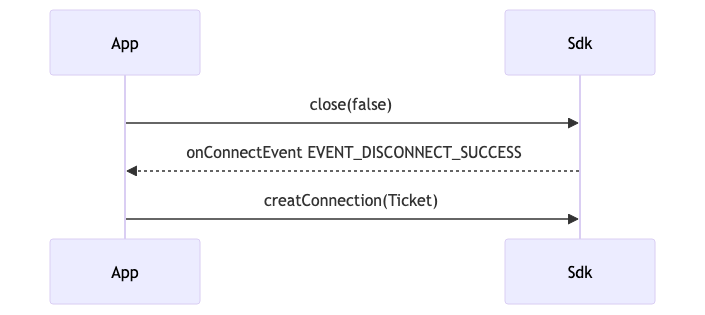
To switch from main control to thumbnail, first close the main control connection and wait for the disconnection to be complete before reopening the thumbnail connection.
sequenceDiagram
      participant App
      participant Sdk
      App->>Sdk: close(true)
      Sdk-->>App: onConnectEvent EVENT_DISCONNECT_SUCCESS
      App->>Sdk: reopen(Ticket)