Local disks are located on the physical machines that host the elastic container instances to which the local disks are mounted. Local disks are cost-effective and provide high random IOPS, high throughput, and low latency. This topic describes how to create an Elastic Container Instance pod by specifying ECS instance types equipped with local disks and how to mount the local disks to the pod.
Configuration description
If you want to use an Elastic Compute Service (ECS) instance type equipped with a local disk to create a pod, you can add an annotation such as k8s.aliyun.com/eci-use-specs: ecs.i2g.2xlarge to the metadata of the configuration file of the pod. When you mount a local disk, you can set the medium of the emptyDir volume to LocalRaid0. The system automatically forms the local disk into a RAID 0 and mount the RAID 0 to the specified directory of the pod.
Annotations must be added to the metadata in the configuration file of the pod. For example, when you create a Deployment, you must add annotations in the spec.template.metadata section.
To use features of Elastic Container Instance, you can add annotations only when you create Elastic Container Instance-based pods. If you add or modify annotations when you update pods, these annotations do not take effect.
When you create an Elastic Container Instance pod, you can specify the following ECS instance families equipped with local disks:
d1, big data instance family that includes a variety of instance types such as ecs.d1.2xlarge
d1ne, big data instance family with enhanced network performance, which includes a variety of instance types such as ecs.d1ne.2xlarge
i2, instance family equipped with local SSDs, which includes a variety of instance types such as ecs.i2.xlarge
i2g, instance family equipped with local SSDs, which includes a variety of instance types such as ecs.i2g.2xlarge
gn5, GPU-accelerated compute-optimized instance family, which includes a variety of instance types such as ecs.gn5-c4g1.xlarge.
Notegn5 is a GPU-accelerated instance family. If you select this instance family, you must specify GPU-related parameters in addition to local disk-related parameters.
For more information about ECS instance families, see the following topics:
Configuration example
Prepare the YAML file.
vim localdis.yamlThe following sample code provides an example of the localdisk.yaml file. In the example, the
k8s.aliyun.com/eci-use-specs: ecs.i2g.2xlargeannotation specifies that the ECS instance type that is used to create the pod is ecs.i2g.2xlarge. This instance type provides a local disk that can be mounted to the pod as an EmptyDir volume.apiVersion: apps/v1 kind: Deployment metadata: name: localdisk-test labels: app: test spec: replicas: 1 selector: matchLabels: app: nginx template: metadata: name: nginx-test labels: app: nginx alibabacloud.com/eci: "true" annotations: k8s.aliyun.com/eci-use-specs: ecs.i2g.2xlarge # Specify an ECS instance type equipped with a local disk. spec: containers: - name: nginx image: registry.cn-shanghai.aliyuncs.com/eci_open/nginx:1.14.2 ports: - containerPort: 80 volumeMounts: - name: localdisk mountPath: /localdisk-test volumes: - name: localdisk emptyDir: medium: LocalRaid0Create a Deployment.
kubectl create -f localdis.yamlView the results.
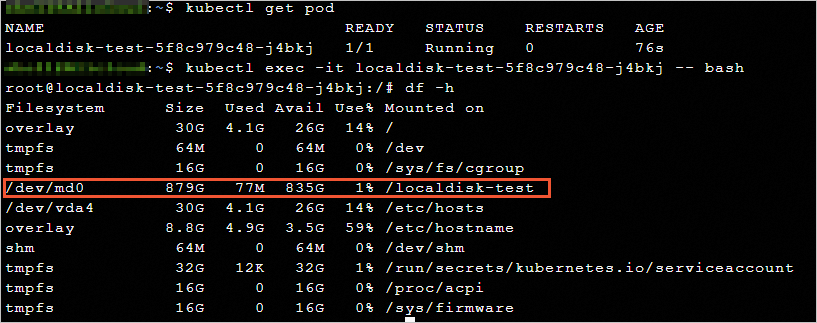
After the pod is created, view the information of the pod. Local disks form into RAID 0 (
/dev/md0) and are mounted to the specified/localdisk-testpath.