When you create an ECI instance, if the specified vCPU and memory do not meet the ECI specification constraints, the system automatically adjusts the instance to match the closest supported specification. This adjustment can result in an oversized instance and cause resource waste. For containers that do not affect your main business logic, such as sidecar containers, you can set an environment variable. This tells the system to ignore the container during specification adjustment, which helps avoid resource waste and reduce ECI costs.
How it works
When you create an ECI instance, you can specify the vCPU and memory for each container. The total resources must meet the overall vCPU and memory constraints of the ECI instance. If you do not configure vCPU and memory at the instance level, the system calculates the total vCPU and memory required for all containers. If this total does not match a supported ECI specification, the system automatically performs a specification adjustment.
The vCPU and memory specified for a container define its resource limits. The system dynamically allocates resources during runtime. Therefore, for certain non-critical containers within an instance, you can set the environment variable __ECI_RESOURCE_IGNORE__:TRUE. This tells the system to ignore these containers during specification adjustment, preventing the creation of an oversized instance and avoiding resource waste.
For example:
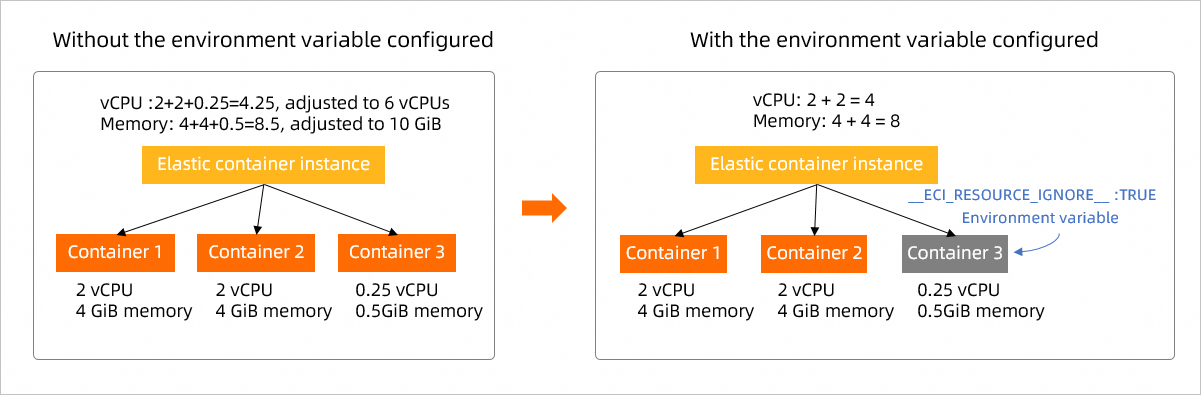
As shown in the figure above, assume you are creating an ECI instance in China (Hangzhou). The instance contains three containers: Container 1 and Container 2 (business containers) are each configured with 2 vCPU and 4 GiB of memory, and Container 3 (a sidecar container) is configured with 0.25 vCPU and 0.5 GiB of memory. By default, the system adjusts the instance specification to 6 vCPU and 10 GiB of memory. However, this specification may exceed your workload's actual needs. To optimize, you can set the __ECI_RESOURCE_IGNORE__:TRUE environment variable for the sidecar container. After applying this setting, the system ignores the sidecar container and adjusts the instance specification to 4 vCPU and 8 GiB of memory.
Configuration
When calling the CreateContainerGroup API to create an ECI instance, you can specify the vCPU and memory for each container using the Container.N.Cpu and Container.N.Memory parameters, provided that the instance-level Cpu and Memory parameters are not set. To ignore a container during specification adjustment, set the __ECI_RESOURCE_IGNORE__:TRUE environment variable for it using the Container.N.EnvironmentVar.N.Key and Container.N.EnvironmentVar.N.Value parameters. The following table describes the relevant parameters. For more information, see CreateContainerGroup.
|
Parameter |
Type |
Example |
Description |
|
Cpu |
Float |
Not specified |
The vCPU size for the instance. Unit: cores. |
|
Memory |
Float |
Not specified |
The memory size for the instance. Unit: GiB. |
|
Container.N.Cpu |
Float |
2 |
The vCPU size of the container. Unit: cores. N represents the container's index. A maximum of 20 containers are supported. |
|
Container.N.Memory |
Float |
4 |
The memory size of the container. Unit: GiB. N represents the container's index. A maximum of 20 containers are supported. |
|
Container.N.EnvironmentVar.N.Key |
String |
__ECI_RESOURCE_IGNORE__ |
The name of the environment variable. The first N is the container index, and the second N is the environment variable index. |
|
Container.N.EnvironmentVar.N.Value |
String |
TRUE |
The value of the environment variable. The first N is the container index, and the second N is the environment variable index. |
When you create an ECI instance using the console, you must set the vCPU and memory at the instance level. Therefore, specification adjustment does not apply.