This topic describes how to use a data cache to deploy the Qwen-7B-Chat application that is provided by the ModelScope community. Before you deploy the Qwen-7B-Chat application, you can store the Qwen-7B-Chat model data to a data cache. When you create the elastic container instance that corresponds to the Qwen-7B-Chat application, you can mount the model data to the instance. This way, the system does not need to pull the model data from the elastic container instance and can deploy the application faster.
Background information
Tongyi Qianwen-7b (Qwen-7B) is a 7 billion-parameter model of the Tongyi Qianwen foundation model series that is developed by Alibaba Cloud. Qwen-7B is a large language model (LLM) that is based on Transformer and trained on ultra-large-scale pre-training data. Qwen-7B-Chat is an LLM AI assistant that is developed based on Qwen-7B by using the alignment mechanism.
Prerequisites
The virtual private cloud (VPC) that you use is associated with an Internet NAT gateway. An SNAT entry is configured for the NAT gateway to allow resources in the VPC or resources connected to vSwitches in the VPC to access the Internet.
If the VPC is not associated with an Internet NAT gateway, you must associate an elastic IP address (EIP) with the VPC when you create the DataCache and deploy the application. This way, you can pull data from the Internet.
Prepare a runtime environment
Hardware requirements
The GPU-accelerated Elastic Compute Service (ECS) instance family that is used to create the Elastic Container Instance-based pod must meet the following conditions. For information about the GPU-accelerated ECS instance families that can be used to create pods, see Supported instance families.
CPU: no strict limits
Memory size: greater than 16 GiB
Number of GPUs: 1 or more
Size of the GPU memory: greater than 16 GB. If the GPU memory size is less than 16 GB, an out-of-memory (OOM) error may occur.
Software requirements
Qwen-7B-Chat depends on a large number of libraries and configurations. Elastic Container Instance provides a public container image that contains a Gradio-based Qwen WebUI. You can directly use the public container image or use it as a base image for secondary development. The image address is registry.cn-hangzhou.aliyuncs.com/eci_open/qwen-webui:1.0.0, and the image size is about 15 GB.
Procedure
Create a data cache
Console mode
Access ModelScope and obtain the ID of the Qwen-7B-Chat model.
In this topic, the version of Qwen-7B-Chat is v1.1.4. Find the model that you want to use in ModelScope, and then copy the model ID at the top of the model details page.
Log on to the Elastic Container Instance console.
In the top navigation bar, select a region.
In the left-side navigation pane, click Data Cache.
Create a data cache for the Qwen-7B-Chat model.
Click Create Data Cache.
Configure the parameters that are used to create the data cache.
The following table describes the sample parameters. You must use the specified values for the Cache Data Source parameter that are fixed configurations for pulling the Qwen-7B-Chat model. You can specify other parameters based on your business requirements. For more information, see Create a data cache.
Parameter
Example
Cache Bucket
test
Cache Directory
/model/qwen/
Cache Name
qwen
Cache Size
20 GiB
Cache Data Source
Type: URL
Parameters
repoSource: ModelScope/Model
repoId: qwen/Qwen-7B-Chat
revision: v1.1.4
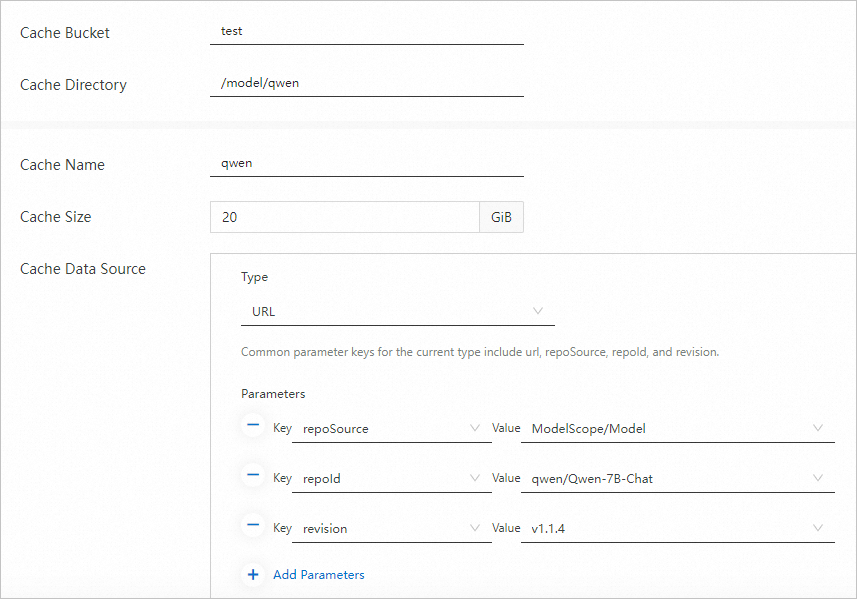
Click OK.
View the status of the data cache.
On the Data Cache page, refresh the page to view the status of the data cache. If the status becomes Available, the data cache is ready for use.
API mode
Access ModelScope and obtain the ID of the Qwen-7B-Chat model.
In this topic, the version of Qwen-7B-Chat is v1.1.4. Find the model that you want to use in ModelScope, and then copy the model ID at the top of the model details page.
Create a data cache for the Qwen-7B-Chat model.
The following code shows the sample parameters that are used if you call the CreateDataCache API operation to create a data cache. The system pulls the model data from ModelScope and saves the model data to the
/model/qwen/directory of the bucket named test. The data cache is named qwen and is retained for one day.ImportantIf you use an SDK to create a DataCache, you do not need to prefix the length of the parameter name to each parameter in DataSource.Options. For example, write
repoSourceinstead of#10#repoSource. WriterepoIdinstead of#6#repoId.{ "RegionId": "cn-beijing", "SecurityGroupId": "sg-2ze7l1o0ql1cbk******", "VSwitchId": "vsw-2ze23nqzig8inpr******", "Bucket": "test", "Path": "/model/qwen/", "Name": "qwen", "DataSource": { "Type": "URL", "Options": { "#6#repoId": "qwen/Qwen-7B-Chat", "#10#repoSource": "ModelScope/Model" "#8#revision": "v1.1.4" } }, "RetentionDays": 1 }Query the status of the data cache.
Use the returned DataCache ID to call the DescribeDataCaches API operation and query the information of the DataCache. If the status of the DataCache that is indicated by DataCaches.Status is Available, the DataCache is ready for use.
Deploy Qwen-7B-Chat
Console mode
In the left-side navigation pane of the Elastic Container Instance console, click Container Group. On the Container Group page, click Create Container Group.
Configure the parameters that are used to create the container group (elastic container instance) and then click Confirm Configuration.
The following table describes the sample parameters that are used to create the elastic container instance. The instance is created based on a GPU-accelerated ECS instance type and is mounted with a Qwen-7B-Chat model. The container in the elastic container instance uses the image that contains the Qwen WebUI application. After the container is started, the container runs the
python Qwen-7B/web_demo.py --server_port 8888command to start the Qwen WebUI.ImportantIf the VPC to which the elastic container instance belongs is associated with an Internet NAT gateway, you may not associate an EIP with the elastic container instance when you create the instance. After the instance is created, you can configure DNAT entries to allow external access to the instance.
Section
Parameter
Example
Container Group Configurations
Specify Instance Type
ecs.gn6i-c16g1.4xlarge
Name
qwen-web
Container Configurations
Container Name
qwen
Image
Image: registry.cn-hangzhou.aliyuncs.com/eci_open/qwen-webui
Image Tag: 1.0.0
Executable Command
/bin/sh
Parameter
-c
python Qwen-7B/web_demo.py --server_port 8888
Data Cache
Data Cache Bucket
test
Click Add to mount the data cache of the Qwen-7B-Chat model.
Data Cache Directory: /model/qwen/
Destination Container: qwen
Container Mount Directory :/data/model/
Enable Burst
Select Enable Burst.
EIP
EIP
Auto Create
Maximum Bandwidth: 5 Mbit/s
Check the configurations of the instance, read and select the Terms of Service, and then click Confirm Order.
Return to the Container Group page, check whether the Qwen-7B-Chat application is deployed, and view the EIP of the instance.
On the Container Group page, you can view the status of the elastic container instance. You can click the instance ID to go to the instance details page and view the status of the container. If the status of the instance and the status of the container are Running, the application is deployed. You can obtain the EIP of the instance in the IP Address column.

API mode
Use the data cache to create an elastic container instance and deploy the Qwen-7B-Chat application.
The following code shows the parameters that are used if you call the CreateContainerGroup API operation to create the elastic container instance. The instance uses a GPU-accelerated ECS instance type and is mounted with the Qwen-7B-Chat model. The container in the elastic container instance uses the image that contains the Qwen WebUI application. After the container is started, the container runs the
python Qwen-7B/web_demo.py --server_port 8888command to start the Qwen WebUI.NoteIn the following example, the system automatically creates an EIP and associates the EIP with the elastic container instance. If the VPC to which the elastic container instance belongs is associated with an Internet NAT gateway, you may not associate an EIP with the elastic container instance when you create the instance. After the instance is created, you can configure DNAT entries to allow external access to the instance.
{
  "RegionId": "cn-beijing",
  "SecurityGroupId": "sg-2ze7l1o0ql1cbk******",
  "VSwitchId": "vsw-2ze23nqzig8inpr******",
  "ContainerGroupName": "qwen-web",
  "InstanceType": "ecs.gn6i-c16g1.4xlarge",
  "DataCacheBucket": "test",
  "Container": [
    {
      "Arg": [
        "-c",
        "python Qwen-7B/web_demo.py --server_port 8888"
      ],
      "Command": [
        "/bin/sh"
      ],
      "Gpu": 1,
      "Name": "qwen",
      "Image": "registry.cn-hangzhou.aliyuncs.com/eci_open/qwen-webui:1.0.0",
      "VolumeMount": [
        {
          "Name": "model-qwen",
          "MountPath": "/data/model"
        }
      ]
    }
  ],
  "Volume": [
    {
      "Type": "HostPathVolume",
      "HostPathVolume.Path": "/model/qwen/",
      "Name": "model-qwen"
    }
  ],
  "DataCacheProvisionedIops": 35000,
  "DataCacheBurstingEnabled": true,
  "AutoCreateEip": true
}
Check whether the application is deployed.
Use the returned instance ID to call the DescribeContainerGroupStatus API operation and query the status of the instance and the container. If the status of the instance that is indicated by Status and the status of the container that is indicated by ContainerStatuses.State are Running, the instance is created and the container is running.
Query the EIP of the elastic container instance.
Use the returned instance ID to call the DescribeContainerGroups API operation and query the instance details. You can obtain the EIP of the instance from the InternetIP parameter.
Test the model
Add an inbound rule to the security group to which the elastic container instance belongs and allow port 8888.
Use a browser to visit the web page of Qwen.
In this example, an EIP is associated with the Qwen-7B-Chat application. You can enter the EIP of the elastic container instance and the allowed port of the container to access the application. Example:
123.57.XX.XX:8888.Enter text to test the effect of the Qwen-7B-Chat model.
Example:
