Data changes are synchronized to a data warehouse or a data lake to ensure consistency with data in an upstream business database. When data in the upstream business database changes, the downstream data warehouse or data lake immediately detects and synchronizes the data changes. In the database field, this scenario is called Change Data Capture (CDC).
Background information
In the database field, various CDC schemes and tools are available. However, few CDC practices and standards or technical implementations are available in the big data field. In most cases, you need to select existing engines and use their capabilities to build your own CDC scheme. The common schemes fall into two categories:
Batch update: captures incremental updates in an upstream source table, records the updated data in a new table, and uses the MERGE or UPSERT syntax to merge the table that stores the updated data with an existing table in a downstream warehouse. This method requires that tables have a primary key or a composite primary key. The real-time performance of this method is poor. In addition, this method cannot synchronize data deletion. You can synchronize data deletion by deleting the existing table and writing data to a new table. However, you need to write full data to a table for each synchronization, which results in low performance. In this method, you need a special field to mark incrementally updated data.
Real-time synchronization: captures the binary logs of an upstream source table and replays the binary logs in a downstream data warehouse. The binary logs are in a general sense and are not limited to MySQL binary logs. This method requires that the downstream warehouse be capable of replaying the binary logs in real time. If the downstream warehouse supports INSERT, UPDATE, and DELETE operations, row changes can be exported as binary logs and synchronized to the downstream warehouse. Different from the first method, this method can be used together with a streaming system. For example, you can ingest binary logs to a topic in Kafka in real time. The downstream warehouse can subscribe to the topic to pull the binary logs and replay them in real time.
Batch update
This method applies to scenarios where no data deletion needs to be synchronized and data does not need to be synchronized in real time.
Create a MySQL table and insert specific data to the table.
CREATE TABLE sales(id LONG, date DATE, name VARCHAR(32), sales DOUBLE, modified DATETIME);

INSERT INTO sales VALUES (1, '2019-11-11', 'Robert', 323.00, '2019-11-11 12:00:05'), (2, '2019-11-11', 'Lee', 500.00, '2019-11-11 16:11:46'), (3, '2019-11-12', 'Robert', 136.00, '2019-11-12 10:23:54'), (4, '2019-11-13', 'Lee', 211.00, '2019-11-13 11:33:27');

SELECT * FROM sales;
+------+------------+--------+-------+---------------------+ | id | date | name | sales | modified | +------+------------+--------+-------+---------------------+ | 1 | 2019-11-11 | Robert | 323 | 2019-11-11 12:00:05 | | 2 | 2019-11-11 | Lee | 500 | 2019-11-11 16:11:46 | | 3 | 2019-11-12 | Robert | 136 | 2019-11-12 10:23:54 | | 4 | 2019-11-13 | Lee | 211 | 2019-11-13 11:33:27 | +------+------------+--------+-------+---------------------+NoteThe
modifiedfield is the special field for marking incrementally updated data.Export all data in the MySQL table to Hadoop Distributed File System (HDFS).
sqoop import --connect jdbc:mysql://emr-header-1:3306/test --username root --password EMRroot1234 -table sales -m1 --target-dir /tmp/cdc/staging_sales

hdfs dfs -ls /tmp/cdc/staging_sales
Found 2 items
-rw-r-----   2 hadoop hadoop          0 2019-11-26 10:58 /tmp/cdc/staging_sales/_SUCCESS
-rw-r-----   2 hadoop hadoop        186 2019-11-26 10:58 /tmp/cdc/staging_sales/part-m-00000
Create a Delta table and import all data in the MySQL table to the Delta table.
Run the following command to start streaming-sql:
streaming-sqlCreate a Delta table.
-- The `LOAD DATA INPATH` syntax is not applicable to a Delta table. You must create a temporary external table first.
CREATE TABLE staging_sales (id LONG, date STRING, name STRING, sales DOUBLE, modified STRING) USING csv LOCATION '/tmp/cdc/staging_sales/';

CREATE TABLE sales USING delta LOCATION '/user/hive/warehouse/test.db/test' SELECT * FROM staging_sales;

SELECT * FROM sales;

1    2019-11-11    Robert    323.0    2019-11-11 12:00:05.0
2    2019-11-11    Lee    500.0    2019-11-11 16:11:46.0
3    2019-11-12    Robert    136.0    2019-11-12 10:23:54.0
4    2019-11-13    Lee    211.0    2019-11-13 11:33:27.0

-- Delete the temporary table.
DROP TABLE staging_sales;
Run the following command to delete the directory in which the temporary table is stored:
hdfs dfs -rm -r -skipTrash /tmp/cdc/staging_sales/ # Delete the directory in which the temporary table is stored.
Update data in and insert data to the MySQL table.
-- Note that Sqoop cannot export deleted data. Therefore, data deletion cannot be synchronized to the destination table.
-- DELETE FROM sales WHERE id = 1;
UPDATE sales SET name='Robert',modified=now() WHERE id = 2;
INSERT INTO sales VALUES (5, '2019-11-14', 'Lee', 500.00, now());

SELECT * FROM sales;
+------+------------+--------+-------+---------------------+ | id | date | name | sales | modified | +------+------------+--------+-------+---------------------+ | 1 | 2019-11-11 | Robert | 323 | 2019-11-11 12:00:05 | | 2 | 2019-11-11 | Robert | 500 | 2019-11-26 11:08:34 | | 3 | 2019-11-12 | Robert | 136 | 2019-11-12 10:23:54 | | 4 | 2019-11-13 | Lee | 211 | 2019-11-13 11:33:27 | | 5 | 2019-11-14 | Lee | 500 | 2019-11-26 11:08:38 | +------+------------+--------+-------+---------------------+Use Sqoop to export the updated data.
sqoop import --connect jdbc:mysql://emr-header-1:3306/test --username root --password EMRroot1234 -table sales -m1 --target-dir /tmp/cdc/staging_sales --incremental lastmodified --check-column modified --last-value "2019-11-20 00:00:00"

hdfs dfs -ls /tmp/cdc/staging_sales/
Found 2 items
-rw-r-----   2 hadoop hadoop          0 2019-11-26 11:11 /tmp/cdc/staging_sales/_SUCCESS
-rw-r-----   2 hadoop hadoop         93 2019-11-26 11:11 /tmp/cdc/staging_sales/part-m-00000
Create a temporary table for storing the updated data and merge the temporary table with the destination table.
CREATE TABLE staging_sales (id LONG, date STRING, name STRING, sales DOUBLE, modified STRING) USING csv LOCATION '/tmp/cdc/staging_sales/';

MERGE INTO sales AS target
USING staging_sales AS source
ON target.id = source.id
WHEN MATCHED THEN UPDATE SET *
WHEN NOT MATCHED THEN INSERT *;

SELECT * FROM sales;

1    2019-11-11    Robert    323.0    2019-11-11 12:00:05.0
3    2019-11-12    Robert    136.0    2019-11-12 10:23:54.0
2    2019-11-11    Robert    500.0    2019-11-26 11:08:34.0
5    2019-11-14    Lee    500.0    2019-11-26 11:08:38.0
4    2019-11-13    Lee    211.0    2019-11-13 11:33:27.0
Real-time synchronization
Compared with batch update, real-time synchronization has fewer limits on scenarios. For example, data deletion can be synchronized without the need to modify the business model or add an additional field. However, it is relatively complex to implement real-time synchronization. If the binary logs of the source database are not in the standard format, you may need to write a user-defined function (UDF) to process the binary logs. For example, the format of the binary logs provided by Simple Log Service is different from that of the binary logs provided by ApsaraDB RDS for MySQL.
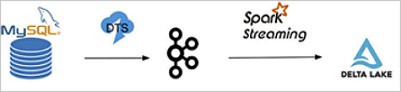
In this example, ApsaraDB RDS for MySQL is used as the source database, and Alibaba Cloud Data Transmission Service (DTS) is used to export the binary logs of the source database to a Kafka cluster in real time. You can also use open source Maxwell or Canal to export the binary logs. Then, the binary logs are periodically read from the Kafka cluster and stored in Alibaba Cloud Object Storage Service (OSS) or HDFS. Then, Spark is used to read and parse the binary logs to obtain inserted, updated, and deleted data. Finally, the merge API of Delta is called to merge the changes in the source table to a Delta table. The following figure shows the process of synchronizing data from ApsaraDB RDS for MySQL to a Delta table.
Activate ApsaraDB RDS for MySQL and configure users, databases, and permissions. For information about how to use ApsaraDB RDS for MySQL, see What is ApsaraDB RDS for MySQL? Create a table and insert specific data into the table.
-- You can create a table in the ApsaraDB RDS console. The following example shows the final table creation statement:
CREATE TABLE `sales` (
  `id` bigint(20) NOT NULL,
  `date` date DEFAULT NULL,
  `name` varchar(32) DEFAULT NULL,
  `sales` double DEFAULT NULL,
  PRIMARY KEY (`id`)
) ENGINE=InnoDB DEFAULT CHARSET=utf8

-- Insert specific data into the table and confirm the result.
INSERT INTO sales VALUES (1, '2019-11-11', 'Robert', 323.00), (2, '2019-11-11', 'Lee', 500.00), (3, '2019-11-12', 'Robert', 136.00), (4, '2019-11-13', 'Lee', 211.00);

SELECT * FROM `sales` ;
```
<img src="./img/rds_tbl.png" width = "400" alt="RDS Table" align=center />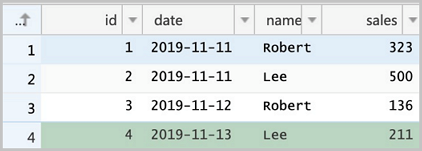
Create an E-MapReduce (EMR) Kafka cluster. You can also use an existing EMR Kafka cluster. Create a topic named sales in the Kafka cluster.
bash
kafka-topics.sh --create --bootstrap-server core-1-1:9092 --partitions 1 --replication-factor 1 --topic salesActivate DTS if it is not activated. Create a synchronization task in the DTS console. When you create the task, select MySQL for Database Type in the Source Database section and Kafka for Datasource Type in the Destination Database section.
Configure the DTS synchronization channel to synchronize the binary logs of the sales table in the ApsaraDB RDS for MySQL database to the sales topic in the Kafka cluster. If the synchronization is successful, you can view the binary logs in the Kafka cluster.
Create a Spark Streaming job to parse the binary logs in Kafka and use the merge API of Delta to replay the binary logs in the destination Delta table in real time. The following code shows the format of the binary logs synchronized by DTS to Kafka. Each record in the binary logs represents a data change in the database. For more information, see the Appendix: Binlog format snooping in Kafka section in this topic.
| Field name | Value | |:--|:--| |recordid|1| |source|{"sourceType": "MySQL", "version": "0.0.0.0"}| |dbtable|delta_cdc.sales| |recordtype|INIT| |recordtimestamp|1970-01-01 08:00:00| |extratags|{}| |fields|["id","date","name","sales"]| |beforeimages|{}| |afterimages|{"sales":"323.0","date":"2019-11-11","name":"Robert","id":"1"}|NoteYou must take note of the
recordtype,beforeimages, andafterimagesfields. Therecordtypefield indicates the action that was performed on a row in the database. Valid values:INIT,UPDATE,DELETE, andINSERT. Thebeforeimagesfield indicates the data before the action was performed. Theafterimagesfield indicates the data after the action was performed.Scala
Write Spark code.
Sample code in Scala:
import io.delta.tables._
import org.apache.spark.internal.Logging
import org.apache.spark.sql.{AnalysisException, SparkSession}
import org.apache.spark.sql.expressions.Window
import org.apache.spark.sql.functions._
import org.apache.spark.sql.types.{DataTypes, StructField}

val schema = DataTypes.createStructType(Array[StructField](
  DataTypes.createStructField("id", DataTypes.StringType, false),
  DataTypes.createStructField("date", DataTypes.StringType, true),
  DataTypes.createStructField("name", DataTypes.StringType, true),
  DataTypes.createStructField("sales", DataTypes.StringType, true)
))

// Initialize data records of the 'INIT' type in the Delta table.
def initDeltaTable(): Unit = {
  spark.read
      .format("kafka")
      .option("kafka.bootstrap.servers", "192.168.XX.XX:9092")
      .option("subscribe", "sales")
      .option("failOnDataLoss", value = false)
      .load()
      .createTempView("initData")

  // Decode the data synchronized by DTS to Kafka in the Avro format. EMR provides the dts_binlog_parser UDF to decode such data.
  val dataBatch = spark.sql(
      """
        |SELECT dts_binlog_parser(value)
        |AS (recordID, source, dbTable, recordType, recordTimestamp, extraTags, fields, beforeImages, afterImages)
        |FROM initData
      """.stripMargin)

  // Select the data whose recordType is INIT as the initial data.
  dataBatch.select(from_json(col("afterImages").cast("string"), schema).as("jsonData"))
      .where("recordType = 'INIT'")
      .select(
        col("jsonData.id").cast("long").as("id"),
        col("jsonData.date").as("date"),
        col("jsonData.name").as("name"),
        col("jsonData.sales").cast("decimal(7,2)")).as("sales")
      .write.format("delta").mode("append").save("/delta/sales")
}

try {
  DeltaTable.forPath("/delta/sales")
} catch {
  case e: AnalysisException if e.getMessage().contains("is not a Delta table") =>
    initDeltaTable()
}

spark.readStream
    .format("kafka")
    .option("kafka.bootstrap.servers", "192.168.XX.XX:9092")
    .option("subscribe", "sales")
    .option("startingOffsets", "earliest")
    .option("maxOffsetsPerTrigger", 1000)
    .option("failOnDataLoss", value = false)
    .load()
    .createTempView("incremental")

// Decode the data synchronized by DTS to Kafka in the Avro format. EMR provides the dts_binlog_parser UDF to decode such data.
val dataStream = spark.sql(
  """
    |SELECT dts_binlog_parser(value)
    |AS (recordID, source, dbTable, recordType, recordTimestamp, extraTags, fields, beforeImages, afterImages)
    |FROM incremental
  """.stripMargin)

val task = dataStream.writeStream
    .option("checkpointLocation", "/delta/sales_checkpoint")
    .foreachBatch(
      (ops, id) => {
        // Obtain the latest modification to a record.
        val windowSpec = Window
            .partitionBy(coalesce(col("before_id"), col("id")))
            .orderBy(col("recordId").desc)
        // Obtain the recordType, beforeImages.id, afterImages.id, afterImages.date, afterImages.name, and afterImages.sales fields from binary logs.
        val mergeDf = ops
            .select(
              col("recordId"),
              col("recordType"),
              from_json(col("beforeImages").cast("string"), schema).as("before"),
              from_json(col("afterImages").cast("string"), schema).as("after"))
            .where("recordType != 'INIT'")
            .select(
              col("recordId"),
              col("recordType"),
              when(col("recordType") === "INSERT", col("after.id")).otherwise(col("before.id")).cast("long").as("before_id"),
              when(col("recordType") === "DELETE", col("before.id")).otherwise(col("after.id")).cast("long").as("id"),
              when(col("recordType") === "DELETE", col("before.date")).otherwise(col("after.date")).as("date"),
              when(col("recordType") === "DELETE", col("before.name")).otherwise(col("after.name")).as("name"),
              when(col("recordType") === "DELETE", col("before.sales")).otherwise(col("after.sales")).cast("decimal(7,2)").as("sales")
            )
            .select(
              dense_rank().over(windowSpec).as("rk"),
              col("recordType"),
              col("before_id"),
              col("id"),
              col("date"),
              col("name"),
              col("sales")
            )
            .where("rk = 1")

        // The merge condition that is used to merge incremental data to the Delta table.
        val mergeCond = "target.id = source.before_id"

        DeltaTable.forPath(spark, "/delta/sales").as("target")
            .merge(mergeDf.as("source"), mergeCond)
            .whenMatched("source.recordType='UPDATE'")
            .updateExpr(Map(
              "id" -> "source.id",
              "date" -> "source.date",
              "name" -> "source.name",
              "sales" -> "source.sales"))
            .whenMatched("source.recordType='DELETE'")
            .delete()
            .whenNotMatched("source.recordType='INSERT' OR source.recordType='UPDATE'")
            .insertExpr(Map(
              "id" -> "source.id",
              "date" -> "source.date",
              "name" -> "source.name",
              "sales" -> "source.sales"))
            .execute()
      }
    ).start()

task.awaitTermination()
Package the code, and deploy the code to the DataLake cluster.
After you debug the code on your on-premises machine, run the following command to package the code:
mvn clean installLog on to the DataLake cluster in SSH mode. For more information, see Log on to a cluster.
Upload the JAR package to the DataLake cluster.
In this example, the JAR package is uploaded to the root directory of the DataLake cluster.
Submit and run a Spark Streaming job.
Run the spark-submit command to submit and run the Spark Streaming job:
spark-submit \ --master yarn \ --deploy-mode cluster \ --driver-memory 1g \ --executor-cores 2 \ --executor-memory 3g \ --num-executors 1 \ --packages org.apache.spark:spark-sql-kafka-0-10_2.12:3.1.2 \ --class com.aliyun.delta.StreamToDelta \ delta-demo-1.0.jarNoteIn this example, a JAR package named delta-demo-1.0.jar is used. You can change the value of the --class parameter and the name of the JAR package based on your business requirements.
SQL
Run the following command to go to the streaming-sql client:
streaming-sql --master localExecute the following SQL statements:
CREATE TABLE kafka_sales
USING kafka
OPTIONS(
kafka.bootstrap.servers='192.168.XX.XX:9092',
subscribe='sales'
);

CREATE TABLE delta_sales(id long, date string,  name string, sales decimal(7, 2))
USING delta
LOCATION '/delta/sales';

INSERT INTO delta_sales
SELECT CAST(jsonData.id AS LONG), jsonData.date, jsonData.name, jsonData.sales
FROM (
  SELECT from_json(CAST(afterImages as STRING), 'id STRING, date DATE, name STRING, sales STRING') as jsonData
  FROM (
    SELECT dts_binlog_parser(value) AS (recordID, source, dbTable, recordType, recordTimestamp, extraTags, fields, beforeImages, afterImages)
    FROM kafka_sales
  ) binlog WHERE recordType='INIT'
) binlog_wo_init;

CREATE SCAN incremental on kafka_sales USING STREAM
OPTIONS(
startingOffsets='earliest',
maxOffsetsPerTrigger='1000',
failOnDataLoss=false
);


CREATE STREAM job
OPTIONS(
checkpointLocation='/delta/sales_checkpoint'
)
MERGE INTO delta_sales as target
USING (
  SELECT
  recordId,
  recordType,
  before_id,
  id,
  date,
  name,
  sales
  FROM(
    SELECT
    recordId,
    recordType,
    CASE WHEN recordType = "INSERT" then after.id else before.id end as before_id,
    CASE WHEN recordType = "DELETE" then CAST(before.id as LONG) else CAST(after.id as LONG) end as id,
    CASE WHEN recordType = "DELETE" then before.date else after.date end as date,
    CASE WHEN recordType = "DELETE" then before.name else after.name end as name,
    CASE WHEN recordType = "DELETE" then CAST(before.sales as DECIMAL(7, 2)) else CAST(after.sales as DECIMAL(7, 2)) end as sales,
    dense_rank() OVER (PARTITION BY coalesce(before.id,after.id) ORDER BY recordId DESC) as rank
    FROM (
      SELECT
      recordId,
      recordType,
      from_json(CAST(beforeImages as STRING), 'id STRING, date STRING, name STRING, sales STRING') as before,
      from_json(CAST(afterImages as STRING), 'id STRING, date STRING, name STRING, sales STRING') as after
      FROM (
        select dts_binlog_parser(value) as (recordID, source, dbTable, recordType, recordTimestamp, extraTags, fields, beforeImages, afterImages) from incremental
      ) binlog WHERE recordType != 'INIT'
    ) binlog_wo_init
  ) binlog_extract WHERE rank=1
) as source
ON target.id = source.before_id
WHEN MATCHED AND source.recordType='UPDATE' THEN
UPDATE SET id=source.id, date=source.date, name=source.name, sales=source.sales
WHEN MATCHED AND source.recordType='DELETE' THEN
DELETE
WHEN NOT MATCHED AND (source.recordType='INSERT' OR source.recordType='UPDATE') THEN
INSERT (id, date, name, sales) values (source.id, source.date, source.name, source.sales);
Read the Delta table after the Spark Streaming job created in the previous step starts.
Run the following commands to go to the spark-shell client and query data:
spark-shell --master localspark.read.format("delta").load("/delta/sales").show +---+----------+------+------+ | id| date| name| sales| +---+----------+------+------+ | 1|2019-11-11|Robert|323.00| | 2|2019-11-11| Lee|500.00| | 3|2019-11-12|Robert|136.00| | 4|2019-11-13| Lee|211.00| +---+----------+------+------+Run the following commands in the ApsaraDB RDS console and confirm the results. Take note that the record whose ID is
2is updated twice. The final result is theoretically the latest update.DELETE FROM sales WHERE id = 1; UPDATE sales SET sales = 150 WHERE id = 2; UPDATE sales SET sales = 175 WHERE id = 2; INSERT INTO sales VALUES (5, '2019-11-14', 'Robert', 233); SELECT * FROM sales;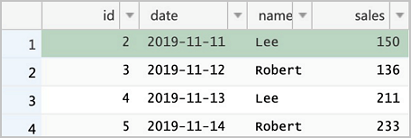
Read the Delta table again. You can find that the data has been updated. In addition, the value of sales in the record whose
idis 2 is the latest.spark.read.format("delta").load("/delta/sales").show +---+----------+------+------+ | id| date| name| sales| +---+----------+------+------+ | 5|2019-11-14|Robert|233.00| | 3|2019-11-12|Robert|136.00| | 4|2019-11-13| Lee|211.00| | 2|2019-11-11| Lee|175.00| +---+----------+------+------+
Best practices
When data is synchronized to Delta in real time, the number of small files in Delta increases rapidly. You can use one of the following methods to resolve the issue:
Partition the table. In most cases, data is written to the latest partition, and historical partitions are seldom modified. You can compact historical partitions, and the compaction operation is less likely to fail due to transaction conflicts. After you partition the table, you can query the table with partition predicates. Queries with partition predicates are much more efficient than queries without partition predicates.
Periodically perform the compaction operation when you write data in streaming mode. For example, you can perform the compaction operation every 10 mini batches. In this case, the compaction operation will not fail due to transaction conflicts. However, subsequent mini batches of data may fail to be written in time due to the compaction operation. You must control the frequency of the compaction operation.
If data does not need to be synchronized in real time and you worry about failures of the compaction operation due to transaction conflicts, you can follow the steps in the following figure to synchronize data. In this method, you need to periodically collect the binary logs to OSS. You can use DTS to export the binary logs to Kafka and then use kafka-connect-oss to collect the binary logs to OSS. You can also use other tools to collect the binary logs to OSS. Then, create a Spark batch job to read the binary logs from OSS and merge all the binary logs to Delta Lake at a time. The following figure shows the process of synchronizing data.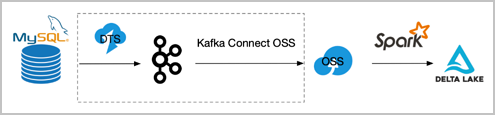
You can replace the scheme framed in dotted lines with other schemes.
Appendix: Introduction to the binary log format in Kafka
The binary logs synchronized by DTS to Kafka are encoded in the Avro format. You can use the dts_binlog_parser UDF provided by EMR to decode Avro-encoded binary logs to the text format.
Scala
Run the following command to go to the spark-shell client:
spark-shell --master localRun the following Scala code to query data:
spark.read
    .format("kafka")
    .option("kafka.bootstrap.servers", "192.168.XX.XX:9092")
    .option("subscribe", "sales")
    .option("maxOffsetsPerTrigger", 1000)
    .load()
    .createTempView("kafkaData")

val kafkaDF = spark.sql("SELECT dts_binlog_parser(value) FROM kafkaData")

kafkaDF.show(false)
SQL
Run the following command to go to the streaming-sql client:
streaming-sql --master localExecute the following SQL statements to create a table and query data:
CREATE TABLE kafkaData
USING kafka
OPTIONS(
kafka.bootstrap.servers='192.168.XX.XX:9092',
subscribe='sales'
);

SELECT dts_binlog_parser(value) FROM kafkaData;
The following output is returned:
+--------+---------------------------------------------+---------------+----------+-------------------+---------+----------------------------+------------+--------------------------------------------------------------+
|recordid|source                                       |dbtable        |recordtype|recordtimestamp    |extratags|fields                      |beforeimages|afterimages                                                   |
+--------+---------------------------------------------+---------------+----------+-------------------+---------+----------------------------+------------+--------------------------------------------------------------+
|1       |{"sourceType": "MySQL", "version": "0.0.0.0"}|delta_cdc.sales|INIT      |1970-01-01 08:00:00|{}       |["id","date","name","sales"]|{}          |{"sales":"323.0","date":"2019-11-11","name":"Robert","id":"1"}|
|2       |{"sourceType": "MySQL", "version": "0.0.0.0"}|delta_cdc.sales|INIT      |1970-01-01 08:00:00|{}       |["id","date","name","sales"]|{}          |{"sales":"500.0","date":"2019-11-11","name":"Lee","id":"2"}   |
|3       |{"sourceType": "MySQL", "version": "0.0.0.0"}|delta_cdc.sales|INIT      |1970-01-01 08:00:00|{}       |["id","date","name","sales"]|{}          |{"sales":"136.0","date":"2019-11-12","name":"Robert","id":"3"}|
|4       |{"sourceType": "MySQL", "version": "0.0.0.0"}|delta_cdc.sales|INIT      |1970-01-01 08:00:00|{}       |["id","date","name","sales"]|{}          |{"sales":"211.0","date":"2019-11-13","name":"Lee","id":"4"}   |
+--------+---------------------------------------------+---------------+----------+-------------------+---------+----------------------------+------------+--------------------------------------------------------------+