This topic describes how to use High-Performance Linpack (HPL) to test the floating-point operations per second (FLOPS) of an Elastic High Performance Computing (E-HPC) cluster.
Background information
HPL is a benchmark that is used to test the FLOPS of high-performance computing clusters. HPL can evaluate the floating-point computing power of high-performance computing clusters. The evaluation is based on a test for solving dense linear unary equations of Nth degree by using Gaussian elimination.
The peak FLOPS is the number of floating-point operations that a computer can perform per second. The peak FLOPS can be divided into two types, theoretical peak FLOPS and actual peak FLOPS. The theoretical peak FLOPS is the number of floating-point operations that a computer can theoretically perform per second. The theoretical peak FLOPS is determined by the clock speed of the CPU. The theoretical peak FLOPS is calculated by using the following formula: Theoretical peak FLOPS = Clock speed of the CPU × Number of CPU cores × Number of floating-point operations that the CPU performs per cycle. This topic describes how to test the actual peak FLOPS by using HPL.
Preparations
Create an E-HPC cluster. For more information, see Create an E-HPC cluster.
In this example, the following parameter configurations are used.
Parameter
Configuration
Series
Standard Edition
Deployment Mode
Public cloud cluster
Cluster Type
OpenPBS
Node configurations
The cluster contains one management node and one compute node. The management node and compute node must have the following specifications:
Management node: The management node must be an ecs.c7.large Elastic Compute Service (ECS) instance that has 2 vCPUs and 4 GiB of memory.
Compute node: The compute node must be an ecs.ebmc5s.24xlarge ECS instance that has 96 vCPUs and 192 GiB of memory.
Image
Public Image: CentOS 7.6 64-bit
Create a cluster user. For more information, see User management.
The cluster user is used to log on to the cluster, compile software, and submit jobs. In this example, the following configurations are used to create the cluster user:
User Name: hpltest
User Group: sudo enabled group.
Install software. For more information, see Install and uninstall cluster software.
The following pieces of software are required:
LINPACK 2018
Intel MPI 2018
Step 1: Connect to the E-HPC cluster
Remotely connect to the E-HPC cluster. For more information, see Connect to an E-HPC cluster.
Step 2: Submit a job
Run the following command to create a sample file named HPL.dat:
vim HPL.datThe HPL.dat file contains the parameters used to run HPL. The following sample code provides an example of the recommended configurations for running HPL on a single ecs.ebmc5s.24xlarge instance.
HPLinpack benchmark input file
Innovative Computing Laboratory, University of Tennessee
HPL.out      output file name (if any)
6            device out (6=stdout,7=stderr,file)
1            # of problems sizes (N)
143600       Ns
1            # of NBs
384          NBs
1            PMAP process mapping (0=Row-,1=Column-major)
1            # of process grids (P x Q)
1            Ps
1            Qs
16.0         threshold
1            # of panel fact
2            PFACTs (0=left, 1=Crout, 2=Right)
1            # of recursive stopping criterium
2            NBMINs (>= 1)
1            # of panels in recursion
2            NDIVs
1            # of recursive panel fact.
1            RFACTs (0=left, 1=Crout, 2=Right)
1            # of broadcast
0            BCASTs (0=1rg,1=1rM,2=2rg,3=2rM,4=Lng,5=LnM)
1            # of lookahead depth
0            DEPTHs (>=0)
0            SWAP (0=bin-exch,1=long,2=mix)
1            swapping threshold
1            L1 in (0=transposed,1=no-transposed) form
1            U  in (0=transposed,1=no-transposed) form
0            Equilibration (0=no,1=yes)
8            memory alignment in double (> 0)
You can modify the parameters in the HPL.dat file based on the hardware settings of the node. The following examples describe the parameters.
Content in line 5 and line 6:
1            # of problems sizes (N)
143600       Ns
N specifies the size of the matrices that you want to solve. A larger matrix size N specifies a greater proportion of valid operations to all operations. Therefore, a larger N reflects a higher FLOPS of the system. However, a larger matrix size leads to higher memory usage. If the available memory space of the system becomes insufficient, the cache is used instead. Therefore, the system performance is greatly reduced. The optimal usage of system memory that the matrix occupies is about 80%. The following formula is used to calculate the value of N: N × N × 8 = Total system memory × 80%. The unit of the total memory is bytes.
Content in line 7 and line 8:
1            # of NBs
384          NBs
NB specifies the size of block matrices when the matrices are solved. The block size has a major impact on the system performance. The value of NB is affected by multiple factors, such as hardware and software. The optimal value of NB is obtained from actual tests. The value of NB meets the following conditions:
The value of NB cannot be too large or too small. In most cases, the value is less than 384.
The product of NB × 8 must be a multiple of the number of cache lines.
The value of NB is determined by multiple factors, such as the communication mode, matrix size, network conditions, and clock speed.
You can obtain several appropriate values of NB from single-node or single-CPU tests. However, if the system capacity is increased and a larger memory space is required, specific values of NB may lead to a decrease in FLOPS. Therefore, we recommend that you select three NB values that can lead to satisfactory FLOPS in small-scale tests. This way, you can perform large-scale tests to decide the optimal NB value.
Content in line 10, line 11 and line 12:
1            # of process grids (P x Q)
1            Ps
1            Qs
P specifies the number of processors for rows, and Q specifies the number of processors for columns. The product of P and Q represents a two-dimensional processor grid. Formula: P × Q = Number of processes. For Intel® Xeon®, you can improve HPL performance by disabling Hyper-Threading (HT). In most cases, the values of P and Q meet the following conditions:
P ≤ Q. In most cases, the value of P is less than the value of Q. This is because the number and data volume of communications in columns are much greater than those in rows.
We recommend that you set the value of P to a power of 2. In HPL, binary exchange is used for horizontal communication. The FLOPS is optimal when the number of processors (P) in the horizontal direction is equal to a power of 2.
Run the following command to create and open a job script file named hpl.pbs:
vim hpl.pbsSample script:
NoteIn this example, only the actual peak FLOPS of a single node is tested. If you want to test the peak FLOPS of multiple nodes, you can modify the following configuration file.
#!/bin/sh
#PBS -j oe
export MODULEPATH=/opt/ehpcmodulefiles/
module load linpack/2018
module load intel-mpi/2018
echo "run at the beginning"
mpirun -n 1 -host compute000 /opt/linpack/2018/xhpl_intel64_static > hpl-output    # Test the FLOPS of a single node. Replace <compute000> with the actual name of the node on which the job runs.
#mpirun -n <N> -ppn 1 -host <node0>,...,<nodeN> /opt/linpack/2018/xhpl_intel64_static > hpl-ouput   # Test the FLOPS of multiple nodes. Replace the variables with the actual values in the test.
Run the following command to submit the job:
qsub hpl.pbsThe following command output is returned, which indicates that the generated job ID is 0.manager.
0.manager
Step 3: View the job result
Run the following command to view the running state of the job.
qstat -x 0.managerThe following code is returned. In the response, an
Rin theScolumn indicates that the job is running, and anFin theScolumn indicates that the job is finished.Job id Name User Time Use S Queue ---------------- ---------------- ---------------- -------- - ----- 0.manager hpl.pbs hpltest 11:01:49 F workqRun the following command to view the job result.
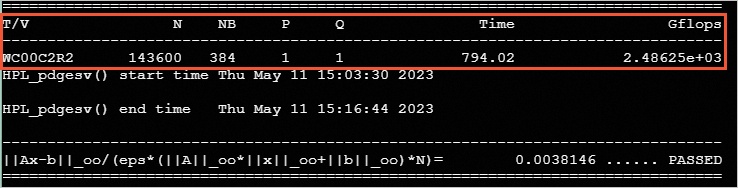
cat /home/hpltest/hpl-outputThe following results are generated in the test: