A domain name transfer from another registrar to Alibaba Cloud typically takes 5 to 7 business days. You can shorten this waiting period to a few minutes or an hour by approving the transfer-out request at your current registrar.
Pre-transfer checklist
Use this checklist to ensure that your domain name is ready for transfer to Alibaba Cloud:
|
Check item |
Description |
|
Domain suffix |
Ensure the domain suffix (Top-Level Domain or TLD) is transferable to Alibaba Cloud. On the Domain Name Pricing page, verify that a price is listed in the "Transfer-in" column. Note
Currently, Alibaba Cloud supports the transfer-in of domain names with only English or Chinese prefixes. Prefixes in other languages, such as Russian and Japanese, are not supported. |
|
Domain status |
The domain name must have an Note
If the domain name status is |
|
Registration date |
The domain name must have been registered for more than 60 days. You can check the registration date by using a WHOIS lookup. ICANN policy prohibits transferring a domain name to another registrar within 60 days of a successful transfer-in. |
|
Expiration date |
The domain name must expire in more than 15 days, and its total registration term must not exceed 10 years. You can use a WHOIS lookup to check the expiration date. |
|
Last renewal date |
Avoid transferring a domain name within 45 days of its renewal or redemption at the current registrar. Transferring within this period may cause your previous renewal to be voided and the registration term to be shortened. |
|
Renewal status |
Ensure the domain name has not reached its maximum registration term of 10 years. |
|
Contact information |
Ensure that the administrative contact information for the domain name is correct. All transfer-related confirmation emails are sent to the administrative contact's email address. |
|
DNSSEC is disabled |
Disable DNSSEC at your current registrar. |
|
Legal status |
The domain name must not be involved in any dispute, arbitration, or court order that prevents its transfer. |
|
Domain name compliance |
Domain names that contain specific keywords — such as "中国" (China), "中华" (Chinese), "全国" (National), or "国家" (State) — may require the registrant to be a qualified rights holder, meaning an organization or enterprise whose registered name contains the corresponding keyword. Individuals or entities that are not qualified rights holders may be unable to complete the transfer of such domain names. Additionally, a domain name may be reclassified as containing sensitive words due to changes in current affairs or geopolitical conditions, even if it was previously transferable. Before initiating a transfer, check whether your domain name contains restricted or sensitive keywords. If the domain name contains sensitive words and you are a qualified rights holder, or you choose to accept the associated risks, you may proceed with the transfer. However, if the naming review fails, the domain name may be placed in ServerHold status (DNS resolution suspended by the registry) and the transfer fee will not be refunded. |
Transfer-in procedure
-
Migrate DNS resolution
A domain name transfer-in only changes the domain name's registrar (the platform that manages the domain). DNS resolution, which directs your domain name to your website or email server, is a separate service.
The transfer-in process itself does not modify your DNS settings. However, your current registrar may terminate its bundled DNS resolution service after you transfer the domain name.
To prevent service interruptions to your website or email, we recommend that you first migrate your DNS resolution to Alibaba Cloud. For instructions, see Smoothly migrate domain name resolution to Alibaba Cloud DNS.
-
Create an information template
An information template is a profile on Alibaba Cloud that stores registrant information, such as name, address, and email. In the Information Template list, create an information template that matches the details of the current registrant to receive the domain name.
NoteTo transfer a ".cn" domain name to Alibaba Cloud, you must select an information template that has completed identity verification. Otherwise, you cannot submit the transfer-in request. For more information about identity verification for information templates, see Identity verification for .cn domain names.
-
Get the authorization code
You need to get an authorization code from your current registrar. This code is also known as a transfer code or an EPP code. Use a WHOIS lookup to find your current registrar and then contact them to request the authorization code.
For instructions on how to get the authorization code from specific registrars, see the following links: GoDaddy | Cloudflare | AWS | dynadot | Porkbun
NoteIf your current registrar refuses to provide the authorization code, you can file a complaint through the following channels.
-
For .cn domain names: Email your complaint to supervise@cnnic.cn or call +86-10-58813000.
-
For international domain names: Fill out and submit the online Transfer Complaint Form .
-
-
Submit the transfer-in information
-
Go to the Domain Name Transfer-in page. Enter the domain name to transfer and its authorization code, and then click Confirm.
Format:
domain name + space + authorization code, with one entry per line. You can submit up to 50 domain names at a time.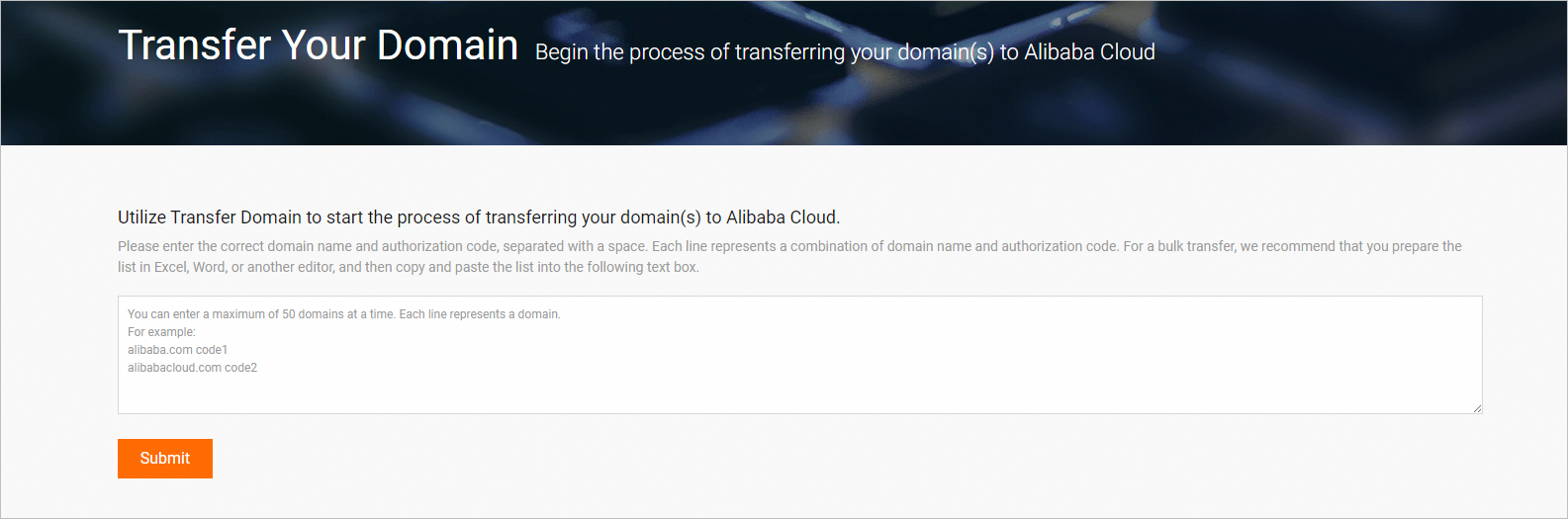 Note
NoteWhen submitting transfer-in information, note the following:
-
Domain name format: Enter only the primary domain name (for example,
example.com). Do not add prefixes such aswww; subdomain prefixes are not accepted. -
Authorization code: When copying and pasting the authorization code, remove any leading or trailing spaces and special characters (such as square brackets
[ ]). Also distinguish between characters that look similar, such as the digit0and the letterO, or the lowercase letterland the uppercase letterI. -
Page not responding or not redirecting to payment: If the page freezes, becomes unresponsive, or fails to redirect to the payment page, try clearing your browser cache, switching to Chrome, or manually navigating to the Domain Name Transfer-in list in the console and clicking Pay.
-
RAM users: RAM user accounts do not support the domain transfer-in operation. You must use the primary Alibaba Cloud account to perform this action.
-
Account ID not required: The domain transfer-in process does not require you to enter a recipient Alibaba Cloud account ID. Do not confuse this operation with the "inter-account domain transfer" operation, which moves a domain between two Alibaba Cloud accounts.
-
-
Select an information template and click Next.
-
Review the order details and complete the payment. The fee is typically for a one-year renewal.
NoteAfter you pay for the transfer-in order, the system automatically verifies the authorization code. If the code is valid, the transfer process begins. The transfer-in order is valid for 15 days from the payment date. If the domain name fails the naming review or if you do not submit the correct authorization code within this period, the order fails and we refund the payment.
-
-
Check the transfer-in status
In accordance with registry policies, the transfer-in process typically takes 5 to 7 days. You can check the transfer-in status, submission time, and other details on the Domain Name Transfer-in page. When the status changes to Transfer-in Succeeded, the domain name has been successfully transferred to Alibaba Cloud.
Cancel the transfer-in
You can cancel a transfer-in after you have paid but before the authorization code is verified, or within five days (5 × 24 hours) after the code is verified. To cancel, go to the Domain Name Transfer-in list, find the domain name being transferred, and follow the prompts to cancel the process. We will refund the transfer-in order fee.
Billing
-
Billing items: The domain name transfer-in itself is free of charge. However, in accordance with ICANN regulations, you must renew most domain names for one year upon transfer. Therefore, the fee you pay is typically for a one-year renewal.
-
Pricing: Prices vary by domain suffix. You can find specific prices in the "Transfer-in" column on the Domain Pricing page. For some premium domain names, the final price appears at checkout.
For example, if your domain name's original expiration date is August 1, 2024, you pay a one-year renewal fee during the transfer-in. After the transfer is successful, the new expiration date becomes August 1, 2025.
When you transfer a .hk domain name, you must pay a one-year fee, but the expiration date of the domain name is not extended.
FAQ
-
Why did my domain name transfer-in fail?
Common reasons for transfer-in failure include: the domain name is locked at the current registrar (the status is not
ok), the authorization code is incorrect or expired, or you did not meet all pre-transfer checklist requirements. For troubleshooting, see Domain Name Transfer-in and Transfer-out FAQ. -
Why was my domain's expiration date not extended by one year after I paid the transfer fee?
-
This usually happens if you transfer the domain name within 45 days of renewing it at your previous registrar. According to ICANN policy, this can void the original renewal. To avoid this, wait at least 45 days after renewal before you initiate a transfer.
-
The registry rules for ".hk" domain names are unique. When you transfer a ".hk" domain name, you must pay a one-year fee, but the expiration date is not extended. This is a special rule for the ".hk" domain suffix and differs from most other suffixes.
-
-
How can I shorten the 5- to 7-day transfer time?
After you submit the transfer-in request and complete the payment, you can log in to your current registrar's management console. Find the section for managing domain transfers and manually approve the transfer-out request. This can reduce the waiting period from 5–7 days to a few minutes or an hour.
-
What is an "information template" and why must I create one?
An information template is a registrant profile on Alibaba Cloud that contains owner information, such as name and contact details. According to regulations from the registry and the Ministry of Industry and Information Technology (MIIT), every domain name must be associated with a registrant whose information has passed identity verification. When you transfer a domain name, selecting an information template designates the new owner for that domain name.
-
The current registrant of the domain name is Registrant A. During the transfer, can I select an information template for a different person, Registrant B? If the transfer is approved, will the domain ownership also be transferred to B?
Yes, you can select the information template for Registrant B, and the domain ownership will be transferred to B. However, we recommend using an information template that matches the current registrant's details to ensure a smooth transfer. You can change the registrant information after the transfer is complete to minimize the risk of failure.
-
Will transferring my domain name to Alibaba Cloud fix an issue with my website being inaccessible?
A domain name transfer only changes the registrar and does not alter DNS resolution settings. If your website was already inaccessible before the transfer, the transfer itself will not fix the issue. You must troubleshoot website access problems separately by checking DNS resolution, server configuration, and network links.
-
Why can't I transfer my domain name even after I disabled the transfer lock?
If you are still unable to transfer the domain name after disabling the transfer lock, check for the following possible reasons:
-
It has been less than 60 days since you registered or last transferred the domain name. ICANN policy prohibits transferring a domain name out within 60 days of registration or a previous transfer.
-
When you modified the registrant information, you did not opt out of the 60-day transfer restriction. As a result, the domain is locked for 60 days after the modification.
-
The domain name has expired or is in the redemption period. You cannot transfer expired domain names.
-
The domain name has another restrictive status, such as
serverTransferProhibited(registry transfer lock).
-