This topic describes how to fix the issue if a Schema Name Conflict alert is reported in the Precheck step when you configure a data synchronization or migration task in Data Transmission Service (DTS).
Problem description
In the Precheck step of a data synchronization or migration task, the Schema Name Conflict check item is marked as Warning. The following figure provides an example on the details of the failed check item.
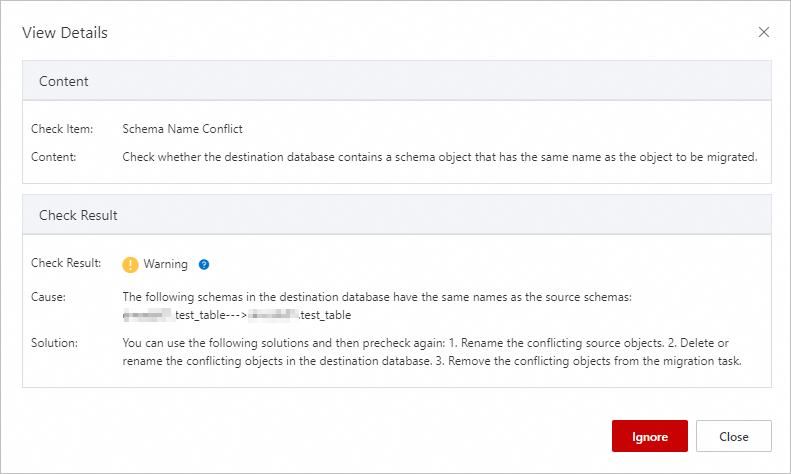
Cause
The source and destination databases of the DTS task have identical schema object names. For example, a table in the destination MySQL database has the same name as a table in the source database. In addition, in the Configure Objects and Advanced Settings step, the Processing Mode of Conflicting Tables parameter is set to Precheck and Report Errors.
Solution
In the Precheck step, find the Schema Name Conflict check item and click Confirm Alert Details.
In the View Details message, view the cause of failure in the Check Result section.
Based on the description of the Cause parameter, check whether the source and destination databases have identical schema object names.
Select a processing method based on the check result of the previous step.
The source and destination databases have identical schema object names.
If you want to keep the data in the destination database:
Select one of the following processing methods as needed:
Rename the source object that is synchronized or migrated to the destination database by using the object name mapping feature. For more information, see Map object names.
Rename the existing object in the destination database. Then, in the lower part of the Precheck step, click Precheck Again.
Do not synchronize or migrate the source object. Go back to the Configure Objects and Advanced Settings step and remove the source object from the Selected Objects section.
If you do not want to keep the data in the destination database:
Select one of the following processing methods as needed:
Delete the existing object in the destination database. Then, in the lower part of the Precheck step, click Precheck Again.
Ignore the check item. In the Precheck step, find the check item and click Confirm Alert Details. In the View Details message, click Ignore. In the message that appears, click OK. Then, in the lower part of the Precheck step, click Precheck Again.
ImportantMake sure that the data structures are compatible between the source and destination databases. Otherwise, data inconsistency or even task failure may occur.
The source and destination databases do not have identical schema object names.
In the View Details message, click Close.
In the lower part of the Precheck step, click Precheck Again.
Wait for the precheck to be performed again.
NoteIf the source and destination databases do not have identical schema object names but the Schema Name Conflict check item is still marked as Warning in multiple follow-up prechecks, contact Alibaba Cloud technical support.
Perform subsequent steps as prompted.